A slow Next.js app is almost always a configuration problem, not a framework problem. Next.js ships with every tool you need to hit 100 on Lighthouse — most developers just haven't connected all the pieces. This guide covers exactly those pieces: images, fonts, bundle size, server components, caching, and the specific Lighthouse metrics each optimization targets.
All examples use Next.js 15 with the App Router. For full-stack fundamentals, see the Next.js full-stack TypeScript guide. For the latest Next.js features including Turbopack, check what's new in Next.js 16.
Understanding What Lighthouse Measures
Before optimizing, understand what you're measuring. Lighthouse scores on five metrics:
| Metric | What it measures | Target |
|---|---|---|
| LCP (Largest Contentful Paint) | Time for main content to render | < 2.5s |
| FID / INP (Interaction to Next Paint) | Responsiveness to user input | < 200ms |
| CLS (Cumulative Layout Shift) | Visual stability, no content jumping | < 0.1 |
| FCP (First Contentful Paint) | Time to first visible content | < 1.8s |
| TTFB (Time to First Byte) | Server response time | < 800ms |
Most sites underperform on LCP (images not optimized), CLS (no size attributes on media), and TTFB (too much server-side work). Fix these three and scores jump significantly.
1. Image Optimization — The Biggest Win
Images account for more than 50% of total bytes transferred on most pages. next/image is non-negotiable:
// BAD — raw img tag, no optimization
<img src="/hero.jpg" alt="Hero" />

// GOOD — next/image handles everything
import Image from 'next/image'

<Image
  src="/hero.jpg"
  alt="Hero"
  width={1200}
  height={630}
  priority              // Preload above-the-fold images
  quality={85}          // Sweet spot: quality vs size
  placeholder="blur"    // Prevents CLS while loading
  blurDataURL="data:image/jpeg;base64,..." // Low-res placeholder
/>
Critical rules:
- Always set
widthandheight(orfill). Without these, CLS score tanks because the browser doesn't know how much space to reserve. - Use
priorityon the hero/above-the-fold image. This adds<link rel="preload">in the document head and directly improves LCP. - Never use
priorityon more than 1-2 images. It defeats the purpose.
For dynamic images from a CMS or CDN, add allowed domains to next.config.ts:
// next.config.ts
const nextConfig: NextConfig = {
  images: {
    remotePatterns: [
      {
        protocol: 'https',
        hostname: 'images.your-cms.com',
        pathname: '/uploads/**',
      },
    ],
    formats: ['image/avif', 'image/webp'], // Serve AVIF first, WebP fallback
    deviceSizes: [640, 750, 828, 1080, 1200, 1920], // Match your breakpoints
    minimumCacheTTL: 31536000, // 1 year cache for optimized images
  },
}
For images that need to fill a container:
<div className="relative w-full h-64">
  <Image
    src="/banner.jpg"
    alt="Banner"
    fill
    className="object-cover"
    sizes="(max-width: 768px) 100vw, 50vw" // Tell browser expected size
  />
</div>
The sizes prop is critical for performance — it prevents the browser from downloading a 1920px image for a 400px slot.
2. Font Optimization — Zero Layout Shift
Custom fonts cause CLS if not handled correctly. next/font eliminates this completely:
// app/layout.tsx
import { Inter, JetBrains_Mono } from 'next/font/google'

const inter = Inter({
  subsets: ['latin'],
  display: 'swap',          // Show fallback font immediately
  variable: '--font-inter', // CSS variable for Tailwind
  preload: true,
})

const mono = JetBrains_Mono({
  subsets: ['latin'],
  display: 'swap',
  variable: '--font-mono',
  weight: ['400', '500', '700'],
})

export default function RootLayout({ children }: { children: React.ReactNode }) {
  return (
    <html lang="en" className={`${inter.variable} ${mono.variable}`}>
      <body className="font-sans">{children}</body>
    </html>
  )
}
What next/font does:
- Downloads fonts at build time and self-hosts them — no Google Fonts request on page load
- Generates exact font-size adjustments to prevent layout shift when the fallback swaps
- Automatically adds
font-display: optionalorswapdepending on your config - Inlines critical font CSS into the HTML
For self-hosted fonts (OTF/WOFF2 files in /public):
import localFont from 'next/font/local'

const customFont = localFont({
  src: [
    { path: './fonts/custom-400.woff2', weight: '400' },
    { path: './fonts/custom-700.woff2', weight: '700' },
  ],
  variable: '--font-custom',
  display: 'swap',
})
3. Server Components — Move Work Off the Client
The single biggest architectural win in App Router is running components on the server. Server Components ship zero JavaScript to the client:
// app/blog/page.tsx — Server Component (default in App Router)
// This fetches data, renders HTML, sends nothing to the JS bundle

async function BlogPage() {
  // This DB call happens on the server. Zero client JS.
  const posts = await db.post.findMany({
    orderBy: { publishedAt: 'desc' },
    take: 10,
  })

  return (
    <main>
      {posts.map(post => (
        <article key={post.id}>
          <h2>{post.title}</h2>
          <p>{post.excerpt}</p>
        </article>
      ))}
    </main>
  )
}
Move client interactivity into isolated leaf components:
// components/LikeButton.tsx
'use client' // Only this component is client-side

import { useState } from 'react'

export function LikeButton({ initialCount }: { initialCount: number }) {
  const [count, setCount] = useState(initialCount)
  return (
    <button onClick={() => setCount(c => c + 1)}>
      ♥ {count}
    </button>
  )
}
// app/blog/[slug]/page.tsx — Server Component
// Passes static data to the interactive island
async function PostPage({ params }: { params: { slug: string } }) {
const post = await getPost(params.slug)
return (
<article>
<h1>{post.title}</h1>
<p>{post.content}</p>
{/* Only LikeButton sends JS to client */}
<LikeButton initialCount={post.likes} />
</article>
)
}For a deep dive on the Server/Client component boundary, see our Server vs Client Components guide.
4. Bundle Size — Analyze and Eliminate
Install the bundle analyzer:
npm install @next/bundle-analyzer// next.config.ts
import withBundleAnalyzer from '@next/bundle-analyzer'
const nextConfig: NextConfig = { /* your config */ }
export default withBundleAnalyzer({
enabled: process.env.ANALYZE === 'true',
})(nextConfig)ANALYZE=true npm run buildThis opens a treemap in your browser. Look for:
- Large third-party libraries in client bundles —
moment.js(usedate-fns),lodash(use individual imports),axios(usefetch) - Server-only code appearing in client bundles — database drivers, file system modules
- Duplicated packages — two versions of React, lodash both full and per-method
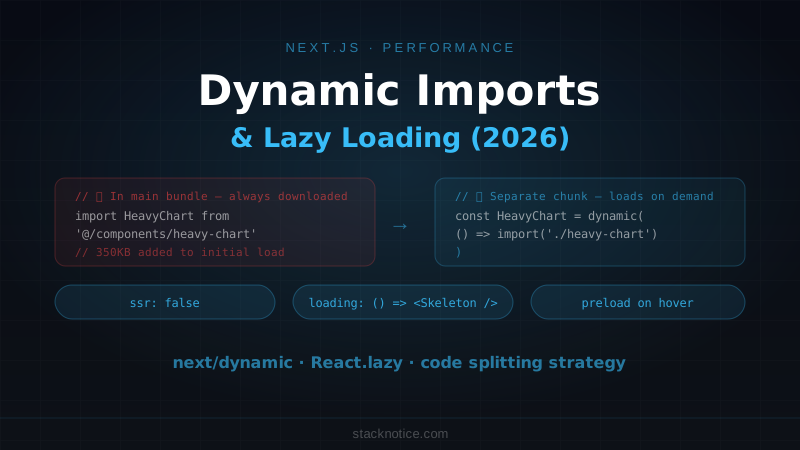
Fix large dependencies with dynamic imports:
// BAD — loads entire chart library on initial page load
import { HeavyChart } from 'some-chart-library'

// GOOD — loads only when the component is needed
import dynamic from 'next/dynamic'

const HeavyChart = dynamic(() => import('some-chart-library').then(m => m.HeavyChart), {
  loading: () => <div className="h-64 animate-pulse bg-gray-100" />,
  ssr: false, // Skip server render for browser-only libraries
})
Use tree-shakeable imports for icon libraries:
// BAD — imports entire icon library
import { Icons } from 'lucide-react'
const icon = <Icons.Search />

// GOOD — imports only what you use
import { Search } from 'lucide-react'
const icon = <Search />
5. Caching Strategy
Next.js 15 ships with explicit caching controls. Use them deliberately:
// Static page — cached at build time, revalidated every hour
export const revalidate = 3600

async function ProductPage({ params }: { params: { id: string } }) {
  const product = await fetch(`https://api.example.com/products/${params.id}`, {
    next: { revalidate: 3600 }
  }).then(r => r.json())

  return <ProductView product={product} />
}
// Dynamic page — no caching, always fresh
export const dynamic = 'force-dynamic'
async function DashboardPage() {
const data = await fetchUserDashboard() // Always fresh
return <Dashboard data={data} />
}For data that changes but doesn't need per-request freshness:
// Cache at the React level — deduplicates requests in the same render
async function getUser(id: string) {
  return fetch(`/api/users/${id}`, { next: { revalidate: 60 } })
    .then(r => r.json())
}

// Multiple components can call getUser(id) — only one request is made
Tag-based revalidation for granular cache invalidation:
// Fetch with a cache tag
const post = await fetch(`/api/posts/${slug}`, {
  next: { tags: [`post-${slug}`] }
})

// Later, in a Server Action or API route:
import { revalidateTag } from 'next/cache'
revalidateTag(`post-${slug}`) // Invalidates only this post's cache
6. Lazy Loading Below-the-Fold Content
Don't load what the user hasn't scrolled to yet:
'use client'
import { Suspense, lazy } from 'react'

// Component only loads when it enters the viewport
const HeavySection = dynamic(() => import('@/components/HeavySection'), {
  loading: () => <SectionSkeleton />,
})

export function PageContent() {
  return (
    <>
      {/* Above the fold — loads immediately */}
      <HeroSection />

      {/* Below the fold — lazy loaded */}
      <Suspense fallback={<SectionSkeleton />}>
        <HeavySection />
      </Suspense>
    </>
  )
}
For comments, analytics dashboards, or other heavy interactive sections:
'use client'
import { useEffect, useRef, useState } from 'react'

export function LazyOnScroll({ children }: { children: React.ReactNode }) {
  const ref = useRef<HTMLDivElement>(null)
  const [visible, setVisible] = useState(false)

  useEffect(() => {
    const observer = new IntersectionObserver(
      ([entry]) => { if (entry.isIntersecting) setVisible(true) },
      { rootMargin: '200px' } // Start loading 200px before visible
    )
    if (ref.current) observer.observe(ref.current)
    return () => observer.disconnect()
  }, [])

  return <div ref={ref}>{visible ? children : <div className="h-96" />}</div>
}
7. Metadata and SEO
Proper metadata doesn't directly affect Lighthouse performance scores, but it prevents extra render-blocking requests and helps Google understand your pages:
// app/blog/[slug]/page.tsx
import { Metadata } from 'next'

export async function generateMetadata(
  { params }: { params: { slug: string } }
): Promise<Metadata> {
  const post = await getPost(params.slug)

  return {
    title: post.title,
    description: post.excerpt,
    alternates: { canonical: `/blog/${params.slug}` },
    openGraph: {
      title: post.title,
      description: post.excerpt,
      images: [{ url: post.coverImage, width: 1200, height: 630 }],
      type: 'article',
    },
  }
}
8. Script Loading
Third-party scripts (analytics, chat widgets) block rendering if loaded synchronously:
// app/layout.tsx
import Script from 'next/script'

export default function RootLayout({ children }: { children: React.ReactNode }) {
  return (
    <html>
      <body>
        {children}

        {/* Load after page is interactive */}
        <Script
          src="https://analytics.example.com/script.js"
          strategy="afterInteractive"
        />

        {/* Load when browser is idle */}
        <Script
          src="https://widget.example.com/chat.js"
          strategy="lazyOnload"
        />
      </body>
    </html>
  )
}
Never use strategy="beforeInteractive" unless the script is truly required for the page to function. It blocks rendering.
Measuring Your Score
Run Lighthouse locally against a production build:
npm run build
npm start
# In another terminal:
npx lighthouse http://localhost:3000 --output html --output-path ./lighthouse-report.html
Always measure against the production build. next dev does not optimize assets and will give misleading scores.
For CI integration, use lighthouse-ci:
npm install -g @lhci/cli

# .lighthouserc.js
module.exports = {
  ci: {
    collect: { url: ['http://localhost:3000', 'http://localhost:3000/blog'] },
    assert: {
      assertions: {
        'categories:performance': ['error', { minScore: 0.9 }],
        'categories:accessibility': ['warn', { minScore: 0.9 }],
      },
    },
  },
}
Quick Wins Checklist
Run through this on any Next.js app:
- All
<img>tags replaced withnext/image+ explicit dimensions - Hero image has
priorityprop - Fonts use
next/font(no Google Fonts<link>tags in_document) -
ANALYZE=true npm run buildrun — no obvious bundle bloat - Heavy libraries lazy-loaded with
dynamic() - Server Components used for data-fetching pages
-
revalidateset on static/semi-static pages - Third-party scripts use
strategy="afterInteractive"or"lazyOnload" -
sizesprop set on all responsivenext/imageinstances
Apply these in order. Images and fonts alone typically move a score from 60 to 85. Server Components and bundle optimization push it to 95+. The last 5 points come from proper caching and eliminating all remaining third-party render-blocking resources.