For years the rendering decision in Next.js was binary: either pre-render the page at build time (SSG) or render it fresh on every request (SSR). The problem is that most real pages don't fit cleanly into either bucket.
A product page has a static title and description (same for everyone, never changes), a live stock count (changes every few minutes), and a personalized "You might also like" section (different per user). With classic Next.js you pick one strategy for the whole page and compromise everywhere else. Static gets you speed but stale data. SSR gets you fresh data but slower delivery.
Partial Prerendering is the fix. It renders the static parts of your page at build time and fills in the dynamic parts at request time — on the same page, without splitting it into separate routes or using client-side fetching as a workaround.
How PPR Works
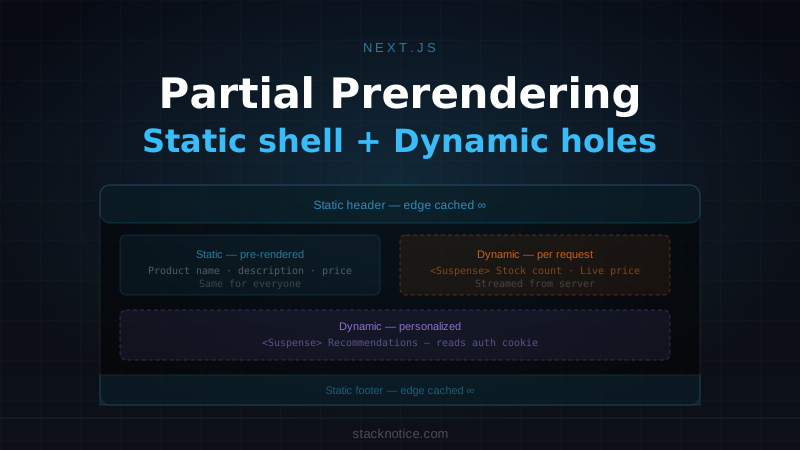
PPR uses <Suspense> boundaries to declare which parts of a page are dynamic. Everything outside a Suspense boundary is the static shell — pre-rendered at build time and cached at the edge. Everything inside a Suspense boundary that reads request-time data is a dynamic hole — rendered on the server at request time and streamed to the client.
Build time  ┌───────────────────────────────┐
            │  Header (static)              │ ← edge-cached HTML
            │  Product name + description   │ ← edge-cached HTML
            │  ┌─────────────────────────┐  │
            │  │  [ SUSPENSE HOLE ]      │  │ ← rendered fresh per request
            │  │  Stock count · Price    │  │
            │  └─────────────────────────┘  │
            │  ┌─────────────────────────┐  │
            │  │  [ SUSPENSE HOLE ]      │  │ ← rendered fresh per request
            │  │  Recommendations        │  │
            │  └─────────────────────────┘  │
            │  Footer (static)              │ ← edge-cached HTML
            └───────────────────────────────┘
From a user's perspective: the static shell arrives essentially instantly from the CDN edge, and the dynamic parts stream in right behind it. No full-page SSR wait. No stale static data.
Enabling PPR
PPR requires Next.js 15 and needs to be turned on in your config:
// next.config.ts
import type { NextConfig } from 'next'

const nextConfig: NextConfig = {
  experimental: {
    ppr: 'incremental', // opt-in per route, not globally
  },
}

export default nextConfig
Then opt in on the routes you want to use it:
// app/products/[id]/page.tsx
export const experimental_ppr = true

export default async function ProductPage({
  params,
}: {
  params: { id: string }
}) {
  // ...
}
The 'incremental' mode means PPR only activates on routes that export experimental_ppr = true. This is the right way to adopt PPR in an existing codebase — one route at a time, tested and verified before expanding.
Static vs Dynamic: the Actual Rule
Next.js determines whether a Server Component is static or dynamic based on what it calls:
Static (pre-rendered at build time):
- Server Components that don't call
cookies(),headers(), or readsearchParams - Fetch calls without
no-storecache option - Any component that doesn't call
unstable_noStore()
Dynamic (rendered at request time):
- Components that call
cookies()orheaders() - Components that read
searchParamsfrom page props - Components that call
unstable_noStore()explicitly - Any component that happens to import something that does the above
The practical rule: if a component needs data that varies by user or by time-of-request, it's dynamic. Everything else is static.
Building a PPR Page
Here's a product page that takes full advantage of PPR:
// app/products/[id]/page.tsx
import { Suspense } from 'react'
import { ProductDetails } from './product-details'
import { StockBadge } from './stock-badge'
import { PersonalizedSection } from './personalized-section'
import { ProductDetailsSkeleton, PersonalizedSkeleton } from './skeletons'

export const experimental_ppr = true

export default function ProductPage({ params }: { params: { id: string } }) {
  return (
    <main className="container mx-auto py-8">
      {/* Static — pre-rendered at build time */}
      <ProductDetails productId={params.id} />

      {/* Dynamic — stock changes constantly */}
      <Suspense fallback={<div className="h-8 w-32 animate-pulse bg-muted rounded" />}>
        <StockBadge productId={params.id} />
      </Suspense>

      {/* Dynamic — personalized per user */}
      <Suspense fallback={<PersonalizedSkeleton />}>
        <PersonalizedSection productId={params.id} />
      </Suspense>
    </main>
  )
}
ProductDetails is a regular async Server Component that reads from the database. Since it doesn't touch cookies or headers, Next.js pre-renders it at build time. The two Suspense boundaries mark dynamic regions that stream in at request time.
The static component
// app/products/[id]/product-details.tsx
import { db } from '@/lib/db'
import { notFound } from 'next/navigation'

export async function ProductDetails({ productId }: { productId: string }) {
  const product = await db.query.products.findFirst({
    where: (p, { eq }) => eq(p.id, productId),
  })

  if (!product) notFound()

  return (
    <div className="space-y-4">
      <h1 className="text-3xl font-bold">{product.name}</h1>
      <p className="text-muted-foreground leading-relaxed">{product.description}</p>
      <p className="text-2xl font-semibold">${product.price.toFixed(2)}</p>
    </div>
  )
}
This component runs during npm run build. Its output is HTML, cached at the edge, sent to every visitor instantly.
The dynamic components
// app/products/[id]/stock-badge.tsx
import { unstable_noStore as noStore } from 'next/cache'
import { getInventoryLevel } from '@/lib/inventory'

export async function StockBadge({ productId }: { productId: string }) {
  noStore() // this component must render fresh on every request

  const stock = await getInventoryLevel(productId)

  if (stock === 0) {
    return (
      <span className="inline-flex items-center gap-1.5 text-sm font-medium text-destructive">
        <span className="h-2 w-2 rounded-full bg-destructive" />
        Out of stock
      </span>
    )
  }

  if (stock <= 5) {
    return (
      <span className="inline-flex items-center gap-1.5 text-sm font-medium text-amber-600">
        <span className="h-2 w-2 rounded-full bg-amber-500" />
        Only {stock} left
      </span>
    )
  }

  return (
    <span className="inline-flex items-center gap-1.5 text-sm font-medium text-emerald-600">
      <span className="h-2 w-2 rounded-full bg-emerald-500" />
      In stock
    </span>
  )
}
// app/products/[id]/personalized-section.tsx
import { cookies } from 'next/headers'
import { getRecommendations } from '@/lib/recommendations'
import { ProductCard } from '@/components/product-card'
export async function PersonalizedSection({ productId }: { productId: string }) {
const cookieStore = cookies() // makes this component dynamic automatically
const userId = cookieStore.get('user_id')?.value
const recommendations = await getRecommendations({
productId,
userId, // null for guests, personalized for logged-in users
})
if (!recommendations.length) return null
return (
<section className="mt-12">
<h2 className="text-xl font-semibold mb-4">
{userId ? 'Recommended for you' : 'You might also like'}
</h2>
<div className="grid grid-cols-2 gap-4 sm:grid-cols-4">
{recommendations.map((product) => (
<ProductCard key={product.id} product={product} />
))}
</div>
</section>
)
}Calling cookies() is enough to make PersonalizedSection dynamic — Next.js detects it automatically. You don't need to call noStore() explicitly if you're already using cookies() or headers().
Deduplicate Requests with cache()
When multiple components — some static, some dynamic — need the same data, use React's cache() to share the result within a render pass:
// lib/queries/product.ts
import { cache } from 'react'
import { db } from '@/lib/db'

export const getProduct = cache(async (id: string) => {
  return db.query.products.findFirst({
    where: (p, { eq }) => eq(p.id, id),
    with: { images: true, category: true },
  })
})
Now both the static ProductDetails and the dynamic StockBadge can call getProduct(productId) — but only one database query runs per render cycle:
// product-details.tsx (static)
import { getProduct } from '@/lib/queries/product'

export async function ProductDetails({ productId }: { productId: string }) {
  const product = await getProduct(productId) // runs at build time
  // ...
}

// stock-badge.tsx (dynamic)
import { unstable_noStore as noStore } from 'next/cache'
import { getProduct } from '@/lib/queries/product'

export async function StockBadge({ productId }: { productId: string }) {
  noStore()
  const product = await getProduct(productId) // same cache entry within this render
  // ...
}
For a deeper look at Next.js caching layers, see the Next.js caching guide.
Suspense Fallbacks That Don't Shift Layout
The fallback you provide to <Suspense> shows while the dynamic hole is loading. Design fallbacks that match the real content's dimensions — otherwise you get layout shift when the real content arrives.
// components/skeletons.tsx
import { Skeleton } from '@/components/ui/skeleton'

export function PersonalizedSkeleton() {
  return (
    <section className="mt-12">
      <Skeleton className="h-7 w-48 mb-4" />
      <div className="grid grid-cols-2 gap-4 sm:grid-cols-4">
        {Array.from({ length: 4 }).map((_, i) => (
          <div key={i} className="space-y-2">
            <Skeleton className="aspect-square rounded-lg" />
            <Skeleton className="h-4 w-3/4" />
            <Skeleton className="h-4 w-1/2" />
          </div>
        ))}
      </div>
    </section>
  )
}
The skeleton reserves the same space the real content will occupy. Users see the static content immediately, with shimmer placeholders where dynamic content will appear — no jarring reflow.
PPR in Layouts
PPR works in layouts too. A common pattern is a static layout with a dynamic header element:
// app/layout.tsx
import { Suspense } from 'react'
import { UserMenu } from '@/components/user-menu'

export default function RootLayout({ children }: { children: React.ReactNode }) {
  return (
    <html lang="en">
      <body>
        <header className="border-b">
          <nav className="container mx-auto flex items-center justify-between h-16">
            <a href="/" className="text-xl font-bold">Acme</a>

            {/* Dynamic: reads auth cookie to show correct UI */}
            <Suspense fallback={<div className="h-9 w-24 animate-pulse bg-muted rounded-md" />}>
              <UserMenu />
            </Suspense>
          </nav>
        </header>
        {children}
      </body>
    </html>
  )
}
The layout itself is the static shell. UserMenu is a dynamic hole — it reads the auth cookie and renders either a sign-in button or the user's avatar. The skeleton prevents layout shift in the header.
Note: PPR must be enabled on each individual page route, not just the layout. The layout participates in PPR when a route with experimental_ppr = true is rendered.
Nested Suspense Boundaries
You can nest Suspense boundaries to control the order and granularity of streaming. Outer boundaries resolve first:
// app/checkout/page.tsx
export const experimental_ppr = true

export default function CheckoutPage() {
  return (
    <main className="container py-8 space-y-8">
      {/* Static: checkout form layout, shipping address form */}
      <CheckoutForm />

      {/* Dynamic: needs cart state */}
      <Suspense fallback={<OrderSummarySkeleton />}>
        <OrderSummary />

        {/* Nested: needs order + user location for estimate */}
        <Suspense fallback={<ShippingEstimateSkeleton />}>
          <ShippingEstimate />
        </Suspense>
      </Suspense>

      {/* Independent dynamic region: needs auth for saved cards */}
      <Suspense fallback={<PaymentSkeleton />}>
        <PaymentSection />
      </Suspense>
    </main>
  )
}
OrderSummary streams in when cart data resolves. ShippingEstimate streams in when its data resolves — independently of PaymentSection. None of them block each other, and none of them block the static CheckoutForm from appearing immediately.
Comparing PPR to Other Strategies
| SSG | ISR | SSR | PPR | |
|---|---|---|---|---|
| Build time work | Full page | Full page | None | Static shell only |
| Request time work | None | None | Full page | Dynamic holes only |
| Edge cache | Full page | Full page | Varies | Static shell |
| Fresh dynamic data | No | After revalidation | Yes | Yes |
| Personalization | No | No | Yes | Yes |
| First byte speed | Instant | Instant | Depends | Near-instant |
PPR isn't a replacement for SSG or SSR — it's the right choice when a page has a meaningful static shell worth caching and dynamic regions that must be fresh or personalized.
What Makes a Component Static in Practice
The most common source of confusion: a component you expect to be static is rendering dynamically. Things that force dynamic rendering anywhere in the component tree:
- Calling
cookies()orheaders()— even if you don't use the result - Reading
searchParamsfrom page props (use a separate component if only part of the page needs them) - Calling
unstable_noStore()explicitly - Using
Date.now()orMath.random()in the render path (Next.js detects these) - A third-party component that calls any of the above internally
If you're unsure, run npm run build and check the output. Routes with PPR show as ◐ (PPR) with a static shell size listed. If the static shell is 0 bytes, everything got pulled into dynamic rendering and PPR isn't helping you.
If only part of your page needs searchParams, move that part into its own Server Component wrapped in Suspense. The rest of the page stays static.
searchParams and PPR
A common pattern: a page with filterable results. searchParams makes the entire page dynamic — unless you isolate them:
// app/products/page.tsx
import { Suspense } from 'react'
import { ProductGrid } from './product-grid'
import { FeaturedBanner } from './featured-banner'

export const experimental_ppr = true

// Don't destructure searchParams at the page level if you want a static shell
export default function ProductsPage({
  searchParams,
}: {
  searchParams: { q?: string; category?: string }
}) {
  return (
    <main>
      {/* Static — no searchParams dependency */}
      <FeaturedBanner />

      {/* Dynamic — passes searchParams down only to this component */}
      <Suspense fallback={<ProductGridSkeleton />}>
        <ProductGrid searchParams={searchParams} />
      </Suspense>
    </main>
  )
}
FeaturedBanner doesn't receive searchParams so it stays static. ProductGrid receives them and becomes dynamic — but it's wrapped in Suspense, so it's a controlled dynamic hole.
Enabling PPR Globally
Once you've validated PPR on key routes, you can enable it globally:
// next.config.ts
const nextConfig: NextConfig = {
  experimental: {
    ppr: true, // all routes participate in PPR
  },
}
With global PPR enabled, routes that have no dynamic components are fully static (no change). Routes with Suspense-wrapped dynamic components get the streaming behavior automatically — you don't need the experimental_ppr export on each page.
PPR and Server Actions
Server actions work normally in PPR pages. The static shell can contain forms that post to server actions — the action runs on the server at submission time regardless of when the surrounding HTML was generated:
// app/newsletter/page.tsx
import { subscribe } from './actions'

export const experimental_ppr = true

export default function NewsletterPage() {
  // This entire page can be static — the form action handles the dynamic part
  return (
    <main>
      <h1>Stay updated</h1>
      <form action={subscribe}>
        <input name="email" type="email" placeholder="you@example.com" />
        <button type="submit">Subscribe</button>
      </form>
    </main>
  )
}
For more on server actions, see the React Server Actions guide.
The Practical Checklist
Before enabling PPR on a route, go through this:
What on this page is the same for all users and doesn't change between requests? That's your static shell candidate.
What reads cookies, headers, or fast-changing data? What's personalized per user? These go inside Suspense.
Create fallback components that match the real content dimensions for each Suspense boundary.
Add export const experimental_ppr = true, run npm run build, and check that the static shell has meaningful content.
In development, add an artificial delay to dynamic components and verify the static shell appears before dynamic content resolves.
Where PPR Shines
PPR is the right choice whenever you have a substantial static shell. A homepage with a hero section and static content below, but a dynamic "logged in as..." notification. A blog post that's entirely static text but has a dynamic comment count or reaction button. A dashboard where the navigation, sidebar links, and layout chrome are static but the data widgets are dynamic.
The pages that benefit most are also usually the pages that matter most for first impressions — product pages, landing pages, content pages. Getting the static shell to the user in milliseconds from the edge, with dynamic content streaming in right behind, is a meaningful improvement in perceived performance compared to waiting for full SSR.
For the performance fundamentals that PPR builds on, see the Next.js performance guide and the app router architecture guide.