Every Next.js app on Vercel eventually needs a database. The default answer used to be "just use Supabase." In 2026 the answer is more nuanced — and for a lot of projects, Neon is the better call.
This guide covers everything: why Neon, the full setup with Drizzle ORM, the pooling configuration that actually matters for serverless, database branching for preview environments, and what to do differently in production.
Why Neon
Neon is serverless Postgres. The core difference from a traditional managed database:
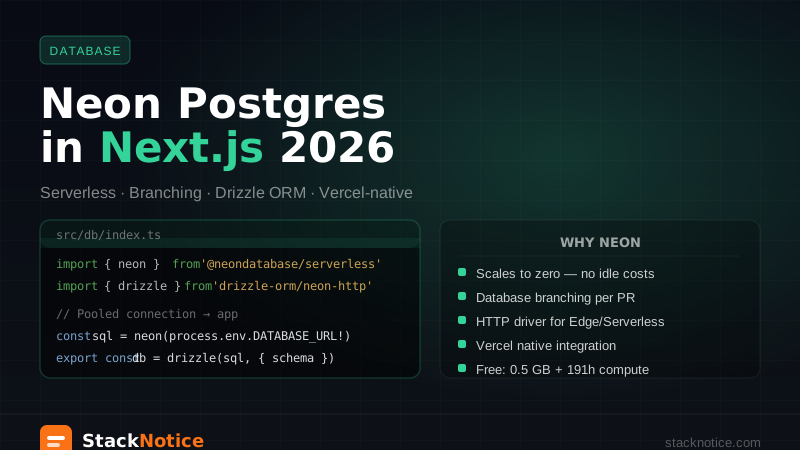
- Scales to zero — if your app gets no traffic for 5 minutes, the database compute suspends. You pay for usage, not uptime.
- Database branching — create a copy of your database schema (and optionally data) as a branch, like a git branch. Perfect for preview deployments.
- Serverless driver — an HTTP and WebSocket-based Postgres driver that works in Edge Functions and Vercel Serverless, where TCP-based
pgcannot connect. - Vercel integration — official integration that creates a Neon branch for every Vercel preview deployment automatically.
Free tier: 0.5 GB storage, 191.9 compute hours per month — enough for a real side project.
Neon vs Supabase
| Neon | Supabase | |
|---|---|---|
| What it is | Serverless Postgres | Full platform (DB + auth + storage + realtime) |
| Branching | Yes | No |
| Serverless driver | Yes | Yes (HTTP) |
| Auth included | No | Yes |
| Free tier storage | 0.5 GB | 500 MB |
| Best for | Apps that already have auth, need just a DB | Rapid prototyping, Firebase alternative |
If you're already using Clerk or NextAuth for auth and just need a solid serverless database, Neon is cleaner and cheaper at scale. If you need the full platform (auth + storage + realtime), the Supabase + Next.js complete guide covers the full setup.
Setup
1. Create a Neon project
Go to neon.tech, sign up, and create a project. Neon creates:
- A primary branch (called
main) - A database named
neondb - Two connection strings: pooled and direct
This distinction matters. Copy both.
2. Two connection strings, two purposes
# .env.local
# Pooled connection — use this in your app (Next.js Server Actions, Route Handlers)
DATABASE_URL=postgresql://user:password@ep-xxx-pooler.us-east-2.aws.neon.tech/neondb?sslmode=require

# Direct connection — use this for migrations ONLY
DATABASE_URL_UNPOOLED=postgresql://user:password@ep-xxx.us-east-2.aws.neon.tech/neondb?sslmode=require
The pooled connection goes through Neon's built-in PgBouncer, which handles connection management. This is essential for serverless — without pooling, every Lambda invocation would open a new Postgres connection, and you'd hit connection limits instantly.
The direct connection bypasses PgBouncer. PgBouncer doesn't support DDL in transaction mode, so migration tools need the direct connection.
Always use the pooled DATABASE_URL in Next.js. The direct connection is only for drizzle-kit push and drizzle-kit migrate.
3. Install packages
npm install @neondatabase/serverless drizzle-orm
npm install -D drizzle-kit
4. Create the database client
// src/db/index.ts
import { neon } from '@neondatabase/serverless';
import { drizzle } from 'drizzle-orm/neon-http';
import * as schema from './schema';

const sql = neon(process.env.DATABASE_URL!);
export const db = drizzle(sql, { schema });
The neon-http driver from drizzle-orm uses Neon's HTTP protocol instead of TCP. This works in:
- Next.js Route Handlers
- Server Actions
- Vercel Edge Functions
- Any serverless environment
5. Define your schema
// src/db/schema.ts
import { pgTable, text, timestamp, boolean, uuid } from 'drizzle-orm/pg-core';

export const users = pgTable('users', {
  id: uuid('id').primaryKey().defaultRandom(),
  email: text('email').notNull().unique(),
  name: text('name').notNull(),
  emailVerified: boolean('email_verified').default(false),
  createdAt: timestamp('created_at').defaultNow().notNull(),
  updatedAt: timestamp('updated_at').defaultNow().notNull(),
});

export const posts = pgTable('posts', {
  id: uuid('id').primaryKey().defaultRandom(),
  title: text('title').notNull(),
  content: text('content'),
  authorId: uuid('author_id').references(() => users.id, { onDelete: 'cascade' }).notNull(),
  published: boolean('published').default(false),
  createdAt: timestamp('created_at').defaultNow().notNull(),
});
6. Configure Drizzle Kit
// drizzle.config.ts
import { defineConfig } from 'drizzle-kit';

export default defineConfig({
  schema: './src/db/schema.ts',
  out: './drizzle',
  dialect: 'postgresql',
  dbCredentials: {
    url: process.env.DATABASE_URL_UNPOOLED!, // direct connection for migrations
  },
});
7. Run migrations
# Generate migration SQL from your schema
npx drizzle-kit generate

# Apply migrations to the database
npx drizzle-kit migrate

# Or push schema directly in development (no migration files)
npx drizzle-kit push
Using the database in Next.js
Server Actions
// app/actions/posts.ts
'use server';

import { db } from '@/db';
import { posts } from '@/db/schema';
import { eq } from 'drizzle-orm';
import { revalidatePath } from 'next/cache';

export async function createPost(data: { title: string; content: string; authorId: string }) {
  const [post] = await db.insert(posts).values(data).returning();
  revalidatePath('/dashboard');
  return post;
}

export async function getPublishedPosts() {
  return db.select().from(posts).where(eq(posts.published, true));
}

export async function deletePost(id: string) {
  await db.delete(posts).where(eq(posts.id, id));
  revalidatePath('/dashboard');
}
Route Handlers
// app/api/posts/route.ts
import { db } from '@/db';
import { posts } from '@/db/schema';
import { eq } from 'drizzle-orm';

export async function GET() {
  const allPosts = await db.select().from(posts).where(eq(posts.published, true));
  return Response.json(allPosts);
}

export async function POST(request: Request) {
  const body = await request.json();

  const [post] = await db
    .insert(posts)
    .values({
      title: body.title,
      content: body.content,
      authorId: body.authorId,
    })
    .returning();

  return Response.json(post, { status: 201 });
}
Server Components
// app/posts/page.tsx
import { db } from '@/db';
import { posts, users } from '@/db/schema';
import { eq } from 'drizzle-orm';

export default async function PostsPage() {
  const publishedPosts = await db
    .select({
      id: posts.id,
      title: posts.title,
      authorName: users.name,
      createdAt: posts.createdAt,
    })
    .from(posts)
    .innerJoin(users, eq(posts.authorId, users.id))
    .where(eq(posts.published, true))
    .orderBy(posts.createdAt);

  return (
    <ul>
      {publishedPosts.map(post => (
        <li key={post.id}>{post.title} — {post.authorName}</li>
      ))}
    </ul>
  );
}
Database branching
This is Neon's standout feature. A database branch is an isolated copy of your database (schema + optionally data) that you can create instantly, modify freely, and delete when done.
The use cases:
- Preview environments — each Vercel PR gets its own database branch
- Feature development — test schema changes against production data without risk
- Staging — permanent branch with production schema, test data
Creating branches manually
# Install the Neon CLI
npm install -g neonctl

# Authenticate
neonctl auth

# Create a branch from main
neonctl branches create --name feature/add-organizations

# Get the connection string for the branch
neonctl connection-string --branch feature/add-organizations
Vercel integration: automatic preview branches
The Neon Vercel integration handles this automatically. Install it from the Neon integrations page, connect your project, and Neon will:
- Create a new database branch for every Vercel preview deployment
- Set
DATABASE_URLin that preview environment to the branch's pooled connection string - Delete the branch when the PR is merged
Your preview environments now have isolated databases with the same schema as production — no more preview environments sharing a staging database and colliding with each other.
# Your Vercel environments:
# Production → main branch (DATABASE_URL → pooled production connection)
# Preview → auto-created branch per PR (DATABASE_URL → pooled branch connection)
# Development → your local .env.local (DATABASE_URL → local Neon or Docker Postgres)
Environment configuration
The recommended setup for Next.js on Vercel:
# .env.local (local development)
DATABASE_URL=postgresql://...pooler...neon.tech/neondb?sslmode=require
DATABASE_URL_UNPOOLED=postgresql://...neon.tech/neondb?sslmode=require

# Vercel: Production environment variables
# DATABASE_URL → Neon main branch pooled connection (set manually)
# DATABASE_URL_UNPOOLED → Neon main branch direct connection (for migrate script)

# Vercel: Preview environment variables
# DATABASE_URL → auto-set by Neon Vercel integration (per-PR branch)
Validate them at startup with Zod:
// src/env.ts
import { z } from 'zod';

const envSchema = z.object({
  DATABASE_URL: z.string().url(),
  DATABASE_URL_UNPOOLED: z.string().url().optional(),
  NODE_ENV: z.enum(['development', 'test', 'production']),
});

export const env = envSchema.parse(process.env);
Running migrations in CI
For production migrations (not just push), add a migration step to your deploy pipeline:
// scripts/migrate.ts
import { drizzle } from 'drizzle-orm/neon-http';
import { neon } from '@neondatabase/serverless';
import { migrate } from 'drizzle-orm/neon-http/migrator';

const sql = neon(process.env.DATABASE_URL_UNPOOLED!);
const db = drizzle(sql);

await migrate(db, { migrationsFolder: './drizzle' });
console.log('Migrations complete');
process.exit(0);
# package.json
"scripts": {
"db:migrate": "tsx scripts/migrate.ts",
"db:generate": "drizzle-kit generate",
"db:push": "drizzle-kit push",
"db:studio": "drizzle-kit studio"
}In your GitHub Actions deploy workflow:
- name: Run database migrations
  run: npm run db:migrate
  env:
DATABASE_URL_UNPOOLED: ${{ secrets.DATABASE_URL_UNPOOLED }}If your new code references a column that doesn't exist yet, you'll get runtime errors. Migration → deploy, in that order.
WebSocket driver for long-lived connections
The neon-http driver handles most Next.js use cases. For long-running operations or when you need Postgres features that require persistent connections (advisory locks, LISTEN/NOTIFY), use the WebSocket driver:
// For long-lived connections (background jobs, scripts)
import { Pool } from '@neondatabase/serverless';
import { drizzle } from 'drizzle-orm/neon-serverless';
import ws from 'ws';

// Required for Node.js (WebSocket polyfill)
import { neonConfig } from '@neondatabase/serverless';
neonConfig.webSocketConstructor = ws;

const pool = new Pool({ connectionString: process.env.DATABASE_URL });
export const db = drizzle(pool);
In a browser or Edge environment, WebSocket is built in — no polyfill needed.
Production checklist
Run through this list — these are the issues people hit in production.
- Pooled connection string in
DATABASE_URL— never use the direct connection in your app - Direct connection in
DATABASE_URL_UNPOOLED— used only by migration scripts - Migrations run before deploy — add to your CI/CD pipeline, not post-deploy
- Connection string in Vercel environment variables — not hardcoded in code or
.envfiles committed to git - Neon Vercel integration installed — automatic branches for preview deployments
- Autosuspend reviewed — Neon suspends compute after 5 minutes of inactivity by default. The first request after suspension takes ~1–2s to resume. For production apps with SLA requirements, configure the suspend delay or disable it on Pro plan.
- Backup strategy — Neon has point-in-time restore on Pro. For Free plan, export periodically with
pg_dump. - Schema validated at startup — fail loudly if the DB schema doesn't match what the app expects.
Troubleshooting
"Too many connections" error
You're using the direct connection in your app. Switch to the pooled connection string (the one with -pooler in the hostname).
"Connection timeout" on first request
Neon suspended the database (no traffic for 5+ minutes). The first request wakes it up — 1–2 second delay is expected. On Free plan, this is unavoidable. On Pro, increase the suspend timeout.
Migrations fail with "prepared statement already exists"
You're running drizzle-kit migrate through the pooled connection. Migrations must use DATABASE_URL_UNPOOLED.
Edge Function / Middleware can't connect
Make sure you're using drizzle-orm/neon-http, not drizzle-orm/node-postgres. The TCP-based driver doesn't work in Edge environments.
Summary
Neon is the right serverless database for Next.js on Vercel in 2026. The setup takes about 30 minutes, the Vercel integration gives you isolated databases per PR with zero configuration, and the neon-http driver works in every Next.js context — Server Actions, Route Handlers, Edge Functions.
The two things that matter most and are most commonly wrong: use the pooled connection in your app, use the direct connection only for migrations.
Related: Drizzle ORM Complete Guide 2026 — full Drizzle setup and query patterns · Saas Database Migrations Without Downtime — production migration strategy · Full-Stack TypeScript Tutorial with Next.js — the complete stack