The JavaScript runtime landscape changed dramatically in the last two years. Bun hit 1.2 with significantly improved Node.js compatibility. Deno 2 launched with native npm support, killing the biggest objection to adoption. Node.js 22 LTS improved startup performance and added native TypeScript stripping.
In 2026, there are three serious options. Choosing the wrong one means rewriting your toolchain. This guide covers everything that actually matters.
TL;DR Comparison
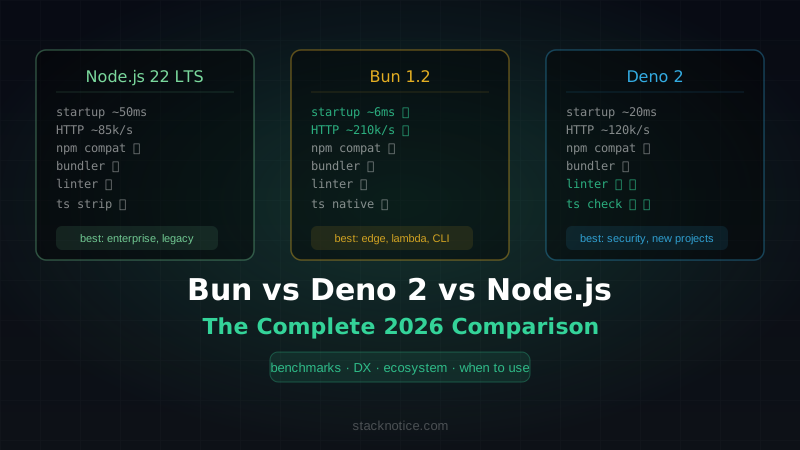
| Node.js 22 LTS | Bun 1.2 | Deno 2 | |
|---|---|---|---|
| HTTP req/s (hello world) | ~85k | ~210k | ~120k |
| Startup time | ~50ms | ~6ms | ~20ms |
| TypeScript | Strip only (no check) | Native (via transpile) | Native (full type check option) |
| npm compat | ✅ Full | ✅ Full | ✅ Full (via npm:) |
| Built-in bundler | ❌ | ✅ | ✅ |
| Built-in test runner | ✅ node:test | ✅ | ✅ |
| Built-in linter/formatter | ❌ | ❌ | ✅ (deno fmt, deno lint) |
| Package manager | npm/pnpm/yarn | bun install | deno / jsr |
| Stability | ✅ Battle-tested | 🟡 Production-ready | 🟡 Production-ready |
| Best for | Enterprise, legacy | Edge, scripts, monorepos | Security-first, new projects |
Node.js 22 LTS: The Safe Choice
Node.js 22 became LTS in October 2024 and remains the most widely deployed JavaScript runtime in production. If you're running a large existing codebase, nothing changes for you — and that's the point.
What's New in Node.js 22
Native TypeScript support (no transpiler needed):
# Node.js 22.6+
node --experimental-strip-types server.ts
It strips type annotations before execution. No type checking — just faster startup without a build step for simple scripts. For full type safety, you still want tsc or a build tool.
Improved node:test module:
import { test, describe } from 'node:test'
import assert from 'node:assert/strict'

describe('User service', () => {
  test('creates user with hashed password', async () => {
    const user = await createUser({ email: 'test@example.com', password: 'secret' })
    assert.notEqual(user.passwordHash, 'secret')
    assert.ok(user.passwordHash.startsWith('$2b$'))
  })
})
The built-in test runner is now fast enough that many teams are dropping Jest/Vitest for new projects. No configuration, no install.
Performance improvements:
Node.js 22 uses V8 12.4, which brings about 10% improvement in startup time compared to Node.js 20. Still ~50ms cold start — much slower than Bun — but not the bottleneck in most apps.
When to Use Node.js
- Existing large codebase — lowest migration risk
- Enterprise environment — best tooling support, best hiring pool
- Libraries you need that have native bindings — widest compatibility
- Your team knows it — experience matters more than benchmarks
The npm ecosystem is built for Node.js. Anything that works reliably elsewhere works here first.
Bun 1.2: The Speed Demon
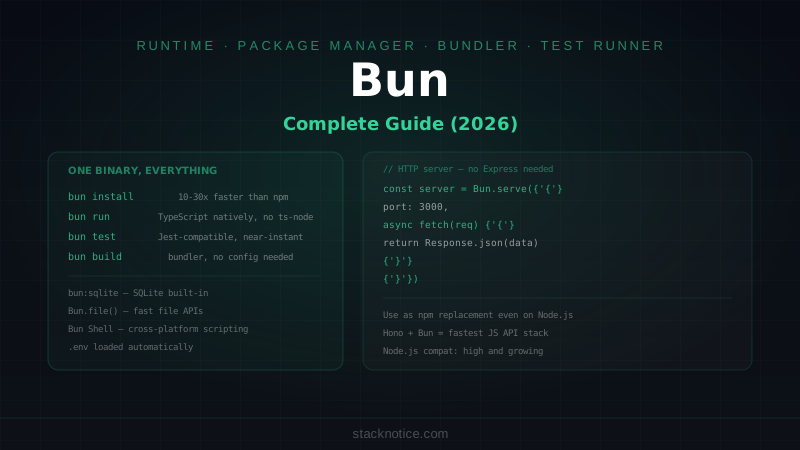
Bun was built from scratch in Zig with JavaScriptCore (Safari's engine) instead of V8. The result is significantly faster startup and I/O. Bun 1.2 fixed the npm compatibility issues that made earlier versions risky in production.
Performance: The Real Numbers
Bun's HTTP server (using Bun.serve):
Bun.serve({
  port: 3000,
  fetch(req) {
    return new Response('Hello')
  },
})
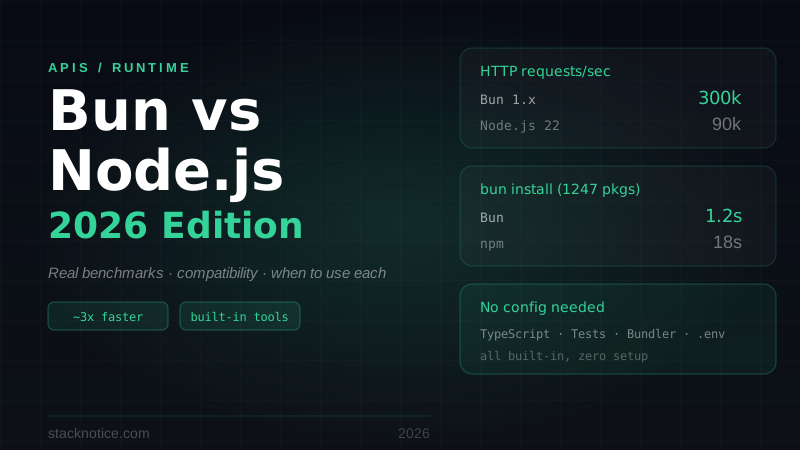
In published benchmarks from the Bun team (independently verified):
- Bun: ~210k req/s
- Node.js: ~85k req/s
- Deno: ~120k req/s
For file I/O (Bun.file vs fs):
- Bun reads a 1MB file in ~0.8ms vs Node's ~3.2ms
Startup time matters most for:
- Lambda functions (cold start)
- CLI tools (user-facing latency)
- Short-lived scripts
# Bun: 6ms
time bun run script.ts

# Node: 50ms
time node --experimental-strip-types script.ts
Bun as a Package Manager
Bun's package manager is legitimately the fastest available:
# Install all deps in a large Next.js project
bun install   # ~1.2s
npm install   # ~18s
pnpm install  # ~8s
It uses a binary lockfile (bun.lock) and a global cache. You can use bun install in any project — it doesn't replace node_modules, it just fills them faster.
Bun's Built-In Bundler
// bun build — fast, esbuild-compatible
await Bun.build({
  entrypoints: ['./src/index.ts'],
  outdir: './dist',
  target: 'node',
  minify: true,
})
For simple bundling use cases, this eliminates esbuild/rollup/webpack from your dependencies. Not a webpack replacement for complex apps, but excellent for libraries and tools.
Node.js Compatibility in Bun 1.2
The biggest issue with earlier Bun versions was missing Node.js APIs. Bun 1.2 added:
- Full
worker_threadssupport node:cryptocomplete implementationnode:httpandnode:httpsfull compatibilitynode:child_process(spawn,exec,fork)
Most packages that worked with Node.js now work with Bun. Edge cases remain — native addons (.node files) require a Node.js process — but pure JS/TS packages are mostly fine.
# Test your project with Bun
bun install
bun run start
# Check for any compatibility errors
When to Use Bun
- Lambda/Edge functions — startup speed matters, cold starts are real
- CLI tools — user sees the latency
- Monorepo workspace —
bun installspeed across 10+ packages - New greenfield projects — no legacy compatibility concerns
- Scripts and automation — faster than Node for one-off tasks
Deno 2: The Security-First Runtime
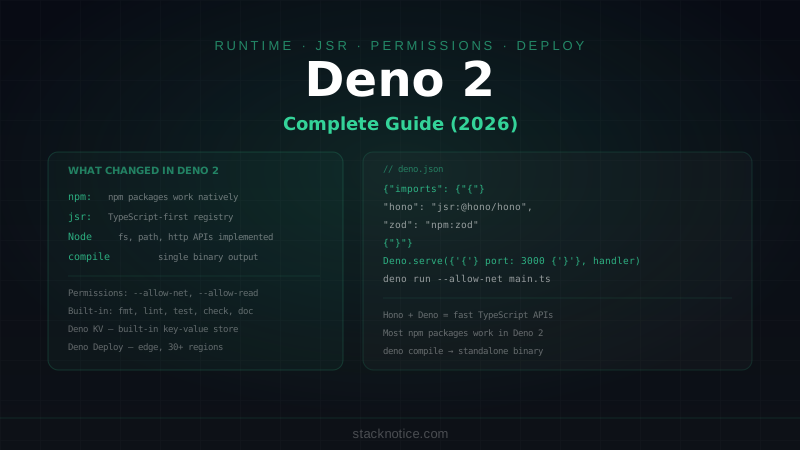
Deno was created by Ryan Dahl (Node.js's creator) to fix the mistakes of Node. Deno 2, released in October 2024, added the npm compatibility that made Deno 1 impractical for most projects.
The Security Model
Deno's most distinctive feature: explicit permissions. Code can't access the filesystem, network, or environment variables without you saying so:
# Must explicitly grant permissions
deno run --allow-net --allow-read=./data server.ts

# Or use a deno.json to lock permissions
// deno.json
{
"tasks": {
"start": "deno run --allow-net --allow-env=DATABASE_URL,PORT src/main.ts"
}
}In Node.js or Bun, any dependency you install has full access to your filesystem and network by default. In Deno, a malicious dependency can only do what you've explicitly permitted. This matters in a world where supply chain attacks are increasingly common.
npm Compatibility in Deno 2
The killer feature of Deno 2:
// Deno 2 — use npm packages directly
import express from 'npm:express'
import { z } from 'npm:zod'
import Stripe from 'npm:stripe'

// JSR — the new TypeScript-first registry
import { Hono } from 'jsr:@hono/hono'
No node_modules directory. Dependencies are cached globally. The first deno run downloads and caches. Subsequent runs are instant.
deno run --allow-net server.ts
# Downloaded npm:express@4.21.0
# Running...
This works for the vast majority of npm packages. Native addons are the main exception.
Built-In Tooling
Deno ships with a complete development toolkit:
# Formatter
deno fmt

# Linter
deno lint

# Type checker
deno check src/main.ts

# Test runner
deno test

# Documentation generator
deno doc src/main.ts

# Task runner (like npm scripts)
deno task start

# Dependency inspector
deno info
This is the biggest DX advantage over Node.js and Bun. One tool, no configuration files to maintain, no version mismatches. For teams starting new projects, this simplicity is valuable.
TypeScript in Deno 2
Deno has the best TypeScript support of the three:
// Full type checking during execution
deno run --check server.ts

// Or just strip types (faster)
deno run server.ts
Unlike Node's --experimental-strip-types (which only strips, doesn't check) or Bun (which transpiles but doesn't check by default), Deno can run full type checking as part of your workflow without a separate tsc step.
JSR — The TypeScript-First Registry
Deno's alternative to npm, designed for TypeScript:
import { Hono } from 'jsr:@hono/hono'
import { assertEquals } from 'jsr:@std/assert'
JSR packages are published as TypeScript source — no compiled JS, no @types packages. The registry generates documentation automatically from your types. It's cross-runtime: JSR packages work on Deno, Node.js, and Bun.
When to Use Deno 2
- Security-sensitive applications — the permissions model adds real protection
- New projects where tooling simplicity matters — no ESLint, Prettier, Jest setup
- TypeScript-first teams — best native TypeScript support
- Library authors — JSR is excellent for publishing TypeScript libraries
- Environments where supply chain security is audited — Deno's model is easier to audit
Head-to-Head: Real-World Scenarios
Scenario 1: REST API with Database
// Hono — works on all three runtimes
import { Hono } from 'hono'

const app = new Hono()

app.get('/users/:id', async (c) => {
  const user = await db.query.users.findFirst({
    where: eq(users.id, c.req.param('id'))
  })
  return c.json(user)
})

// Node.js: node server.ts (or tsx watch)
// Bun: bun run server.ts
// Deno: deno run --allow-net --allow-env server.ts
For this use case, all three work well. Pick based on team familiarity and deployment target. If you're deploying to AWS Lambda, Bun wins on cold start. If you're deploying to Deno Deploy, Deno wins obviously.
Scenario 2: CLI Tool
Bun wins clearly. 6ms vs 50ms startup is significant when the user runs your tool on every file save.
# Compiling to single binary
bun build --compile ./src/cli.ts --outfile my-cli

# The result: a single native binary, no Node.js required
./my-cli --help  # Starts in <5ms
Deno also supports single binary compilation. Node.js's --experimental-sea-config (Single Executable Applications) is less mature.
Scenario 3: Existing Next.js / Express App
Node.js or Bun (as a drop-in replacement). Deno can run Express via npm:express but some middleware with native addons won't work.
# Bun as drop-in for Node.js — zero changes needed
bun install
bun run dev  # Instead of node run dev

# Most Next.js apps "just work" — Bun team maintains compatibility
Scenario 4: Monorepo with Many Packages
Bun wins on bun install speed alone. In a monorepo with 15 packages and 300 total dependencies, the difference between 2 seconds and 45 seconds adds up in CI.
# Workspace setup
cat bun.workspace.json
{
  "workspaces": ["packages/*", "apps/*"]
}

bun install  # All workspaces, ~2s
TypeScript Support Comparison
This is nuanced. All three support TypeScript without a separate compile step, but in different ways:
| Node.js 22 | Bun 1.2 | Deno 2 | |
|---|---|---|---|
| Type stripping | ✅ | ✅ | ✅ |
| Type checking during run | ❌ | ❌ | ✅ (--check) |
| tsconfig support | Requires tsc | ✅ | ✅ |
| Paths/aliases | Requires bundler | ✅ | ✅ |
| Decorators | Via esbuild/swc | ✅ | ✅ |
For most production workflows, you run tsc --noEmit in CI regardless of runtime. The difference is day-to-day DX.
Deployment Compatibility
| Platform | Node.js | Bun | Deno |
|---|---|---|---|
| Vercel | ✅ | ✅ | ✅ |
| Railway | ✅ | ✅ | ✅ |
| Fly.io | ✅ | ✅ | ✅ |
| AWS Lambda | ✅ | ✅ (unofficial) | ❌ (Deno Deploy) |
| Cloudflare Workers | ❌ | ❌ | ✅ (Workers compat) |
| Deno Deploy | ❌ | ❌ | ✅ |
| Docker | ✅ | ✅ | ✅ |
For most hosting platforms, all three work. The gaps are at the edges — Cloudflare Workers has Deno/WinterCG compatibility, not Node.js native.
Migrating From Node.js
To Bun (Lowest friction)
- Install Bun:
curl -fsSL https://bun.sh/install | bash - Replace
npm installwithbun install - Replace
node src/index.tswithbun src/index.ts - Run your test suite:
bun test(Jest-compatible API) - Check for native addon dependencies — these may need Node.js
Most projects work without code changes. If you have issues, Bun's error messages link to tracking issues.
To Deno 2 (Medium friction)
# Install
curl -fsSL https://deno.land/install.sh | sh

# Create deno.json
cat deno.json
{
  "imports": {
    "express": "npm:express",
    "zod": "npm:zod",
    "@/": "./src/"
  },
  "tasks": {
    "dev": "deno run --allow-net --allow-env --allow-read --watch src/main.ts",
    "start": "deno run --allow-net --allow-env src/main.ts"
  }
}
The main migration work is:
- Converting npm imports to
npm:specifiers or a deno.json import map - Adding explicit permission flags
- Replacing
__dirname/__filenamewithimport.meta.dirname
Our Recommendation
For most developers in 2026:
-
Staying on Node.js? Upgrade to 22 LTS, add
--experimental-strip-typesfor scripts, adoptnode:test. Zero migration risk. -
Starting something new? Try Bun first. Drop-in compatibility means low risk, and the speed improvements are real and measurable. If you hit compatibility issues, the Bun team usually fixes them within days.
-
Security is a first-class concern? Deno 2. The permissions model and built-in tooling eliminate whole categories of supply chain risk and configuration overhead.
-
Building CLI tools or Lambda functions? Bun. The startup speed advantage is the biggest practical difference between runtimes.
The era of "Node.js or nothing" is over. None of these runtimes will disappear — they serve different needs. The real risk is not choosing wrong; it's not evaluating the options at all.
Further Reading
- Bun vs Node.js: Deep Dive on Performance — our earlier comparison with more benchmark detail
- Hono.js Complete Guide — the framework that runs on all three runtimes
- Your Full-Stack Project Setup as a Senior Dev — where runtime choice fits in the bigger decision