Bun launched in 2023, promised to be 3x faster than Node.js, and the JavaScript community collectively held its breath. In 2026, Bun 1.x is production-ready, adopted by real companies, and genuinely compelling — but it's not a drop-in replacement for every use case. Here's an honest breakdown of what it does better, where Node.js still wins, and how to decide which to use.
What Bun Is
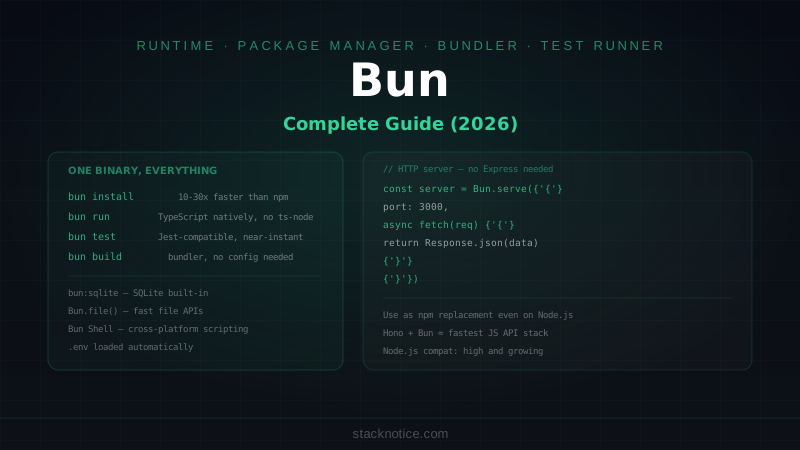
Bun is a JavaScript runtime, package manager, bundler, and test runner — all in one binary. It's built on WebKit's JavaScriptCore engine (the same one powering Safari) instead of V8 (Chrome, Node.js). This difference is the root of both its performance advantages and its occasional compatibility gaps.
Key components:
- Bun runtime — executes JavaScript and TypeScript natively (no ts-node, no tsx, no esbuild needed)
bun install— package manager compatible with npm packages, 10-100x faster than npmbun build— bundler for production, outputs ESM or CJSbun test— Jest-compatible test runnerbun run— runs scripts frompackage.json
Speed: Where Bun's Claims Are Real
HTTP Server Throughput
These benchmarks are consistently reproducible on a standard VPS (Ubuntu 22.04, 4 cores):
Simple HTTP server:
// Bun
Bun.serve({
  port: 3000,
  fetch(req) {
    return new Response('Hello World')
  },
})
// Node.js
import http from 'node:http'
http.createServer((_, res) => {
res.writeHead(200)
res.end('Hello World')
}).listen(3000)| Runtime | Requests/sec | Latency (avg) |
|---|---|---|
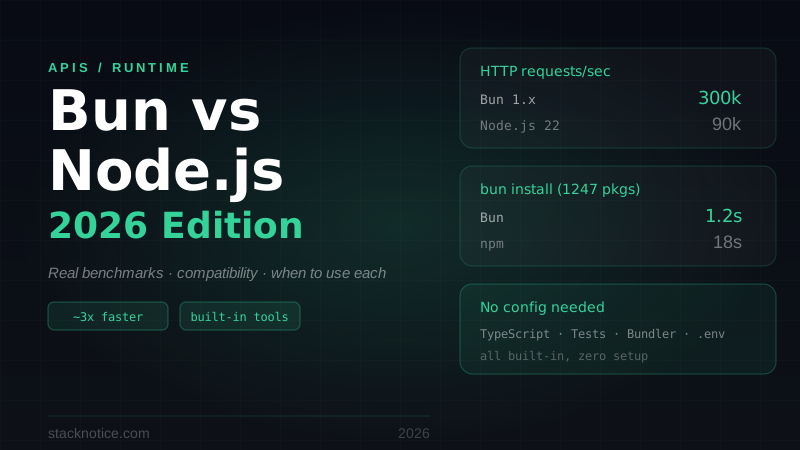
| Bun 1.x | ~300,000 | ~0.3ms |
| Node.js 22 | ~90,000 | ~1.1ms |
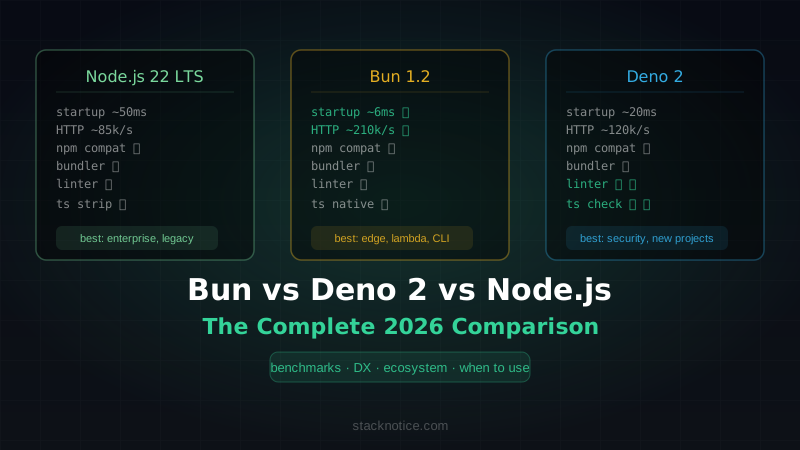
| Deno 2.x | ~120,000 | ~0.8ms |
Bun wins at raw HTTP throughput — roughly 3x faster than Node.js.
Important caveat: in real applications with database calls, authentication, and business logic, the difference shrinks significantly. Your bottleneck becomes Postgres, not the HTTP layer. Still, lower latency and higher throughput per instance means fewer servers and lower infrastructure cost.
Package Installation
This one is not close:
# Fresh install, Next.js project (1,247 packages)
npm install      # ~18 seconds
yarn install     # ~12 seconds
pnpm install     # ~8 seconds
bun install      # ~1.2 seconds
If you switch nothing else, using bun install in place of npm install in CI/CD pipelines alone can save minutes per build.
TypeScript Execution
Node.js needs a transpiler to run TypeScript:
# Node.js
npx tsx server.ts      # adds ~200ms startup
npx ts-node server.ts  # adds ~400ms startup

# Bun
bun run server.ts      # runs directly, ~20ms startup
For CLI tools, scripts, and watch-mode development, this is a significant quality-of-life improvement.
Built-in Tools vs Node.js Ecosystem
One of Bun's biggest selling points is replacing 4-5 tools with a single binary:
| Tool | Node.js needs | Bun |
|---|---|---|
| TypeScript | ts-node / tsx / esbuild | built-in |
| Test runner | Jest / Vitest | bun test |
| Bundler | webpack / esbuild / rollup | bun build |
| Package manager | npm / yarn / pnpm | bun install |
| Watch mode | nodemon | --watch flag |
# Node.js dev setup
npm install --save-dev typescript tsx jest @types/jest nodemon

# Bun dev setup
# ...nothing. It's all there.
bun --watch run server.ts
bun test --watch
This matters most for small teams and solo developers — fewer config files, fewer version conflicts, less tooling overhead.
Compatibility: The Real Story
Bun claims ~96% Node.js API compatibility. In practice, that 4% catches you in specific scenarios:
What works well
- Most npm packages — Express, Fastify, Hono, Zod, Prisma, Drizzle, etc.
- CommonJS and ESM modules
node:fs,node:path,node:crypto,node:http,node:streamfetch,WebSocket,ReadableStream(native in Bun)- Environment variables via
process.envandBun.env
What has friction
- Native addons (
.nodefiles) — packages compiled with node-gyp may not work. This affects some cryptography packages, database drivers with native bindings (though pure JS alternatives usually exist) node:worker_threads— Bun has workers but some edge cases differ- Some Jest APIs —
bun testis Jest-compatible but not 100% identical; some advanced mocking patterns may need adjustment - AWS Lambda — Bun runtimes are available but less battle-tested than the Node.js runtime
Testing compatibility before migrating
# Just install Bun and try running your project:
curl -fsSL https://bun.sh/install | bash
bun install
bun run your-start-script.ts
Most Express/Fastify/Hono APIs run unmodified. The issues surface in test suites and packages with native bindings.
Writing Code for Bun
Bun-native APIs are faster and more ergonomic than Node.js equivalents:
File I/O
// Read file (Bun native — faster than fs.readFile)
const text = await Bun.file('data.txt').text()
const json = await Bun.file('data.json').json()
const bytes = await Bun.file('image.png').bytes()

// Write file
await Bun.write('output.txt', 'Hello World')
await Bun.write('output.json', JSON.stringify({ data: 123 }))
HTTP Server with routing
// Bun's built-in server handles routing cleanly
const server = Bun.serve({
  port: 3000,
  async fetch(req) {
    const url = new URL(req.url)

    if (url.pathname === '/health') {
      return Response.json({ status: 'ok' })
    }

    if (url.pathname === '/users' && req.method === 'GET') {
      const users = await getUsers()
      return Response.json(users)
    }

    if (url.pathname === '/users' && req.method === 'POST') {
      const body = await req.json()
      const user = await createUser(body)
      return Response.json(user, { status: 201 })
    }

    return new Response('Not Found', { status: 404 })
  },
})

console.log(`Listening on ${server.url}`)
For production apps, most developers use Hono on top of Bun — it's the Express of the Bun ecosystem:
bun add honoimport { Hono } from 'hono'
const app = new Hono()
app.get('/users', async (c) => {
const users = await db.query.users.findMany()
return c.json(users)
})
app.post('/users', async (c) => {
const body = await c.req.json()
const user = await createUser(body)
return c.json(user, 201)
})
export default appEnvironment Variables
// Both work in Bun
const key = process.env.API_KEY
const key2 = Bun.env.API_KEY

// Bun auto-loads .env without dotenv package
Testing
// tests/users.test.ts
import { describe, it, expect, beforeAll } from 'bun:test'

describe('Users API', () => {
  beforeAll(async () => {
    // setup
  })

  it('returns a list of users', async () => {
    const res = await fetch('http://localhost:3000/users')
    expect(res.status).toBe(200)
    const data = await res.json()
    expect(Array.isArray(data)).toBe(true)
  })

  it('creates a user', async () => {
    const res = await fetch('http://localhost:3000/users', {
      method: 'POST',
      headers: { 'Content-Type': 'application/json' },
      body: JSON.stringify({ name: 'Alice', email: 'alice@test.com' }),
    })
    expect(res.status).toBe(201)
    const user = await res.json()
    expect(user.email).toBe('alice@test.com')
  })
})
bun test # run all tests
bun test --watch # re-run on file changes
bun test --coverage # with code coverageBun with Next.js
Bun works as the package manager and runtime for Next.js apps. The dev experience is faster:
# Create Next.js app with Bun
bunx create-next-app@latest my-app --typescript --tailwind --app
cd my-app

# Dev server (uses Bun as runtime, Next.js as framework)
bun dev

# Build
bun run build
Next.js uses its own bundling and compilation pipeline regardless, so the speed gains here come mainly from bun install and faster script execution, not from Bun's HTTP layer.
When to Use Bun
Good fit:
- New projects where you control the full stack
- TypeScript-heavy backends (CLI tools, APIs, scripts)
- CI/CD pipelines —
bun installalone saves significant time - Projects targeting Bun's native HTTP performance (APIs with high request volume)
- Teams that want fewer tools to configure and maintain
- Hono-based APIs deployed to VPS or containers
Stick with Node.js when:
- You have native addons (.node files) that don't work with Bun
- You're deploying to AWS Lambda (Node.js runtime is more mature)
- Your team has deep Node.js expertise and the migration cost isn't justified
- You're running a large legacy codebase where compatibility risk is high
- You need
node:clusteror advancedworker_threadspatterns
Migrating an Existing Project
The minimal migration path:
# Step 1: Install Bun
curl -fsSL https://bun.sh/install | bash

# Step 2: Replace package manager (lowest risk)
bun install  # reads existing package.json, generates bun.lockb

# Step 3: Try running with Bun
bun run start

# Step 4: Run your test suite
bun test

# Step 5: Address any compatibility issues
The most common issues at step 4:
- Missing Node.js globals — add
import 'bun'or polyfill as needed - Jest-specific APIs — check bun:test docs for equivalents
- Native modules — find pure-JS alternatives or keep those packages on Node.js
Docker
Bun has official Docker images:
FROM oven/bun:1 AS base
WORKDIR /app

FROM base AS install
COPY package.json bun.lockb ./
RUN bun install --frozen-lockfile

FROM base AS release
COPY --from=install /app/node_modules ./node_modules
COPY . .
EXPOSE 3000
CMD ["bun", "run", "src/index.ts"]
The image is ~120MB vs ~180MB for node:20-alpine, and bun install in CI is dramatically faster.
The Verdict for 2026
Bun is production-ready. Companies are running it in production. The performance is real. The tooling simplification is real.
But it's not a universal drop-in. The 4% compatibility gap is small overall, but if you hit it, it's a blocker. Evaluate based on your specific dependencies, deployment target, and risk tolerance.
For new projects: use Bun. The speed, built-in tooling, and native TypeScript support make it a better starting point than a fresh Node.js setup.
For existing Node.js projects: start by replacing npm install with bun install in CI — zero risk, immediate gain. Then test your app with bun run in a branch. If it works, keep going. If you hit blockers, keep npm/yarn and revisit in 6 months.
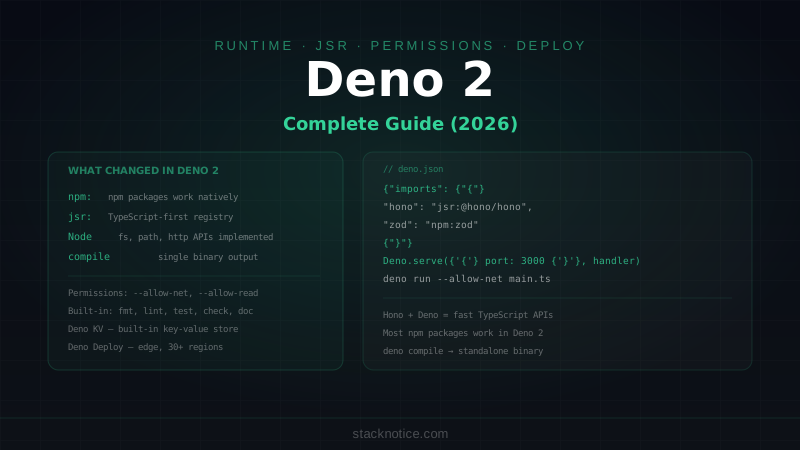
The JavaScript runtime space is more competitive in 2026 than ever. Node.js 22+ is faster than it's ever been, and Deno 2 is also a serious option — see the Bun vs Deno vs Node.js comparison for a three-way breakdown. But Bun's unique combination of speed + built-in tools + npm compatibility makes it the most compelling alternative for most new TypeScript projects.
For building APIs on top of Bun, Hono is the recommended framework — it's similarly designed around performance and TypeScript-first. For the database layer, Drizzle ORM pairs naturally with Bun's ethos of lightweight, SQL-first tooling. For benchmarking and profiling your own APIs, the principles in the Next.js performance optimization guide apply equally to any backend.