Single agents are good. Multi-agent systems are what actually ships production-grade automation.
Here's the problem: you give a single LLM a complex task — "review this PR, run the tests, check for security issues, and write a summary for the team" — and it either forgets half of it, runs out of context window, or produces mediocre output because it's doing too many things at once.
Multi-agent systems solve this by doing what good engineering teams do: breaking work into focused roles, running tasks in parallel where possible, and having one coordinator keep everything on track.
In 2026, this isn't theoretical. Anthropic ships Claude Code subagents natively. LangGraph, CrewAI, and AutoGen have matured. The Model Context Protocol gives every agent standardized access to external tools. The infrastructure is here. What most developers are missing is the mental model for how to design these systems well.
This article gives you that mental model — plus working code.
Why Single Agents Hit a Ceiling
A single agent with a long context window sounds like it should handle anything. In practice, you run into four walls:
Context dilution. As a conversation grows, LLMs pay less attention to earlier content. Stuffing a 200-file codebase, a full test suite, and business requirements into one context doesn't work — the model loses track of constraints defined 80,000 tokens ago.
Sequential bottlenecks. A single agent does one thing at a time. If you need to process 50 documents, it processes them one by one. A multi-agent system can fan out to 10 workers running in parallel and finish in 20% of the time.
Jack-of-all-trades mediocrity. An agent asked to "write code, review it for security, check the docs, and format the PR" does all of these worse than four agents each doing one thing with a focused system prompt.
No fault isolation. When a single agent fails halfway through a complex task, you have no clear recovery point. Multi-agent systems let you checkpoint between stages and retry only the failed part.
The ceiling is real, and it shows up fast once your automation goes beyond a single well-defined task.
The Core Patterns
Multi-agent architectures aren't a monolith — they're a toolkit. Here are the four patterns you'll reach for repeatedly.
1. Orchestrator-Worker
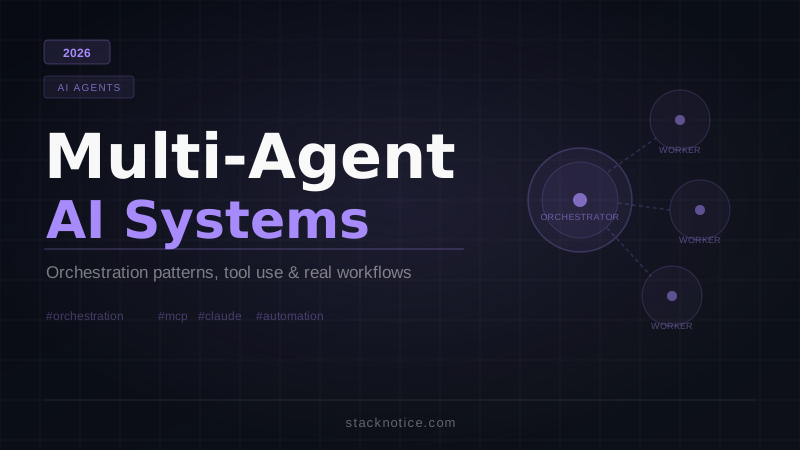
The most common pattern. One agent (the orchestrator) receives the high-level goal, breaks it into subtasks, delegates to specialized workers, and assembles the final result.
User → Orchestrator → Worker A (research)
                    → Worker B (write)
                    → Worker C (review)
                    ↓
              Final Output
The orchestrator doesn't execute work itself — it plans, delegates, and synthesizes. Workers are focused and stateless where possible.
Best for: Multi-step workflows with distinct phases that require different capabilities or context.
2. Sequential Pipeline
Agents are chained — the output of one becomes the input of the next. No orchestrator needed; the flow is predetermined.
Raw Data → Extractor Agent → Enricher Agent → Formatter Agent → Output
This is essentially a typed data pipeline where each "processor" is an LLM call with a focused purpose.
Best for: Document processing, ETL workflows, content transformation pipelines.
3. Parallel Fan-Out
One coordinator distributes the same task across N workers simultaneously, then aggregates results.
Orchestrator → Worker 1 (doc 1)  ┐
             → Worker 2 (doc 2)  ├→ Aggregator → Summary
             → Worker 3 (doc 3)  ┘
This pattern is where multi-agent systems really shine on throughput. Use it any time you have independent chunks of work.
Best for: Batch processing, research aggregation, parallel code analysis.
4. Hierarchical Agents
Like orchestrator-worker, but with multiple layers. A top-level manager delegates to sub-orchestrators, which in turn delegate to workers.
CEO Agent → Engineering Manager Agent → Dev Worker A
                                      → Dev Worker B
          → Marketing Manager Agent  → Content Worker
                                      → SEO Worker
This scales to genuinely complex tasks but adds coordination overhead. Don't add hierarchy unless you need it.
Best for: Complex autonomous tasks that span multiple domains (full software projects, business process automation).
Tool Use and MCP: How Agents Access Real Systems
An agent that can only talk to itself isn't useful in production. Real multi-agent systems need agents that can read databases, call APIs, execute code, and interact with external services.
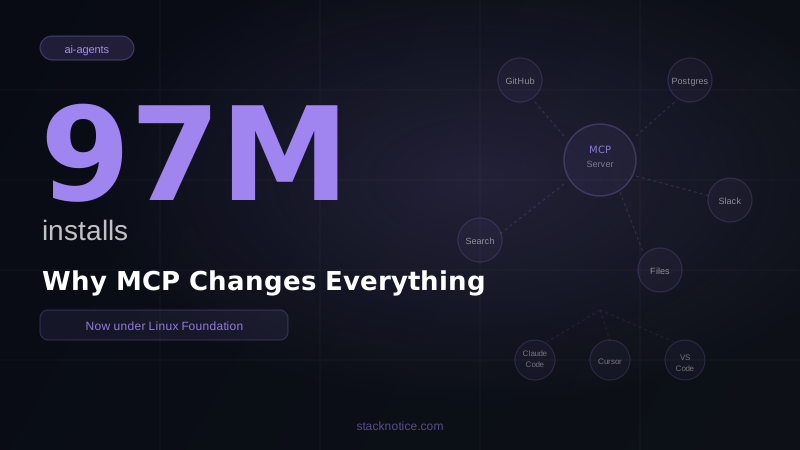
This is where Model Context Protocol (MCP) becomes critical. MCP is an open standard that lets agents connect to external systems through a consistent interface. Instead of writing custom integration code for every tool, you connect to MCP servers that expose capabilities as standardized tools.
In a multi-agent system, you can give different agents access to different MCP servers:
- Research agent: access to web search MCP, Wikipedia MCP
- Code agent: access to filesystem MCP, shell execution MCP
- Database agent: access to PostgreSQL MCP or a read-only analytics MCP
- Notification agent: access to Slack MCP, email MCP
This separation of concerns is powerful — your code agent can't accidentally write to the database, and your notification agent can't access the filesystem.
For tool use outside MCP, the Anthropic SDK's native tool use (tools parameter) is the other standard approach. You define tools as JSON schemas, the model decides which to call, and you execute them in your application code.
Real Code: Orchestrator Calling Workers via Anthropic SDK
Here's a working Python implementation of the orchestrator-worker pattern. The orchestrator receives a task, breaks it into subtasks, and calls worker agents for each one.
import anthropic
import json
from typing import Any

client = anthropic.Anthropic()

WORKER_SYSTEM_PROMPTS = {
    "researcher": """You are a research specialist. Given a topic or question,
    provide factual, well-structured information. Be concise and accurate.
    Return your findings as a JSON object with keys: 'summary', 'key_facts', 'sources_consulted'.""",

    "writer": """You are a technical writer. Given research findings and a target audience,
    transform the content into clear, engaging prose.
    Return a JSON object with keys: 'title', 'content', 'word_count'.""",

    "reviewer": """You are a content reviewer. Check for accuracy, clarity, and completeness.
    Return a JSON object with keys: 'approved', 'issues', 'suggestions', 'quality_score'.""",
}


def call_worker(worker_type: str, task: str, context: dict[str, Any] | None = None) -> dict:
    """Call a specialized worker agent and return structured output."""
    messages = [{"role": "user", "content": task}]

    if context:
        messages[0]["content"] = f"Context:\n{json.dumps(context, indent=2)}\n\nTask:\n{task}"

    response = client.messages.create(
        model="claude-opus-4-5",
        max_tokens=2048,
        system=WORKER_SYSTEM_PROMPTS[worker_type],
        messages=messages,
    )

    # Workers return structured JSON — parse it out
    text = response.content[0].text
    try:
        # Handle markdown code blocks if the model wraps JSON
        if "```json" in text:
            text = text.split("```json")[1].split("```")[0].strip()
        elif "```" in text:
            text = text.split("```")[1].split("```")[0].strip()
        return json.loads(text)
    except json.JSONDecodeError:
        return {"raw_output": text}


def orchestrate(goal: str) -> dict:
    """
    Orchestrator agent: breaks a goal into subtasks and coordinates workers.
    Returns the final assembled result.
    """
    print(f"[Orchestrator] Starting task: {goal}")

    # Step 1: Research phase
    print("[Orchestrator] Delegating to researcher...")
    research_result = call_worker(
        "researcher",
        f"Research the following topic thoroughly: {goal}"
    )
    print(f"[Researcher] Completed. Summary: {research_result.get('summary', '')[:100]}...")

    # Step 2: Writing phase — passes research context to writer
    print("[Orchestrator] Delegating to writer...")
    writing_result = call_worker(
        "writer",
        f"Write a technical blog post about: {goal}. Target audience: senior developers.",
        context={"research": research_result}
    )
    print(f"[Writer] Completed. Word count: {writing_result.get('word_count', 'unknown')}")

    # Step 3: Review phase — passes written content for QA
    print("[Orchestrator] Delegating to reviewer...")
    review_result = call_worker(
        "reviewer",
        "Review this content for accuracy, clarity, and technical correctness.",
        context={
            "original_goal": goal,
            "research": research_result,
            "written_content": writing_result,
        }
    )
    print(f"[Reviewer] Quality score: {review_result.get('quality_score', 'N/A')}")
    print(f"[Reviewer] Approved: {review_result.get('approved', False)}")

    # Orchestrator assembles the final result
    return {
        "goal": goal,
        "research": research_result,
        "content": writing_result,
        "review": review_result,
        "pipeline_complete": True,
    }


if __name__ == "__main__":
    result = orchestrate("Claude Code subagents and parallel task execution in 2026")

    print("\n--- FINAL OUTPUT ---")
    if result["review"].get("approved"):
        print("Content approved. Ready to publish.")
        print(f"Title: {result['content'].get('title')}")
    else:
        print("Content needs revision:")
        for issue in result["review"].get("issues", []):
            print(f"  - {issue}")
This is a sequential pipeline. To add parallelism, you'd use asyncio or concurrent.futures for the fan-out pattern:
import asyncio
import anthropic

async_client = anthropic.AsyncAnthropic()

async def call_worker_async(worker_type: str, task: str) -> dict:
    response = await async_client.messages.create(
        model="claude-opus-4-5",
        max_tokens=1024,
        system=WORKER_SYSTEM_PROMPTS[worker_type],
        messages=[{"role": "user", "content": task}],
    )
    # ... parse and return

async def parallel_research(topics: list[str]) -> list[dict]:
    """Fan out research across multiple topics simultaneously."""
    tasks = [
        call_worker_async("researcher", f"Research: {topic}")
        for topic in topics
    ]
    # All workers run concurrently
    results = await asyncio.gather(*tasks)
    return list(results)

# Usage
topics = ["agent orchestration", "MCP servers", "LangGraph internals"]
research = asyncio.run(parallel_research(topics))
With asyncio.gather, all three research calls fire simultaneously. For CPU-bound tasks or when hitting rate limits, use asyncio.Semaphore to cap concurrency.
Claude Code Subagents: The Practical Shortcut
If you're already using Claude Code, you have multi-agent capability built in without writing any orchestration code.
Claude Code's subagent system lets the main Claude instance spawn parallel agents via the Task tool. You describe what you want, and Claude decides to spin up subagents for independent portions of the work.
You: "Review every TypeScript file in /src for type safety issues and performance problems"

Claude Code:
  → Spawns Agent A: reviews src/api/ (12 files)
  → Spawns Agent B: reviews src/components/ (31 files)
  → Spawns Agent C: reviews src/utils/ (8 files)
  [All three run in parallel]
  → Orchestrator: synthesizes findings into a unified report
Each subagent gets its own context window, so the total work isn't limited by a single 200k window. The orchestrating Claude instance coordinates without doing the actual file reading itself.
This is genuinely useful for:
- Large codebase analysis (fan out across directories)
- Writing tests for multiple modules in parallel
- Running independent refactoring tasks simultaneously
- Multi-step workflows where some branches are independent
The tradeoff: you're constrained to Claude Code's interface and Claude models. For custom orchestration logic, cross-model setups, or non-code tasks, you'll want to build your own orchestration layer.
Framework Comparison: LangGraph vs CrewAI vs Claude Native
You have three main options for building multi-agent systems today. The right choice depends on your use case. For a deeper comparison, see LangGraph vs CrewAI vs Claude Agents.
LangGraph
LangGraph models your agent workflow as a directed graph. Nodes are actions (LLM calls, tool calls, code), edges define transitions, and state flows between nodes.
Strengths:
- Explicit, inspectable flow — you can see exactly what happens when
- First-class support for cycles (agents that loop until a condition is met)
- Human-in-the-loop checkpoints built into the framework
- Excellent for complex conditional workflows
Weaknesses:
- Steeper learning curve — graph abstractions take time to grok
- More boilerplate for simple use cases
- Python-first (TypeScript support exists but lags)
Use when: You need precise control over agent flow, want auditable execution graphs, or are building stateful agents that loop.
CrewAI
CrewAI takes a role-based approach. You define "agents" with roles, goals, and backstories, then define "tasks" assigned to them. Agents can collaborate via a crew.
Strengths:
- Intuitive mental model (CEO, researcher, writer roles)
- Low boilerplate for standard workflows
- Built-in memory and tool integrations
Weaknesses:
- Less control over exact execution flow
- "Agent personalities" via backstory prompts can be inconsistent
- Complex conditional logic is awkward
Use when: You want to ship a multi-agent workflow quickly and the role-based model fits your use case naturally.
Claude Native (Anthropic SDK)
Building directly on the Anthropic SDK with no framework. The code examples above are this approach.
Strengths:
- Maximum control and flexibility
- No framework abstraction overhead
- Easiest to debug (it's just Python/TypeScript you wrote)
- Best for integration with existing codebases
Weaknesses:
- You build everything yourself — orchestration, state management, error handling
- More code for common patterns that frameworks handle automatically
Use when: Your use case doesn't fit framework patterns well, or you want full control without framework magic.
Honest take for 2026: Start with Claude native for anything under ~3 agents. Reach for LangGraph when you need looping, branching, or auditable flows. Use CrewAI when the role-based model fits naturally and you want to move fast.
When NOT to Use Multi-Agent
Multi-agent systems add complexity. Don't add them unless the problem demands it.
Skip multi-agent when:
-
The task is sequential with no parallelism. If step B always depends on step A, parallel workers don't help. A well-prompted single agent is simpler and faster.
-
The total work fits in one context window. If your entire task can be handled in 50k tokens, one agent handles it better than coordinating multiple. Multi-agent has coordination overhead.
-
Latency matters more than throughput. Orchestrator + worker adds at least one extra LLM call. If you're optimizing for p50 response time in a user-facing app, a single fast call wins.
-
You can't tolerate non-determinism in flow. Multi-agent systems have more failure surfaces. In high-stakes pipelines (financial, medical), every coordination step is a place things can go wrong.
-
The team doesn't have the operational maturity. Running multi-agent in production means monitoring multiple LLM calls, handling partial failures, managing cost across N agents instead of one. If you don't have observability tooling set up, start simpler.
The rule: reach for multi-agent when you have genuinely independent parallel work, when context limits are a real constraint, or when specialized roles meaningfully improve output quality.
Failure Modes and How to Avoid Them
Multi-agent systems fail in predictable ways. Know these patterns.
Context Loss Between Agents
When the orchestrator passes results to a worker, it serializes the context. Critical nuances often get lost in this translation — the worker doesn't have the "why" behind the task, only the "what."
Fix: Pass structured context explicitly. Don't rely on free-form summaries. Use typed schemas (JSON or Pydantic models) for inter-agent communication. Include the original goal in every worker's context, not just the immediate subtask.
Infinite Loops
An agent calls a tool, the tool returns an unexpected result, the agent retries, same result, it retries again... infinitely.
Fix: Set explicit max_iterations limits on every agent loop. Add step counters to agent state. Design tool failures to surface as distinct states (not as prompts to "try again").
Hallucinated Tool Calls
An agent decides to call a tool that doesn't exist, or calls a real tool with parameters it invented. This is more common in orchestrators trying to coordinate workers they "remember" from training rather than workers actually defined in your system.
Fix: Always validate tool calls before executing them. Use strict JSON schema validation on tool parameters. Never execute tool calls without confirming the tool name matches your actual tool registry.
Cascading Failures
Worker A fails. The orchestrator retries with a slightly different prompt. Worker A fails again differently. The orchestrator calls Worker B with the bad partial output from A. B produces garbage. The final output is nonsense with no clear error to debug.
Fix: Fail fast and explicitly. Workers should return structured error objects, not just bad content. Orchestrators should halt and surface errors rather than continuing with degraded input. Design for failure, not just the happy path.
Cost Explosions
You fan out to 20 workers on a task that could have been handled by 3. Or you set no token limits on workers that occasionally write 4k token responses when 400 would do. Multi-agent multiplies your per-task cost.
Fix: Set max_tokens per worker appropriate to the task. Monitor cost per pipeline run, not just per API call. Add circuit breakers that halt execution if total cost exceeds a threshold.
Building Reliable Multi-Agent Systems: Production Checklist
Before you ship multi-agent to production, verify each of these:
Observability
- Every agent call is logged with: agent ID, input, output, latency, token count, cost
- You can reconstruct the full execution trace for any run from logs
- Alerts exist for failed runs, cost spikes, and latency outliers
Error handling
- Every agent returns structured errors (not just bad content) on failure
- The orchestrator has explicit logic for each failure type (retry, fallback, halt)
- Max iteration limits are set on every loop
- Cascading failures stop at defined checkpoints
State management
- Agent state is serializable (you can pause and resume a pipeline)
- Intermediate results are persisted before passing to the next agent
- Duplicate execution is safe (idempotent workers where possible)
Human-in-the-loop
- High-stakes decisions have explicit human approval gates
- Agents can surface uncertainty ("I'm not confident — should I proceed?") rather than guessing
- Output review is part of the workflow for new agent configurations
Cost controls
- Per-worker
max_tokensis calibrated to the task - Total pipeline cost budget is defined and enforced
- Parallel fan-out has concurrency limits to avoid rate limit spikes
Testing
- Each worker agent is tested in isolation before integration
- You have a replay mechanism to re-run a pipeline on fixed inputs
- Edge cases are tested: empty inputs, tool failures, partial results
Real-World Use Cases
Code Review Pipeline
PR Diff → Security Agent → Performance Agent → Style Agent
                                                      ↓
                                            Aggregator Agent
                                                      ↓
                                           PR Comment + Score
Each specialized reviewer focuses on what it's good at. Security agent checks for injection vulnerabilities, exposed secrets, and unsafe dependencies. Performance agent looks for O(n²) patterns, unnecessary renders, and inefficient queries. Style agent checks naming, documentation, and consistency. The aggregator synthesizes into one coherent PR review.
Content Generation Pipeline
Topic → Research Agent (web + docs) → Outline Agent → Writer Agent
                                                             ↓
                                                    Editor Agent → Final Draft
Each article starts with grounded research from real sources, gets structured into an evidence-based outline, then gets written and edited. The editor agent checks consistency, grammar, and whether claims are actually supported by the research.
Data Processing Pipeline
Raw Dataset → [Validator A, Validator B, Validator C] → Aggregator → Clean Dataset
                (parallel validation by domain)
Large datasets get split and validated in parallel by multiple agents, each applying domain-specific rules. Results merge into a single validated, enriched dataset.
FAQ
Q: How many agents is too many? There's no universal number, but complexity grows faster than agent count. 3-7 agents is the sweet spot for most production systems. Beyond 10, coordination overhead and debugging difficulty become significant. If you need more, consider hierarchical structure (sub-orchestrators managing groups of workers).
Q: Can agents call other agents directly, or does everything go through an orchestrator? Both patterns work. Pure orchestrator-worker is easier to reason about. Peer-to-peer agent communication (agent A calls agent B directly) is more flexible but harder to trace and debug. For production, prefer the orchestrator model.
Q: Do all agents in a system need to use the same LLM? No. You can mix models. Use a powerful model (Claude Opus) for the orchestrator and cheaper/faster models (Claude Haiku, GPT-4o-mini) for routine worker tasks. This is a common cost optimization.
Q: How do I handle secrets and authentication across agents? Never put credentials in agent system prompts or task descriptions. Use environment variables, and give each worker only the credentials it needs. This is the principle of least privilege applied to agents.
Q: What's the difference between a multi-agent system and a simple chain of LLM calls? A chain of LLM calls is a sequential pipeline — essentially sequential multi-agent without an orchestrator. It's a valid pattern (and often the right one). The distinction matters when you need: dynamic task decomposition (the orchestrator decides at runtime how to split work), parallel execution, or specialized agents with different tools/capabilities.
Conclusion
Multi-agent systems are the architecture that makes serious AI automation possible in 2026. Single agents hit ceilings — context limits, sequential bottlenecks, jack-of-all-trades quality. Multi-agent systems solve these by applying the same principles that make good engineering teams work: specialization, parallelism, and clear coordination.
The patterns are proven: orchestrator-worker, sequential pipelines, parallel fan-out, hierarchical agents. The infrastructure is mature: MCP for tool access, Claude Code subagents for code workflows, LangGraph and CrewAI for framework-based orchestration.
The missing piece for most developers is the mental model — knowing when to use which pattern, what failure modes to design against, and how to build something observable enough to debug in production.
Start with the orchestrator-worker pattern. Build three agents, get them working end-to-end, instrument the logs, and watch where it breaks. That first working multi-agent pipeline teaches you more than any amount of reading.
The agents are ready. Now build the workflows.