The AI agent framework landscape changed significantly in early 2026. LangGraph 1.0 hit GA and surpassed CrewAI in GitHub stars. Claude agents matured into a production-ready option with the Agent SDK. AutoGen 0.4 shipped a complete rewrite.
If you're choosing a framework now, you're choosing between three distinct philosophies. This guide breaks them down with real code so you can make an informed decision — not a hype-driven one.
The Three Philosophies
Before comparing features, understand what each framework is optimizing for:
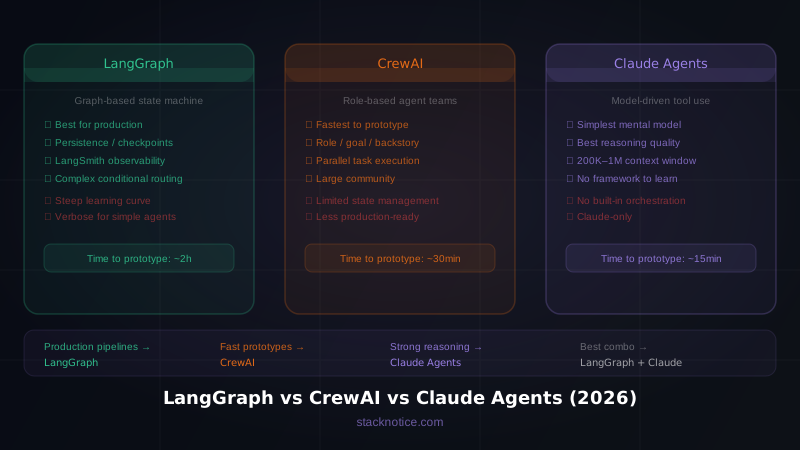
- LangGraph — explicit state machines. You define nodes, edges, and transitions. Maximum control, maximum complexity.
- CrewAI — role-based teams. You define agents with roles and goals, and the framework coordinates them. Fastest to prototype.
- Claude Agents (Anthropic Agent SDK) — tool-augmented Claude models. The model decides when and how to use tools. Simplest mental model.
None of them is universally better. Each wins in different scenarios.
LangGraph
LangGraph models your agent workflow as a directed graph. Each node is a function that receives state, does work, and returns updated state. Edges define transitions — including conditional edges that route based on state.
Basic agent in LangGraph
from langgraph.graph import StateGraph, END
from langchain_anthropic import ChatAnthropic
from typing import TypedDict, Annotated
import operator

class AgentState(TypedDict):
    messages: Annotated[list, operator.add]
    next_step: str

llm = ChatAnthropic(model="claude-sonnet-4-6")

def call_model(state: AgentState):
    response = llm.invoke(state["messages"])
    return {"messages": [response]}

def should_continue(state: AgentState):
    last_message = state["messages"][-1]
    if last_message.tool_calls:
        return "tools"
    return END

workflow = StateGraph(AgentState)
workflow.add_node("agent", call_model)
workflow.add_conditional_edges("agent", should_continue)
workflow.set_entry_point("agent")

app = workflow.compile()
What LangGraph does well
Persistence and checkpointing. LangGraph has built-in support for saving state between steps. If your agent fails mid-task, it can resume from the last checkpoint. This is critical for long-running workflows.
from langgraph.checkpoint.sqlite import SqliteSaver

memory = SqliteSaver.from_conn_string(":memory:")
app = workflow.compile(checkpointer=memory)

# Resume a previous run
config = {"configurable": {"thread_id": "run-123"}}
result = app.invoke(input, config=config)
Production observability. LangGraph integrates natively with LangSmith for tracing every node execution, input/output, and latency. For production systems, this is essential.
Conditional routing. Complex workflows where the next step depends on what happened in the previous one are a natural fit:
def route_after_research(state):
    if state["confidence"] > 0.8:
        return "write_report"
    elif state["needs_human"] == True:
        return "human_review"
    else:
        return "research_more"

workflow.add_conditional_edges("research", route_after_research, {
    "write_report": "writer",
    "human_review": "human",
    "research_more": "research",
})
Where LangGraph struggles
A simple ReAct agent takes ~120 lines in LangGraph. The same agent takes 40 in Smolagents. For straightforward tasks, LangGraph's explicitness becomes verbosity. It also has a steep learning curve — understanding graphs, state types, and edge routing takes real time.
Best for: production multi-agent pipelines, workflows requiring checkpointing/replay, enterprise systems needing audit trails.
CrewAI
CrewAI takes the opposite approach. Instead of defining a state machine, you define a crew — a team of agents with roles, goals, and backstories. The framework handles coordination.
Basic crew in CrewAI
from crewai import Agent, Task, Crew, Process

researcher = Agent(
    role="Senior Research Analyst",
    goal="Find accurate, up-to-date information on the given topic",
    backstory="""You're a meticulous researcher who always cites sources
    and cross-references information before reporting findings.""",
    verbose=True,
    llm="claude-sonnet-4-6"
)

writer = Agent(
    role="Technical Writer",
    goal="Write clear, engaging content based on research",
    backstory="""You transform complex technical information into
    accessible content that developers actually want to read.""",
    verbose=True,
    llm="claude-sonnet-4-6"
)

research_task = Task(
    description="Research the latest developments in {topic}",
    expected_output="A structured summary with key findings and sources",
    agent=researcher
)

write_task = Task(
    description="Write a blog post based on the research",
    expected_output="A 1500-word technical blog post",
    agent=writer,
    context=[research_task]
)

crew = Crew(
    agents=[researcher, writer],
    tasks=[research_task, write_task],
    process=Process.sequential,
    verbose=True
)

result = crew.kickoff(inputs={"topic": "MCP servers in 2026"})
What CrewAI does well
Speed to prototype. The role/goal/backstory model maps to how humans think about teams. You can have a working multi-agent system in 30 minutes.
Role specialization. Giving agents distinct personas genuinely improves output quality. A "Senior Security Auditor" with a relevant backstory performs better on security tasks than a generic agent.
Parallel execution. CrewAI supports parallel task execution with Process.parallel:
crew = Crew(
    agents=[analyst1, analyst2, analyst3],
    tasks=[task1, task2, task3],
    process=Process.parallel
)
Flow support. CrewAI 0.9+ added Flows for event-driven orchestration between crews:
from crewai.flow.flow import Flow, listen, start

class ContentFlow(Flow):
    @start()
    def research(self):
        return research_crew.kickoff()

    @listen(research)
    def write(self, research_output):
        return writing_crew.kickoff(inputs={"research": research_output})
Where CrewAI struggles
State management is implicit — the framework manages it for you, which means you have less control. For complex conditional workflows ("if the research found X, do Y; otherwise do Z"), you're fighting the abstraction. Persistence and checkpointing are less mature than LangGraph.
Best for: role-based team workflows, content pipelines, multi-step research and synthesis tasks, rapid prototyping.
Claude Agents (Anthropic Agent SDK)
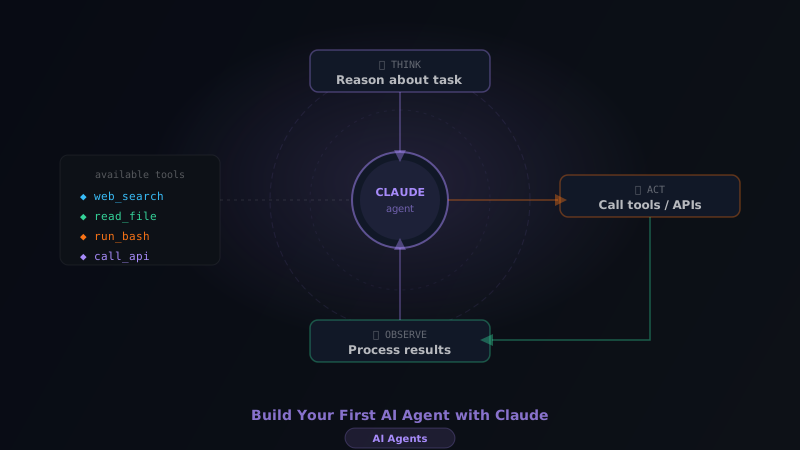
Claude's own approach is the most model-centric. You give Claude tools and let the model reason about when and how to use them. No graph, no crew — just a capable model with access to capabilities.
Basic agent with Claude
import anthropic

client = anthropic.Anthropic()

tools = [
    {
        "name": "search_web",
        "description": "Search the web for current information",
        "input_schema": {
            "type": "object",
            "properties": {
                "query": {"type": "string", "description": "The search query"}
            },
            "required": ["query"]
        }
    },
    {
        "name": "read_file",
        "description": "Read a file from the local filesystem",
        "input_schema": {
            "type": "object",
            "properties": {
                "path": {"type": "string", "description": "File path to read"}
            },
            "required": ["path"]
        }
    }
]

def run_agent(user_message: str):
    messages = [{"role": "user", "content": user_message}]

    while True:
        response = client.messages.create(
            model="claude-sonnet-4-6",
            max_tokens=4096,
            tools=tools,
            messages=messages
        )

        if response.stop_reason == "end_turn":
            return response.content[0].text

        # Process tool calls
        tool_results = []
        for block in response.content:
            if block.type == "tool_use":
                result = execute_tool(block.name, block.input)
                tool_results.append({
                    "type": "tool_result",
                    "tool_use_id": block.id,
                    "content": result
                })

        messages.append({"role": "assistant", "content": response.content})
        messages.append({"role": "user", "content": tool_results})
Claude Code as an agent runtime
If you're already using Claude Code, you're using Claude's agent capabilities directly. Claude Code spawns subagents, uses tools (Read, Edit, Bash, Grep), and maintains state across complex multi-step tasks. It's a production agent system built on the same primitives.
For programmatic use, the Anthropic Agent SDK provides higher-level abstractions:
from anthropic import AgentSDK

agent = AgentSDK.create(
    model="claude-sonnet-4-6",
    tools=["web_search", "code_execution", "file_system"],
    system="You are an expert developer assistant."
)

result = agent.run("Analyze this codebase and identify the top 3 performance bottlenecks")
What Claude agents do well
Reasoning quality. Claude's reasoning about when to use tools, in what order, and how to combine results is genuinely excellent. The model's judgment reduces the need for explicit routing logic.
Simplicity. No framework to learn. If you know the Claude API, you know how to build agents.
Long context. Claude's 200K context window (1M with Opus) makes it uniquely capable for tasks requiring large amounts of context — reading entire codebases, long documents, complex conversation histories.
Tool use accuracy. Claude consistently outperforms other models on structured tool use. It rarely hallucinates tool parameters or misuses tool semantics.
Where Claude agents struggle
No built-in orchestration for multi-agent systems — you build that yourself. No native persistence layer. If you need complex multi-agent coordination with checkpointing, you're combining Claude with a framework like LangGraph.
Best for: single-agent tasks requiring strong reasoning, code-related workflows, tasks with large context requirements, prototypes where simplicity matters.
Head-to-Head Comparison
| LangGraph | CrewAI | Claude Agents | |
|---|---|---|---|
| Learning curve | High | Low | Very low |
| Multi-agent coordination | Native | Native | Manual |
| State persistence | ✅ Built-in | ⚠️ Limited | ❌ Manual |
| Production observability | ✅ LangSmith | ⚠️ Basic | ⚠️ Requires setup |
| Time to first prototype | ~2 hours | ~30 min | ~15 min |
| Conditional routing | Explicit | Limited | Model-driven |
| GitHub stars (2026) | 🔼 Growing fast | Stable | N/A |
| Best model support | Multi-model | Multi-model | Claude only |
| Community size | Large | Large | Growing |
Which One Should You Use?
Use LangGraph if:
- You're building a production system that needs reliability, persistence, and observability
- Your workflow has complex conditional branching
- You need to audit every decision the agent makes
- You're in an enterprise context where explainability matters
Use CrewAI if:
- You want to ship something working fast
- Your workflow maps naturally to a team of specialists
- You're doing content, research, or synthesis tasks
- You don't need complex state management
Use Claude directly if:
- You're building a single-agent system
- Simplicity is the priority
- You're already on Claude Code or the Anthropic ecosystem
- Your task requires long context or strong reasoning
Use LangGraph + Claude if:
- You want LangGraph's orchestration with Claude's reasoning quality
- You need the best of both: explicit state management + excellent tool use
# LangGraph + Claude — the production combination
from langchain_anthropic import ChatAnthropic
from langgraph.graph import StateGraph

llm = ChatAnthropic(model="claude-sonnet-4-6")
# Build your graph using Claude as the underlying model
The Real Answer
In 2026, the right choice depends less on the framework and more on your phase:
- Exploring / prototyping → Claude directly or CrewAI
- Building toward production → LangGraph (probably with Claude as the model)
- Already in production → stick with what's working, evaluate LangGraph 1.0 if you have persistence pain points
All three are good enough to ship real products. The framework won't save a bad product or sink a good one. Pick the one that matches your team's mental model and move. For a deeper look at how Claude's API compares to OpenAI's in terms of capabilities and cost, see the OpenAI API vs Claude API comparison.
Building your first AI agent? Start with our Complete Guide to Building AI Agents with Claude for the fundamentals before choosing a framework.