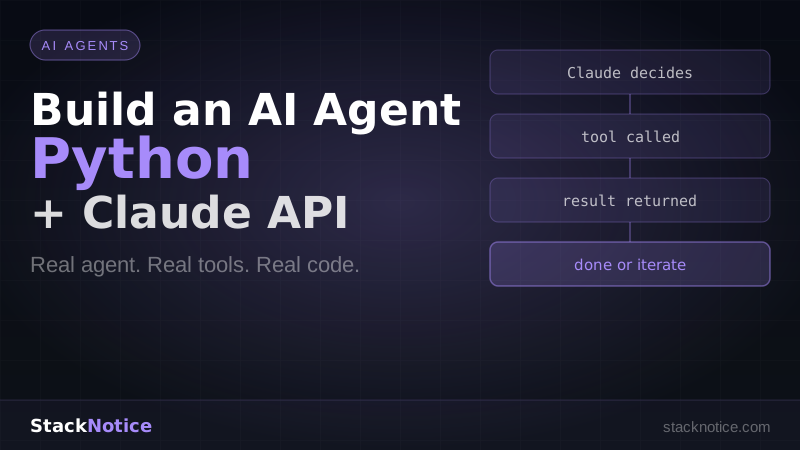
An AI agent is a program where the model decides what to do next. You give it a goal and a set of tools. It figures out the steps, calls the tools, and iterates until the job is done.
This tutorial builds a real one — a research agent that takes a question, searches the web, reads pages, and writes a summary. No toy examples. Code you can run and extend.
What You'll Build
A Python agent that:
- Takes a research question as input
- Decides which tools to call (web search, fetch URL, write file)
- Iterates across multiple steps until the answer is complete
- Writes the final output to a markdown file
Stack: Python 3.12, Anthropic SDK, httpx for web requests.
Prerequisites
- Python 3.10+
- An Anthropic API key
- Basic Python knowledge
Project Setup
mkdir research-agent && cd research-agent
python -m venv venv
source venv/bin/activate  # Windows: venv\Scripts\activate
pip install anthropic httpx beautifulsoup4
Create a .env file:
ANTHROPIC_API_KEY=your_key_here
Step 1: Define the Tools
Tools are JSON schemas that tell Claude what functions it can call. The model reads the schema, decides when to use each tool, and returns a structured call with arguments.
# tools.py

TOOLS = [
    {
        "name": "web_search",
        "description": (
            "Search the web for information about a topic. "
            "Returns a list of search results with titles and URLs."
        ),
        "input_schema": {
            "type": "object",
            "properties": {
                "query": {
                    "type": "string",
                    "description": "The search query"
                }
            },
            "required": ["query"]
        }
    },
    {
        "name": "fetch_page",
        "description": (
            "Fetch the text content of a web page given its URL. "
            "Use this after web_search to read the full content of a result."
        ),
        "input_schema": {
            "type": "object",
            "properties": {
                "url": {
                    "type": "string",
                    "description": "The URL of the page to fetch"
                }
            },
            "required": ["url"]
        }
    },
    {
        "name": "write_file",
        "description": "Write content to a local file. Use this to save the final output.",
        "input_schema": {
            "type": "object",
            "properties": {
                "filename": {
                    "type": "string",
                    "description": "The name of the file to write"
                },
                "content": {
                    "type": "string",
                    "description": "The content to write to the file"
                }
            },
            "required": ["filename", "content"]
        }
    }
]
Step 2: Implement the Tool Functions
The tools Claude "calls" are just Python functions. When Claude returns a tool call, you execute the corresponding function and return the result.
# tool_functions.py

import httpx
from bs4 import BeautifulSoup


def web_search(query: str) -> str:
    """
    Simulates web search using DuckDuckGo's HTML interface.
    For production, use a proper API like Brave Search or SerpAPI.
    """
    url = "https://html.duckduckgo.com/html/"
    headers = {"User-Agent": "Mozilla/5.0 (compatible; ResearchAgent/1.0)"}

    try:
        response = httpx.post(
            url,
            data={"q": query},
            headers=headers,
            timeout=10.0,
            follow_redirects=True
        )
        soup = BeautifulSoup(response.text, "html.parser")
        results = []

        for result in soup.select(".result")[:5]:
            title_el = result.select_one(".result__title")
            url_el = result.select_one(".result__url")
            snippet_el = result.select_one(".result__snippet")

            if title_el and url_el:
                results.append({
                    "title": title_el.get_text(strip=True),
                    "url": url_el.get_text(strip=True),
                    "snippet": snippet_el.get_text(strip=True) if snippet_el else ""
                })

        if not results:
            return "No results found."

        formatted = "\n\n".join([
            f"Title: {r['title']}\nURL: {r['url']}\nSnippet: {r['snippet']}"
            for r in results
        ])
        return formatted

    except Exception as e:
        return f"Search failed: {str(e)}"


def fetch_page(url: str) -> str:
    """Fetch and extract text content from a URL."""
    headers = {"User-Agent": "Mozilla/5.0 (compatible; ResearchAgent/1.0)"}

    try:
        response = httpx.get(url, headers=headers, timeout=15.0, follow_redirects=True)
        soup = BeautifulSoup(response.text, "html.parser")

        # Remove scripts, styles, and nav elements
        for tag in soup(["script", "style", "nav", "footer", "header"]):
            tag.decompose()

        text = soup.get_text(separator="\n", strip=True)

        # Truncate to avoid overwhelming the context
        if len(text) > 8000:
            text = text[:8000] + "\n\n[Content truncated]"

        return text

    except Exception as e:
        return f"Failed to fetch page: {str(e)}"


def write_file(filename: str, content: str) -> str:
    """Write content to a local file."""
    try:
        with open(filename, "w", encoding="utf-8") as f:
            f.write(content)
        return f"Successfully written to {filename}"
    except Exception as e:
        return f"Failed to write file: {str(e)}"


def execute_tool(tool_name: str, tool_input: dict) -> str:
    """Route a tool call to the correct function."""
    if tool_name == "web_search":
        return web_search(tool_input["query"])
    elif tool_name == "fetch_page":
        return fetch_page(tool_input["url"])
    elif tool_name == "write_file":
        return write_file(tool_input["filename"], tool_input["content"])
    else:
        return f"Unknown tool: {tool_name}"
Step 3: Build the Agent Loop
This is the core of the agent. The loop sends messages to Claude, executes any tool calls it returns, adds the results back, and repeats until Claude is done.
# agent.py

import os
import anthropic
from dotenv import load_dotenv
from tools import TOOLS
from tool_functions import execute_tool

load_dotenv()

client = anthropic.Anthropic(api_key=os.environ["ANTHROPIC_API_KEY"])

SYSTEM_PROMPT = """You are a research agent. Your job is to thoroughly research
a given topic and produce a well-structured markdown report.

Process:
1. Start with a web search to get an overview
2. Identify the most relevant results and fetch 2-3 pages for details
3. Synthesize the information into a comprehensive report
4. Write the report to a file named 'report.md'

Be thorough. Use multiple searches if needed. Always write the final output to a file."""


def run_agent(question: str) -> None:
    print(f"\nResearching: {question}\n")

    messages = [
        {"role": "user", "content": question}
    ]

    iteration = 0
    max_iterations = 10  # Safety limit

    while iteration < max_iterations:
        iteration += 1
        print(f"--- Step {iteration} ---")

        response = client.messages.create(
            model="claude-opus-4-6",
            max_tokens=4096,
            system=SYSTEM_PROMPT,
            tools=TOOLS,
            messages=messages
        )

        print(f"Stop reason: {response.stop_reason}")

        # If Claude is done (no more tool calls), we're finished
        if response.stop_reason == "end_turn":
            print("\nAgent finished.")
            break

        # Process tool calls
        if response.stop_reason == "tool_use":
            # Add Claude's response to message history
            messages.append({
                "role": "assistant",
                "content": response.content
            })

            # Execute each tool call and collect results
            tool_results = []

            for block in response.content:
                if block.type == "tool_use":
                    print(f"Calling tool: {block.name}")
                    print(f"Input: {block.input}")

                    result = execute_tool(block.name, block.input)

                    print(f"Result preview: {result[:200]}...")

                    tool_results.append({
                        "type": "tool_result",
                        "tool_use_id": block.id,
                        "content": result
                    })

            # Add tool results to message history
            messages.append({
                "role": "user",
                "content": tool_results
            })
        else:
            # Unexpected stop reason
            print(f"Unexpected stop reason: {response.stop_reason}")
            break

    if iteration >= max_iterations:
        print("Max iterations reached.")


if __name__ == "__main__":
    import sys

    if len(sys.argv) > 1:
        question = " ".join(sys.argv[1:])
    else:
        question = "What are the main differences between LangGraph, CrewAI, and Claude Agents for building AI systems in 2026?"

    run_agent(question)
Step 4: Run It
python agent.py "What is Model Context Protocol and why is it important?"You'll see the agent:
- Search the web for MCP information
- Fetch 2-3 relevant pages
- Synthesize everything into a report
- Write
report.mdto disk
Researching: What is Model Context Protocol and why is it important?

--- Step 1 ---
Stop reason: tool_use
Calling tool: web_search
Input: {'query': 'Model Context Protocol MCP 2026 explained'}
Result preview: Title: Model Context Protocol - Anthropic...

--- Step 2 ---
Stop reason: tool_use
Calling tool: fetch_page
Input: {'url': 'https://modelcontextprotocol.io/...'}
Result preview: Model Context Protocol (MCP) is an open standard...

--- Step 3 ---
Stop reason: tool_use
Calling tool: write_file
Input: {'filename': 'report.md', 'content': '# Model Context Protocol...'}
Result preview: Successfully written to report.md

--- Step 4 ---
Stop reason: end_turn
Agent finished.
Step 5: Add Streaming for Better UX
For applications where users watch the agent work in real time, use streaming:
# agent_streaming.py

def run_agent_streaming(question: str) -> None:
    messages = [{"role": "user", "content": question}]

    while True:
        tool_calls = []
        current_tool = None
        full_text = ""

        with client.messages.stream(
            model="claude-sonnet-4-6",
            max_tokens=4096,
            system=SYSTEM_PROMPT,
            tools=TOOLS,
            messages=messages
        ) as stream:
            for event in stream:
                if hasattr(event, "type"):
                    if event.type == "content_block_start":
                        if hasattr(event.content_block, "type"):
                            if event.content_block.type == "tool_use":
                                current_tool = {
                                    "id": event.content_block.id,
                                    "name": event.content_block.name,
                                    "input_json": ""
                                }

                    elif event.type == "content_block_delta":
                        if hasattr(event.delta, "text"):
                            print(event.delta.text, end="", flush=True)
                            full_text += event.delta.text
                        elif hasattr(event.delta, "partial_json") and current_tool:
                            current_tool["input_json"] += event.delta.partial_json

                    elif event.type == "content_block_stop":
                        if current_tool:
                            import json
                            current_tool["input"] = json.loads(current_tool["input_json"])
                            tool_calls.append(current_tool)
                            current_tool = None

            final_message = stream.get_final_message()

        if final_message.stop_reason == "end_turn":
            break

        if tool_calls:
            messages.append({
                "role": "assistant",
                "content": final_message.content
            })

            results = []
            for tool in tool_calls:
                print(f"\n[Calling {tool['name']}...]")
                result = execute_tool(tool["name"], tool["input"])
                results.append({
                    "type": "tool_result",
                    "tool_use_id": tool["id"],
                    "content": result
                })

            messages.append({"role": "user", "content": results})
Choosing the Right Model
| Task | Model | Why |
|---|---|---|
| Simple research, quick answers | claude-haiku-4-5-20251001 | Fastest, cheapest |
| Most agent tasks | claude-sonnet-4-6 | Best speed/quality balance |
| Complex reasoning, hard problems | claude-opus-4-6 | Maximum intelligence, 1M context |
For the research agent, claude-sonnet-4-6 is the right default. Use Haiku for lightweight summarization tasks, Opus when the reasoning chain is long or ambiguous.
Error Handling and Robustness
Production agents need retry logic and graceful degradation:
import time
from anthropic import RateLimitError, APIError

def call_claude_with_retry(client, **kwargs, max_retries=3):
    for attempt in range(max_retries):
        try:
            return client.messages.create(**kwargs)
        except RateLimitError:
            if attempt < max_retries - 1:
                wait = 2 ** attempt  # Exponential backoff
                print(f"Rate limited. Waiting {wait}s...")
                time.sleep(wait)
            else:
                raise
        except APIError as e:
            if e.status_code >= 500 and attempt < max_retries - 1:
                time.sleep(1)
            else:
                raise
Also add tool-level error handling — tool functions should never raise exceptions, only return error strings. Claude will read the error and decide how to recover.
Taking It Further
This agent handles research tasks, but the pattern applies to any autonomous workflow:
Code review agent — give it access to git diff, your linting rules, and a write tool to produce a review report.
Data pipeline agent — tools to query a database, run transformations, and write outputs.
Deployment agent — tools to check test results, build artifacts, and trigger deploys based on conditions.
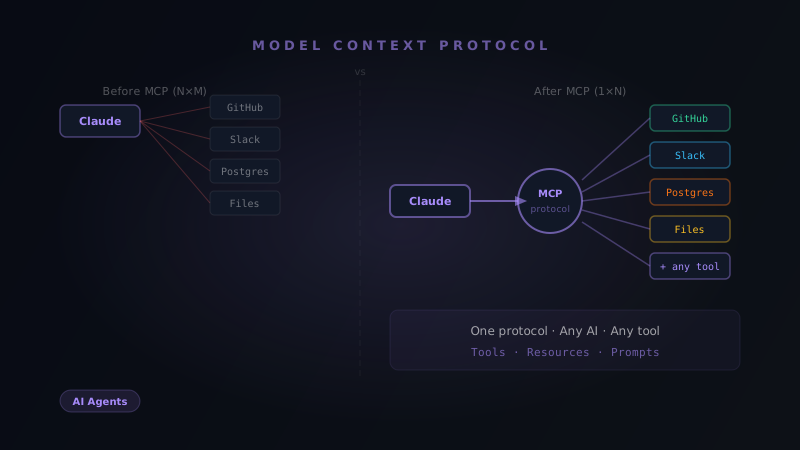
For multi-agent systems where multiple Claude instances work in parallel, see multi-agent systems and AI workflows. For the MCP protocol that lets agents access standardized external tools, see what is Model Context Protocol. For how Claude Agents compare to LangGraph and CrewAI, read the full framework comparison.
The key insight: once you understand the tool use loop, you can build almost any autonomous system. The pattern is always the same — tools + loop + stop condition. The sophistication comes from the tools you give it and the system prompt that guides its reasoning.
Start with the research agent above. Run it. Break it. Then replace the tools with something specific to your domain.