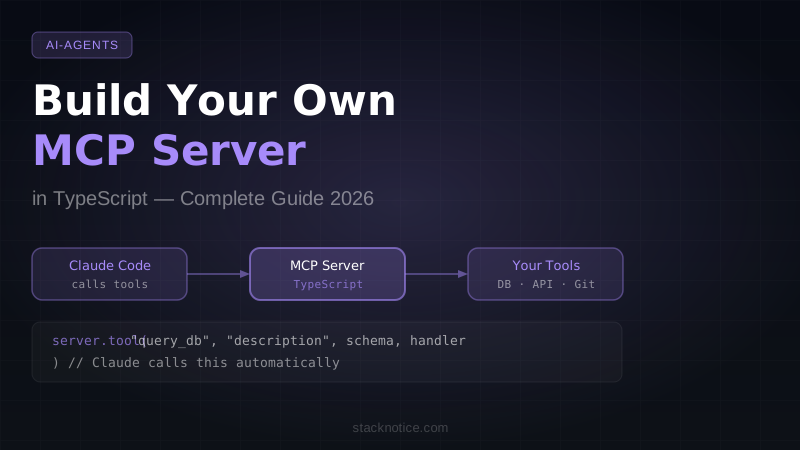
The Model Context Protocol crossed 97 million installs because it solved a real problem: AI assistants that can't access your data are only half as useful. But most developers stop at installing existing MCP servers. Building your own is where the real power is — and it's simpler than you think.
This guide walks you through building a production-ready MCP server in TypeScript from scratch, connecting it to Claude Code, and exposing tools that give Claude access to your actual codebase, database, or internal APIs.
What you'll build
A git intelligence server — an MCP server with tools that help Claude understand your repository in ways it can't natively:
get_recent_commits— list recent commits with author, date, and messageget_file_history— show commit history for a specific filesummarize_pr— generate a structured diff summary for PR descriptions
All three work in any git repository. You'll add them one by one, learning the full MCP primitives along the way.
Understanding MCP primitives
An MCP server exposes three types of capabilities:
Tools — functions Claude can call to take action or retrieve data. This is the most important primitive. Claude decides when to call them based on their descriptions, so description quality matters as much as implementation quality.
Resources — read-only data sources Claude can pull from context. Think of them as files or API responses that Claude can reference without being explicitly asked.
Prompts — reusable prompt templates that users can invoke. Less common, but useful for standardizing complex interactions across your team.
For 90% of use cases, you'll only need tools. Resources and prompts are covered at the end.
Project setup
mkdir mcp-git-server && cd mcp-git-server
bun init -y
bun add @modelcontextprotocol/sdk zod
Or with npm:
npm init -y
npm install @modelcontextprotocol/sdk zod
npm install -D typescript @types/node tsx
Create tsconfig.json:
{
  "compilerOptions": {
    "target": "ES2022",
    "module": "ESNext",
    "moduleResolution": "bundler",
    "strict": true,
    "outDir": "dist"
  },
  "include": ["src"]
}
Create src/index.ts with the server scaffold:
import { McpServer } from "@modelcontextprotocol/sdk/server/mcp.js";
import { StdioServerTransport } from "@modelcontextprotocol/sdk/server/stdio.js";
import { z } from "zod";
import { execSync } from "child_process";

const server = new McpServer({
  name: "git-intelligence",
  version: "1.0.0",
});

// Tools go here

async function main() {
  const transport = new StdioServerTransport();
  await server.connect(transport);
  console.error("Git Intelligence MCP server running on stdio");
}

main().catch((err) => {
  console.error("Fatal error:", err);
  process.exit(1);
});
Critical detail: use console.error, never console.log. MCP communication happens over stdout — anything you print to stdout corrupts the protocol. All logging must go to stderr.
Building the get_recent_commits tool
server.tool(
  "get_recent_commits",
  "Get the N most recent git commits with author, date, and message. Use this when asked about recent changes, commit history, or who changed what.",
  {
    count: z
      .number()
      .min(1)
      .max(50)
      .default(10)
      .describe("Number of commits to retrieve"),
    branch: z
      .string()
      .optional()
      .describe("Branch name. Defaults to current branch."),
  },
  async ({ count, branch }) => {
    try {
      const ref = branch ?? "HEAD";
      const output = execSync(
        `git log ${ref} --format="%H|%an|%ar|%s" -${count}`,
        { encoding: "utf-8" }
      );

      const commits = output
        .trim()
        .split("\n")
        .filter(Boolean)
        .map((line) => {
          const [hash, author, when, ...msgParts] = line.split("|");
          return {
            hash: hash.slice(0, 7),
            author,
            when,
            message: msgParts.join("|"),
          };
        });

      const formatted = commits
        .map((c) => `${c.hash}  ${c.author} (${c.when})\n  ${c.message}`)
        .join("\n\n");

      return {
        content: [{ type: "text", text: formatted || "No commits found." }],
      };
    } catch (error) {
      return {
        content: [
          {
            type: "text",
            text: `Git error: ${error instanceof Error ? error.message : String(error)}`,
          },
        ],
        isError: true,
      };
    }
  }
);
A few things to notice about this structure:
- The description is how Claude knows when to call this tool. Write it as if you're explaining to a smart person when they should use this function, not just what it does.
- The Zod schema defines and validates inputs. Claude sends structured data that gets validated before your handler runs.
- Return
isError: truefor failures. This signals a tool execution error without throwing an exception, which would crash the server.
Building get_file_history
server.tool(
  "get_file_history",
  "Show the git commit history for a specific file, including what changed in each commit. Useful for understanding why code looks the way it does.",
  {
    filepath: z
      .string()
      .describe("Path to the file, relative to repository root"),
    count: z
      .number()
      .min(1)
      .max(20)
      .default(5)
      .describe("Number of commits to show"),
  },
  async ({ filepath, count }) => {
    try {
      const log = execSync(
        `git log --follow --format="%H|%an|%ar|%s" -${count} -- "${filepath}"`,
        { encoding: "utf-8" }
      );

      if (!log.trim()) {
        return {
          content: [
            {
              type: "text",
              text: `No commits found for: ${filepath}. Check the path is correct and relative to the repo root.`,
            },
          ],
        };
      }

      const stats = execSync(
        `git log --follow --stat --format="---" -${count} -- "${filepath}"`,
        { encoding: "utf-8" }
      );

      return {
        content: [
          {
            type: "text",
            text: `History for: ${filepath}\n\n${log.trim()}\n\nChange stats:\n${stats.trim()}`,
          },
        ],
      };
    } catch (error) {
      return {
        content: [
          {
            type: "text",
            text: `Error: ${error instanceof Error ? error.message : String(error)}`,
          },
        ],
        isError: true,
      };
    }
  }
);
Building summarize_pr
This tool is where Claude Code really shines — it gets the full diff, then Claude can write a professional PR description from it.
server.tool(
  "summarize_pr",
  "Generate a structured diff summary between the current branch and a base branch. Use this when the user wants to write a PR description or understand what changed.",
  {
    base: z
      .string()
      .default("main")
      .describe("Base branch to diff against (default: main)"),
    include_stats: z
      .boolean()
      .default(true)
      .describe("Include per-file change statistics"),
    max_diff_lines: z
      .number()
      .default(300)
      .describe("Maximum diff lines to include (avoids flooding context)"),
  },
  async ({ base, include_stats, max_diff_lines }) => {
    try {
      const currentBranch = execSync("git branch --show-current", {
        encoding: "utf-8",
      }).trim();

      if (!currentBranch || currentBranch === base) {
        return {
          content: [
            {
              type: "text",
              text: `You are on '${currentBranch || "detached HEAD"}'. Switch to a feature branch first.`,
            },
          ],
        };
      }

      const commitLog = execSync(
        `git log ${base}..HEAD --oneline --format="- %s (%an, %ar)"`,
        { encoding: "utf-8" }
      ).trim();

      const statsOutput = include_stats
        ? execSync(`git diff ${base}...HEAD --stat`, {
            encoding: "utf-8",
          }).trim()
        : "";

      const diff = execSync(`git diff ${base}...HEAD`, {
        encoding: "utf-8",
      });

      const diffLines = diff.split("\n");
      const truncated = diffLines.length > max_diff_lines;
      const diffPreview = diffLines.slice(0, max_diff_lines).join("\n");

      const parts = [
        `Branch: ${currentBranch} → ${base}`,
        `\nCommits in this branch:\n${commitLog || "(none)"}`,
        include_stats && statsOutput
          ? `\nFiles changed:\n${statsOutput}`
          : "",
        `\nDiff${truncated ? ` (first ${max_diff_lines} lines of ${diffLines.length})` : ""}:\n${diffPreview}`,
      ].filter(Boolean);

      return {
        content: [{ type: "text", text: parts.join("\n") }],
      };
    } catch (error) {
      return {
        content: [
          {
            type: "text",
            text: `Git error: ${error instanceof Error ? error.message : String(error)}`,
          },
        ],
        isError: true,
      };
    }
  }
);
The max_diff_lines parameter is important for production use. Large diffs can flood Claude's context window. Give callers control over the tradeoff.
Adding resources (optional)
Resources are data Claude can read as background context. Here's a resource that exposes your repo's README:
import { readFileSync, existsSync } from "fs";
import { join } from "path";

server.resource(
  "repo-readme",
  "file://readme",
  async (uri) => {
    const readmePath = join(process.cwd(), "README.md");

    if (!existsSync(readmePath)) {
      return {
        contents: [
          {
            uri: uri.href,
            mimeType: "text/plain",
            text: "No README.md found in current directory.",
          },
        ],
      };
    }

    const content = readFileSync(readmePath, "utf-8");
    return {
      contents: [
        { uri: uri.href, mimeType: "text/markdown", text: content },
      ],
    };
  }
);
Adding prompts (optional)
Prompts are reusable templates. Here's a code review prompt:
server.prompt(
  "code-review",
  "Generate a thorough code review for the current branch",
  {},
  async () => ({
    messages: [
      {
        role: "user",
        content: {
          type: "text",
          text: `Please review the changes in the current branch. Check for:
1. Correctness and edge cases
2. Performance implications
3. Security vulnerabilities (injection, exposure, auth gaps)
4. Code consistency with the existing codebase
5. Missing tests or error handling

Use the summarize_pr tool first to get the diff, then provide specific feedback with file and line references.`,
        },
      },
    ],
  })
);
Connecting to Claude Code
Build and configure:
# With Bun (recommended, no build step needed)
bun build src/index.ts --outfile dist/index.js --target node
Add to .claude/settings.json in your project:
{
  "mcpServers": {
    "git-intelligence": {
      "command": "node",
      "args": ["/absolute/path/to/mcp-git-server/dist/index.js"]
    }
  }
}
For development with no build step:
{
  "mcpServers": {
    "git-intelligence": {
      "command": "bun",
      "args": ["run", "/absolute/path/to/mcp-git-server/src/index.ts"]
    }
  }
}
Restart Claude Code. The tools appear automatically — Claude will call them whenever it determines they're needed.
Real-world example: a database query tool
The git example is great for learning, but the real power of custom MCP servers is connecting Claude to your internal systems. Here's a read-only database tool pattern:
import { Pool } from "pg";

const db = new Pool({
  connectionString: process.env.DATABASE_URL,
  // Use a read-only role in production
  max: 3,
});

server.tool(
  "query_db",
  "Run a read-only SQL query against the application database. Only SELECT statements are allowed. Use this to understand the current data shape or debug production issues.",
  {
    sql: z
      .string()
      .describe("A SELECT query to execute. Must start with SELECT."),
    limit: z
      .number()
      .min(1)
      .max(100)
      .default(20)
      .describe("Maximum rows to return"),
  },
  async ({ sql, limit }) => {
    const normalized = sql.trim().toUpperCase();
    if (!normalized.startsWith("SELECT")) {
      return {
        content: [
          {
            type: "text",
            text: "Rejected: only SELECT queries are allowed.",
          },
        ],
        isError: true,
      };
    }

    try {
      // Add LIMIT if not already present
      const safeSQL = normalized.includes("LIMIT")
        ? sql
        : `${sql} LIMIT ${limit}`;

      const result = await db.query(safeSQL);
      const formatted = JSON.stringify(result.rows, null, 2);

      return {
        content: [
          {
            type: "text",
            text: `${result.rowCount} row(s):\n\n${formatted}`,
          },
        ],
      };
    } catch (error) {
      return {
        content: [
          {
            type: "text",
            text: `Query error: ${error instanceof Error ? error.message : String(error)}`,
          },
        ],
        isError: true,
      };
    }
  }
);
With this tool, you can ask Claude Code things like "how many users signed up this week?" or "show me the 5 most recent failed payments" and get real answers from your database — without ever leaving your editor.
Publishing as an npm package
If you want to share the server across projects or teams:
// package.json additions
{
  "name": "@yourorg/mcp-git-intelligence",
  "version": "1.0.0",
  "bin": {
    "mcp-git-intelligence": "./dist/index.js"
  },
  "files": ["dist"],
  "scripts": {
    "build": "tsc",
    "prepublishOnly": "npm run build"
  }
}
npm publish --access publicUsers add it to Claude Code with:
{
  "mcpServers": {
    "git-intelligence": {
      "command": "npx",
      "args": ["-y", "@yourorg/mcp-git-intelligence"]
    }
  }
}
Security checklist
Before using an MCP server with sensitive data:
- Use Zod constraints aggressively —
.min(),.max(),.regex()prevent malformed inputs from reaching your handlers - Never return secrets in tool responses — API keys, passwords, tokens become part of Claude's context and can appear in conversation logs
- Use read-only credentials — your DB tool should connect as a read-only database user, not the app user
- Scope the config to the project — put the MCP config in
.claude/settings.json(project-scoped), not~/.claude/settings.json(global), to limit which projects have access - Validate file paths — if you expose file access, use
path.resolve()and check that the result is within an allowed directory
What to build next
The git intelligence server is a starting point. The most impactful custom MCP servers are the ones only your team could build:
- Your internal API documentation, surfaced as resources
- Your feature flag system, queryable as a tool
- Your observability platform (log search, error rates) as tools
- Your deployment pipeline status as a tool
Every time you find yourself copy-pasting context into Claude, ask: could I build a tool that fetches this automatically?
To go deeper on MCP, read the guide on how to add MCP servers to Claude Code and the multi-agent systems overview for patterns that combine custom tools with complex agent workflows. For building agents that use these tools programmatically, check the Python AI agent guide.