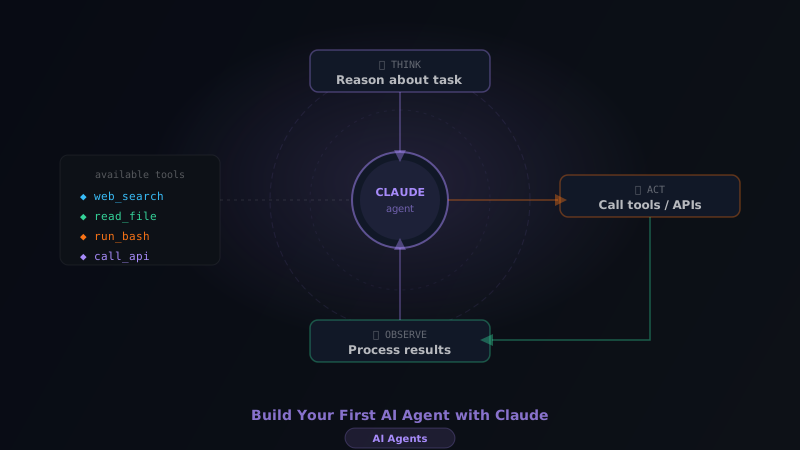
AI agents are programs that use a language model to autonomously complete multi-step tasks. Unlike a single API call that generates text, an agent can decide what actions to take, use tools, observe results, and iterate until the task is complete.
In this tutorial, we'll build a research agent using Claude's tool use API. By the end, you'll have a working agent that can search for information and produce structured summaries.
What We're Building
Our research agent will:
- Accept a research query from the user
- Search for relevant information (we'll simulate this with a mock search tool)
- Read and analyze the results
- Produce a structured research brief
This pattern extends to any tool-use scenario: code execution, database queries, API calls, file management.
Prerequisites
- Node.js 18+ or Python 3.10+
- An Anthropic API key
- Basic TypeScript or Python knowledge
Understanding Tool Use
Claude's tool use works through a structured conversation loop:
- You define tools (functions Claude can call)
- Claude decides if it needs a tool
- Claude returns a
tool_useblock with the tool name and input - You execute the tool and return the result
- Claude uses the result and either calls another tool or returns a final answer
User message → Claude → tool_use → You run tool → tool_result → Claude → Final answer
This loop is the core of every AI agent.
Setting Up
npm install @anthropic-ai/sdkCreate a .env file:
ANTHROPIC_API_KEY=your-key-here
Defining Our Tools
First, let's define the tools our agent can use:
import Anthropic from '@anthropic-ai/sdk'

const client = new Anthropic()

const tools: Anthropic.Tool[] = [
  {
    name: 'search_web',
    description: 'Search the web for information on a topic. Returns a list of relevant results with titles and snippets.',
    input_schema: {
      type: 'object',
      properties: {
        query: {
          type: 'string',
          description: 'The search query',
        },
        num_results: {
          type: 'number',
          description: 'Number of results to return (1-10)',
          default: 5,
        },
      },
      required: ['query'],
    },
  },
  {
    name: 'read_page',
    description: 'Read the full content of a web page given its URL.',
    input_schema: {
      type: 'object',
      properties: {
        url: {
          type: 'string',
          description: 'The URL to read',
        },
      },
      required: ['url'],
    },
  },
  {
    name: 'save_research',
    description: 'Save the final research brief to a file.',
    input_schema: {
      type: 'object',
      properties: {
        title: { type: 'string' },
        summary: { type: 'string' },
        key_points: {
          type: 'array',
          items: { type: 'string' },
        },
        sources: {
          type: 'array',
          items: { type: 'string' },
        },
      },
      required: ['title', 'summary', 'key_points', 'sources'],
    },
  },
]
Implementing Tool Execution
Now we implement the actual functions that run when Claude calls a tool:
import * as fs from 'fs'

// Mock search — in production, use Brave Search API, Tavily, or SerpAPI
function searchWeb(query: string, numResults: number = 5): string {
  const mockResults = [
    {
      title: `${query} — Complete Guide 2025`,
      url: `https://example.com/guide-${query.toLowerCase().replace(/\s+/g, '-')}`,
      snippet: `Comprehensive overview of ${query}. Learn the fundamentals, best practices, and advanced techniques...`,
    },
    {
      title: `Best practices for ${query}`,
      url: `https://docs.example.com/${query.toLowerCase()}`,
      snippet: `Official documentation covering all aspects of ${query} with code examples...`,
    },
    {
      title: `${query} in 2025: What you need to know`,
      url: `https://blog.example.com/${query.toLowerCase()}-2025`,
      snippet: `The latest developments in ${query}. Updated for 2025 with new features and patterns...`,
    },
  ]

  return JSON.stringify(mockResults.slice(0, numResults))
}

function readPage(url: string): string {
  // Mock page content — in production, use a headless browser or Firecrawl
  return `Content from ${url}:\n\nThis page contains detailed information about the topic.
  Key points include: the fundamentals, advanced usage, and real-world examples.
  The author recommends starting with the basics before moving to advanced concepts.`
}

function saveResearch(data: {
  title: string
  summary: string
  key_points: string[]
  sources: string[]
}): string {
  const content = `# ${data.title}\n\n## Summary\n${data.summary}\n\n## Key Points\n${data.key_points.map((p) => `- ${p}`).join('\n')}\n\n## Sources\n${data.sources.map((s) => `- ${s}`).join('\n')}`

  fs.writeFileSync('research-brief.md', content)
  return `Research brief saved to research-brief.md`
}

// Tool dispatcher
function executeTool(name: string, input: Record<string, any>): string {
  switch (name) {
    case 'search_web':
      return searchWeb(input.query, input.num_results)
    case 'read_page':
      return readPage(input.url)
    case 'save_research':
      return saveResearch(input)
    default:
      return `Unknown tool: ${name}`
  }
}
The Agent Loop
Now the core agent loop — this is where the magic happens:
async function runResearchAgent(query: string): Promise<void> {
  console.log(`\n🔍 Starting research on: "${query}"\n`)

  const messages: Anthropic.MessageParam[] = [
    {
      role: 'user',
      content: `Research the following topic and create a comprehensive brief: "${query}".
      Use the search tool to find relevant sources, read the most promising ones,
      and then save a structured research brief with your findings.`,
    },
  ]

  let iteration = 0
  const MAX_ITERATIONS = 10

  while (iteration < MAX_ITERATIONS) {
    iteration++
    console.log(`\n--- Iteration ${iteration} ---`)

    const response = await client.messages.create({
      model: 'claude-opus-4-6',
      max_tokens: 4096,
      tools,
      messages,
    })

    console.log(`Stop reason: ${response.stop_reason}`)

    // Add assistant's response to the message history
    messages.push({ role: 'assistant', content: response.content })

    // If Claude is done, exit the loop
    if (response.stop_reason === 'end_turn') {
      console.log('\n✅ Agent completed task')
      // Extract and print the final text response
      const finalText = response.content
        .filter((block): block is Anthropic.TextBlock => block.type === 'text')
        .map((block) => block.text)
        .join('\n')
      if (finalText) console.log('\nFinal response:', finalText)
      break
    }

    // If Claude wants to use tools
    if (response.stop_reason === 'tool_use') {
      const toolResults: Anthropic.ToolResultBlockParam[] = []

      for (const block of response.content) {
        if (block.type === 'tool_use') {
          console.log(`\n🔧 Calling tool: ${block.name}`)
          console.log(`   Input: ${JSON.stringify(block.input)}`)

          const result = executeTool(block.name, block.input as Record<string, any>)
          console.log(`   Result: ${result.substring(0, 100)}...`)

          toolResults.push({
            type: 'tool_result',
            tool_use_id: block.id,
            content: result,
          })
        }
      }

      // Add tool results back to the conversation
      messages.push({ role: 'user', content: toolResults })
    }
  }

  if (iteration >= MAX_ITERATIONS) {
    console.log('\n⚠️ Reached maximum iterations')
  }
}

// Run the agent
runResearchAgent('AI agents with Claude')
Running the Agent
npx ts-node agent.tsYou'll see output like:
🔍 Starting research on: "AI agents with Claude"

--- Iteration 1 ---
Stop reason: tool_use
🔧 Calling tool: search_web
   Input: {"query":"AI agents with Claude","num_results":5}
   Result: [{"title":"AI Agents — Complete Guide...

--- Iteration 2 ---
Stop reason: tool_use
🔧 Calling tool: read_page
   Input: {"url":"https://example.com/guide-ai-agents"}
   Result: Content from https://example.com/...

--- Iteration 3 ---
Stop reason: tool_use
🔧 Calling tool: save_research
   Input: {"title":"AI Agents with Claude",...}
   Result: Research brief saved to research-brief.md

--- Iteration 4 ---
Stop reason: end_turn

✅ Agent completed task
Adding a System Prompt
Make your agent more reliable by adding a system prompt:
const response = await client.messages.create({
  model: 'claude-opus-4-6',
  max_tokens: 4096,
  system: `You are a research assistant. Your job is to:
1. Search for information using the search_web tool
2. Read the most relevant pages using read_page
3. Synthesize the information into a structured brief
4. Always save your final brief using save_research

Be thorough but efficient. Read 2-3 sources before writing your summary.
Always cite your sources.`,
  tools,
  messages,
})
Production Considerations
Error handling — Tools can fail. Wrap executeTool in try/catch and return error messages instead of throwing:
function executeTool(name: string, input: Record<string, any>): string {
  try {
    // ... tool execution
  } catch (error) {
    return `Error executing ${name}: ${error instanceof Error ? error.message : String(error)}`
  }
}
Real search integration — Replace the mock search with Tavily (built for AI agents) or Brave Search API. Alternatively, use MCP servers to connect your agent to databases, GitHub, and more without writing custom integrations.
Real web reading — Use Firecrawl to extract clean markdown from any URL.
Persistence — Store the message history in a database to support long-running agents that can be paused and resumed.
Streaming — For better UX, stream Claude's responses in real-time using client.messages.stream().
Next Steps
You've built a working AI agent. From here:
- Add real tools — connect to actual APIs (search, web scraping, databases)
- Add memory — store past research to avoid repeating work
- Multi-agent — create specialized agents that hand off to each other
- Eval — test your agent against a benchmark to measure quality
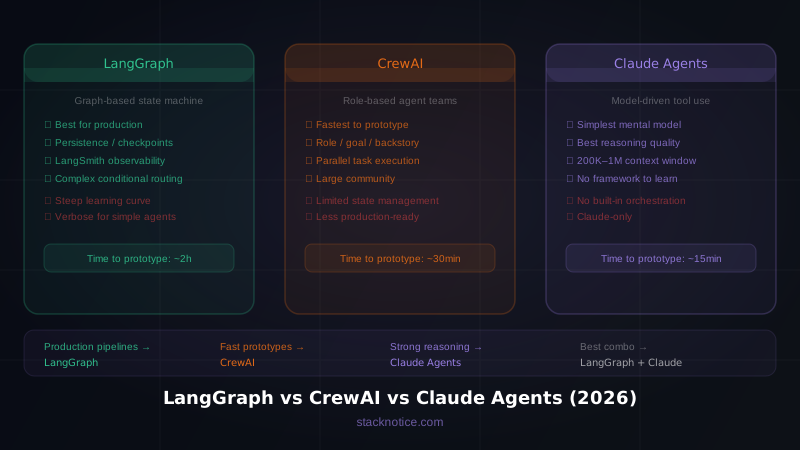
The agent pattern you learned here — define tools, run the loop, execute calls, return results — scales to any complexity. Every advanced AI system is just a more sophisticated version of this loop. To connect your agent to external tools and services, read the complete guide to Model Context Protocol. When you're ready to compare frameworks, see LangGraph vs CrewAI vs Claude agents.