LangChain.js is the TypeScript port of the Python LangChain framework — a set of abstractions for building LLM-powered applications. It's not a model or an API; it's a layer that makes certain patterns easier: chaining prompts, using tools, building RAG pipelines, and managing conversation memory.
Whether LangChain is the right choice depends on what you're building. This guide covers what it does well, where it gets in the way, and how to use v0.3 with real TypeScript code.
When LangChain vs Raw SDK
Before installing anything, it's worth being honest about the trade-offs.
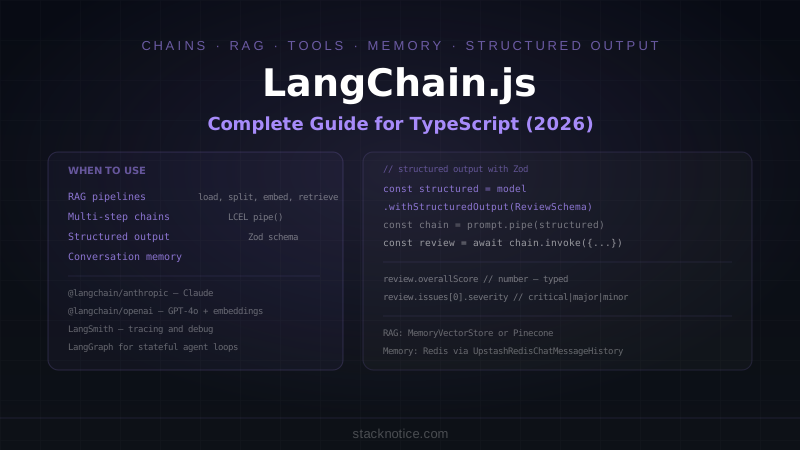
LangChain adds value when:
- You're building RAG pipelines with multiple steps (load, split, embed, retrieve, generate)
- You need to chain multiple LLM calls with intermediate processing
- You're integrating with vector databases (Pinecone, Chroma, Supabase pgvector)
- You want structured output with Zod schema validation without wiring it yourself
- You need conversation memory with different storage backends
Use the raw SDK instead when:
- You're making a few straightforward API calls
- Your "agent" is just a loop with tool calling — the Anthropic SDK handles this natively
- You want to minimize dependencies and bundle size
- Your team doesn't know LangChain and the abstractions will confuse them
The raw Anthropic SDK + a few utility functions handles 80% of what most apps need. LangChain is the right choice when you're building something genuinely complex — multi-step pipelines, full RAG systems, or applications that need to swap models without rewriting logic.
Installation
LangChain v0.3 split into modular packages. Install only what you need:
# Core (required)
npm install @langchain/core

# Model providers (pick yours)
npm install @langchain/anthropic   # Claude
npm install @langchain/openai      # GPT-4o, embeddings
npm install @langchain/google-genai # Gemini

# For RAG
npm install @langchain/community   # vector stores, loaders
npm install langchain              # high-level chains (RAG, agents)
ANTHROPIC_API_KEY=your-key
OPENAI_API_KEY=your-key # needed for embeddings even if using ClaudeBasic Chat
The simplest use case — a model call with a prompt:
import { ChatAnthropic } from '@langchain/anthropic'
import { HumanMessage, SystemMessage } from '@langchain/core/messages'

const model = new ChatAnthropic({
  model: 'claude-sonnet-4-5',
  temperature: 0,
  maxTokens: 2048
})

const response = await model.invoke([
  new SystemMessage('You are a senior TypeScript developer. Be concise.'),
  new HumanMessage('What is the difference between type and interface in TypeScript?')
])

console.log(response.content)
You can swap ChatAnthropic for ChatOpenAI or ChatGoogleGenerativeAI without changing anything else — that's the value of the abstraction.
Prompt Templates
Prompt templates prevent string interpolation mistakes and make prompts reusable:
import { ChatPromptTemplate } from '@langchain/core/prompts'
import { ChatAnthropic } from '@langchain/anthropic'

const model = new ChatAnthropic({ model: 'claude-sonnet-4-5' })

const promptTemplate = ChatPromptTemplate.fromMessages([
  ['system', 'You are a code reviewer specializing in {language}. Be specific about issues.'],
  ['human', 'Review this code:\n\n{code}']
])

// Use the pipe operator (LCEL — LangChain Expression Language)
const chain = promptTemplate.pipe(model)

const result = await chain.invoke({
  language: 'TypeScript',
  code: `
    async function getUser(id) {
      const user = await db.query('SELECT * FROM users WHERE id = ' + id)
      return user
    }
  `
})

console.log(result.content)
// → Points out: missing type annotation, SQL injection vulnerability, should use parameterized queries
The .pipe() operator is LCEL (LangChain Expression Language) — a functional composition pattern where you chain steps: template.pipe(model).pipe(parser).
Structured Output with Zod
Getting JSON from a model reliably is harder than it looks. LangChain's .withStructuredOutput() handles the schema enforcement:
import { ChatAnthropic } from '@langchain/anthropic'
import { ChatPromptTemplate } from '@langchain/core/prompts'
import { z } from 'zod'

const model = new ChatAnthropic({ model: 'claude-sonnet-4-5' })

const ReviewSchema = z.object({
  overallScore: z.number().min(1).max(10).describe('Overall code quality score'),
  issues: z.array(z.object({
    severity: z.enum(['critical', 'major', 'minor']),
    description: z.string(),
    suggestion: z.string()
  })),
  approvedForMerge: z.boolean()
})

type Review = z.infer<typeof ReviewSchema>

const structuredModel = model.withStructuredOutput(ReviewSchema)

const prompt = ChatPromptTemplate.fromMessages([
  ['system', 'You are a strict code reviewer. Return a structured review.'],
  ['human', 'Review this TypeScript function:\n\n{code}']
])

const chain = prompt.pipe(structuredModel)

const review: Review = await chain.invoke({
  code: `
    export async function deleteUser(id: string) {
      await db.user.delete({ where: { id } })
    }
  `
})

console.log(review.overallScore)        // 6
console.log(review.approvedForMerge)    // false
console.log(review.issues[0].severity)  // 'critical'
// review is fully typed — TypeScript knows the shape
Under the hood, LangChain uses tool calling to enforce the schema — the model is forced to call a function with the exact shape you defined.
Tool Use (Function Calling)
Tools let the model call external functions. LangChain's tool definition is cleaner than wiring tool calling manually:
import { tool } from '@langchain/core/tools'
import { ChatAnthropic } from '@langchain/anthropic'
import { z } from 'zod'

// Define tools
const getWeather = tool(
  async ({ city }) => {
    // Real implementation would call a weather API
    return `Weather in ${city}: 22°C, partly cloudy`
  },
  {
    name: 'get_weather',
    description: 'Get current weather for a city',
    schema: z.object({
      city: z.string().describe('The city name')
    })
  }
)

const searchPosts = tool(
  async ({ query, limit = 5 }) => {
    const posts = await db.post.findMany({
      where: { title: { contains: query } },
      take: limit,
      select: { title: true, slug: true }
    })
    return JSON.stringify(posts)
  },
  {
    name: 'search_posts',
    description: 'Search blog posts by keyword',
    schema: z.object({
      query: z.string(),
      limit: z.number().optional()
    })
  }
)

// Bind tools to model
const model = new ChatAnthropic({ model: 'claude-sonnet-4-5' })
const modelWithTools = model.bindTools([getWeather, searchPosts])

// The model decides which tools to call
const response = await modelWithTools.invoke(
  'What posts do you have about TypeScript? Also, what is the weather in Madrid?'
)

// If the model wants to call a tool, response.tool_calls is populated
console.log(response.tool_calls)
// [{ name: 'search_posts', args: { query: 'TypeScript' } },
//  { name: 'get_weather', args: { city: 'Madrid' } }]
For a complete agent loop (model calls tools → tools return results → model continues), use LangGraph rather than wiring the loop yourself. LangChain's own documentation recommends LangGraph for agent patterns now.
RAG (Retrieval-Augmented Generation)
RAG is where LangChain genuinely shines. The abstractions for document loading, splitting, embedding, and retrieval save significant boilerplate:
import { ChatAnthropic } from '@langchain/anthropic'
import { OpenAIEmbeddings } from '@langchain/openai'
import { MemoryVectorStore } from 'langchain/vectorstores/memory'
import { RecursiveCharacterTextSplitter } from 'langchain/text_splitter'
import { ChatPromptTemplate } from '@langchain/core/prompts'
import { Document } from '@langchain/core/documents'

// Step 1: Load and split documents
const splitter = new RecursiveCharacterTextSplitter({
  chunkSize: 1000,
  chunkOverlap: 200
})

const docs = await splitter.createDocuments([
  `Prisma is a TypeScript ORM that generates a fully typed client from your schema...`,
  `Drizzle is a lightweight SQL-first ORM that stays close to SQL syntax...`,
  // your actual documents
])

// Step 2: Embed and store
const embeddings = new OpenAIEmbeddings({
  model: 'text-embedding-3-small'
})

const vectorStore = await MemoryVectorStore.fromDocuments(docs, embeddings)

// Step 3: Retriever
const retriever = vectorStore.asRetriever({ k: 4 })

// Step 4: RAG chain
const model = new ChatAnthropic({ model: 'claude-sonnet-4-5' })

const ragPrompt = ChatPromptTemplate.fromMessages([
  ['system', `Answer the question using only the context below.
If the context doesn't contain the answer, say so.

Context:
{context}`],
  ['human', '{question}']
])

// Manually wire the chain
async function ragQuery(question: string) {
  const relevantDocs = await retriever.invoke(question)
  const context = relevantDocs.map(d => d.pageContent).join('\n\n')

  const chain = ragPrompt.pipe(model)
  const response = await chain.invoke({ context, question })

  return response.content
}

const answer = await ragQuery('What are the key differences between Prisma and Drizzle?')
console.log(answer)
Production RAG with Pinecone
For production, replace MemoryVectorStore with a real vector database:
import { PineconeStore } from '@langchain/pinecone'
import { Pinecone } from '@pinecone-database/pinecone'

const pinecone = new Pinecone({ apiKey: process.env.PINECONE_API_KEY! })
const index = pinecone.index('my-index')

// Index documents (run once during ingestion)
const vectorStore = await PineconeStore.fromDocuments(docs, embeddings, {
  pineconeIndex: index,
  namespace: 'docs-v1'
})

// Query (run on every user request)
const queryVectorStore = await PineconeStore.fromExistingIndex(embeddings, {
  pineconeIndex: index,
  namespace: 'docs-v1'
})

const retriever = queryVectorStore.asRetriever({ k: 5 })
Supabase pgvector works the same way via @langchain/community/vectorstores/supabase — useful if you're already on Supabase and don't want another service.
Conversation Memory
Memory keeps conversation history across multiple turns:
import { ChatAnthropic } from '@langchain/anthropic'
import { ChatPromptTemplate, MessagesPlaceholder } from '@langchain/core/prompts'
import { InMemoryChatMessageHistory } from '@langchain/core/chat_history'
import { RunnableWithMessageHistory } from '@langchain/core/runnables'

const model = new ChatAnthropic({ model: 'claude-sonnet-4-5' })

const prompt = ChatPromptTemplate.fromMessages([
  ['system', 'You are a helpful coding assistant. Remember context from the conversation.'],
  new MessagesPlaceholder('history'),
  ['human', '{input}']
])

const chain = prompt.pipe(model)

// In-memory store (use Redis or database in production)
const store: Record<string, InMemoryChatMessageHistory> = {}

function getHistory(sessionId: string) {
  if (!store[sessionId]) {
    store[sessionId] = new InMemoryChatMessageHistory()
  }
  return store[sessionId]
}

const chainWithHistory = new RunnableWithMessageHistory({
  runnable: chain,
  getMessageHistory: getHistory,
  inputMessagesKey: 'input',
  historyMessagesKey: 'history'
})

const sessionId = 'user-session-123'

// First message
const response1 = await chainWithHistory.invoke(
  { input: 'I am building a Next.js app with Prisma and PostgreSQL.' },
  { configurable: { sessionId } }
)

// Second message — model remembers the context
const response2 = await chainWithHistory.invoke(
  { input: 'What ORM pattern should I use for connection pooling?' },
  { configurable: { sessionId } }
)
// → Model knows you're using Prisma and Next.js without you repeating it
For production memory, use Redis or a database:
import { UpstashRedisChatMessageHistory } from '@langchain/community/stores/message/upstash_redis'

function getHistory(sessionId: string) {
  return new UpstashRedisChatMessageHistory({
    sessionId,
    config: {
      url: process.env.UPSTASH_REDIS_REST_URL!,
      token: process.env.UPSTASH_REDIS_REST_TOKEN!
    }
  })
}
Document Loaders
LangChain Community includes loaders for many document types:
import { PDFLoader } from '@langchain/community/document_loaders/fs/pdf'
import { CheerioWebBaseLoader } from '@langchain/community/document_loaders/web/cheerio'
import { GithubRepoLoader } from '@langchain/community/document_loaders/web/github'

// Load a PDF
const pdfLoader = new PDFLoader('docs/api-reference.pdf')
const pdfDocs = await pdfLoader.load()

// Load a web page
const webLoader = new CheerioWebBaseLoader('https://docs.anthropic.com/en/docs/overview')
const webDocs = await webLoader.load()

// Load a GitHub repo
const githubLoader = new GithubRepoLoader(
  'https://github.com/your-org/your-repo',
  { branch: 'main', recursive: true, unknown: 'warn', maxConcurrency: 5 }
)
const repoDocs = await githubLoader.load()
Useful for ingestion pipelines — load documents from wherever they live, split them, embed them, store in your vector DB.
Streaming
For user-facing applications, stream the response instead of waiting for the full completion:
import { ChatAnthropic } from '@langchain/anthropic'
import { ChatPromptTemplate } from '@langchain/core/prompts'

const model = new ChatAnthropic({ model: 'claude-sonnet-4-5', streaming: true })

const prompt = ChatPromptTemplate.fromMessages([
  ['human', '{input}']
])

const chain = prompt.pipe(model)

// Stream tokens
const stream = await chain.stream({ input: 'Explain React Server Components' })

for await (const chunk of stream) {
  process.stdout.write(chunk.content as string)
}
In Next.js with the AI SDK pattern:
// app/api/chat/route.ts
import { ChatAnthropic } from '@langchain/anthropic'
import { HumanMessage } from '@langchain/core/messages'

export async function POST(req: Request) {
  const { message } = await req.json()

  const model = new ChatAnthropic({
    model: 'claude-sonnet-4-5',
    streaming: true
  })

  const encoder = new TextEncoder()

  const stream = new ReadableStream({
    async start(controller) {
      const response = await model.stream([new HumanMessage(message)])

      for await (const chunk of response) {
        controller.enqueue(encoder.encode(chunk.content as string))
      }

      controller.close()
    }
  })

  return new Response(stream, {
    headers: { 'Content-Type': 'text/plain; charset=utf-8' }
  })
}
LangChain vs LangGraph vs Raw SDK
It's worth being clear about when to use each:
| Scenario | Tool |
|---|---|
| Single LLM call with a prompt | Raw Anthropic/OpenAI SDK |
| Tool calling (one round) | Raw SDK with tool definitions |
| Structured output | LangChain .withStructuredOutput() |
| Multi-step prompt chain | LangChain LCEL |
| RAG pipeline | LangChain (document loaders + retrievers) |
| Stateful agent (loops, branching) | LangGraph |
| Multi-agent workflows | LangGraph or OpenAI Agents SDK |
| Simple chatbot with memory | LangChain RunnableWithMessageHistory |
| Production agent with human-in-the-loop | LangGraph |
LangGraph is LangChain's framework for graph-based agent workflows — it's built on top of LangChain but handles the stateful loop execution that LangChain alone is not designed for. Think of LangChain as the building blocks and LangGraph as the orchestration layer.
For a deeper comparison of LangGraph vs CrewAI vs Claude's native multi-agent approach, see LangGraph vs CrewAI vs Claude Agents.
Error Handling and Retries
LangChain calls can fail — rate limits, timeouts, model errors. Handle them:
import { ChatAnthropic } from '@langchain/anthropic'
import { RunnableRetry } from '@langchain/core/runnables'

const model = new ChatAnthropic({ model: 'claude-sonnet-4-5' })

// Add automatic retries with exponential backoff
const modelWithRetry = model.withRetry({
  stopAfterAttempt: 3,
  onFailedAttempt: (error) => {
    console.error(`Attempt failed: ${error.message}`)
  }
})

// Add a timeout
const modelWithTimeout = model.withConfig({
  timeout: 30_000 // 30 seconds
})

// Both together
const robustModel = model
  .withRetry({ stopAfterAttempt: 3 })
  .withConfig({ timeout: 30_000 })
Observability with LangSmith
LangSmith is the LangChain tracing and debugging platform. It shows every step of your chain, the exact prompts sent, tokens used, and latency. Invaluable for debugging RAG pipelines:
npm install langsmithLANGCHAIN_TRACING_V2=true
LANGCHAIN_API_KEY=your-langsmith-key
LANGCHAIN_PROJECT=my-projectWith these env vars set, every LangChain call is automatically traced. Go to smith.langchain.com to see the full execution tree — every prompt, every retrieval step, every tool call.
No code changes needed. The instrumentation is automatic.
What LangChain Gets Wrong
Abstraction leakage. When things go wrong, debugging requires understanding both your code and LangChain's internals. Error messages can point to LangChain code you didn't write.
Versioning. The @langchain/core, langchain, and community packages have separate versions that can get out of sync. Check compatibility tables when upgrading.
Over-abstraction for simple cases. A straightforward API call wrapped in LCEL is more complex than it needs to be. If your chain has one step, skip LangChain.
Bundle size. langchain + @langchain/community is heavy. For edge runtimes, be selective about what you import.
None of these are dealbreakers for the use cases where LangChain shines (RAG, complex chains, production pipelines). But they're reasons to not reach for it by default on every project.
LangChain.js is a well-designed tool for specific patterns — RAG pipelines, multi-step prompt chains, document ingestion. For those patterns, it saves real engineering time. For simpler cases, the raw Anthropic or OpenAI SDK is cleaner and easier to debug.
For more on building AI agents in JavaScript, see Building Your First AI Agent with Claude and Building an MCP Server in TypeScript.