OpenAI's Agents SDK has become the standard starting point for building production agentic systems with Python. Released in early 2025 and matured significantly since, it gives developers a small, opinionated set of primitives — Agent, Runner, Tools, Handoffs, Guardrails, Sessions — that map directly onto what you need for real multi-agent workflows without the overhead of more complex orchestration frameworks.
If you've built something with LangGraph or CrewAI and found yourself fighting the abstraction more than the problem, the Agents SDK is worth understanding. It sits at a useful point in the complexity spectrum: enough structure to standardize how agents hand off work to each other and validate their outputs, but no graph topology to author or role definitions to wrangle.
What the SDK Gives You
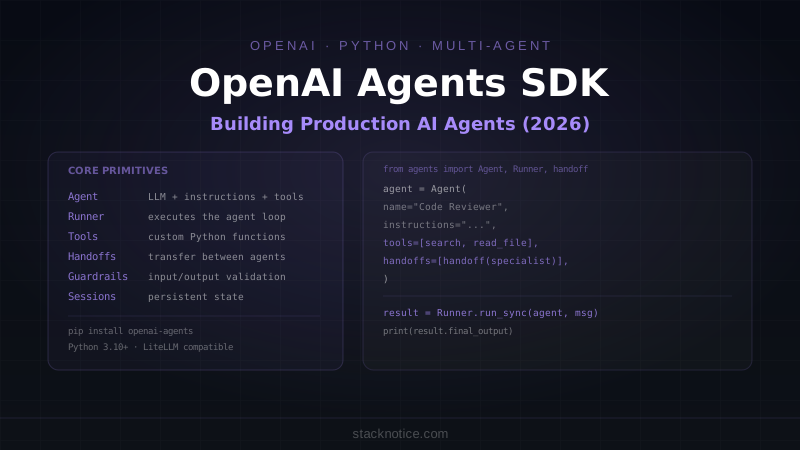
Six core primitives:
- Agent: An LLM with a system prompt, a list of tools it can call, and optionally a list of other agents it can hand off to
- Runner: Executes the agent loop — runs the model, processes tool calls, loops until done
- Tools: Functions the agent can call during its reasoning (built-in: web search, code execution; or custom Python functions)
- Handoffs: Structured transfer of control from one agent to another with context passed along
- Guardrails: Input/output validators that run before the model sees a message or after it produces one
- Sessions: Persistent conversation state across multiple runs
The SDK is built on the OpenAI Responses API and works with any model accessible via LiteLLM, which means you can swap Claude, Gemini, or local models for the LLM layer while keeping the agent infrastructure.
Installation
pip install openai-agentsRequires Python 3.10 or newer. Set your API key:
export OPENAI_API_KEY=sk-...Your First Agent
from agents import Agent, Runner

agent = Agent(
    name="Code Reviewer",
    instructions="""You are a TypeScript code reviewer.
    When given code, you analyze it for:
    - TypeScript type safety issues
    - Performance problems
    - Security vulnerabilities
    - Missing error handling

    Be specific. Quote the problematic code and explain why it's an issue.""",
    model="gpt-4o",
)

result = Runner.run_sync(agent, "Review this: const data = await fetch(url).then(r => r.json())")
print(result.final_output)
Runner.run_sync runs the full agent loop synchronously. For async contexts (FastAPI, async scripts):
import asyncio
from agents import Agent, Runner

async def main():
    agent = Agent(
        name="Assistant",
        instructions="You are a helpful coding assistant.",
    )
    result = await Runner.run(agent, "What's the difference between null and undefined in TypeScript?")
    print(result.final_output)

asyncio.run(main())
Custom Tools
Tools are the mechanism through which agents interact with the world — APIs, databases, filesystems, external services. Define them as Python functions with type annotations:
from agents import Agent, Runner, function_tool
import httpx

@function_tool
def search_npm_package(package_name: str) -> str:
    """Search npm registry for a package and return its latest version and description."""
    response = httpx.get(f"https://registry.npmjs.org/{package_name}/latest")
    if response.status_code == 404:
        return f"Package '{package_name}' not found on npm"

    data = response.json()
    return f"Name: {data['name']}\nVersion: {data['version']}\nDescription: {data.get('description', 'No description')}"

@function_tool
def read_file(path: str) -> str:
    """Read a file from the current project directory. Path must be relative."""
    import os
    # Security: restrict to current directory
    full_path = os.path.abspath(path)
    cwd = os.path.abspath(".")
    if not full_path.startswith(cwd):
        return "Error: cannot read files outside project directory"

    try:
        with open(full_path) as f:
            return f.read()
    except FileNotFoundError:
        return f"File not found: {path}"

agent = Agent(
    name="Package Analyst",
    instructions="""You help analyze npm packages.
    When asked about a package, look it up with search_npm_package.
    When asked to review code, read it with read_file first.""",
    tools=[search_npm_package, read_file],
)

result = Runner.run_sync(agent, "What version is react and what does it do?")
print(result.final_output)
The @function_tool decorator generates the JSON schema for the tool from your function's type annotations and docstring. The docstring becomes the tool description the model sees — write it from the model's perspective, not yours.
Built-In Tools
The SDK ships with several built-in tools:
from agents import Agent
from agents.tools import WebSearchTool, CodeInterpreterTool

research_agent = Agent(
    name="Research Agent",
    instructions="You research technical topics using web search.",
    tools=[
        WebSearchTool(),           # Searches the web
        CodeInterpreterTool(),     # Executes Python code in a sandbox
    ],
)
Handoffs: Multi-Agent Architecture
Handoffs are how you build systems where a coordinator agent delegates work to specialized agents. The coordinator doesn't do the work itself — it decides which specialist should handle each part.
from agents import Agent, Runner, handoff

# Specialist agents
typescript_expert = Agent(
    name="TypeScript Expert",
    instructions="""You are a TypeScript expert.
    You fix TypeScript type errors, improve type safety, and add proper generics.
    You only work on TypeScript/JavaScript files.
    When done, summarize what you changed and why.""",
    model="gpt-4o",
)

security_reviewer = Agent(
    name="Security Reviewer",
    instructions="""You are a web security expert.
    You check code for OWASP vulnerabilities: SQL injection, XSS, CSRF,
    insecure direct object references, authentication flaws.
    You provide specific remediation for each issue found.""",
    model="gpt-4o",
)

performance_analyst = Agent(
    name="Performance Analyst",
    instructions="""You analyze code for performance issues:
    N+1 queries, unnecessary re-renders, missing memoization,
    inefficient algorithms, blocking operations.""",
    model="gpt-4o",
)

# Coordinator decides who handles what
coordinator = Agent(
    name="Code Review Coordinator",
    instructions="""You coordinate thorough code reviews.

    When given code to review:
    1. First identify the type of issues present
    2. Hand off to TypeScript Expert if there are type issues
    3. Hand off to Security Reviewer if there are security concerns
    4. Hand off to Performance Analyst if there are performance issues
    5. You can hand off to multiple specialists sequentially

    After all specialists have reviewed, synthesize their findings into
    a final summary with priorities (critical, major, minor).""",
    handoffs=[
        handoff(typescript_expert),
        handoff(security_reviewer),
        handoff(performance_analyst),
    ],
)

code_to_review = """
async function getUser(req, res) {
    const userId = req.query.id;
    const user = await db.query(`SELECT * FROM users WHERE id = ${userId}`);
    res.json(user.rows[0]);
}
"""

result = Runner.run_sync(coordinator, f"Review this code:\n```javascript\n{code_to_review}\n```")
print(result.final_output)
The coordinator loops: it can hand off to multiple specialists in sequence, collect their outputs, and synthesize a final response. Each specialist agent only sees what the coordinator passes to it.
Handoff with Context
Pass structured context when handing off:
from agents import handoff
from pydantic import BaseModel

class SecurityHandoffData(BaseModel):
    code: str
    language: str
    known_issues: list[str]
    priority: str  # "critical" | "high" | "normal"

security_reviewer = Agent(
    name="Security Reviewer",
    instructions="Review code for security vulnerabilities. Focus on critical issues first.",
)

coordinator = Agent(
    name="Coordinator",
    handoffs=[
        handoff(
            security_reviewer,
            input_type=SecurityHandoffData,
            tool_name="request_security_review",
            tool_description="Send code to the security specialist for review",
        )
    ],
)
Guardrails: Input and Output Validation
Guardrails run validation logic before the model sees input (input guardrails) or after it produces output (output guardrails). Use them to enforce safety constraints, validate output format, or detect jailbreak attempts.
from agents import Agent, Runner, GuardrailFunctionOutput, input_guardrail, output_guardrail
from pydantic import BaseModel

# Input guardrail: block requests about competitors
@input_guardrail
async def block_competitor_questions(ctx, agent, input) -> GuardrailFunctionOutput:
    input_text = input if isinstance(input, str) else str(input)
    competitors = ["anthropic", "google", "meta llama"]

    if any(c in input_text.lower() for c in competitors):
        return GuardrailFunctionOutput(
            output_info="Competitor question detected",
            tripwire_triggered=True,  # blocks the request
        )
    return GuardrailFunctionOutput(output_info="OK", tripwire_triggered=False)

# Output guardrail: ensure responses don't contain PII
class PIICheck(BaseModel):
    contains_pii: bool
    pii_types: list[str]

pii_checker = Agent(
    name="PII Checker",
    instructions="""Check if the given text contains PII: names, emails,
    phone numbers, addresses, social security numbers.
    Return a structured assessment.""",
    output_type=PIICheck,
)

@output_guardrail
async def check_for_pii(ctx, agent, output) -> GuardrailFunctionOutput:
    result = await Runner.run(pii_checker, f"Check this for PII:\n{output.final_output}")
    check = result.final_output

    if check.contains_pii:
        return GuardrailFunctionOutput(
            output_info=f"PII detected: {check.pii_types}",
            tripwire_triggered=True,  # blocks the output
        )
    return GuardrailFunctionOutput(output_info="No PII", tripwire_triggered=False)

safe_agent = Agent(
    name="Customer Support Agent",
    instructions="Help customers with their questions about our product.",
    input_guardrails=[block_competitor_questions],
    output_guardrails=[check_for_pii],
)
When a guardrail triggers (tripwire_triggered=True), the runner raises a GuardrailTripwireTriggered exception that you can catch and handle:
from agents.exceptions import GuardrailTripwireTriggered

try:
    result = await Runner.run(safe_agent, user_message)
    return {"response": result.final_output}
except GuardrailTripwireTriggered as e:
    return {"error": "Request blocked by safety policy", "reason": str(e)}
Structured Output
Force the agent to return a specific Pydantic model:
from pydantic import BaseModel
from agents import Agent, Runner

class CodeReview(BaseModel):
    overall_score: int  # 1-10
    critical_issues: list[str]
    warnings: list[str]
    suggestions: list[str]
    summary: str

reviewer = Agent(
    name="Structured Reviewer",
    instructions="Review code and return a structured assessment.",
    output_type=CodeReview,
)

result = Runner.run_sync(reviewer, "Review: const x = eval(userInput)")
review: CodeReview = result.final_output

print(f"Score: {review.overall_score}/10")
for issue in review.critical_issues:
    print(f"🚨 {issue}")
Sessions: Persistent State
Sessions maintain conversation history across multiple runs — essential for chatbots, multi-turn workflows, and anything where the agent needs to remember previous context.
from agents import Agent, Runner
from agents.sessions import InMemorySession, SqliteSession

agent = Agent(
    name="Project Assistant",
    instructions="""You are a project management assistant.
    Remember tasks, deadlines, and team members across conversations.""",
)

# In-memory session (lost when process exits)
session = InMemorySession()

# SQLite session (persists to disk)
session = SqliteSession("agent_sessions.db")

# First turn
result = await Runner.run(
    agent,
    "Add a task: implement OAuth login, due Friday, assigned to Alice",
    session=session,
    session_id="project-alpha",
)

# Second turn — agent remembers the first
result = await Runner.run(
    agent,
    "What tasks are pending?",
    session=session,
    session_id="project-alpha",  # same session ID = same conversation
)
print(result.final_output)
# → "You have one pending task: implement OAuth login, due Friday, assigned to Alice."
Tracing and Observability
The SDK includes built-in tracing — every agent run produces a trace showing which tools were called, what the model received and produced, how long each step took, and how handoffs occurred.
from agents import Agent, Runner
from agents.tracing import TracingProcessor

# Print traces to console (development)
import agents
agents.enable_verbose_stdout_logging()

# Or send to your observability platform
from agents.tracing import set_trace_processors
from agents.tracing.processors import OTELSpanExporter

set_trace_processors([OTELSpanExporter(endpoint="http://your-otel-collector:4317")])
In production, traces give you the audit trail needed for debugging agent behavior and meeting compliance requirements — every decision the agent made, in order, with timing.
Using Non-OpenAI Models
The SDK supports any model via LiteLLM. Swap the LLM while keeping all the agent infrastructure:
from agents import Agent, Runner
from agents.extensions.models.litellm_model import LitellmModel

# Use Claude instead of GPT
claude_agent = Agent(
    name="Claude Reviewer",
    instructions="You review code for quality and security issues.",
    model=LitellmModel(model="anthropic/claude-sonnet-4-6"),
)

# Use Gemini
gemini_agent = Agent(
    name="Gemini Analyst",
    instructions="You analyze data and produce summaries.",
    model=LitellmModel(model="gemini/gemini-2.0-flash"),
)

# Mix models in a multi-agent system
coordinator = Agent(
    name="Coordinator",
    instructions="Coordinate between specialists.",
    model="gpt-4o",  # OpenAI for coordination
    handoffs=[handoff(claude_agent), handoff(gemini_agent)],
)
This is a significant feature: you can benchmark different models against each other within the same agent structure, or use cheaper/faster models for simple tasks and more capable ones for complex reasoning.
A Complete Production Pattern: Support Ticket Classifier
Putting it together — a real pattern you'd build in a production app:
from agents import Agent, Runner, function_tool, handoff
from pydantic import BaseModel
import asyncio

class TicketClassification(BaseModel):
    category: str  # "billing" | "technical" | "general" | "refund"
    priority: str  # "critical" | "high" | "normal" | "low"
    summary: str
    requires_human: bool

@function_tool
def get_account_info(account_id: str) -> str:
    """Look up account details by ID."""
    # In production: query your database
    return f"Account {account_id}: Pro plan, active since 2024-01, no open incidents"

@function_tool
def create_ticket(category: str, priority: str, summary: str, account_id: str) -> str:
    """Create a support ticket in the ticketing system."""
    ticket_id = f"TICK-{hash(summary) % 10000:04d}"
    return f"Ticket {ticket_id} created: {category} / {priority}"

# Specialists
billing_agent = Agent(
    name="Billing Specialist",
    instructions="""You handle billing questions, refunds, and subscription changes.
    You have access to account information.
    Always look up the account before responding.""",
    tools=[get_account_info, create_ticket],
)

technical_agent = Agent(
    name="Technical Specialist",
    instructions="""You handle technical issues and bugs.
    Collect: error messages, steps to reproduce, environment details.
    Create a ticket for anything requiring engineering investigation.""",
    tools=[create_ticket],
)

# Triage coordinator
triage_agent = Agent(
    name="Triage Agent",
    instructions="""You classify incoming support requests and route them.
    First classify the request (category, priority, summary).
    Then route to the appropriate specialist.
    For critical issues, set requires_human=True.""",
    output_type=TicketClassification,
    handoffs=[
        handoff(billing_agent, tool_description="Route billing and payment questions"),
        handoff(technical_agent, tool_description="Route technical issues and bugs"),
    ],
)

async def handle_support_request(account_id: str, message: str):
    result = await Runner.run(
        triage_agent,
        f"Account ID: {account_id}\nRequest: {message}",
    )

    if isinstance(result.final_output, TicketClassification):
        classification = result.final_output
        if classification.requires_human:
            print(f"🔴 Escalating to human: {classification.summary}")
        else:
            print(f"✅ Handled automatically: {classification.summary}")
    else:
        print(result.final_output)

asyncio.run(handle_support_request("ACC-12345", "I was charged twice this month"))
SDK vs LangGraph vs CrewAI
| OpenAI Agents SDK | LangGraph | CrewAI | |
|---|---|---|---|
| Abstraction level | Medium | Low (graphs) | High (roles/crews) |
| Setup complexity | Low | High | Low |
| Control | High | Maximum | Medium |
| Multi-agent model | Handoffs | Graph edges | Crews |
| Python version | 3.10+ | 3.9+ | 3.10+ |
| Non-OpenAI models | Via LiteLLM | Yes (native) | Yes (via LiteLLM) |
| Tracing | Built-in | Via LangSmith | Limited |
| Best for | Production APIs | Complex stateful flows | Prototype teams |
Choose the Agents SDK when you want structured handoffs and guardrails without authoring a graph. Choose LangGraph when you need explicit control over state transitions and loops. For building agents with Claude specifically, see Building Your First AI Agent with Claude.
For the security and governance layer needed to run agents in enterprise environments, see AI Agents in Production: Why 88% of Enterprise Pilots Fail.
Quick Reference
from agents import Agent, Runner, function_tool, handoff
from agents.sessions import SqliteSession

# Agent
agent = Agent(
    name="My Agent",
    instructions="System prompt here",
    model="gpt-4o",
    tools=[my_tool],
    handoffs=[handoff(other_agent)],
    output_type=MyPydanticModel,  # structured output
)

# Tool
@function_tool
def my_tool(param: str) -> str:
    """Description the model sees."""
    return "result"

# Run
result = Runner.run_sync(agent, "user message")
result = await Runner.run(agent, "user message")  # async
print(result.final_output)

# With session
session = SqliteSession("sessions.db")
result = await Runner.run(agent, "message", session=session, session_id="user-123")

# Guardrail
from agents import GuardrailFunctionOutput, input_guardrail

@input_guardrail
async def my_guardrail(ctx, agent, input) -> GuardrailFunctionOutput:
    blocked = "bad word" in str(input)
    return GuardrailFunctionOutput(output_info="check", tripwire_triggered=blocked)

# Catch guardrail block
from agents.exceptions import GuardrailTripwireTriggered
try:
    result = await Runner.run(agent, input)
except GuardrailTripwireTriggered:
    return {"error": "blocked"}