GitHub Copilot's agent mode launched in early 2026 and changed what most devs expected from an in-editor AI assistant. Where the original Copilot autocompleted lines and Copilot Chat answered questions, agent mode can take a task, edit multiple files across the codebase, run terminal commands, observe the output, fix errors it caused, and iterate until the task is done — all without you directing each step.
This guide covers what agent mode can actually do in practice, how to configure it well, and how it compares to Claude Code for different workflows.
What Agent Mode Actually Is
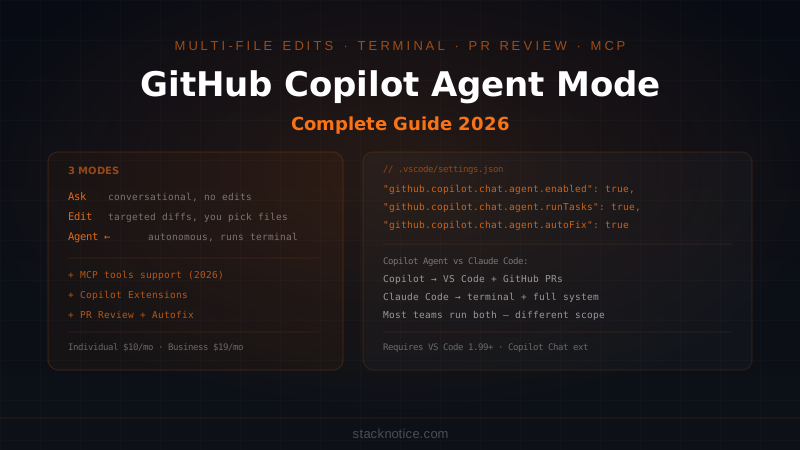
Copilot has three distinct modes in VS Code as of 2026:
Ask mode — conversational. Ask questions about your code, get explanations, generate snippets. No edits applied automatically.
Edit mode — targeted edits. You describe what to change, Copilot proposes diffs across specific files. You review and accept/reject.
Agent mode — autonomous. You describe a task. Copilot plans the steps, edits files, runs terminal commands, reads error output, and iterates. It can work across your entire codebase without you specifying which files to touch.
The shift from Edit to Agent mode is significant. Edit mode requires you to think at the file level — "change this function in this file." Agent mode lets you think at the task level — "add email verification to the signup flow" and let it figure out which files need to change.
Setup
Agent mode requires:
- VS Code 1.99+ (or VS Code Insiders)
- GitHub Copilot subscription (Individual $10/mo, Business $19/mo, Enterprise $39/mo)
- Copilot Chat extension installed
Enable in VS Code settings:
// .vscode/settings.json
{
  "github.copilot.chat.agent.enabled": true,
  "github.copilot.chat.agent.runTasks": true,
  "github.copilot.chat.agent.autoFix": true
}
autoFix: true lets the agent run, see errors, and fix them without asking you after each step. This is what makes the loop genuinely autonomous.
Open the Copilot Chat panel (Ctrl+Alt+I) and switch to Agent in the dropdown at the top.
What Agent Mode Can Do
Multi-file edits
Agent mode reads your workspace context automatically. You don't need to specify files:
Add a rate limiting middleware to the Express app.
Use in-memory store for development, Redis in production.
Wire it up to the /api routes.
It will find your Express setup, identify the routes, create a middleware file, update the server config, and add environment-based switching — all without you saying "look in server.ts" or "create middleware/rateLimiter.ts."
Terminal command execution
With runTasks: true, the agent can run commands and read their output:
Install the missing dependencies, run the tests, and fix any failures.
It runs npm install, then npm test, reads the failing test output, identifies the root cause, edits the code, runs tests again, and continues until they pass.
This is the most powerful capability — the feedback loop between code change and test output was always the slowest part of debugging with AI assistants.
Codebase-aware refactoring
Refactor the user authentication to use JWT instead of session cookies.
Update all routes that check session state, update the middleware,
and add token refresh logic.
The agent searches the workspace for all files relevant to authentication, plans the changes across them, and executes. For large refactors that touch many files, this is faster than doing it manually or with Edit mode.
Tools and MCP Integration
Agent mode in 2026 exposes tools the agent can call during its work. Built-in tools include:
- File system — read, write, search files
- Terminal — run commands, read output
- GitHub — create issues, PRs, read PR comments
- Workspace search — semantic search across the codebase
And since mid-2026, Copilot supports MCP (Model Context Protocol) tools. Any MCP server you've configured (databases, APIs, external services) is available to the agent:
// .vscode/settings.json — add MCP tools
{
  "github.copilot.chat.mcp.enabled": true,
  "mcp": {
    "servers": {
      "postgres": {
        "command": "npx",
        "args": ["-y", "@modelcontextprotocol/server-postgres"],
        "env": { "DATABASE_URL": "${env:DATABASE_URL}" }
      }
    }
  }
}
With the Postgres MCP server active, the agent can query your schema, understand your data model, and generate type-safe code without you describing the database structure.
Writing Effective Agent Prompts
The quality of agent output correlates directly with the specificity of the prompt. A few patterns that work well:
Include the acceptance criteria:
Add full-text search to the posts listing page.

Requirements:
- Search input in the header, debounced 300ms
- Query the /api/posts?q= endpoint as you type
- Highlight matching terms in results
- Show "No results" state
- Preserve existing URL params when searching

Use the existing PostCard component for results.
Reference existing patterns:
Add a DeletePostModal component following the same pattern as
the existing ArchivePostModal in components/modals/ArchivePostModal.tsx.
It should call DELETE /api/posts/:id and redirect to /blog on success.
Constrain the scope:
Refactor the date formatting in this project to use date-fns instead of
native Date methods. Only change files in src/utils/ and src/components/.
Do not touch any test files.
Without constraints, the agent sometimes changes more than you intended. Explicit scope ("only change files in X") prevents this.
GitHub Copilot for Pull Requests
Outside VS Code, Copilot integrates directly into GitHub PRs:
Copilot Code Review — on any PR, click "Request Copilot review." It leaves inline comments on logic issues, security concerns, and potential bugs — similar to a code review from a senior dev.
Copilot Autofix — when a security scan (CodeQL, Dependabot) finds a vulnerability, Copilot can propose a fix directly in the PR. One click to apply.
PR summaries — Copilot can generate a PR description from the diff. Saves time on mechanical PR writing, though you'll want to review before merging.
These features are available on Business and Enterprise plans, not Individual.
What Works Well vs What Doesn't
Agent mode excels at:
- Scaffolding new features with clear specs (CRUD endpoints, form flows, API integrations)
- Running and fixing failing tests iteratively
- Refactors that follow a clear pattern across many files
- Generating boilerplate that matches existing code style
- Understanding your codebase when you've been in VS Code with the same project open
Where it struggles:
- Ambiguous tasks without clear success criteria
- Architectural decisions requiring context from outside the codebase (business requirements, past decisions)
- Long multi-step tasks where early decisions affect later ones — it can lose coherence across 20+ file edits
- Tasks requiring external context (documentation, API specs not in the repo)
Copilot Agent Mode vs Claude Code
Both tools handle autonomous coding tasks, but they work differently and have different strengths:
| GitHub Copilot Agent Mode | Claude Code | |
|---|---|---|
| Interface | VS Code sidebar | Terminal (any editor) |
| Context | Current workspace | Full filesystem + shell |
| Memory across sessions | None | CLAUDE.md persists |
| Hooks / automation | Limited | Full hook system |
| Multi-agent | No | Yes (subagents) |
| GitHub integration | Deep (PRs, issues, CodeQL) | Via MCP or CLI |
| Model | GPT-4o / Claude Sonnet (selectable) | Claude Sonnet/Opus |
| Price | $10-39/mo (bundled) | $20/mo (Claude Pro) |
| Best for | In-editor tasks, PR workflows | Complex projects, automation, scripting |
The most important difference isn't the model — it's the working environment. Copilot lives inside VS Code and has deep IDE integration (inline suggestions, PR reviews, issue creation). Claude Code lives in the terminal and has broader system access, persistent memory via CLAUDE.md, hooks for automation, and the ability to run complex multi-step workflows across your entire system.
Teams often run both: Copilot for in-editor autocomplete and quick PR tasks, Claude Code for larger feature work, refactors, and automated workflows. They don't compete directly — they operate at different levels of abstraction.
Copilot Extensions: Extending the Agent
GitHub released Copilot Extensions in 2025, letting third parties build custom agent capabilities. Extensions give the agent access to external systems:
- Sentry — query error data, get stack traces, ask "what caused this error in production"
- Datadog — query metrics and logs
- Docker — manage containers from the chat panel
- Linear — create issues, update tickets
Install extensions from the VS Code marketplace or GitHub Marketplace. Enable in the chat with @extension-name:
@sentry What are the top 3 errors in production this week?
The extension fetches the data from Sentry's API and returns it in context — the agent can then help you fix the code that's causing those errors.
Practical Workflow
A typical session with agent mode:
- Open the Copilot Chat panel, switch to Agent mode
- Write a specific task with acceptance criteria
- The agent proposes a plan — read it, reject if the approach is wrong before it starts
- Let it execute — watch the terminal output and file changes in real time
- Review the diffs in the Source Control panel when it stops
- Accept, reject, or ask it to adjust specific parts
The most important step is #3 — reviewing the plan before execution. Agent mode has an "Explain what you'll do" step before starting. If the approach is wrong (wrong files, wrong pattern), say so before it edits 20 files in the wrong direction.
For reference on managing context in long agentic sessions and what to put in project specs that guide autonomous agents, the patterns are the same regardless of which tool you're using.
Pricing and Plans
| Plan | Price | Agent Mode | PR Features | Teams |
|---|---|---|---|---|
| Individual | $10/mo | ✅ | ✅ | No |
| Business | $19/mo/seat | ✅ | ✅ Full | Up to 300 |
| Enterprise | $39/mo/seat | ✅ | ✅ Full | Unlimited |
GitHub Copilot Individual now includes agent mode and PR review — at $10/month it's the cheapest entry into autonomous AI coding among the major tools. The Business plan adds policy controls, audit logs, and the Autofix feature for security vulnerabilities.
If you're already paying for GitHub (which most teams are), the Individual plan is essentially a $10 upgrade on top of your existing subscription.