The standard Claude Code workflow is one session, one branch, one task at a time. That works fine for a focused bug fix. But when you have a feature to build, a module to refactor, and tests to write — all of which Claude Code could handle — you're leaving a lot of speed on the table by doing them serially.
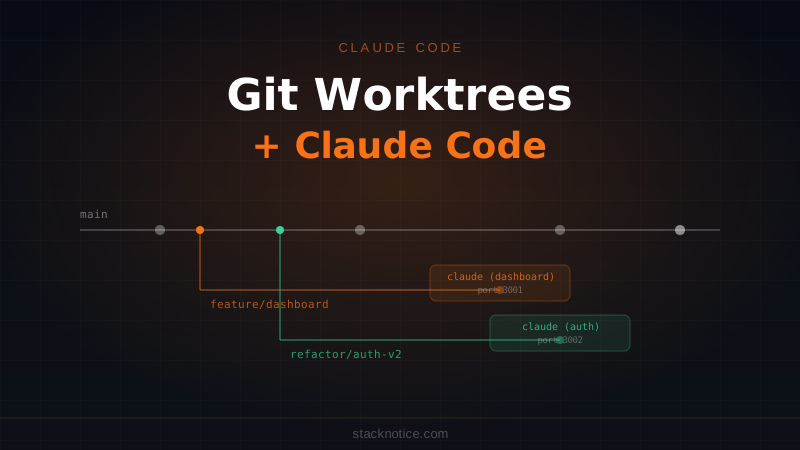
Git worktrees change that. They let you check out multiple branches from the same repository into separate directories. Each directory is independent. Each can run its own Claude Code session. Multiple AI agents working in parallel, zero interference.
This is how you set that up.
What Git Worktrees Actually Are
A git worktree is a linked working directory attached to the same repository. You get a separate folder with its own branch, its own staging area, and its own HEAD — but sharing the same .git history and object store.
# Normal repo: one branch at a time
my-app/
  .git/
  src/
  # active branch: main

# With worktrees: multiple branches simultaneously
my-app/          # main branch
my-app-dash/     # feature/dashboard
my-app-refactor/ # refactor/auth-module
Each extra directory is a full checkout. You can git status, git add, git commit in any of them independently. Changes in one don't touch the others.
Why This Pairs Well with Claude Code
Claude Code operates inside a directory — it reads files there, edits them, runs shell commands in that context. If two tasks touch different parts of your codebase, running them in the same directory creates friction:
- Context bleed: Claude sees half-done work from task A while doing task B
- File conflicts: both tasks might edit a shared file for unrelated reasons
- Serial bottleneck: you wait for task one before starting task two
With worktrees, each Claude Code session gets a clean working copy on its own branch. They run in true parallel, completely isolated.
Setting Up Worktrees
The basics
# Inside your main repo
cd my-app

# Create a worktree for a new feature (creates the branch too)
git worktree add ../my-app-dashboard -b feature/dashboard

# Create one for a refactor
git worktree add ../my-app-auth -b refactor/auth-cleanup
Now you have three separate directories, each on its own branch, all pointing at the same git repository.
Starting Claude Code in each
Open terminal windows (or split panes in your editor) for each worktree:
# Terminal 1
cd ../my-app-dashboard
claude

# Terminal 2
cd ../my-app-auth
claude
Two Claude Code sessions running in parallel, on different branches, no overlap.
A Real Parallel Workflow
Say today's backlog has three independent tasks:
- Build a
/dashboardpage with charts and a stats row - Refactor the auth module from better-auth v1 to v2
- Add missing Vitest coverage for
src/lib/payments.ts
None of them share files. All three can run simultaneously.
# Create the worktrees
git worktree add ../my-app-dashboard -b feature/dashboard
git worktree add ../my-app-auth      -b refactor/auth-v2
git worktree add ../my-app-tests     -b tests/payments-coverage

# Optional: install dependencies in each (worktrees don't share node_modules)
for dir in ../my-app-dashboard ../my-app-auth ../my-app-tests; do
  (cd "$dir" && npm install --silent) &
done
wait
Then kick off all three:
# Terminal 1
cd ../my-app-dashboard
claude
# Prompt: "Build a /dashboard page with a revenue chart using Recharts,
# a recent orders table using shadcn DataTable, and a stats summary row
# at the top. Use the existing layout.tsx and color tokens."
# Terminal 2
cd ../my-app-auth
claude
# Prompt: "Read src/lib/auth.ts first, then migrate it from better-auth v1
# to v2. The new API uses user.findById() instead of getUserById() and
# session.create() instead of createSession(). Keep the same exports."# Terminal 3
cd ../my-app-tests
claude
# Prompt: "Write Vitest unit tests for src/lib/payments.ts.
# Cover: createSubscription, cancelSubscription, applyPromoCode.
# Mock the Stripe client at the module level."While all three run, you can review code elsewhere, respond to Slack, or read the docs. When each session finishes, you review → commit → open a PR.
Before creating worktrees, install any new packages on your main branch and commit them. Worktrees inherit the committed package.json but don't share node_modules, so running npm install in each worktree picks up the latest committed dependencies cleanly.
Managing Worktrees
See all active worktrees
git worktree list/Users/you/my-app a3f9c21 [main]
/Users/you/my-app-dashboard HEAD detached at feature/dashboard
/Users/you/my-app-auth HEAD detached at refactor/auth-v2
/Users/you/my-app-tests HEAD detached at tests/payments-coverage
Remove a worktree after merging
git worktree remove ../my-app-dashboard

# If there are untracked files you don't need
git worktree remove --force ../my-app-dashboard
Prune stale references
If you deleted a worktree directory manually without using git worktree remove:
git worktree prunePer-Task CLAUDE.md
Your project's CLAUDE.md in the repo root is shared across all worktrees — which is exactly what you want for project-wide conventions. But you can also add a task-specific CLAUDE.md at the worktree root to give that session focused context:
# CLAUDE.md — refactor/auth-v2 worktree

## Current goal
Migrate src/lib/auth.ts from better-auth v1 to v2.

## Do not touch
- src/lib/auth-adapters/ — already migrated in a previous PR
- src/middleware.ts — separate PR, not related to this task

## better-auth v2 breaking changes
- `createSession()` → `session.create()`
- `getUserById()` → `user.findById()`
- All methods now return `{ data, error }` instead of `data | null`
- Token refresh is now automatic — remove manual refresh calls
This file lives only in that worktree directory and doesn't pollute the shared project CLAUDE.md. When the worktree is removed after merging, the file goes with it.
For more on structuring CLAUDE.md, see the complete CLAUDE.md guide.
Worktrees vs Subagents
Claude Code subagents also run tasks in parallel. The difference is significant:
| Worktrees + parallel sessions | Subagents | |
|---|---|---|
| Isolation | Separate directories + branches | Same working directory |
| File conflicts | Impossible — different branches | Possible if tasks overlap |
| Context | Each session is independent | Agents share parent context window |
| Token cost | Separate billing per session | Counted within the parent session |
| Coordination | You merge the branches manually | Parent agent coordinates results |
| Best for | Long independent tasks (hours) | Short parallel lookups (minutes) |
Use worktrees when tasks are genuinely independent and will each involve many file changes. Use subagents when tasks are quick and need to feed results back to the parent session.
Handling Files Shared Between Branches
Some files get touched by multiple features — package.json, schema.ts, or types/index.ts. Two approaches:
Do shared changes first on main
# Add a new shared dependency on main before creating worktrees
cd my-app
npm install recharts @types/recharts
git add package.json package-lock.json
git commit -m "deps: add recharts"

# Now worktrees inherit the change
git worktree add ../my-app-dashboard -b feature/dashboard
Let branches diverge and resolve at merge time
If two branches independently edit schema.ts, let them. Git merge handles this. If the conflict is complex, Claude Code can resolve it:
cd my-app
git checkout main
git merge feature/dashboard
# Conflict in schema.ts

claude
# Prompt: "Resolve the merge conflict in src/db/schema.ts.
# feature/dashboard added a 'page_views' column to the analytics table.
# refactor/auth-v2 renamed 'user_token' to 'auth_token' in the users table.
# Both changes should be kept — they don't overlap logically."
Headless Batch Execution
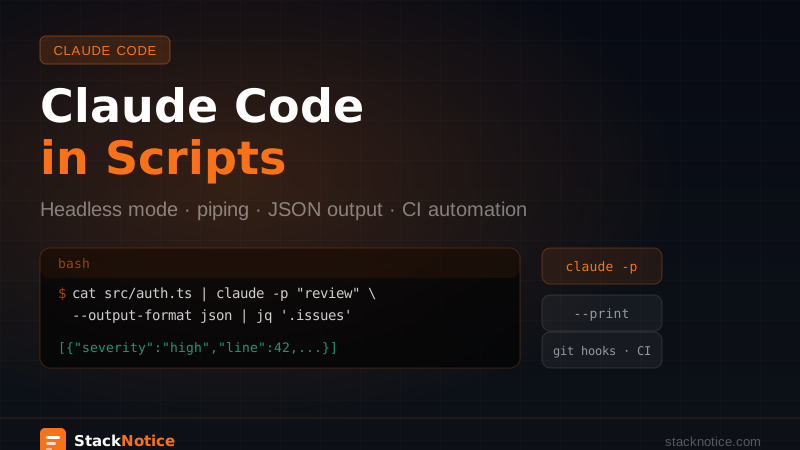
Combine worktrees with Claude Code's -p flag for fully automated parallel execution:
#!/bin/bash
# batch-tasks.sh

declare -A TASKS
TASKS["dashboard"]="feature/dashboard|Build the /dashboard page with revenue charts and a stats summary row"
TASKS["auth"]="refactor/auth-v2|Migrate src/lib/auth.ts to better-auth v2. Read the file first."
TASKS["tests"]="tests/payments|Write Vitest tests for src/lib/payments.ts — cover all exported functions"

mkdir -p logs

for name in "${!TASKS[@]}"; do
  IFS='|' read -r branch prompt <<< "${TASKS[$name]}"

  # Create worktree (safe to call if it exists)
  git worktree add "../$(basename "$PWD")-$name" -b "$branch" 2>/dev/null || true

  (
    cd "../$(basename "$PWD")-$name"
    npm install --silent
    claude -p "$prompt" --output-format text > "../logs/$name.log" 2>&1
    echo "done: $name"
  ) &
done

wait
echo "All tasks finished. Logs in ./logs/"
This fires all three sessions simultaneously and waits for them. Each runs isolated, writes its own log, and produces its own commits.
For more on the -p flag and headless patterns, see the headless scripting guide.
The Review Step
After Claude Code finishes each session, review before merging:
cd ../my-app-dashboard

# What changed?
git diff main...HEAD --stat

# Type-check
npx tsc --noEmit

# Run tests
npm test

# If good, push and open a PR
git push origin feature/dashboard
gh pr create --title "feat: dashboard page" --body "Revenue chart, orders table, stats row"
Repeat for each worktree. You now have three PRs ready for human review — generated in parallel, each with a clean branch history.
Don't skip the review step. Claude Code produces good output, but parallel sessions have no awareness of each other. A shared utility function might be modified independently in two branches. The type checker and tests will catch it — that's why they're part of the workflow, not optional.
Common Issues
"fatal: 'feature/dashboard' is already checked out"
A branch can only be active in one worktree at a time. Either remove the existing worktree first, or use a new branch name:
git worktree add ../my-app-dashboard -b feature/dashboard-v2Claude Code can't find .env
Worktrees don't copy .env files — they're not tracked in git. Either symlink it:
ln -s "$(pwd)/.env" ../my-app-dashboard/.envOr add a step in your setup script to copy it. Don't commit .env.
node_modules not found
Worktrees share the git index, not node_modules. Run npm install in each new worktree before starting Claude Code:
git worktree add ../my-app-tests -b tests/payments-coverage
cd ../my-app-tests && npm install
claude
Shell Alias for Quick Setup
Once the pattern clicks, add this to your .zshrc or .bashrc:
function cw() {
  local name=$1
  local branch=${2:-feature/$1}
  local dir="../$(basename "$PWD")-$name"

  git worktree add "$dir" -b "$branch"
  cd "$dir"
  npm install --silent
  claude
}
Usage from inside your repo:
cw dashboard feature/dashboardCreates the worktree, installs dependencies, and opens Claude Code — in one command.
When This Pattern Makes Sense
Use worktrees when:
- Tasks involve different parts of the codebase with no file overlap
- Each task is substantial enough that a parallel head start is worth the setup time
- You want clean branch history: one branch per feature, one PR per feature
- You're doing large-scale work where context isolation genuinely matters
Stick to a single session when:
- Tasks depend on each other's output — task B needs what task A produces
- You're doing a single, focused change
- The overhead of three terminal windows outweighs the benefit
The setup takes about two minutes. Any task that runs longer than two minutes in Claude Code — which is most real tasks — starts paying off immediately.
How It Fits the Bigger Picture
Worktrees are the local, single-developer version of the broader Claude Code parallelism story. Subagents handle parallel tasks within one session. Headless scripting handles automation at the shell level. Worktrees handle the case in between: tasks too complex for a subagent, too independent to share a context window.
Combined, these three patterns let Claude Code operate much closer to its actual capacity — which is more than one thing at a time.