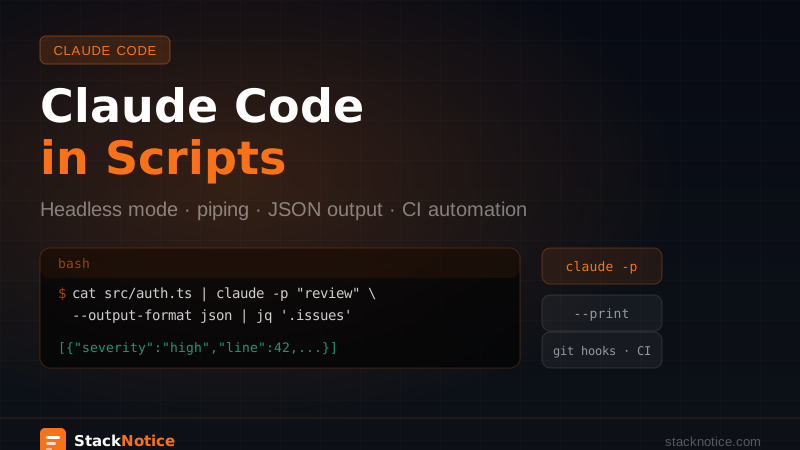
Most people use Claude Code as an interactive REPL. But there's a second mode — headless, non-interactive — that turns it into a scriptable tool you can wire into bash pipelines, git hooks, cron jobs, and CI systems.
The same model, none of the conversation. Just input, processing, output.
The Two Modes
Interactive mode (the default): you open a session, type prompts back and forth, and close when done. Context builds across messages.
Headless mode: you pass a prompt, Claude runs it, prints the result, and exits. No conversation, no interactivity — pure input/output.
# Interactive (default)
claude

# Headless — print result and exit
claude -p "What does this function do?"
The -p Flag
-p (or --print) runs Claude in print mode. The prompt goes in, the result comes out to stdout, Claude exits.
# One-shot prompt
claude -p "Generate a TypeScript interface for a blog post with id, title, content, author, and publishedAt"
You can pipe file contents through stdin:
# Review a file
cat src/lib/auth.ts | claude -p "Review this code for security issues. Be specific about line numbers."

# Review multiple files at once
cat src/lib/actions/user.ts src/types/user.ts | claude -p "Are these types consistent with each other?"
Or pass structured context:
claude -p "$(cat <<EOF
Review this TypeScript file for potential issues:

$(cat src/services/OrderService.ts)
EOF
)"
Output Formats
By default, -p outputs markdown. For scripts that need to parse the output, use --output-format:
# Plain text — no markdown symbols
claude -p "List 3 improvements for this code" --output-format text < src/lib/payments.ts

# JSON — structured output for piping
claude -p "Analyze this for security issues. Return JSON with shape:
{ \"issues\": [{ \"line\": number, \"severity\": \"low|medium|high\", \"description\": string }] }" \
  --output-format json < src/lib/auth.ts
Pipe JSON output into jq for filtering:
claude -p "Analyze and return JSON: { issues: [{severity, description, line}] }" \
  --output-format json < src/lib/auth.ts \
  | jq '.issues[] | select(.severity == "high")'
Real Script: Auto-Changelog
Generate a changelog entry from recent git commits:
#!/bin/bash
# scripts/generate-changelog.sh

SINCE=${1:-"1 week ago"}
COMMITS=$(git log --oneline --since="$SINCE")

if [ -z "$COMMITS" ]; then
  echo "No commits since $SINCE"
  exit 0
fi

CHANGELOG=$(claude -p "$(cat <<EOF
Generate a changelog entry in markdown for these git commits.
Group by: Features, Bug Fixes, Improvements, Other.
Use bullet points. Be concise and developer-friendly.

Commits:
$COMMITS
EOF
)" --output-format text)

# Prepend to CHANGELOG.md
echo "## $(date +%Y-%m-%d)" > /tmp/new-entry.md
echo "" >> /tmp/new-entry.md
echo "$CHANGELOG" >> /tmp/new-entry.md
echo "" >> /tmp/new-entry.md
cat /tmp/new-entry.md CHANGELOG.md > /tmp/full.md
mv /tmp/full.md CHANGELOG.md

echo "Changelog updated."
./scripts/generate-changelog.sh # since 1 week ago
./scripts/generate-changelog.sh "1 day ago" # since yesterdayReal Script: Commit Message Generator
#!/bin/bash
# scripts/commit-msg-gen.sh
# Usage: git diff --staged | ./scripts/commit-msg-gen.sh

DIFF=$(cat)

if [ -z "$DIFF" ]; then
  echo "No staged changes. Run: git diff --staged | ./scripts/commit-msg-gen.sh"
  exit 1
fi

claude -p "$(cat <<EOF
Generate a conventional commit message for this diff.
Format: <type>(<scope>): <description>
Types: feat, fix, refactor, docs, test, chore, perf
Keep description under 72 characters.
Add a short body only if the change is complex.
Output the commit message only — no explanation.

Diff:
$DIFF
EOF
)" --output-format text
# Preview the suggestion
git diff --staged | ./scripts/commit-msg-gen.sh
# Use it directly
git commit -m "$(git diff --staged | ./scripts/commit-msg-gen.sh)"Real Script: Batch File Review
Review all changed files in a branch before opening a PR:
#!/bin/bash
# scripts/pr-review.sh

BASE=${1:-"main"}
FILES=$(git diff --name-only "$BASE"...HEAD)

if [ -z "$FILES" ]; then
  echo "No changed files compared to $BASE"
  exit 0
fi

echo "# PR Review Report — $(date)" > pr-review.md
echo "" >> pr-review.md

for file in $FILES; do
  case "$file" in
    *.md|*.json|*.lock|*.svg|*.png) continue ;;
  esac

  [ ! -f "$file" ] && continue

  echo "Reviewing $file..."

  REVIEW=$(cat "$file" | claude -p "$(cat <<EOF
Review this file for:
1. Potential bugs or edge cases
2. Security issues
3. Missing error handling
4. Performance concerns

Be specific — include line numbers where relevant.
If nothing to flag, say "Looks good."
File: $file
EOF
)" --output-format text)

  echo "## $file" >> pr-review.md
  echo "" >> pr-review.md
  echo "$REVIEW" >> pr-review.md
  echo "" >> pr-review.md
done

echo "Done → pr-review.md"
Combining with Git Hooks
The Claude Code hooks guide covers hooks triggered by Claude's actions. With -p, you can wire Claude into standard git hooks too:
# .git/hooks/prepare-commit-msg
#!/bin/bash

COMMIT_MSG_FILE=$1
COMMIT_SOURCE=$2

# Only run when no message is pre-populated
if [ "$COMMIT_SOURCE" = "" ]; then
  STAGED=$(git diff --staged)
  if [ -n "$STAGED" ]; then
    SUGGESTION=$(echo "$STAGED" | claude -p \
      "Write a conventional commit message for this diff. One line, under 72 chars." \
      --output-format text 2>/dev/null)
    if [ -n "$SUGGESTION" ]; then
      echo "# Suggested: $SUGGESTION" > /tmp/msg-suggestion
      cat "$COMMIT_MSG_FILE" >> /tmp/msg-suggestion
      mv /tmp/msg-suggestion "$COMMIT_MSG_FILE"
    fi
  fi
fi
chmod +x .git/hooks/prepare-commit-msgNow every git commit without a -m flag shows Claude's suggestion at the top of the editor.
In CI/CD
For CI, pair -p with --dangerously-skip-permissions to skip interactive approval prompts. In read-only review tasks inside an isolated runner, this is appropriate — see the skip permissions guide for the full safety model.
# .github/workflows/claude-review.yml
name: Claude Code Review

on:
  pull_request:
    types: [opened, synchronize]

jobs:
  review:
    runs-on: ubuntu-latest
    steps:
      - uses: actions/checkout@v4
        with:
          fetch-depth: 0

      - name: Install Claude Code
        run: npm install -g @anthropic-ai/claude-code

      - name: Review changed files
        env:
          ANTHROPIC_API_KEY: ${{ secrets.ANTHROPIC_API_KEY }}
        run: |
          FILES=$(git diff --name-only origin/main...HEAD)
          for file in $FILES; do
            case "$file" in
              *.ts|*.tsx|*.js|*.jsx)
                echo "=== $file ===" >> review.txt
                cat "$file" | claude -p \
                  "Flag any security issues or bugs. Be specific." \
                  --output-format text \
                  --dangerously-skip-permissions \
                  >> review.txt
                echo "" >> review.txt
                ;;
            esac
          done
          cat review.txt
Error Handling in Scripts
Claude Code exits with status 0 on success and non-zero on error. Always check:
RESULT=$(cat src/main.ts | claude -p "Analyze this code" --output-format text)
STATUS=$?

if [ $STATUS -ne 0 ]; then
  echo "Claude Code failed (exit $STATUS)" >&2
  exit 1
fi

echo "$RESULT"
For retries on transient failures:
run_claude() {
  local input="$1"
  local prompt="$2"
  local retries=3
  local wait=5

  for i in $(seq 1 $retries); do
    RESULT=$(echo "$input" | claude -p "$prompt" --output-format text 2>&1)
    [ $? -eq 0 ] && { echo "$RESULT"; return 0; }
    echo "Attempt $i failed, retrying in ${wait}s..." >&2
    sleep $wait
    wait=$((wait * 2))
  done

  echo "All $retries attempts failed" >&2
  return 1
}
When to Use Headless vs Interactive
Headless (-p) works best for:
- Well-defined tasks with clear input/output
- Processing multiple files in a loop
- Automation pipelines where you know exactly what you want
- CI/CD where there's no human in the loop
Interactive works better for:
- Exploratory tasks where the output informs the next question
- Refactoring sessions that need back-and-forth
- Anything where you'd naturally say "yes, do that" or "actually, try this instead"
Don't force complex context-heavy tasks into headless mode. The interactive session can read files, ask clarifying questions, and adjust course mid-task in ways a single -p call can't replicate.
The best setups use both: interactive for the creative and exploratory work, headless for the repetitive and automatable.