If you're a developer in 2026, you're using an AI coding tool. The question is: which one is actually worth your money — and your context window?
I've spent the last three months running real projects through Claude Code, GitHub Copilot, and Cursor. Not toy examples. Actual production work: a Next.js SaaS, a Python data pipeline, and a TypeScript monorepo refactor. Here's the unfiltered verdict.
TL;DR: How They Differ Fundamentally
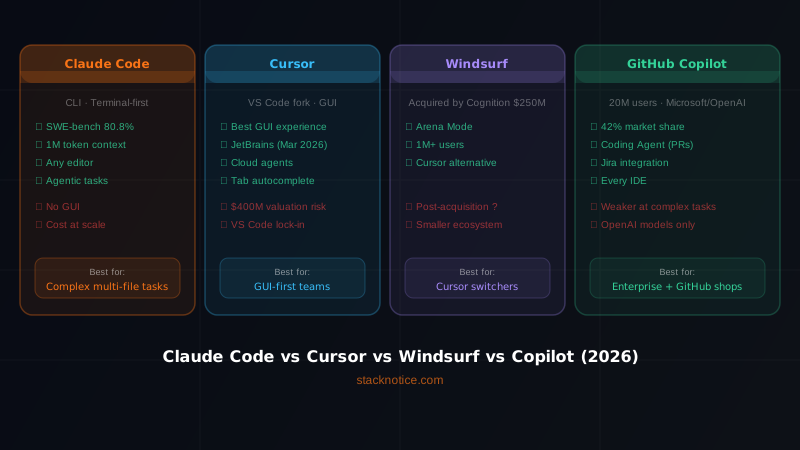
These tools aren't just different interfaces to the same AI. They solve different problems:
| Tool | Mental model | Best for |
|---|---|---|
| Claude Code | Autonomous agent in your terminal | Complex multi-file tasks, refactors, debugging sessions |
| GitHub Copilot | Autocomplete on steroids | Fast inline suggestions while typing |
| Cursor | AI-native IDE (fork of VS Code) | Teams that want everything in one editor |
If you only remember one thing: Copilot finishes your sentences. Claude Code thinks with you. Cursor tries to do both.
Claude Code: The Agentic Approach
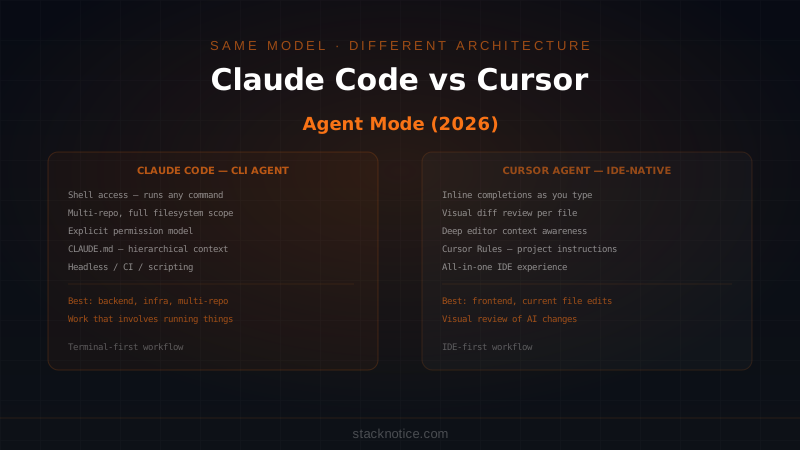
Claude Code runs in your terminal and operates as a proper agent — it reads files, runs commands, edits code, and loops until the task is done. There's no autocomplete. There's no suggestion popup. You describe what you want in plain language and it executes.
What Claude Code does well
Multi-file refactors are where it shines. Ask it to "rename the UserProfile type to Profile everywhere and update all the imports" and it will actually trace the dependency graph, find every usage, update the type definitions, and fix the imports — without you touching a single file.
# You type this in the terminal
> Refactor the authentication middleware to use JWT instead of sessions.
  Update the login route, the protected route wrapper, and the user model.
  Make sure the tests still pass.

# Claude Code:
# 1. Reads the current middleware
# 2. Reads the routes and model
# 3. Edits all three files
# 4. Runs npm test
# 5. Fixes any failures
# 6. Reports back
CLAUDE.md gives it project memory. Drop a CLAUDE.md file in your repo root and Claude Code reads it at the start of every session. You can encode your architecture decisions, naming conventions, preferred libraries, and anything else that matters. It's like onboarding a contractor who actually reads the docs.
# CLAUDE.md example
## Stack
- Next.js 14 App Router (no Pages Router)
- Prisma + PostgreSQL
- Zod for all validation — never use `any`

## Conventions
- All API routes return `{ data, error }` shape
- Use `cn()` from @/lib/utils for class merging
- No default exports in components
Hooks let you automate quality gates. Claude Code supports pre/post-tool hooks that run shell commands automatically. Format on save, run type checks before commits, send desktop notifications when a long task finishes — all configurable in a JSON file.
{
  "hooks": {
    "PostToolUse": [
      {
        "matcher": "Edit",
        "hooks": [
          { "type": "command", "command": "npx prettier --write $CLAUDE_TOOL_INPUT_PATH" }
        ]
      }
    ]
  }
}
Where Claude Code falls short
No inline autocomplete. You can't tab-complete a function mid-keystroke. If you're used to Copilot's flow, this will feel slow at first.
Terminal-first UX isn't for everyone. If your muscle memory lives in a GUI, the context switch to terminal-based commands takes a week to feel natural.
Cost adds up on long sessions. Claude Code uses the Anthropic API directly. Complex tasks with many file reads can consume a lot of tokens. On a heavy refactoring day, you'll notice.
GitHub Copilot: The Speed Demon
Copilot is the original AI coding assistant, and it's still the fastest at what it does: suggesting the next line (or the next ten lines) as you type.
What Copilot does well
Inline suggestions are genuinely fast. Ghost text appears in ~300ms. When you're in flow, it correctly predicts function implementations, test cases, and boilerplate with surprising accuracy.
// You type:
function calculateTax(price: number, rate: number

// Copilot suggests instantly:
): number {
  return price * (rate / 100)
}
Context from your open files. Copilot looks at the files you have open and uses them as context. If you have a User type open in one tab and you're writing a createUser function in another, it knows the shape.
Copilot Chat is solid for explanation. Highlight code, right-click, "Explain this" — it gives you a clear breakdown. Good for onboarding to a new codebase or deciphering legacy code.
GitHub integration is native. PR summaries, issue references, code review suggestions — if you're deep in the GitHub ecosystem, Copilot is a first-class citizen.
Where Copilot falls short
It doesn't execute. Copilot suggests. You accept or reject. You still run the code, fix the error, go back to Copilot. It has no agency — it can't read a file, notice a bug, and fix it unprompted.
Multi-file awareness is limited. It's good at single-file context but struggles with "update this and the three files that depend on it."
Hallucination on APIs. Copilot still suggests plausible-but-wrong API calls for libraries it doesn't know well. Always verify suggestions against docs for anything non-trivial.
Workspace Agent is beta quality. The newer "Copilot Workspace" / @workspace agent tries to be more agentic, but it's nowhere near Claude Code's capability for complex multi-step tasks.
Cursor: The IDE Play
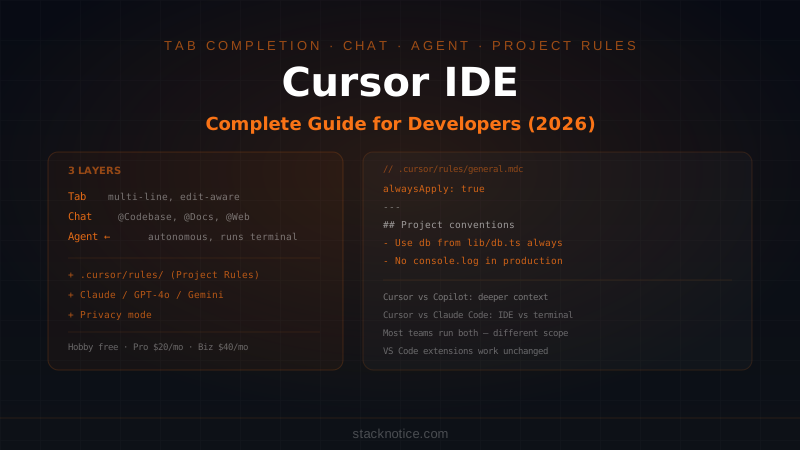
Cursor is a fork of VS Code with AI baked into every surface. You get autocomplete like Copilot, a chat panel like you'd get with Claude, and a "Composer" mode for multi-file edits — all inside one editor.
What Cursor does well
Composer mode is genuinely powerful. Cmd+I opens Composer, you describe a task, and Cursor makes multi-file edits with a diff view before applying. It's Claude Code's multi-file capability but with a visual review step.
# Composer prompt example:
"Add rate limiting to all API routes using the existing Redis client.
 Use a sliding window algorithm, 100 req/min per IP."

# Cursor shows you all the diffs before applying
Tab completion rivals Copilot. Cursor's autocomplete (powered by their own model + Claude/GPT-4 under the hood) is on par with Copilot for speed and accuracy.
.cursorrules is their CLAUDE.md equivalent. Project-level instructions that persist across sessions. Same idea, slightly different syntax.
# .cursorrules
You are working on a Next.js 14 SaaS app.
Always use TypeScript strict mode.
Never use `any`. Use Zod for validation.
Prefer server components unless interactivity is required.
VS Code compatibility is a big deal. All your existing extensions, themes, and keybindings work. Migration cost is near zero if you're already on VS Code.
Where Cursor falls short
Price-to-value for power users. Cursor Pro is $20/month, and fast Claude/GPT-4 requests are capped. If you use it heavily, you hit rate limits and fall back to slower models.
Not truly agentic. Composer can make multi-file edits, but it doesn't run your tests, see the output, and self-correct. That loop is still manual.
Privacy concerns for enterprise. Some companies won't allow code to leave their environment. Cursor's privacy mode helps, but it's not self-hosted.
Head-to-Head: The Real Benchmark
I ran the same three tasks through each tool on a real Next.js codebase.
Task 1: Add pagination to an API route
A simple but real task — add cursor-based pagination to an existing /api/posts route, update the TypeScript types, and update the client hook.
| Tool | Time | Quality | Manual edits needed |
|---|---|---|---|
| Claude Code | 4 min | Excellent | 0 |
| Cursor Composer | 6 min | Good | 2 (missed type update) |
| Copilot | 12 min | Good | Multiple (suggestion-by-suggestion) |
Winner: Claude Code. It handled the full task autonomously including the type update Cursor missed.
Task 2: Write tests for an existing component
Test a <UserCard /> React component with mocked API calls. Target: 90% coverage.
| Tool | Time | Quality | Manual edits needed |
|---|---|---|---|
| Copilot | 8 min | Excellent | 1 (test description) |
| Cursor Composer | 9 min | Excellent | 0 |
| Claude Code | 7 min | Excellent | 0 |
Winner: Tie between Cursor and Claude Code. Copilot was fast here too, but required slightly more back-and-forth.
Task 3: Debug a production error from a stack trace
Given a Sentry stack trace and the relevant codebase files, find and fix the bug.
| Tool | Identified root cause | Fix quality | Time |
|---|---|---|---|
| Claude Code | ✅ Yes | Correct + added null check | 3 min |
| Cursor Chat | ✅ Yes | Correct | 5 min |
| Copilot Chat | ⚠️ Partial | Addressed symptom, not cause | 8 min |
Winner: Claude Code. It traced the execution path across three files to find the actual cause, not just the line that threw.
Pricing Comparison (2026)
| Tool | Price | Model |
|---|---|---|
| Claude Code | API usage (~$10–30/month for typical use) | Pay per token |
| GitHub Copilot Individual | $10/month | Flat |
| GitHub Copilot Business | $19/user/month | Flat |
| Cursor Pro | $20/month | Capped fast requests |
| Cursor Business | $40/user/month | Team features |
Copilot is the cheapest for light users. Claude Code can be cheaper or more expensive depending on how heavily you use it — token consumption varies wildly by task complexity.
Quick Decision Guide
Choose Claude Code if:
- You work on complex, multi-file tasks regularly
- You want a tool that runs, tests, and iterates — not just suggests
- You're comfortable in the terminal
- You want to encode project conventions that persist across sessions
Choose GitHub Copilot if:
- Your primary need is fast inline autocomplete while you type
- You live in the GitHub ecosystem (PRs, issues, code review)
- You want the lowest-cost entry point
- Your company already pays for it through GitHub Enterprise
Choose Cursor if:
- You want everything in one editor without switching to terminal
- Your team is migrating from VS Code and wants zero friction
- You prefer a visual diff before applying multi-file changes
- You want the best combination of autocomplete + agentic edits
Use Claude Code + Copilot together if:
- You want the best of both worlds: inline suggestions while typing (Copilot) + autonomous task execution for complex work (Claude Code)
- This is actually the setup I run daily
The Honest Verdict
Copilot is a feature. Cursor is an IDE. Claude Code is a workflow shift.
If you're evaluating "which one autocompletes better," you're missing the point of Claude Code. It's not in that race. It's for the tasks that used to take 30 minutes of file-hopping — migrations, refactors, debugging sessions with multiple suspects — and compresses them to 5 minutes of clear instruction.
Cursor is the best option if you refuse to leave VS Code and want a single tool that covers 80% of what each other tool does. It's a strong second place for nearly everything.
Copilot wins on one metric that matters: price and ubiquity. It's everywhere, it's cheap, and for pure autocomplete it's still best-in-class.
My daily setup: Cursor as my primary IDE (autocomplete + quick edits) + Claude Code for anything that spans more than two files or requires actual execution. Best of both worlds, and the cost stays reasonable. For a more recent look at how Windsurf also fits into this picture, see the 2026 AI tools comparison.
FAQ
Can I use Claude Code inside Cursor? Not natively. Claude Code runs in a separate terminal. But you can run a terminal panel inside Cursor and use Claude Code there. Many developers do exactly this.
Does Claude Code work offline? No. It calls the Anthropic API. You need internet connectivity.
Is GitHub Copilot using GPT-4? GitHub Copilot uses multiple models depending on the feature. Copilot Chat uses GPT-4o by default; you can switch to Claude 3.5 Sonnet or Gemini in settings as of 2025.
Which is most private? Claude Code: code is sent to Anthropic. Copilot: code is sent to GitHub/Microsoft. Cursor: code is sent to their servers unless using privacy mode. For sensitive codebases, check each vendor's data policies — none of them are fully local unless you use a self-hosted model alternative.
Can I get Claude Code for free? Claude Code has a free tier via the Claude.ai Pro plan, but heavy agentic use will push you to API billing. Copilot has a free tier with limited completions. Cursor has a free tier with limited fast requests.
Next Steps
- Getting started with Claude Code — set up Claude Code from scratch in under 10 minutes
- Claude Code hooks: automate your dev workflow — the automation layer that makes Claude Code a proper CI tool
- Try Cursor free at cursor.com and compare it yourself against your current setup — a week of real use tells you more than any benchmark