The biggest limitation of language models is that they only know what they were trained on. Ask Claude about your internal docs, your proprietary codebase, or events after its training cutoff — it either doesn't know or makes something up.
RAG fixes this. Retrieval-Augmented Generation lets you inject fresh, relevant context into every query. The model doesn't need to memorize your data — it reads it at query time.
This tutorial builds a complete RAG pipeline from scratch: document ingestion, embedding, vector storage, retrieval, and generation with Claude.
What RAG Actually Does
Without RAG:
User: "What's our refund policy for enterprise customers?"
Claude: [guesses or says it doesn't know]
With RAG:
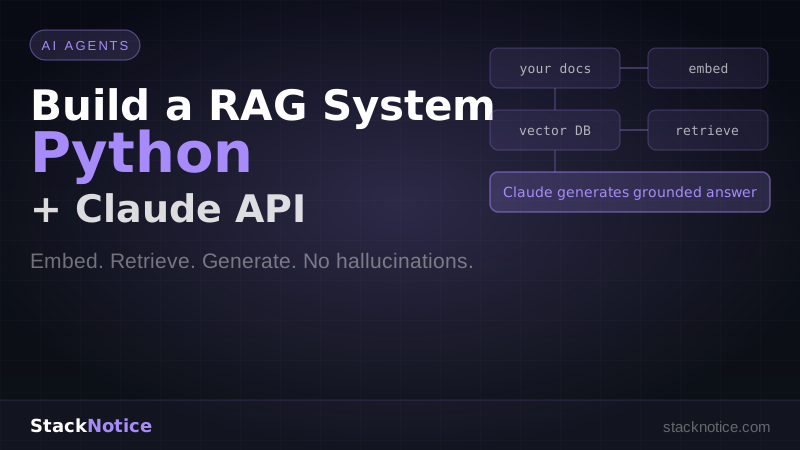
1. Embed user query → vector
2. Search vector DB → find relevant policy docs
3. Inject those docs into prompt
4. Claude: [reads the actual policy, gives accurate answer]
The model doesn't hallucinate because it's reading real data, not generating from memory.
Stack
- Python 3.11+
- Anthropic SDK — Claude for generation and embeddings
- ChromaDB — local vector database, no setup required
- httpx — for fetching documents
- PyPDF2 — for parsing PDFs
pip install anthropic chromadb pypdf2 httpxStep 1: Document Ingestion
The first step is loading your documents and splitting them into chunks. Chunks should be small enough to be semantically focused but large enough to contain useful context.
# ingestion.py

import os
import hashlib
from pathlib import Path
from typing import List
import PyPDF2


def load_text_file(path: str) -> str:
    with open(path, "r", encoding="utf-8") as f:
        return f.read()


def load_pdf(path: str) -> str:
    text = ""
    with open(path, "rb") as f:
        reader = PyPDF2.PdfReader(f)
        for page in reader.pages:
            text += page.extract_text() + "\n"
    return text


def load_document(path: str) -> str:
    ext = Path(path).suffix.lower()
    if ext == ".pdf":
        return load_pdf(path)
    elif ext in (".txt", ".md", ".mdx"):
        return load_text_file(path)
    else:
        raise ValueError(f"Unsupported file type: {ext}")


def chunk_text(
    text: str,
    chunk_size: int = 512,
    overlap: int = 64
) -> List[str]:
    """
    Split text into overlapping chunks.
    Overlap ensures context isn't lost at chunk boundaries.
    """
    words = text.split()
    chunks = []
    start = 0

    while start < len(words):
        end = start + chunk_size
        chunk = " ".join(words[start:end])
        chunks.append(chunk)
        start += chunk_size - overlap

    return chunks


def document_id(path: str, chunk_index: int) -> str:
    """Deterministic ID for deduplication."""
    content = f"{path}:{chunk_index}"
    return hashlib.md5(content.encode()).hexdigest()
Step 2: Embeddings with Claude
Embeddings convert text into vectors — arrays of numbers that capture semantic meaning. Similar text produces similar vectors, which is what enables semantic search.
Claude provides an embeddings API through the voyage-3 model (Anthropic's embedding model via the API):
# embeddings.py

import anthropic
import os

client = anthropic.Anthropic(api_key=os.environ["ANTHROPIC_API_KEY"])


def embed_texts(texts: List[str], input_type: str = "document") -> List[List[float]]:
    """
    Embed a list of texts.
    input_type: "document" for content being indexed, "query" for search queries.
    """
    response = client.beta.messages.create(
        model="voyage-3",
        max_tokens=1,
        messages=[{"role": "user", "content": "embed"}],
        extra_headers={"anthropic-beta": "embeddings-2024-02-15"},
        # Note: use the Voyage API directly for production embeddings
    )
    # For production, use the Voyage AI Python client:
    # pip install voyageai
    # import voyageai
    # vo = voyageai.Client(api_key=os.environ["VOYAGE_API_KEY"])
    # return vo.embed(texts, model="voyage-3", input_type=input_type).embeddings
    pass
For production, use the Voyage AI client directly (Anthropic's recommended embedding provider):
# embeddings.py (production version)

import voyageai
import os

vo = voyageai.Client(api_key=os.environ["VOYAGE_API_KEY"])


def embed_texts(texts: List[str], input_type: str = "document") -> List[List[float]]:
    """
    input_type: "document" for indexing, "query" for search
    """
    result = vo.embed(texts, model="voyage-3", input_type=input_type)
    return result.embeddings


def embed_query(query: str) -> List[float]:
    return embed_texts([query], input_type="query")[0]
Alternatively, use OpenAI embeddings (text-embedding-3-small) or a local model via sentence-transformers if you want fully offline operation.
Step 3: Vector Storage with ChromaDB
ChromaDB stores your vectors locally with no server required — just a directory on disk.
# vector_store.py

import chromadb
from chromadb.config import Settings
from typing import List, Dict, Any


class VectorStore:
    def __init__(self, persist_dir: str = "./chroma_db"):
        self.client = chromadb.PersistentClient(path=persist_dir)
        self.collection = self.client.get_or_create_collection(
            name="documents",
            metadata={"hnsw:space": "cosine"}  # cosine similarity
        )

    def add_documents(
        self,
        ids: List[str],
        embeddings: List[List[float]],
        documents: List[str],
        metadatas: List[Dict[str, Any]]
    ) -> None:
        # Skip already-indexed documents
        existing = set(self.collection.get(ids=ids)["ids"])
        new_indices = [i for i, id_ in enumerate(ids) if id_ not in existing]

        if not new_indices:
            print("All documents already indexed.")
            return

        self.collection.add(
            ids=[ids[i] for i in new_indices],
            embeddings=[embeddings[i] for i in new_indices],
            documents=[documents[i] for i in new_indices],
            metadatas=[metadatas[i] for i in new_indices]
        )
        print(f"Indexed {len(new_indices)} new chunks.")

    def search(
        self,
        query_embedding: List[float],
        n_results: int = 5
    ) -> List[Dict[str, Any]]:
        results = self.collection.query(
            query_embeddings=[query_embedding],
            n_results=n_results
        )

        hits = []
        for i in range(len(results["ids"][0])):
            hits.append({
                "id": results["ids"][0][i],
                "document": results["documents"][0][i],
                "metadata": results["metadatas"][0][i],
                "distance": results["distances"][0][i]
            })

        return hits

    def count(self) -> int:
        return self.collection.count()
Step 4: The Indexing Pipeline
Combine ingestion, embedding, and storage into a single pipeline:
# indexer.py

from ingestion import load_document, chunk_text, document_id
from embeddings import embed_texts
from vector_store import VectorStore
from pathlib import Path


def index_directory(directory: str, store: VectorStore) -> None:
    """Index all supported documents in a directory."""
    supported = {".pdf", ".txt", ".md", ".mdx"}
    docs_path = Path(directory)

    all_chunks = []
    all_ids = []
    all_metadatas = []

    for file_path in docs_path.rglob("*"):
        if file_path.suffix.lower() not in supported:
            continue

        print(f"Loading: {file_path}")

        try:
            text = load_document(str(file_path))
            chunks = chunk_text(text, chunk_size=512, overlap=64)

            for i, chunk in enumerate(chunks):
                chunk_id = document_id(str(file_path), i)
                all_chunks.append(chunk)
                all_ids.append(chunk_id)
                all_metadatas.append({
                    "source": str(file_path),
                    "chunk_index": i,
                    "filename": file_path.name
                })

        except Exception as e:
            print(f"Error loading {file_path}: {e}")

    if not all_chunks:
        print("No documents found.")
        return

    print(f"Embedding {len(all_chunks)} chunks...")

    # Embed in batches to avoid API limits
    batch_size = 128
    all_embeddings = []

    for i in range(0, len(all_chunks), batch_size):
        batch = all_chunks[i:i + batch_size]
        embeddings = embed_texts(batch, input_type="document")
        all_embeddings.extend(embeddings)
        print(f"  Embedded {min(i + batch_size, len(all_chunks))}/{len(all_chunks)}")

    store.add_documents(all_ids, all_embeddings, all_chunks, all_metadatas)
    print(f"Done. Total chunks indexed: {store.count()}")
Step 5: Generation with Claude
Now the retrieval + generation step. Given a user question, find the most relevant chunks and pass them as context to Claude:
# rag.py

import anthropic
import os
from embeddings import embed_query
from vector_store import VectorStore

client = anthropic.Anthropic(api_key=os.environ["ANTHROPIC_API_KEY"])


def build_context(hits: list, max_tokens: int = 4000) -> str:
    """Assemble retrieved chunks into a context string."""
    context_parts = []
    total_chars = 0
    char_limit = max_tokens * 4  # rough estimate

    for hit in hits:
        source = hit["metadata"].get("filename", "unknown")
        chunk = hit["document"]

        if total_chars + len(chunk) > char_limit:
            break

        context_parts.append(f"[Source: {source}]\n{chunk}")
        total_chars += len(chunk)

    return "\n\n---\n\n".join(context_parts)


def answer(question: str, store: VectorStore, n_results: int = 5) -> str:
    # 1. Embed the question
    query_embedding = embed_query(question)

    # 2. Retrieve relevant chunks
    hits = store.search(query_embedding, n_results=n_results)

    if not hits:
        return "No relevant documents found in the knowledge base."

    # 3. Build context
    context = build_context(hits)

    # 4. Generate answer with Claude
    prompt = f"""You are a helpful assistant. Answer the user's question based ONLY on the
provided context. If the context doesn't contain enough information to answer,
say so clearly. Do not make up information.

Context:
{context}

Question: {question}"""

    response = client.messages.create(
        model="claude-sonnet-4-6",
        max_tokens=1024,
        messages=[{"role": "user", "content": prompt}]
    )

    return response.content[0].text


def answer_with_sources(question: str, store: VectorStore) -> dict:
    """Returns the answer and its source documents."""
    query_embedding = embed_query(question)
    hits = store.search(query_embedding, n_results=5)

    if not hits:
        return {"answer": "No relevant documents found.", "sources": []}

    context = build_context(hits)
    sources = list({hit["metadata"]["filename"] for hit in hits})

    prompt = f"""Answer the question based only on the provided context.
If the answer isn't in the context, say so.

Context:
{context}

Question: {question}"""

    response = client.messages.create(
        model="claude-sonnet-4-6",
        max_tokens=1024,
        messages=[{"role": "user", "content": prompt}]
    )

    return {
        "answer": response.content[0].text,
        "sources": sources
    }
Step 6: Putting It Together
# main.py

from vector_store import VectorStore
from indexer import index_directory
from rag import answer_with_sources


def main():
    store = VectorStore(persist_dir="./chroma_db")

    # Index your documents (run once, then the DB persists)
    print("Indexing documents...")
    index_directory("./docs", store)

    # Interactive Q&A loop
    print(f"\nKnowledge base ready. {store.count()} chunks indexed.")
    print("Ask questions (type 'exit' to quit):\n")

    while True:
        question = input("Q: ").strip()

        if question.lower() in ("exit", "quit"):
            break

        if not question:
            continue

        result = answer_with_sources(question, store)
        print(f"\nA: {result['answer']}")
        print(f"Sources: {', '.join(result['sources'])}\n")


if __name__ == "__main__":
    main()
Run it:
# Put your documents in ./docs/
mkdir docs
cp your-docs.pdf docs/
cp your-notes.md docs/

python main.py
Improving Retrieval Quality
Chunk size matters. 512 words works well for most prose. For technical docs with lots of code, smaller chunks (256 words) improve precision. For narrative content, larger chunks (1024 words) preserve more context.
Hybrid search. Combine vector search (semantic) with keyword search (BM25) for better results on technical queries. ChromaDB supports this via its full-text search feature.
Re-ranking. After retrieving the top N chunks, use a cross-encoder model to re-rank them by relevance before sending to Claude. This adds latency but significantly improves quality.
Query expansion. Ask Claude to rephrase the user's question in 3 different ways, run all 3 searches, and merge the results. Catches cases where the user's phrasing doesn't match the document's phrasing.
def expand_query(question: str) -> List[str]:
    response = client.messages.create(
        model="claude-haiku-4-5-20251001",
        max_tokens=256,
        messages=[{
            "role": "user",
            "content": f"Generate 3 alternative phrasings of this question. Return only the questions, one per line:\n\n{question}"
        }]
    )
    variants = response.content[0].text.strip().split("\n")
    return [question] + variants[:3]
Production Considerations
Vector DB choice. ChromaDB is great for local development and small deployments. For production at scale, consider Pinecone, Weaviate, or pgvector (PostgreSQL extension) depending on your infrastructure.
Metadata filtering. Add filters to your search — only retrieve chunks from specific document types, date ranges, or authors. ChromaDB supports where clauses on metadata.
Caching. Cache embeddings for frequently asked questions to reduce latency and API costs.
Evaluation. Use a test set of question-answer pairs to measure retrieval precision (did we retrieve the right chunks?) and generation accuracy (did Claude answer correctly?). Without evaluation, you're flying blind.
For more on building autonomous systems with Claude, see the Python AI agent tutorial. For connecting RAG to external data sources via standardized protocols, read what is Model Context Protocol. For orchestrating multiple RAG agents working in parallel, see multi-agent systems.
RAG is the bridge between static model knowledge and live data. Once you have the pipeline running, the bottleneck isn't the technology — it's the quality of your documents. Good data in, good answers out.