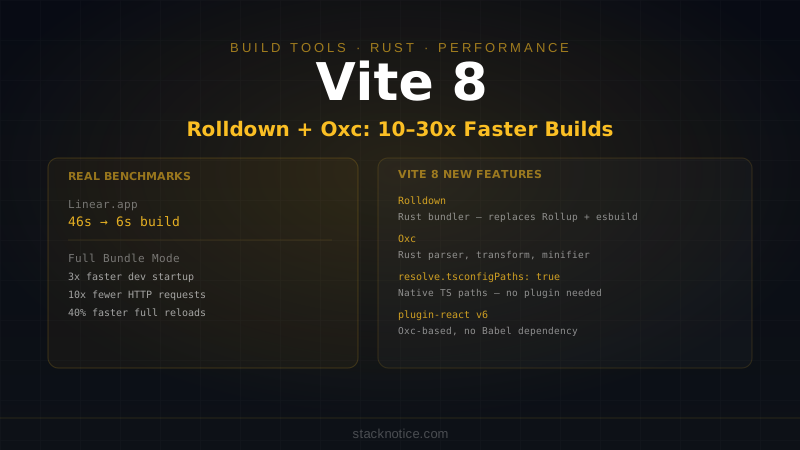
Build times in modern frontend development fell off a cliff in March 2026. Vite 8 shipped with Rolldown — a Rust-based bundler that replaces both esbuild and Rollup, runs the same Vite plugin API, and cuts production build times by 10–30x in real-world projects. Linear's build went from 46 seconds to 6. GitLab's shrank by 7x. The era of waiting for webpack is long over; now even waiting for the previous generation of fast tools is optional.
This guide covers Vite 8 from initial setup to production optimization: what the new Rust toolchain actually changes, the new Full Bundle Mode for development, TypeScript path resolution without extra plugins, and migrating from Vite 6 or 7.
What Vite Does
Before diving into Vite 8 specifics: Vite solves two different problems with two different strategies.
Development: No bundling. Vite serves files over native ES modules directly to the browser. The browser requests what it needs, Vite transforms it on demand. Dev server startup is sub-300ms regardless of project size because nothing is bundled upfront.
Production: Full bundling. Vite produces an optimized bundle — tree-shaken, code-split, minified — for deployment. Historically this used esbuild for transforms and Rollup for bundling, which meant slightly different behavior between dev and prod. That's the problem Vite 8 solves.
What Changed in Vite 8
Vite 8 replaces the dual-tool production pipeline with a single unified Rust toolchain:
- Rolldown (bundler) replaces Rollup
- Oxc (parser, transformer, minifier) replaces esbuild
- Both are from VoidZero, built to work together
- Both are Rust, running at native speeds
The result is a single toolchain that handles dev transforms and production bundling with identical semantics. No more "works in dev, breaks in prod" surprises from subtle differences between esbuild and Rollup behavior.
Installation
# New project
npm create vite@latest my-app -- --template react-ts
cd my-app
npm install
npm run dev

# Existing project
npm install --save-dev vite@latest @vitejs/plugin-react@latest
Vite 8 requires Node.js 20.0.0 or higher. Node.js 18 support was dropped in Vite 7.
vite.config.ts Anatomy
A complete vite.config.ts for a React TypeScript project:
import { defineConfig } from 'vite'
import react from '@vitejs/plugin-react'

export default defineConfig({
  plugins: [
    react(), // @vitejs/plugin-react v6 — uses Oxc, no Babel dependency
  ],

  resolve: {
    // New in Vite 8: native TypeScript path alias resolution
    // Replaces the vite-tsconfig-paths plugin entirely
    tsconfigPaths: true,
    alias: {
      // You can still add manual aliases alongside tsconfigPaths
      '@utils': '/src/lib/utils',
    },
  },

  server: {
    port: 3000,
    open: true,
    proxy: {
      '/api': {
        target: 'http://localhost:8080',
        changeOrigin: true,
        rewrite: (path) => path.replace(/^\/api/, ''),
      },
    },
    cors: true,
  },

  build: {
    outDir: 'dist',
    sourcemap: true,
    minify: true,           // uses Oxc minifier by default in Vite 8
    rollupOptions: {        // Rolldown-compatible — most Rollup options work as-is
      output: {
        manualChunks: {
          vendor: ['react', 'react-dom'],
          router: ['react-router-dom'],
        },
      },
    },
    chunkSizeWarningLimit: 1000,
  },

  css: {
    modules: {
      localsConvention: 'camelCaseOnly',
    },
    preprocessorOptions: {
      scss: {
        api: 'modern-compiler',
      },
    },
  },

  define: {
    __APP_VERSION__: JSON.stringify(process.env.npm_package_version),
  },
})
The Rust Toolchain: Rolldown + Oxc
Rolldown
Rolldown is not just Rollup rewritten in Rust. It's a bundler designed from scratch with Vite's use case in mind, with Rollup API compatibility as a constraint rather than a goal.
Key improvements over Rollup:
- 10–30x faster on real projects
- Module-level persistent caching — only re-bundles what changed
- Full Bundle Mode (covered below)
- Module Federation support — micro-frontend architecture without plugins
- Better chunk splitting — more control over output structure
The existing rollupOptions in your config works. There's a compatibility layer that auto-converts esbuild and Rollup configuration to their Rolldown equivalents. For most projects, upgrading to Vite 8 requires zero config changes.
The places where behavior changes:
// Some advanced Rollup plugin hooks are no longer supported
// Check https://rolldown.rs/guide/in-depth/rollup-compatibility for the list
// Most popular plugins (vite-plugin-*, @vitejs/plugin-*) are already updated
Oxc
Oxc is the parser and transformer that Rolldown uses internally. In Vite 8, it also handles:
- TypeScript stripping — removes types at transpile time
- JSX transform — replaces Babel for React Refresh in
@vitejs/plugin-reactv6 - Minification — replaces terser and esbuild's minifier
- Tree-shaking — Oxc's semantic analysis produces better dead code elimination than esbuild's simpler approach
The impact on @vitejs/plugin-react v6:
# Vite 7 deps:
@vitejs/plugin-react → requires @babel/core, @babel/plugin-transform-react-jsx-source
# Installation size: ~45MB

# Vite 8 deps:
@vitejs/plugin-react@6 → uses Oxc directly, no Babel
# Installation size: ~8MB
Babel configuration you might have in your Vite config for React is no longer needed:
// Vite 7 — Babel config for decorators, styled-components, etc.
react({
  babel: {
    plugins: ['babel-plugin-styled-components'],
  },
})

// Vite 8 — Babel is gone; use Oxc plugins or Vite plugins instead
// For styled-components: use @vitejs/plugin-oxc-styled-components
// For decorators: use resolve.oxcOptions.decorator
react()
Most projects don't have custom Babel config. For those that do, there's usually an Oxc or Vite plugin equivalent available.
Full Bundle Mode
The most significant new feature for development experience. Normally, Vite's dev server uses unbundled native ESM — fast to start but results in potentially thousands of individual HTTP requests as the browser fetches each module separately.
Full Bundle Mode bundles during development too, giving you:
- 3x faster dev server startup on large projects (bundling is still faster than letting the browser resolve 1,000 imports)
- 40% faster full reloads
- 10x fewer network requests
- Dev and prod environments that behave identically
Enable it in config:
export default defineConfig({
  dev: {
    bundleMode: true, // enable Full Bundle Mode
  },
})
Or toggle it for a single run:
VITE_BUNDLE_MODE=true viteFor small projects (under ~100 modules), unbundled mode is still faster. Full Bundle Mode's benefits become significant at medium-to-large scale.
HMR continues to work in Full Bundle Mode — Vite invalidates only the affected module chunk, not the entire bundle.
TypeScript Paths Without Plugins
One longstanding Vite annoyance: tsconfig.json path aliases don't automatically work in Vite — you had to install vite-tsconfig-paths and add it as a plugin. Vite 8 fixes this natively:
// vite.config.ts
export default defineConfig({
  resolve: {
    tsconfigPaths: true,  // reads paths from your tsconfig.json
  },
})
// tsconfig.json — these paths now work without any plugin
{
"compilerOptions": {
"baseUrl": ".",
"paths": {
"@/*": ["./src/*"],
"@components/*": ["./src/components/*"],
"@hooks/*": ["./src/hooks/*"],
"@lib/*": ["./src/lib/*"]
}
}
}You can uninstall vite-tsconfig-paths if you were using it.
Environment Variables
Vite exposes env variables via import.meta.env:
// .env
VITE_API_URL=https://api.example.com
VITE_APP_NAME=MyApp
# Variables without VITE_ prefix are NOT exposed to the browser

// In your code
const apiUrl = import.meta.env.VITE_API_URL  // string | undefined
const isDev = import.meta.env.DEV             // boolean
const isProd = import.meta.env.PROD           // boolean
const mode = import.meta.env.MODE             // 'development' | 'production' | custom
For TypeScript type safety, add to vite-env.d.ts:
/// <reference types="vite/client" />

interface ImportMetaEnv {
  readonly VITE_API_URL: string
  readonly VITE_APP_NAME: string
}

interface ImportMeta {
  readonly env: ImportMetaEnv
}
Environment-specific files load in priority order:
.env.production.local  → highest priority
.env.production
.env.local
.env                   → lowest priority
Build Optimization
Code Splitting
Automatic code splitting puts each dynamic import into its own chunk. Be explicit for third-party dependencies:
build: {
  rollupOptions: {
    output: {
      manualChunks(id) {
        // Put all node_modules into a vendor chunk
        if (id.includes('node_modules')) {
          // Split heavy packages into their own chunks
          if (id.includes('react')) return 'react-vendor'
          if (id.includes('@tanstack')) return 'tanstack-vendor'
          if (id.includes('recharts') || id.includes('d3')) return 'chart-vendor'
          return 'vendor'
        }
      },
    },
  },
},
Asset Handling
build: {
  assetsInlineLimit: 4096,  // inline assets under 4KB as base64
  assetsDir: 'assets',      // subdirectory for generated assets
  rollupOptions: {
    output: {
      // Content-hash filenames for cache busting
      assetFileNames: 'assets/[name]-[hash][extname]',
      chunkFileNames: 'js/[name]-[hash].js',
      entryFileNames: 'js/[name]-[hash].js',
    },
  },
},
Analyzing Bundle Size
npm install --save-dev rollup-plugin-visualizerimport { visualizer } from 'rollup-plugin-visualizer'
export default defineConfig({
plugins: [
react(),
visualizer({
open: true, // opens browser after build
gzipSize: true,
brotliSize: true,
}),
],
})Run npm run build and it opens an interactive treemap of your bundle.
Library Mode
Building a package for npm instead of an app? Library mode skips HTML entry, externalizes dependencies, and outputs formats other packages can consume:
import { resolve } from 'path'
import { defineConfig } from 'vite'
import dts from 'vite-plugin-dts'

export default defineConfig({
  plugins: [
    dts({ include: ['src'] }),  // generates .d.ts files
  ],
  build: {
    lib: {
      entry: resolve(__dirname, 'src/index.ts'),
      name: 'MyLib',
      formats: ['es', 'cjs'],
      fileName: (format) => `my-lib.${format}.js`,
    },
    rollupOptions: {
      // Don't bundle peer dependencies
      external: ['react', 'react-dom'],
      output: {
        globals: {
          react: 'React',
          'react-dom': 'ReactDOM',
        },
      },
    },
  },
})
The output: dist/my-lib.es.js and dist/my-lib.cjs.js, plus TypeScript declarations. In package.json:
{
  "main": "./dist/my-lib.cjs.js",
  "module": "./dist/my-lib.es.js",
  "exports": {
    ".": {
      "import": "./dist/my-lib.es.js",
      "require": "./dist/my-lib.cjs.js"
    }
  },
  "types": "./dist/index.d.ts"
}
Plugin Ecosystem
The most used plugins in 2026:
import { defineConfig } from 'vite'
import react from '@vitejs/plugin-react'                   // React + Fast Refresh (Oxc-based)
import { visualizer } from 'rollup-plugin-visualizer'      // Bundle analysis
import compression from 'vite-plugin-compression'          // Brotli/gzip compression
import { VitePWA } from 'vite-plugin-pwa'                  // Service worker + manifest
import tsconfigPaths from 'vite-tsconfig-paths'            // (no longer needed in Vite 8)

export default defineConfig({
  plugins: [
    react(),
    // PWA
    VitePWA({
      registerType: 'autoUpdate',
      manifest: {
        name: 'My App',
        short_name: 'App',
        theme_color: '#0D1117',
      },
    }),
    // Compression for production
    process.env.NODE_ENV === 'production' && compression({
      algorithm: 'brotliCompress',
    }),
  ],
})
Migration from Vite 6 or 7
Vite 8's compatibility layer handles most migrations automatically. For the majority of projects:
npm install vite@latest @vitejs/plugin-react@latest
npm run build
That's it. The Rolldown compatibility layer converts your existing rollupOptions configuration. If your build passes, you're done.
What to check manually:
// 1. Remove vite-tsconfig-paths if you were using it
// Before:
import tsconfigPaths from 'vite-tsconfig-paths'
plugins: [react(), tsconfigPaths()]
// After:
resolve: { tsconfigPaths: true }

// 2. Remove Babel config from plugin-react (if any)
// Before:
react({ babel: { plugins: ['babel-plugin-X'] } })
// After: find the Oxc/Vite equivalent for plugin X

// 3. Node.js version
// Vite 8 requires Node.js 20+
// Update your CI/CD if it uses Node.js 18

// 4. Check custom plugins
// Plugins using Rollup-only APIs (not in Vite's virtual plugin API) may need updates
// Run 'npm run build' and check for warnings about deprecated hooks
Common Rollup-to-Rolldown differences:
Most projects see zero issues. The edge cases:
generateBundlehook: behavior identicalrenderChunk: works, some options differresolveIdwithisEntry: unchanged- Custom
intro/outroin chunks: works acornInjectPlugins: removed (Oxc handles parsing now)
For a detailed diff, see the Rolldown compatibility docs at rolldown.rs/guide/in-depth/rollup-compatibility.
With Vitest (Testing)
Vite 8 pairs naturally with Vitest — they share the same config file and plugin pipeline:
/// <reference types="vitest" />
import { defineConfig } from 'vite'
import react from '@vitejs/plugin-react'

export default defineConfig({
  plugins: [react()],
  resolve: {
    tsconfigPaths: true,
  },
  test: {
    environment: 'jsdom',
    setupFiles: ['./src/test/setup.ts'],
    globals: true,
    coverage: {
      provider: 'v8',
      reporter: ['text', 'html'],
    },
  },
})
See the Next.js testing guide for patterns that apply directly to Vite projects.
Quick Reference
# Create project
npm create vite@latest my-app -- --template react-ts

# Dev server
vite                           # start dev server
vite --port 4000               # custom port
vite --host                    # expose to network

# Build
vite build                     # production build
vite build --sourcemap         # with source maps
vite preview                   # preview prod build locally

# Key config
resolve.tsconfigPaths: true    # native tsconfig path aliases (no plugin needed)
dev.bundleMode: true           # Full Bundle Mode (3x faster startup, 10x fewer requests)
build.rollupOptions            # Rolldown-compatible build config
// Minimal vite.config.ts for React + TypeScript (Vite 8)
import { defineConfig } from 'vite'
import react from '@vitejs/plugin-react'
export default defineConfig({
plugins: [react()],
resolve: { tsconfigPaths: true },
build: {
rollupOptions: {
output: {
manualChunks: {
vendor: ['react', 'react-dom'],
},
},
},
},
})Why Vite 8 Matters
The numbers are real: 87% build time reductions aren't marketing. A 46-second build becoming a 6-second build changes how you work — you stop avoiding rebuilds, you run more experiments, you ship faster.
More importantly, the dev/prod parity problem is solved. Years of "it works in dev but breaks in prod" bugs traced back to differences between esbuild and Rollup behavior are gone. One toolchain, one behavior. That's worth a major version bump.
For greenfield projects in 2026, Vite 8 is the default. For existing projects, the migration is almost always a package.json update — check the Biome guide for the same "zero config change" approach applied to linting.