At some point every growing project hits the same wall: you have a web app, a mobile app, a shared UI library, and a utility package — all in separate repositories. Keeping them in sync is a full-time job.
A monorepo puts everything in one place. Turborepo makes that monorepo fast.
This guide walks you through a complete Turborepo setup with two Next.js apps, a shared UI package, shared TypeScript configs, and a CI pipeline with remote caching.
Why Turborepo
You've probably heard of Nx and Lerna. Turborepo's advantage is simplicity: it does one thing — task orchestration with caching — and does it extremely well.
- Smart caching: if nothing changed in a package, Turborepo skips rebuilding it entirely
- Parallel execution: runs tasks across packages simultaneously
- Remote caching: share the build cache across your entire team and CI — Vercel hosts this for free
- Zero config for small repos: a single
turbo.jsonis enough to start
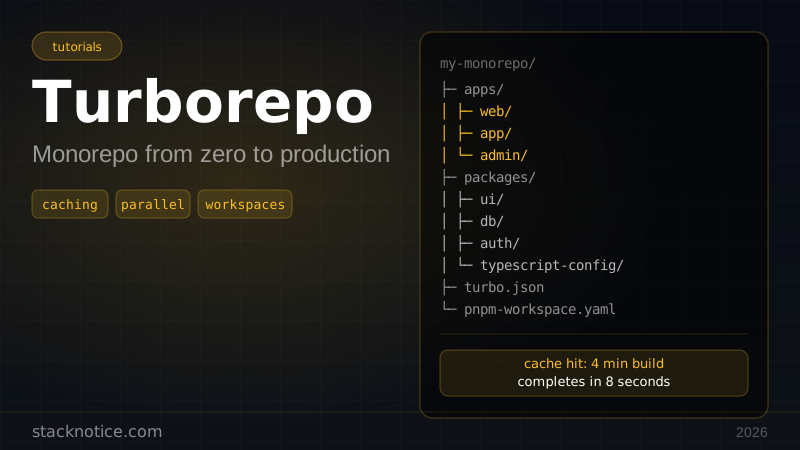
A cold build that takes 4 minutes runs in under 10 seconds on a cache hit.
Scaffold the monorepo
npx create-turbo@latest my-monorepo
cd my-monorepo
Choose pnpm when prompted — it's the recommended package manager for Turborepo because of its strict dependency isolation and fast installs.
The scaffold gives you this structure:
my-monorepo/
├── apps/
│   ├── web/          # Next.js app
│   └── docs/         # Another Next.js app
├── packages/
│   ├── ui/           # Shared React components
│   ├── typescript-config/  # Shared tsconfig
│   └── eslint-config/      # Shared ESLint rules
├── turbo.json
├── package.json      # Root (private: true)
└── pnpm-workspace.yaml
Understanding workspaces
# pnpm-workspace.yaml
packages:
  - "apps/*"
  - "packages/*"
This tells pnpm that everything under apps/ and packages/ is a workspace package. Each has its own package.json with its own dependencies.
The root package.json is always "private": true — it's never published and only contains dev tooling:
{
  "name": "my-monorepo",
  "private": true,
  "scripts": {
    "build": "turbo build",
    "dev": "turbo dev",
    "lint": "turbo lint",
    "test": "turbo test",
    "format": "turbo format"
  },
  "devDependencies": {
    "turbo": "^2.0.0"
  }
}
You run everything from the root. turbo build runs build in every package in the correct order.
turbo.json — the pipeline
{
  "$schema": "https://turbo.build/schema.json",
  "tasks": {
    "build": {
      "dependsOn": ["^build"],
      "inputs": ["$TURBO_DEFAULT$", ".env*"],
      "outputs": [".next/**", "!.next/cache/**", "dist/**"]
    },
    "lint": {
      "dependsOn": ["^lint"]
    },
    "test": {
      "dependsOn": ["^build"],
      "inputs": ["src/**", "test/**"]
    },
    "dev": {
      "cache": false,
      "persistent": true
    },
    "format": {
      "outputs": []
    }
  }
}
The key is "dependsOn": ["^build"]. The ^ means "first build all packages that this package depends on". So if web depends on packages/ui, Turborepo builds ui before web automatically.
Cache inputs and outputs: Turborepo hashes the inputs to decide if the cache is valid. If nothing in src/** changed, it restores from cache and skips the build entirely.
Shared TypeScript config
Create a base tsconfig that all packages extend:
// packages/typescript-config/base.json
{
  "$schema": "https://json.schemastore.org/tsconfig",
  "compilerOptions": {
    "target": "ES2022",
    "lib": ["ES2022"],
    "module": "NodeNext",
    "moduleResolution": "NodeNext",
    "declaration": true,
    "declarationMap": true,
    "sourceMap": true,
    "strict": true,
    "noUncheckedIndexedAccess": true,
    "noImplicitOverride": true,
    "skipLibCheck": true
  }
}
// packages/typescript-config/nextjs.json
{
"$schema": "https://json.schemastore.org/tsconfig",
"extends": "./base.json",
"compilerOptions": {
"target": "ES2017",
"lib": ["dom", "dom.iterable", "esnext"],
"module": "esnext",
"moduleResolution": "bundler",
"jsx": "preserve",
"allowJs": true,
"plugins": [{ "name": "next" }]
}
}Each Next.js app extends this:
// apps/web/tsconfig.json
{
  "extends": "@repo/typescript-config/nextjs.json",
  "include": ["next-env.d.ts", "**/*.ts", "**/*.tsx", ".next/types/**/*.ts"],
  "exclude": ["node_modules"]
}
This pairs well with the TypeScript 6 migration guide — you update strict settings once in the shared config and it propagates everywhere.
Shared linting with Biome
Instead of complex ESLint sharing, use Biome — one config file, zero plugin inheritance issues:
// packages/biome-config/biome.json
{
  "$schema": "https://biomejs.dev/schemas/1.9.0/schema.json",
  "organizeImports": { "enabled": true },
  "linter": {
    "enabled": true,
    "rules": {
      "recommended": true,
      "correctness": {
        "noUnusedVariables": "error",
        "noUnusedImports": "error"
      },
      "suspicious": {
        "noExplicitAny": "warn"
      }
    }
  },
  "formatter": {
    "enabled": true,
    "indentStyle": "space",
    "indentWidth": 2,
    "lineWidth": 100
  }
}
Each package extends it:
// apps/web/biome.json
{
  "extends": ["//packages/biome-config/biome.json"]
}
Building the shared UI package
This is where monorepos pay off — write a component once, use it across all apps.
// packages/ui/package.json
{
  "name": "@repo/ui",
  "version": "0.0.0",
  "private": true,
  "exports": {
    "./button": {
      "types": "./src/button.tsx",
      "default": "./src/button.tsx"
    },
    "./card": {
      "types": "./src/card.tsx",
      "default": "./src/card.tsx"
    }
  },
  "peerDependencies": {
    "react": "^19",
    "react-dom": "^19"
  },
  "devDependencies": {
    "@repo/typescript-config": "*",
    "typescript": "^5"
  }
}
// packages/ui/src/button.tsx
import type { ButtonHTMLAttributes, ReactNode } from 'react'
interface ButtonProps extends ButtonHTMLAttributes<HTMLButtonElement> {
variant?: 'primary' | 'secondary' | 'ghost'
size?: 'sm' | 'md' | 'lg'
children: ReactNode
}
export function Button({
variant = 'primary',
size = 'md',
className,
children,
...props
}: ButtonProps) {
const base = 'inline-flex items-center justify-center rounded-md font-medium transition-colors'
const variants = {
primary: 'bg-blue-600 text-white hover:bg-blue-700',
secondary: 'bg-gray-100 text-gray-900 hover:bg-gray-200',
ghost: 'text-gray-600 hover:bg-gray-100',
}
const sizes = {
sm: 'h-8 px-3 text-sm',
md: 'h-10 px-4',
lg: 'h-12 px-6 text-lg',
}
return (
<button
className={`${base} ${variants[variant]} ${sizes[size]} ${className ?? ''}`}
{...props}
>
{children}
</button>
)
}Consume it in any app:
// apps/web/package.json
{
  "dependencies": {
    "@repo/ui": "*"
  }
}
// apps/web/src/app/page.tsx
import { Button } from '@repo/ui/button'
export default function Home() {
return <Button variant="primary">Get Started</Button>
}TypeScript follows the import all the way to the source in packages/ui. You get full type checking and Go-to-Definition across the monorepo.
Adding a new Next.js app
cd apps
npx create-next-app@latest dashboard --typescript --tailwind --app
Update its package.json to use workspace packages:
// apps/dashboard/package.json
{
  "name": "dashboard",
  "dependencies": {
    "@repo/ui": "*",
    "next": "^15",
    "react": "^19",
    "react-dom": "^19"
  },
  "devDependencies": {
    "@repo/typescript-config": "*",
    "@repo/biome-config": "*"
  }
}
Run pnpm install from the root to link everything.
Filtering — run tasks for specific packages
You don't always want to rebuild everything:
# Build only the web app and its dependencies
pnpm turbo build --filter=web

# Build everything that changed since main
pnpm turbo build --filter="[origin/main]"

# Run dev for both apps simultaneously
pnpm turbo dev --filter="./apps/*"

# Test only packages affected by a file change
pnpm turbo test --filter="...[src/utils.ts]"
The --filter flag is what makes day-to-day work in a large monorepo manageable.
Remote caching with Vercel
The real power of Turborepo is sharing the cache across your team and CI. Every developer and every CI run can reuse each other's build artifacts.
Link to Vercel Remote Cache:
npx turbo login
npx turbo link
Now when any developer builds a package that another developer already built, they get the cached output in seconds instead of rebuilding from scratch.
For CI without Vercel, you can use Turborepo's self-hosted remote cache or services like Depot.
GitHub Actions CI
# .github/workflows/ci.yml
name: CI

on:
  push:
    branches: [main]
  pull_request:

jobs:
  build:
    runs-on: ubuntu-latest
    steps:
      - uses: actions/checkout@v4
        with:
          fetch-depth: 0  # needed for --filter=[HEAD^1]

      - uses: pnpm/action-setup@v4
        with:
          version: 9

      - uses: actions/setup-node@v4
        with:
          node-version: 22
          cache: 'pnpm'

      - run: pnpm install --frozen-lockfile

      - name: Build, lint, and test
        run: pnpm turbo build lint test
        env:
          TURBO_TOKEN: ${{ secrets.TURBO_TOKEN }}
          TURBO_TEAM: ${{ vars.TURBO_TEAM }}

  deploy-web:
    needs: build
    runs-on: ubuntu-latest
    if: github.ref == 'refs/heads/main'
    steps:
      - uses: actions/checkout@v4
      - uses: pnpm/action-setup@v4
      - run: pnpm install --frozen-lockfile
      - run: pnpm turbo build --filter=web
        env:
          TURBO_TOKEN: ${{ secrets.TURBO_TOKEN }}
          TURBO_TEAM: ${{ vars.TURBO_TEAM }}
TURBO_TOKEN and TURBO_TEAM enable remote caching in CI. If the branch build was already done locally, CI fetches from cache and completes in seconds.
Managing dependencies
Add a dependency to a specific app:
pnpm add react-hook-form --filter=webAdd a dev dependency to the root:
pnpm add -Dw typescriptUpdate all packages at once:
pnpm update -rThe -r flag runs the command recursively across all workspaces. This is one place where Bun workspaces are catching up fast — worth watching if you want even faster installs.
Common gotchas
Gotcha 1: peer dependencies in shared packages
packages/ui should list React as a peerDependency, not a dependency. Otherwise each app gets its own copy of React, which causes the "hooks called in a different React instance" error.
Gotcha 2: missing "private": true on internal packages
Any package you don't want published to npm should have "private": true. Without it, a stray npm publish can accidentally publish your internal packages.
Gotcha 3: forgetting to add outputs to turbo.json
If you don't list outputs for a task, Turborepo can't restore them from cache. Always specify what build artifacts to cache (.next/**, dist/**).
Gotcha 4: using require() in ESM packages
If your shared packages use "type": "module", importing them with require() anywhere will fail. Stick to one module system per package, or use the exports field with dual CJS/ESM builds.
Gotcha 5: pnpm-lock.yaml conflicts
In a team setting, lockfile conflicts are common. Always resolve them by running pnpm install after pulling — never manually edit the lockfile.
What a real-world structure looks like
Once you're building seriously, the monorepo grows naturally:
apps/
├── web/         # marketing site (Next.js)
├── app/         # main product (Next.js)
├── admin/       # internal admin (Next.js)
└── mobile/      # Expo React Native

packages/
├── ui/          # shared components
├── db/          # Drizzle schema + client
├── auth/        # shared auth logic
├── email/       # email templates (React Email)
├── utils/       # shared utilities
├── typescript-config/
└── biome-config/
Each packages/* item is a first-class TypeScript package consumed by any app that needs it. The Next.js App Router works particularly well here because Server Components can import directly from @repo/db with no API layer in between.
Summary
Turborepo solves the coordination problem of multi-package TypeScript projects. The learning curve is shallow — you only need turbo.json and workspace package references to get started.
The biggest wins:
- Shared packages — UI, types, utils, database client — written once, typed everywhere
- Intelligent caching — unchanged packages never rebuild
- Remote cache — team and CI share build artifacts
- Filtering — work on one package without rebuilding the world
Start small: pull an existing project into the apps/ folder and extract one shared package. The structure naturally emerges from there.