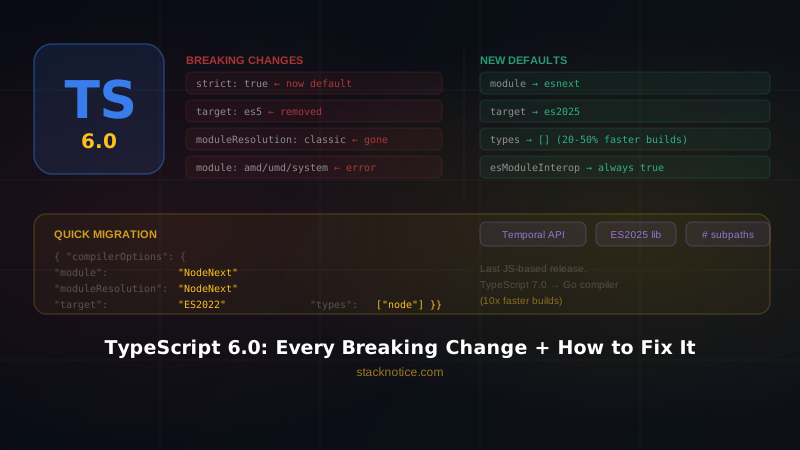
TypeScript 6.0 landed on March 23, 2026 — and it's not a minor release. It's the last TypeScript version built on the JavaScript codebase before the Go-powered TypeScript 7.0 takes over. Microsoft used this release to modernize every default that should have changed years ago.
The result: a lot of existing projects will have compiler errors on day one of upgrading. But every breaking change has a clear fix. This guide covers all of them.
Why TypeScript 6.0 Is Different
TypeScript 6.0 exists to serve one purpose: align the ecosystem before the native Go compiler drops in 7.0. The team took the opportunity to remove legacy options, change outdated defaults, and enforce practices that the community already considers standard.
If your project followed modern TypeScript conventions, you might need zero changes. If you're maintaining a legacy codebase — CommonJS, AMD modules, ES5 targets — you have work to do.
Quick check: Run
npx tsc --versionbefore starting. If you see6.x, you're on the new version.
Breaking Change #1 — strict is now true by default
What changed: TypeScript 6.0 enables strict mode unconditionally. Previously you had to opt in with "strict": true in your tsconfig.
What breaks: Any project that didn't have strict mode enabled will now surface type errors that were silently ignored before. Common ones:
noImplicitAny— variables inferred asanynow errorstrictNullChecks—nullandundefinedare no longer assignable to all typesstrictFunctionTypes— stricter function parameter checking
How to fix:
If your codebase is large and you can't fix everything at once, add this to your tsconfig to restore the old behavior temporarily:
{
  "compilerOptions": {
    "strict": false
  }
}
Then enable individual strict flags one by one as you fix them:
{
  "compilerOptions": {
    "noImplicitAny": true,
    "strictNullChecks": true
  }
}
The right long-term move is to enable strict: true and fix the errors. Use // @ts-expect-error to temporarily suppress specific errors without silencing the whole project.
Breaking Change #2 — target defaults to es2025
What changed: The default target is now the most recent supported ECMAScript spec version — currently es2025. Previously it defaulted to es3.
What breaks: If you were relying on the default target to output old JavaScript syntax, your output will now use modern features (optional chaining, nullish coalescing, logical assignment, etc.) that older environments may not support.
How to fix:
If you need to support older environments, set the target explicitly:
{
  "compilerOptions": {
    "target": "ES2018"
  }
}
If you're targeting modern browsers or Node.js 18+, you can leave the default or set it explicitly:
{
  "compilerOptions": {
    "target": "ES2025"
  }
}
Note: For projects using bundlers (Vite, esbuild, Webpack), the TypeScript target doesn't control final browser output — the bundler does. In those cases, set
"target": "ESNext"in TypeScript and let your bundler handle downleveling.
Breaking Change #3 — module defaults to esnext
What changed: The default module format is now esnext instead of commonjs. ESM is the dominant module format in 2026.
What breaks: Projects that relied on CommonJS output without specifying it will now emit ES modules. This breaks things like require() calls and CJS-specific patterns.
How to fix:
If you're on Node.js with CommonJS:
{
  "compilerOptions": {
    "module": "CommonJS",
    "moduleResolution": "node"
  }
}
If you're on Node.js 20+ with native ESM:
{
  "compilerOptions": {
    "module": "NodeNext",
    "moduleResolution": "NodeNext"
  }
}
If you're using a bundler (Vite, esbuild, Rollup):
{
  "compilerOptions": {
    "module": "ESNext",
    "moduleResolution": "Bundler"
  }
}
Breaking Change #4 — moduleResolution: "classic" is removed
What changed: The classic module resolution strategy — TypeScript's original algorithm from before Node.js became the standard — has been removed entirely. Setting it now throws an error.
What breaks: Any tsconfig with "moduleResolution": "classic" will fail to compile.
How to fix:
| Old setting | Replace with |
|---|---|
"classic" + CommonJS | "node" or "node16" |
"classic" + bundler | "bundler" |
"classic" + Node 20+ | "nodenext" |
Example for a modern bundler setup:
{
  "compilerOptions": {
    "moduleResolution": "Bundler"
  }
}
Breaking Change #5 — AMD, UMD, and System modules are now errors
What changed: Setting "module": "amd", "module": "umd", or "module": "system" is now a compiler error. These formats were designed for a pre-ESM world.
What breaks: Legacy projects using RequireJS (AMD), UMD bundles, or SystemJS.
How to fix:
The right move is migrating to a modern bundler. These formats are dead in practice:
- RequireJS/AMD → migrate to Vite or esbuild, set
"module": "ESNext" - UMD → most bundlers generate UMD if you need it for library output; remove it from TypeScript config
- SystemJS → replace with native ESM
If you absolutely need UMD output in the short term, generate it through your bundler (Rollup's output.format: 'umd') rather than through TypeScript directly.
Breaking Change #6 — target: "ES5" is deprecated
What changed: ES5 is no longer a valid compilation target. TypeScript's minimum supported target is now ES2015.
What breaks: Projects explicitly setting "target": "ES5" will get a deprecation warning (error in strict configs).
How to fix:
For most modern projects, jump straight to ES2018 or higher:
{
  "compilerOptions": {
    "target": "ES2018"
  }
}
If you actually need ES5 output (supporting IE11, which should be impossible to justify in 2026), use Babel or esbuild for downleveling instead:
npx esbuild src/index.ts --bundle --target=es5 --outfile=dist/index.jsBreaking Change #7 — esModuleInterop and allowSyntheticDefaultImports always enabled
What changed: These two flags are now always true. You can no longer disable them.
What was: They were opt-in to avoid breaking existing projects. Setting them to false often caused subtle runtime issues when importing CommonJS modules from ESM.
What breaks: Code that relied on the absence of synthetic default imports — usually CJS-specific import patterns like:
// Old pattern that breaks without esModuleInterop
import * as React from 'react'

// Now this works correctly everywhere
import React from 'react'
In practice, this only breaks if you wrote code specifically to work without esModuleInterop. Most projects already had it enabled.
Breaking Change #8 — types defaults to an empty array
What changed: TypeScript previously auto-included all @types/* packages installed in your node_modules/@types directory. Now it starts with an empty list.
What this means: If you had @types/node, @types/jest, or similar installed globally and relied on them being auto-included, they won't be — unless you're inside a file that's logically part of that environment.
The upside: Microsoft reports this single change improved build times by 20–50% in tested projects. TypeScript was doing unnecessary work resolving types you weren't using.
How to fix:
Explicitly declare the types your project needs:
{
  "compilerOptions": {
    "types": ["node", "jest"]
  }
}
Or, for environment-specific types in a monorepo, use tsconfig per environment:
// tsconfig.test.json
{
  "extends": "./tsconfig.json",
  "compilerOptions": {
    "types": ["jest", "node"]
  }
}
Breaking Change #9 — rootDir defaults to tsconfig location
What changed: rootDir now defaults to the directory containing tsconfig.json instead of being inferred from source file paths.
What breaks: Projects where source files lived in subdirectories and rootDir was previously inferred automatically. Output paths may shift.
How to fix:
Set it explicitly to match your existing structure:
{
  "compilerOptions": {
    "rootDir": "./src",
    "outDir": "./dist"
  }
}
Breaking Change #10 — noUncheckedSideEffectImports is now true by default
What changed: TypeScript now checks that side-effect-only imports (import './setup') resolve to an actual file. Previously a typo here was silently ignored.
What breaks: Imports to files that don't exist, or paths that relied on ambient module declarations without real files behind them.
How to fix:
If you have legitimate ambient modules:
// src/types/modules.d.ts
declare module './polyfills'
declare module './legacy-lib'
Or if you need to disable the check temporarily:
{
  "compilerOptions": {
    "noUncheckedSideEffectImports": false
  }
}
New Features Worth Knowing
TypeScript 6.0 isn't only breaking changes. It ships real improvements:
ES2025 target and lib
Full support for "target": "ES2025" and "lib": ["ES2025"], including Promise.try, Iterator methods, RegExp.escape, and Float16Array.
Temporal types
The Temporal API — the long-awaited replacement for Date — now has built-in types. No more installing @js-temporal/polyfill types separately.
const now = Temporal.Now.plainDateTimeISO()
console.log(now.toString()) // "2026-04-10T14:32:00"
Improved type inference for method calls in generics
TypeScript 6.0 significantly improves inference when passing method expressions to generic function calls — a common pain point in codebases using functional patterns.
#/ subpath imports
TypeScript now supports the # prefix for package subpath imports defined in package.json:
// package.json
{
  "imports": {
    "#utils": "./src/utils.js"
  }
}

// Any file in the package
import { helper } from '#utils'
Complete Migration Checklist
Copy this into your project and work through it:
[ ] Run: npm install typescript@6 --save-dev
[ ] Run: npx tsc --noEmit and collect all errors

Breaking changes to check:
[ ] Remove "moduleResolution": "classic" from tsconfig
[ ] Replace "module": "amd"/"umd"/"system" with modern equivalent
[ ] Replace "target": "es5" with "ES2015" or higher
[ ] Add explicit "types": [...] if you rely on @types/* auto-inclusion
[ ] Add explicit "rootDir" if it was previously inferred
[ ] Fix noImplicitAny errors from strict mode (or add "strict": false temporarily)
[ ] Fix strictNullChecks errors (or suppress with ts-expect-error + ticket)
[ ] Fix side-effect imports that don't resolve to real files

New defaults to verify:
[ ] Check "module" default (now esnext) — set explicitly if you need CJS
[ ] Check "target" default (now es2025) — set explicitly for older environments
[ ] Verify esModuleInterop behavior is correct in your imports

Optional improvements:
[ ] Add "target": "ES2025" to access new lib types
[ ] Use Temporal API if relevant
[ ] Audit #/ subpath imports in packages you maintain
The Bigger Picture
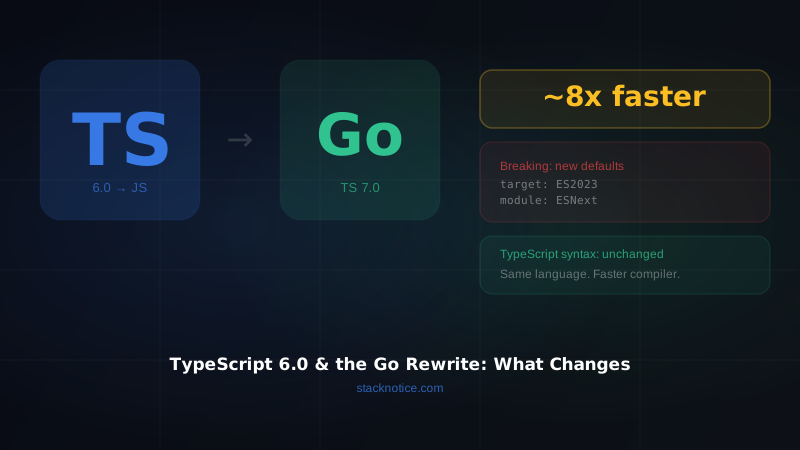
TypeScript 6.0 is a bridge release. Microsoft's real goal is TypeScript 7.0 — the native Go compiler that's already in preview and benchmarks at 10x faster than the current compiler on large codebases. Read the full breakdown in TypeScript's Go rewrite and what it means for developers.
TypeScript 6.0 modernizes the defaults so that when 7.0 drops, the ecosystem is in the right shape. Most of these changes (strict by default, ESM first, no ES5) should have happened years ago. They're just overdue.
Upgrade now, fix the errors, and your project will be ready for what comes next.
Already using Claude Code to catch TypeScript errors as you write? Check out Claude Code Subagents to run type checks across your entire codebase in parallel.