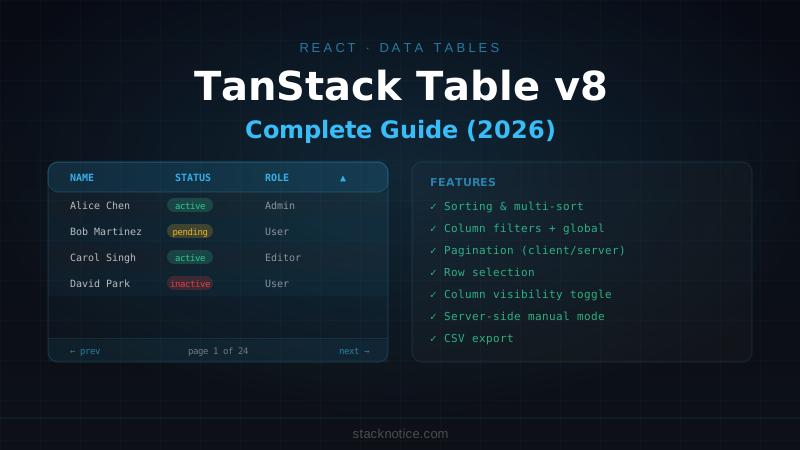
Building a data table in React that actually works — sorting, filtering, pagination, row selection, and responsive column controls — is surprisingly complex when you do it yourself. TanStack Table (formerly React Table) is the headless library that handles all the state logic while you own the markup completely. No CSS to fight, no opinionated UI, just the table logic.
This guide covers every feature you'll need for a real admin dashboard or data management interface.
Setup
npm install @tanstack/react-tableTanStack Table is headless — it returns data and handlers, but no HTML. You write the <table> elements yourself, which means it works with any UI library.
Column Definitions
The starting point is defining your columns. Each column knows which field it shows, how to display it, and how to sort/filter:
import { ColumnDef } from '@tanstack/react-table'

type User = {
  id: string
  name: string
  email: string
  role: 'admin' | 'user' | 'viewer'
  status: 'active' | 'inactive'
  createdAt: Date
}

export const columns: ColumnDef<User>[] = [
  {
    accessorKey: 'name',
    header: 'Name',
    cell: ({ row }) => (
      <div className="flex items-center gap-3">
        <Avatar className="h-8 w-8">
          <AvatarFallback>{row.original.name[0]}</AvatarFallback>
        </Avatar>
        <span className="font-medium">{row.getValue('name')}</span>
      </div>
    ),
  },
  {
    accessorKey: 'email',
    header: 'Email',
  },
  {
    accessorKey: 'role',
    header: 'Role',
    cell: ({ row }) => {
      const role = row.getValue<string>('role')
      return (
        <Badge variant={role === 'admin' ? 'default' : 'secondary'}>
          {role}
        </Badge>
      )
    },
  },
  {
    accessorKey: 'status',
    header: 'Status',
    cell: ({ row }) => (
      <span className={cn(
        'inline-flex items-center gap-1 rounded-full px-2 py-0.5 text-xs font-medium',
        row.getValue('status') === 'active'
          ? 'bg-green-50 text-green-700'
          : 'bg-gray-100 text-gray-600'
      )}>
        <span className={cn(
          'h-1.5 w-1.5 rounded-full',
          row.getValue('status') === 'active' ? 'bg-green-500' : 'bg-gray-400'
        )} />
        {row.getValue('status')}
      </span>
    ),
  },
  {
    accessorKey: 'createdAt',
    header: 'Created',
    cell: ({ row }) => new Date(row.getValue<Date>('createdAt')).toLocaleDateString(),
  },
]
Basic Table
import {
  useReactTable,
  getCoreRowModel,
  flexRender,
} from '@tanstack/react-table'

function DataTable({ data, columns }: { data: User[]; columns: ColumnDef<User>[] }) {
  const table = useReactTable({
    data,
    columns,
    getCoreRowModel: getCoreRowModel(),
  })

  return (
    <div className="rounded-md border">
      <Table>
        <TableHeader>
          {table.getHeaderGroups().map((headerGroup) => (
            <TableRow key={headerGroup.id}>
              {headerGroup.headers.map((header) => (
                <TableHead key={header.id}>
                  {header.isPlaceholder
                    ? null
                    : flexRender(header.column.columnDef.header, header.getContext())}
                </TableHead>
              ))}
            </TableRow>
          ))}
        </TableHeader>
        <TableBody>
          {table.getRowModel().rows.length ? (
            table.getRowModel().rows.map((row) => (
              <TableRow key={row.id}>
                {row.getVisibleCells().map((cell) => (
                  <TableCell key={cell.id}>
                    {flexRender(cell.column.columnDef.cell, cell.getContext())}
                  </TableCell>
                ))}
              </TableRow>
            ))
          ) : (
            <TableRow>
              <TableCell colSpan={columns.length} className="h-24 text-center text-muted-foreground">
                No results.
              </TableCell>
            </TableRow>
          )}
        </TableBody>
      </Table>
    </div>
  )
}
This uses the shadcn/ui Table components — see the shadcn/ui guide for setup.
Sorting
import { useState } from 'react'
import { SortingState, getSortedRowModel } from '@tanstack/react-table'
import { ArrowUpDown, ArrowUp, ArrowDown } from 'lucide-react'

function SortableHeader({ column, children }: {
  column: Column<User, unknown>
  children: React.ReactNode
}) {
  return (
    <Button
      variant="ghost"
      onClick={() => column.toggleSorting(column.getIsSorted() === 'asc')}
      className="-ml-3 h-8"
    >
      {children}
      {column.getIsSorted() === 'asc' ? (
        <ArrowUp className="ml-2 h-4 w-4" />
      ) : column.getIsSorted() === 'desc' ? (
        <ArrowDown className="ml-2 h-4 w-4" />
      ) : (
        <ArrowUpDown className="ml-2 h-4 w-4 opacity-50" />
      )}
    </Button>
  )
}

// In column definition:
{
  accessorKey: 'name',
  header: ({ column }) => <SortableHeader column={column}>Name</SortableHeader>,
}

// In the table:
const [sorting, setSorting] = useState<SortingState>([])

const table = useReactTable({
  data,
  columns,
  state: { sorting },
  onSortingChange: setSorting,
  getCoreRowModel: getCoreRowModel(),
  getSortedRowModel: getSortedRowModel(),
})
Filtering
Global filter (search all columns)
import { useState } from 'react'
import { getFilteredRowModel } from '@tanstack/react-table'

const [globalFilter, setGlobalFilter] = useState('')

const table = useReactTable({
  data,
  columns,
  state: { globalFilter },
  onGlobalFilterChange: setGlobalFilter,
  getCoreRowModel: getCoreRowModel(),
  getFilteredRowModel: getFilteredRowModel(),
  // Optional: customize which columns are searched
  globalFilterFn: 'includesString',
})

// In your JSX:
<Input
  placeholder="Search all columns..."
  value={globalFilter}
  onChange={(e) => setGlobalFilter(e.target.value)}
  className="max-w-sm"
/>
Column-specific filter
import { ColumnFiltersState } from '@tanstack/react-table'

const [columnFilters, setColumnFilters] = useState<ColumnFiltersState>([])

const table = useReactTable({
  state: { columnFilters },
  onColumnFiltersChange: setColumnFilters,
  getFilteredRowModel: getFilteredRowModel(),
})

// Filter input for a specific column:
<Input
  placeholder="Filter by email..."
  value={(table.getColumn('email')?.getFilterValue() as string) ?? ''}
  onChange={(e) => table.getColumn('email')?.setFilterValue(e.target.value)}
/>

// Filter by select (e.g. role):
<Select
  value={(table.getColumn('role')?.getFilterValue() as string) ?? 'all'}
  onValueChange={(value) =>
    table.getColumn('role')?.setFilterValue(value === 'all' ? '' : value)
  }
>
  <SelectTrigger><SelectValue placeholder="All roles" /></SelectTrigger>
  <SelectContent>
    <SelectItem value="all">All roles</SelectItem>
    <SelectItem value="admin">Admin</SelectItem>
    <SelectItem value="user">User</SelectItem>
  </SelectContent>
</Select>
Pagination
import { getPaginationRowModel } from '@tanstack/react-table'

const [pagination, setPagination] = useState({ pageIndex: 0, pageSize: 10 })

const table = useReactTable({
  state: { pagination },
  onPaginationChange: setPagination,
  getCoreRowModel: getCoreRowModel(),
  getPaginationRowModel: getPaginationRowModel(),
})

// Pagination controls:
function TablePagination({ table }: { table: ReactTable<User> }) {
  return (
    <div className="flex items-center justify-between px-2 py-4">
      <p className="text-sm text-muted-foreground">
        {table.getFilteredSelectedRowModel().rows.length > 0 && (
          <>{table.getFilteredSelectedRowModel().rows.length} of{' '}</>
        )}
        {table.getFilteredRowModel().rows.length} row(s)
      </p>

      <div className="flex items-center gap-6">
        <div className="flex items-center gap-2">
          <span className="text-sm text-muted-foreground">Rows per page</span>
          <Select
            value={String(table.getState().pagination.pageSize)}
            onValueChange={(v) => table.setPageSize(Number(v))}
          >
            <SelectTrigger className="h-8 w-16">
              <SelectValue />
            </SelectTrigger>
            <SelectContent>
              {[10, 20, 50, 100].map((size) => (
                <SelectItem key={size} value={String(size)}>{size}</SelectItem>
              ))}
            </SelectContent>
          </Select>
        </div>

        <span className="text-sm text-muted-foreground">
          Page {table.getState().pagination.pageIndex + 1} of {table.getPageCount()}
        </span>

        <div className="flex gap-1">
          <Button variant="outline" size="icon" className="h-8 w-8"
            onClick={() => table.firstPage()} disabled={!table.getCanPreviousPage()}>
            <ChevronsLeft className="h-4 w-4" />
          </Button>
          <Button variant="outline" size="icon" className="h-8 w-8"
            onClick={() => table.previousPage()} disabled={!table.getCanPreviousPage()}>
            <ChevronLeft className="h-4 w-4" />
          </Button>
          <Button variant="outline" size="icon" className="h-8 w-8"
            onClick={() => table.nextPage()} disabled={!table.getCanNextPage()}>
            <ChevronRight className="h-4 w-4" />
          </Button>
          <Button variant="outline" size="icon" className="h-8 w-8"
            onClick={() => table.lastPage()} disabled={!table.getCanNextPage()}>
            <ChevronsRight className="h-4 w-4" />
          </Button>
        </div>
      </div>
    </div>
  )
}
Row Selection
import { RowSelectionState } from '@tanstack/react-table'
import { Checkbox } from '@/components/ui/checkbox'

const [rowSelection, setRowSelection] = useState<RowSelectionState>({})

// Add a selection column at the start of your columns array:
const selectionColumn: ColumnDef<User> = {
  id: 'select',
  header: ({ table }) => (
    <Checkbox
      checked={
        table.getIsAllPageRowsSelected() ||
        (table.getIsSomePageRowsSelected() && 'indeterminate')
      }
      onCheckedChange={(value) => table.toggleAllPageRowsSelected(!!value)}
      aria-label="Select all"
    />
  ),
  cell: ({ row }) => (
    <Checkbox
      checked={row.getIsSelected()}
      onCheckedChange={(value) => row.toggleSelected(!!value)}
      aria-label="Select row"
    />
  ),
  enableSorting: false,
  enableHiding: false,
  size: 40,
}

// In useReactTable:
const table = useReactTable({
  state: { rowSelection },
  onRowSelectionChange: setRowSelection,
  enableRowSelection: true,
  // Optional: disable selection for specific rows
  enableRowSelection: (row) => row.original.status !== 'inactive',
})

// Use selected rows:
const selectedUsers = table.getFilteredSelectedRowModel().rows.map(r => r.original)
Column Visibility
import { VisibilityState } from '@tanstack/react-table'
import { SlidersHorizontal } from 'lucide-react'

const [columnVisibility, setColumnVisibility] = useState<VisibilityState>({})

const table = useReactTable({
  state: { columnVisibility },
  onColumnVisibilityChange: setColumnVisibility,
})

// Column toggle dropdown:
<DropdownMenu>
  <DropdownMenuTrigger asChild>
    <Button variant="outline" size="sm">
      <SlidersHorizontal className="mr-2 h-4 w-4" />
      Columns
    </Button>
  </DropdownMenuTrigger>
  <DropdownMenuContent align="end">
    <DropdownMenuLabel>Toggle columns</DropdownMenuLabel>
    <DropdownMenuSeparator />
    {table.getAllColumns()
      .filter((col) => col.getCanHide())
      .map((col) => (
        <DropdownMenuCheckboxItem
          key={col.id}
          checked={col.getIsVisible()}
          onCheckedChange={(value) => col.toggleVisibility(!!value)}
        >
          {col.id}
        </DropdownMenuCheckboxItem>
      ))}
  </DropdownMenuContent>
</DropdownMenu>
Server-Side Table
For large datasets, you fetch only the current page from the server and let the server handle sorting and filtering:
// Types for server state
type TableState = {
  pagination: { pageIndex: number; pageSize: number }
  sorting: SortingState
  globalFilter: string
}

// Server Component: fetch page data based on table state
async function fetchUsers(state: TableState) {
  const { pageIndex, pageSize } = state.pagination
  const orderBy = state.sorting[0]
  const search = state.globalFilter

  const [users, total] = await Promise.all([
    db.select().from(usersTable)
      .where(search ? ilike(usersTable.name, `%${search}%`) : undefined)
      .orderBy(orderBy?.desc ? desc(usersTable[orderBy.id as keyof User]) : asc(usersTable[orderBy?.id as keyof User ?? 'name']))
      .offset(pageIndex * pageSize)
      .limit(pageSize),
    db.select({ count: count() }).from(usersTable)
      .where(search ? ilike(usersTable.name, `%${search}%`) : undefined),
  ])

  return { users, pageCount: Math.ceil(total[0].count / pageSize) }
}

// Client Component with manual pagination:
'use client'

function ServerDataTable({ initialData, pageCount }: {
  initialData: User[]
  pageCount: number
}) {
  const [data, setData] = useState(initialData)
  const [totalPageCount, setTotalPageCount] = useState(pageCount)
  const [pagination, setPagination] = useState({ pageIndex: 0, pageSize: 10 })
  const [sorting, setSorting] = useState<SortingState>([])
  const [globalFilter, setGlobalFilter] = useState('')

  // Fetch when state changes
  useEffect(() => {
    fetchUsers({ pagination, sorting, globalFilter }).then((result) => {
      setData(result.users)
      setTotalPageCount(result.pageCount)
    })
  }, [pagination, sorting, globalFilter])

  const table = useReactTable({
    data,
    columns,
    pageCount: totalPageCount,
    state: { pagination, sorting, globalFilter },
    onPaginationChange: setPagination,
    onSortingChange: setSorting,
    onGlobalFilterChange: setGlobalFilter,
    getCoreRowModel: getCoreRowModel(),
    manualPagination: true,   // ← tells TanStack not to paginate client-side
    manualSorting: true,      // ← tells TanStack not to sort client-side
    manualFiltering: true,    // ← tells TanStack not to filter client-side
  })

  return <DataTable table={table} />
}
Export to CSV
function exportToCSV(table: ReactTable<User>) {
  const headers = table.getAllColumns()
    .filter(col => col.getIsVisible() && col.id !== 'select' && col.id !== 'actions')
    .map(col => col.id)

  const rows = table.getFilteredRowModel().rows.map(row =>
    headers.map(header => {
      const value = row.getValue(header)
      // Escape commas and quotes
      const str = String(value ?? '')
      return str.includes(',') || str.includes('"')
        ? `"${str.replace(/"/g, '""')}"`
        : str
    }).join(',')
  )

  const csv = [headers.join(','), ...rows].join('\n')
  const blob = new Blob([csv], { type: 'text/csv;charset=utf-8;' })
  const url = URL.createObjectURL(blob)
  const link = document.createElement('a')
  link.href = url
  link.download = `export-${new Date().toISOString().split('T')[0]}.csv`
  link.click()
  URL.revokeObjectURL(url)
}

<Button variant="outline" size="sm" onClick={() => exportToCSV(table)}>
  <Download className="mr-2 h-4 w-4" />
  Export CSV
</Button>
Putting It All Together
'use client'

import { useState } from 'react'
import {
  useReactTable,
  getCoreRowModel,
  getSortedRowModel,
  getFilteredRowModel,
  getPaginationRowModel,
  SortingState,
  ColumnFiltersState,
  VisibilityState,
  RowSelectionState,
} from '@tanstack/react-table'

export function UsersTable({ data }: { data: User[] }) {
  const [sorting, setSorting] = useState<SortingState>([])
  const [columnFilters, setColumnFilters] = useState<ColumnFiltersState>([])
  const [columnVisibility, setColumnVisibility] = useState<VisibilityState>({})
  const [rowSelection, setRowSelection] = useState<RowSelectionState>({})
  const [globalFilter, setGlobalFilter] = useState('')

  const table = useReactTable({
    data,
    columns: [selectionColumn, ...columns],
    state: { sorting, columnFilters, columnVisibility, rowSelection, globalFilter },
    onSortingChange: setSorting,
    onColumnFiltersChange: setColumnFilters,
    onColumnVisibilityChange: setColumnVisibility,
    onRowSelectionChange: setRowSelection,
    onGlobalFilterChange: setGlobalFilter,
    getCoreRowModel: getCoreRowModel(),
    getSortedRowModel: getSortedRowModel(),
    getFilteredRowModel: getFilteredRowModel(),
    getPaginationRowModel: getPaginationRowModel(),
    enableRowSelection: true,
  })

  const selectedCount = table.getFilteredSelectedRowModel().rows.length

  return (
    <div className="space-y-4">
      {/* Toolbar */}
      <div className="flex items-center justify-between gap-4">
        <Input
          placeholder="Search users..."
          value={globalFilter}
          onChange={(e) => setGlobalFilter(e.target.value)}
          className="max-w-sm"
        />
        <div className="flex items-center gap-2">
          {selectedCount > 0 && (
            <Button variant="destructive" size="sm" onClick={() => deleteUsers(
              table.getFilteredSelectedRowModel().rows.map(r => r.original.id)
            )}>
              Delete {selectedCount}
            </Button>
          )}
          <ColumnVisibilityToggle table={table} />
          <Button variant="outline" size="sm" onClick={() => exportToCSV(table)}>
            Export CSV
          </Button>
        </div>
      </div>

      {/* Table */}
      <DataTable table={table} columns={columns} />

      {/* Pagination */}
      <TablePagination table={table} />
    </div>
  )
}
Quick Reference
// Install
npm install @tanstack/react-table

// Core setup
const table = useReactTable({
  data,
  columns,
  state: { sorting, columnFilters, columnVisibility, rowSelection, globalFilter, pagination },
  onSortingChange: setSorting,
  // ... other change handlers
  getCoreRowModel: getCoreRowModel(),
  getSortedRowModel: getSortedRowModel(),       // client-side sort
  getFilteredRowModel: getFilteredRowModel(),    // client-side filter
  getPaginationRowModel: getPaginationRowModel(), // client-side pagination
})

// Server-side: use manualPagination, manualSorting, manualFiltering: true
// and pass pageCount from the server

// Get selected rows
table.getFilteredSelectedRowModel().rows.map(r => r.original)

// Column filter
table.getColumn('email')?.setFilterValue(value)

// Toggle column visibility
column.toggleVisibility(true/false)
For data fetching that drives the table, pair this with TanStack Query for caching and background refetching, and shadcn/ui for the Table, Button, and Input components.