Disclosure: This article contains affiliate links. If you sign up through them, I earn a small commission at no extra cost to you. I only recommend tools I use myself.
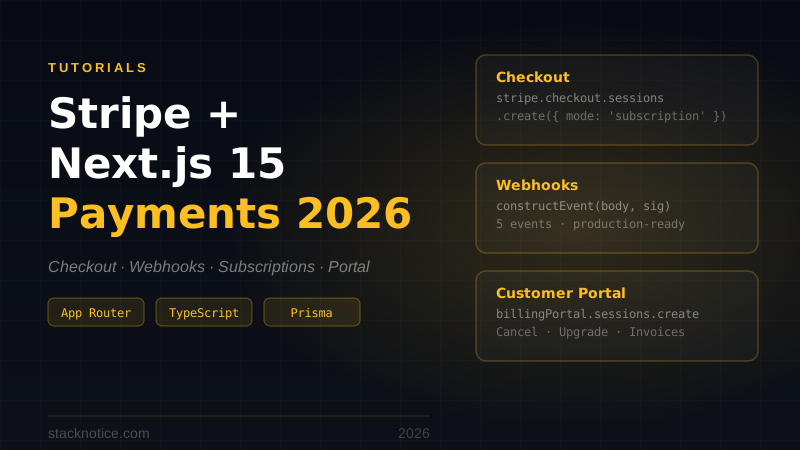
Most Stripe + Next.js tutorials are outdated (Pages Router), incomplete (stop at Checkout), or have a critical bug in the middleware that causes database calls from the edge. This guide builds the full production payment stack: Checkout, webhooks that actually update your database, subscriptions, customer portal, and the correct pattern for protecting premium routes.
Stack: Next.js 15 App Router, Drizzle ORM + Neon Postgres, Better Auth.
What You'll Build
- Stripe Checkout for subscription payments (monthly + yearly)
- Webhook handler for all subscription lifecycle events
- Customer portal for cancellation, plan changes, and card updates
- Subscription status check utility usable from Server Components
- Middleware that protects premium routes without hitting the database on every request
Setup
npm install stripe @stripe/stripe-jsCreate a Stripe account and grab your API keys from the dashboard.
# .env.local
STRIPE_SECRET_KEY=sk_test_...
NEXT_PUBLIC_STRIPE_PUBLISHABLE_KEY=pk_test_...
STRIPE_WEBHOOK_SECRET=whsec_...  # set up webhooks first, then add this
NEXT_PUBLIC_APP_URL=http://localhost:3000
Stripe Client
// lib/stripe.ts
import Stripe from 'stripe'

export const stripe = new Stripe(process.env.STRIPE_SECRET_KEY!, {
  apiVersion: '2025-01-27.acacia',
  typescript: true,
})
Database Schema with Drizzle
Add subscription fields to your users table:
// db/schema.ts
import { pgTable, text, timestamp } from 'drizzle-orm/pg-core'

export const users = pgTable('users', {
  id: text('id').primaryKey(),
  email: text('email').notNull().unique(),
  name: text('name'),
  // Stripe fields
  stripeCustomerId: text('stripe_customer_id').unique(),
  stripeSubscriptionId: text('stripe_subscription_id').unique(),
  stripePriceId: text('stripe_price_id'),
  stripeCurrentPeriodEnd: timestamp('stripe_current_period_end'),
  // ... rest of your fields
})

export type User = typeof users.$inferSelect
Run the migration:
npx drizzle-kit generate
npx drizzle-kit migrate
Step 1: Create Products in Stripe
Do this in the Stripe Dashboard or via script:
// scripts/seed-stripe.ts (run once)
import { stripe } from '@/lib/stripe'

const product = await stripe.products.create({
  name: 'Pro Plan',
  description: 'Access to all premium features',
})

const monthly = await stripe.prices.create({
  product: product.id,
  unit_amount: 1900,
  currency: 'usd',
  recurring: { interval: 'month' },
})

const yearly = await stripe.prices.create({
  product: product.id,
  unit_amount: 19000,
  currency: 'usd',
  recurring: { interval: 'year' },
})

console.log('Monthly:', monthly.id)
console.log('Yearly:', yearly.id)
Add the price IDs to your environment:
STRIPE_PRO_MONTHLY_PRICE_ID=price_...
STRIPE_PRO_YEARLY_PRICE_ID=price_...
Step 2: Checkout Session API Route
// app/api/stripe/checkout/route.ts
import { NextRequest, NextResponse } from 'next/server'
import { auth } from '@/lib/auth'
import { stripe } from '@/lib/stripe'
import { db } from '@/db'
import { users } from '@/db/schema'
import { eq } from 'drizzle-orm'
import { z } from 'zod'
import { headers } from 'next/headers'

const schema = z.object({
  priceId: z.string().startsWith('price_'),
})

export async function POST(request: NextRequest) {
  const session = await auth.api.getSession({
    headers: await headers(),
  })

  if (!session?.user?.id) {
    return NextResponse.json({ error: 'Unauthorized' }, { status: 401 })
  }

  const body = await request.json()
  const parsed = schema.safeParse(body)

  if (!parsed.success) {
    return NextResponse.json({ error: parsed.error.flatten() }, { status: 400 })
  }

  const { priceId } = parsed.data

  const [user] = await db
    .select()
    .from(users)
    .where(eq(users.id, session.user.id))
    .limit(1)

  if (!user) {
    return NextResponse.json({ error: 'User not found' }, { status: 404 })
  }

  // Create Stripe customer if this is their first checkout
  let stripeCustomerId = user.stripeCustomerId

  if (!stripeCustomerId) {
    const customer = await stripe.customers.create({
      email: user.email,
      name: user.name ?? undefined,
      metadata: { userId: user.id },
    })

    stripeCustomerId = customer.id

    await db
      .update(users)
      .set({ stripeCustomerId })
      .where(eq(users.id, user.id))
  }

  const baseUrl = process.env.NEXT_PUBLIC_APP_URL!

  const checkoutSession = await stripe.checkout.sessions.create({
    customer: stripeCustomerId,
    mode: 'subscription',
    payment_method_types: ['card'],
    line_items: [{ price: priceId, quantity: 1 }],
    success_url: `${baseUrl}/dashboard?payment=success`,
    cancel_url: `${baseUrl}/pricing?payment=cancelled`,
    metadata: { userId: user.id },
    subscription_data: {
      metadata: { userId: user.id },
    },
    allow_promotion_codes: true,
  })

  return NextResponse.json({ url: checkoutSession.url })
}
Step 3: Pricing Page
// app/pricing/page.tsx
import { PricingCard } from '@/components/PricingCard'

const plans = [
  {
    name: 'Free',
    price: '$0',
    priceId: null,
    features: ['5 projects', 'Basic analytics', 'Community support'],
  },
  {
    name: 'Pro Monthly',
    price: '$19/mo',
    priceId: process.env.STRIPE_PRO_MONTHLY_PRICE_ID!,
    features: ['Unlimited projects', 'Advanced analytics', 'Priority support', 'API access'],
    highlight: true,
  },
  {
    name: 'Pro Yearly',
    price: '$190/yr',
    priceId: process.env.STRIPE_PRO_YEARLY_PRICE_ID!,
    features: ['Everything in Pro', '2 months free', 'Custom integrations'],
    badge: 'Best value',
  },
]

export default function PricingPage() {
  return (
    <div className="max-w-5xl mx-auto py-20 px-4">
      <h1 className="text-4xl font-bold text-center mb-3">Simple pricing</h1>
      <p className="text-center text-gray-500 mb-12">Start free. Upgrade when you need more.</p>
      <div className="grid grid-cols-1 md:grid-cols-3 gap-8">
        {plans.map((plan) => (
          <PricingCard key={plan.name} plan={plan} />
        ))}
      </div>
    </div>
  )
}
// components/PricingCard.tsx
'use client'
import { useState } from 'react'
interface Plan {
name: string
price: string
priceId: string | null
features: string[]
highlight?: boolean
badge?: string
}
export function PricingCard({ plan }: { plan: Plan }) {
const [loading, setLoading] = useState(false)
async function handleCheckout() {
if (!plan.priceId) return
setLoading(true)
try {
const res = await fetch('/api/stripe/checkout', {
method: 'POST',
headers: { 'Content-Type': 'application/json' },
body: JSON.stringify({ priceId: plan.priceId }),
})
const data = await res.json()
if (data.url) window.location.href = data.url
} finally {
setLoading(false)
}
}
return (
<div className={`relative rounded-2xl border p-8 ${
plan.highlight ? 'border-black ring-2 ring-black' : 'border-gray-200'
}`}>
{plan.badge && (
<span className="absolute -top-3 left-1/2 -translate-x-1/2 bg-black text-white text-xs px-3 py-1 rounded-full">
{plan.badge}
</span>
)}
<h3 className="text-lg font-semibold mb-1">{plan.name}</h3>
<p className="text-3xl font-bold mb-6">{plan.price}</p>
<ul className="space-y-3 mb-8">
{plan.features.map((f) => (
<li key={f} className="flex items-center gap-2 text-sm text-gray-700">
<span className="text-emerald-500">✓</span> {f}
</li>
))}
</ul>
{plan.priceId ? (
<button
onClick={handleCheckout}
disabled={loading}
className="w-full bg-black text-white py-2.5 rounded-lg hover:bg-gray-800 disabled:opacity-50 transition"
>
{loading ? 'Redirecting...' : 'Get started'}
</button>
) : (
<div className="w-full text-center py-2.5 text-gray-400 text-sm">Current plan</div>
)}
</div>
)
}Step 4: Webhooks — The Part That Actually Matters
Webhooks are how Stripe notifies your server when a payment succeeds, a subscription renews, or a card fails. Everything else in this guide is plumbing — webhooks are the source of truth for subscription state.
In the Stripe Dashboard: Developers → Webhooks → Add endpoint
- URL:
https://your-domain.com/api/stripe/webhooks - Events:
checkout.session.completed,invoice.payment_succeeded,invoice.payment_failed,customer.subscription.updated,customer.subscription.deleted
Copy the signing secret to .env.local as STRIPE_WEBHOOK_SECRET.
// app/api/stripe/webhooks/route.ts
import { NextRequest, NextResponse } from 'next/server'
import Stripe from 'stripe'
import { stripe } from '@/lib/stripe'
import { db } from '@/db'
import { users } from '@/db/schema'
import { eq } from 'drizzle-orm'

// Must run in Node.js — needs raw body for signature verification
export const runtime = 'nodejs'

async function syncSubscription(userId: string, subscription: Stripe.Subscription) {
  await db
    .update(users)
    .set({
      stripeSubscriptionId: subscription.id,
      stripePriceId: subscription.items.data[0].price.id,
      stripeCurrentPeriodEnd: new Date(subscription.current_period_end * 1000),
    })
    .where(eq(users.id, userId))
}

export async function POST(request: NextRequest) {
  const body = await request.text()
  const signature = request.headers.get('stripe-signature')!

  let event: Stripe.Event

  try {
    event = stripe.webhooks.constructEvent(
      body,
      signature,
      process.env.STRIPE_WEBHOOK_SECRET!
    )
  } catch {
    return NextResponse.json({ error: 'Invalid signature' }, { status: 400 })
  }

  switch (event.type) {
    case 'checkout.session.completed': {
      const session = event.data.object as Stripe.CheckoutSession

      if (session.mode === 'subscription' && session.subscription) {
        const subscription = await stripe.subscriptions.retrieve(
          session.subscription as string
        )
        const userId = subscription.metadata.userId
        if (userId) await syncSubscription(userId, subscription)
      }
      break
    }

    case 'invoice.payment_succeeded': {
      const invoice = event.data.object as Stripe.Invoice

      if (invoice.subscription) {
        const subscription = await stripe.subscriptions.retrieve(
          invoice.subscription as string
        )
        const userId = subscription.metadata.userId
        if (userId) await syncSubscription(userId, subscription)
      }
      break
    }

    case 'invoice.payment_failed': {
      const invoice = event.data.object as Stripe.Invoice

      if (invoice.subscription) {
        const subscription = await stripe.subscriptions.retrieve(
          invoice.subscription as string
        )
        const userId = subscription.metadata.userId

        if (userId) {
          // Set period end to the past — subscription check will return false
          await db
            .update(users)
            .set({ stripeCurrentPeriodEnd: new Date(0) })
            .where(eq(users.id, userId))
        }
      }
      break
    }

    case 'customer.subscription.updated': {
      const subscription = event.data.object as Stripe.Subscription
      const userId = subscription.metadata.userId
      if (userId) await syncSubscription(userId, subscription)
      break
    }

    case 'customer.subscription.deleted': {
      const subscription = event.data.object as Stripe.Subscription
      const userId = subscription.metadata.userId

      if (userId) {
        await db
          .update(users)
          .set({
            stripeSubscriptionId: null,
            stripePriceId: null,
            stripeCurrentPeriodEnd: null,
          })
          .where(eq(users.id, userId))
      }
      break
    }
  }

  return NextResponse.json({ received: true })
}The ?payment=success URL is not a reliable signal — users can manually navigate to it. Always read subscription state from your database, which gets populated via webhooks.
Idempotency
Stripe may deliver the same webhook event more than once (network retries, Stripe's at-least-once delivery guarantee). The syncSubscription function above is safe to call multiple times with the same data because it's a full UPDATE — running it twice produces the same result as running it once.
For checkout.session.completed, you can add an idempotency guard:
case 'checkout.session.completed': {
  const session = event.data.object as Stripe.CheckoutSession

  // Check if already processed using the session ID
  const [existing] = await db
    .select({ stripeSubscriptionId: users.stripeSubscriptionId })
    .from(users)
    .where(eq(users.stripeSubscriptionId, session.subscription as string))
    .limit(1)

  if (existing?.stripeSubscriptionId) break  // already processed

  // ... process normally
  break
}
Step 5: Customer Portal
Let users cancel, upgrade, and update their payment method — Stripe provides the entire UI:
// app/api/stripe/portal/route.ts
import { NextResponse } from 'next/server'
import { auth } from '@/lib/auth'
import { stripe } from '@/lib/stripe'
import { db } from '@/db'
import { users } from '@/db/schema'
import { eq } from 'drizzle-orm'
import { headers } from 'next/headers'

export async function POST() {
  const session = await auth.api.getSession({
    headers: await headers(),
  })

  if (!session?.user?.id) {
    return NextResponse.json({ error: 'Unauthorized' }, { status: 401 })
  }

  const [user] = await db
    .select({ stripeCustomerId: users.stripeCustomerId })
    .from(users)
    .where(eq(users.id, session.user.id))
    .limit(1)

  if (!user?.stripeCustomerId) {
    return NextResponse.json({ error: 'No subscription found' }, { status: 404 })
  }

  const portalSession = await stripe.billingPortal.sessions.create({
    customer: user.stripeCustomerId,
    return_url: `${process.env.NEXT_PUBLIC_APP_URL}/dashboard`,
  })

  return NextResponse.json({ url: portalSession.url })
}
Enable the portal in Stripe Dashboard → Settings → Billing → Customer portal. Configure what customers can do — cancel, switch plans, update card.
// components/ManageSubscriptionButton.tsx
'use client'

export function ManageSubscriptionButton() {
  async function handleManage() {
    const res = await fetch('/api/stripe/portal', { method: 'POST' })
    const data = await res.json()
    if (data.url) window.location.href = data.url
  }

  return (
    <button onClick={handleManage} className="text-sm underline text-gray-500 hover:text-gray-900">
      Manage subscription
    </button>
  )
}
Step 6: Subscription Status Utility
A helper function to call from Server Components:
// lib/subscription.ts
import { db } from '@/db'
import { users } from '@/db/schema'
import { eq } from 'drizzle-orm'

export async function getSubscription(userId: string) {
  const [user] = await db
    .select({
      stripeSubscriptionId: users.stripeSubscriptionId,
      stripePriceId: users.stripePriceId,
      stripeCurrentPeriodEnd: users.stripeCurrentPeriodEnd,
    })
    .from(users)
    .where(eq(users.id, userId))
    .limit(1)

  const isActive =
    user?.stripeCurrentPeriodEnd != null &&
    new Date(user.stripeCurrentPeriodEnd) > new Date()

  return {
    isActive,
    subscriptionId: user?.stripeSubscriptionId ?? null,
    priceId: user?.stripePriceId ?? null,
    currentPeriodEnd: user?.stripeCurrentPeriodEnd ?? null,
  }
}
Use it in a Server Component:
// app/dashboard/page.tsx
import { auth } from '@/lib/auth'
import { getSubscription } from '@/lib/subscription'
import { headers } from 'next/headers'
import { redirect } from 'next/navigation'

export default async function DashboardPage() {
  const session = await auth.api.getSession({ headers: await headers() })

  if (!session) redirect('/sign-in')

  const subscription = await getSubscription(session.user.id)

  return (
    <div>
      <h1>Dashboard</h1>
      {subscription.isActive ? (
        <p>Pro plan — renews {subscription.currentPeriodEnd?.toLocaleDateString()}</p>
      ) : (
        <a href="/pricing">Upgrade to Pro</a>
      )}
    </div>
  )
}
Step 7: Protecting Premium Routes in Middleware
Middleware runs on the Edge Runtime, which has no Node.js APIs. More importantly, making a database call on every request adds 50–200ms of latency to every page load. The correct pattern is to check auth in middleware (fast cookie check) and verify subscription status in Server Components.
// middleware.ts
import { NextRequest, NextResponse } from 'next/server'

// Better Auth session cookie name
const SESSION_COOKIE = 'better-auth.session_token'

const PUBLIC_PATHS = ['/', '/sign-in', '/sign-up', '/pricing', '/api/stripe/webhooks']
const PREMIUM_PATHS = ['/dashboard/pro', '/api/premium']

export function middleware(request: NextRequest) {
  const { pathname } = request.nextUrl
  const sessionCookie = request.cookies.get(SESSION_COOKIE)

  // Skip public paths
  if (PUBLIC_PATHS.some((p) => pathname === p || pathname.startsWith(p + '/'))) {
    return NextResponse.next()
  }

  // Redirect unauthenticated users
  if (!sessionCookie) {
    return NextResponse.redirect(new URL('/sign-in', request.url))
  }

  // For premium paths: the cookie check confirms auth.
  // Subscription validation happens in the Server Component via getSubscription().
  // Middleware does NOT hit the database.

  return NextResponse.next()
}

export const config = {
  matcher: ['/((?!_next/static|_next/image|favicon.ico|covers|.*\\.svg$).*)'],
}
The premium route protection happens in the Server Component layer:
// app/dashboard/pro/page.tsx
import { auth } from '@/lib/auth'
import { getSubscription } from '@/lib/subscription'
import { headers } from 'next/headers'
import { redirect } from 'next/navigation'

export default async function ProPage() {
  const session = await auth.api.getSession({ headers: await headers() })

  if (!session) redirect('/sign-in')

  const { isActive } = await getSubscription(session.user.id)

  if (!isActive) redirect('/pricing?reason=pro-required')

  return <div>Pro content here</div>
}
This pattern is both faster (no DB call on every request) and correct (the database is the source of truth for subscription state, not a cookie value that could be stale).
Step 8: Test Locally
Use the Stripe CLI to forward webhooks to your local server:
# macOS
brew install stripe/stripe-cli/stripe

# Windows
scoop install stripe

# Login
stripe login

# Forward to local Next.js
stripe listen --forward-to localhost:3000/api/stripe/webhooks
The CLI outputs a temporary webhook secret — use it as STRIPE_WEBHOOK_SECRET in .env.local for local testing.
Test cards:
| Card number | Behavior |
|---|---|
4242 4242 4242 4242 | Payment succeeds |
4000 0000 0000 9995 | Payment fails (tests invoice.payment_failed) |
4000 0025 0000 3155 | Requires 3D Secure |
Any future date for expiry, any 3-digit CVC.
Going to Production
- Switch
STRIPE_SECRET_KEYtosk_live_... - Switch
NEXT_PUBLIC_STRIPE_PUBLISHABLE_KEYtopk_live_... - Create a new webhook endpoint in Stripe pointing to your production URL
- Update
STRIPE_WEBHOOK_SECRETto the production signing secret - Enable the Customer Portal in production
Everything else is identical — test mode and live mode use the same API surface.
Common Mistakes
Verifying webhook signatures but ignoring the result. If constructEvent throws, return a 400. Don't swallow the error and try to process the event anyway.
Trusting checkout.session.completed as the only subscription event. That event fires once. Renewals come through invoice.payment_succeeded. Failed renewals come through invoice.payment_failed. If you only handle the checkout event, users get permanent access even after their card fails on renewal.
Caching subscription status in a cookie. The stripeCurrentPeriodEnd you store in the database is the correct source. Don't try to sync it to a cookie — it gets stale and you'll have users with expired subscriptions still accessing premium content.
Making DB calls in middleware. As covered above: check auth in middleware (cookie), check subscription in Server Components (database).
Missing idempotency on webhook handlers. Add a guard for events you handle more than once. The syncSubscription pattern above is naturally idempotent, but for one-time actions (like sending a welcome email on subscription creation), check whether you've already done it before doing it again.
For the authentication setup that this integrates with, see the Better Auth complete guide. For the full SaaS stack including database, auth, and payments wired together, see The SaaS Tech Stack I'd Choose in 2026. For the Stripe webhook and subscription management patterns in production, see Stripe Webhooks: Idempotent Subscriptions in Production.