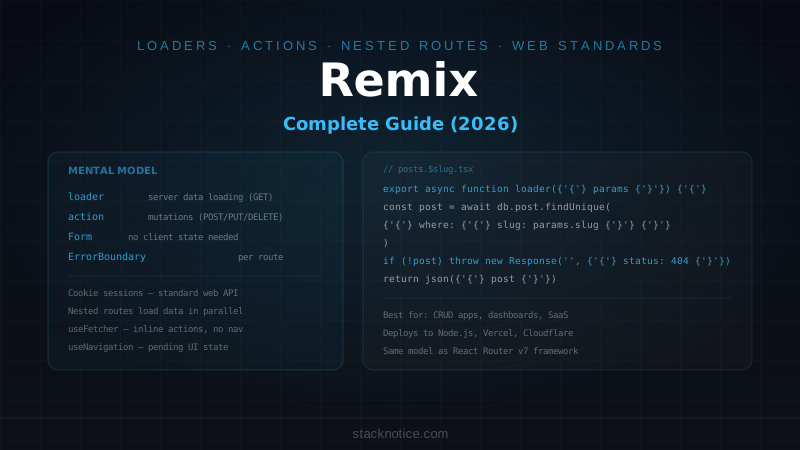
Remix is a full-stack React framework built on web platform fundamentals: Request, Response, FormData, cookies. It doesn't invent abstractions for things the browser already does — form submissions, redirects, error boundaries, loading states — it builds on them.
The result is a framework where most of what you need to learn is web standard knowledge, not Remix-specific API. The data loading model (loaders) and mutation model (actions) map directly to HTTP GET and POST. There's no client-side state library needed for server data — the framework manages the request/response cycle.
This guide covers Remix from setup through production patterns: routing, data loading, form handling, authentication, error boundaries, and deployment.
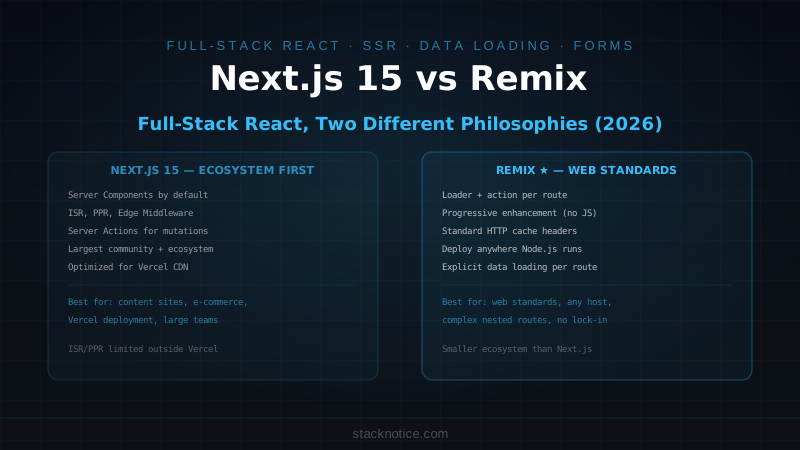
Remix vs Next.js — When to Choose Which
Before diving in, the honest comparison:
Remix advantages:
- Web standard philosophy — less framework lock-in, concepts transfer
- Better form handling — actions handle mutations without client state
- Nested route data loading — parallel, no request waterfalls
- Error boundaries per route — part of the surface area they isolate
- Smaller mental model for full-stack React
Next.js advantages:
- Larger ecosystem and community
- Better static generation for content-heavy sites
- More deployment targets (Vercel optimizations, edge network)
- React Server Components more integrated
- More mature for complex caching scenarios
Choose Remix if you're building a data-intensive app (dashboards, admin panels, forms-heavy apps) where the request/response model matches how users interact. Choose Next.js if you need strong static generation, ISR, or you're building a marketing site alongside the app. See Next.js App Router Guide for the Next.js approach.
Installation
npx create-remix@latest my-app
cd my-app
npm install
npm run dev
Choose a deployment target during setup — the default (Remix App Server) works for Node.js. Other options: Cloudflare Pages, Vercel, Netlify, AWS.
Project Structure
my-app/
├── app/
│   ├── routes/               # File-based routing
│   │   ├── _index.tsx        # /
│   │   ├── posts._index.tsx  # /posts
│   │   ├── posts.$slug.tsx   # /posts/:slug
│   │   ├── posts.new.tsx     # /posts/new
│   │   └── api.posts.ts      # /api/posts (API route)
│   ├── components/           # Shared components
│   ├── lib/                  # Utilities, db client
│   ├── root.tsx              # Root layout
│   └── entry.server.tsx      # Server entry point
├── public/
├── remix.config.js
└── package.json
File-Based Routing
Remix uses dot notation for nested routes:
routes/
├── _index.tsx                → /
├── about.tsx                 → /about
├── posts._index.tsx          → /posts
├── posts.$slug.tsx           → /posts/:slug  (dynamic)
├── posts.new.tsx             → /posts/new
├── dashboard.tsx             → layout for /dashboard/*
├── dashboard._index.tsx      → /dashboard
├── dashboard.analytics.tsx   → /dashboard/analytics
└── _auth.login.tsx           → /login (no layout nesting)
The _ prefix means "pathless" — the file contributes a layout but not a URL segment. Route files with $ in the name are dynamic parameters.
Loaders — Loading Data
loader functions run on the server for GET requests:
// app/routes/posts._index.tsx
import { json } from '@remix-run/node'
import { useLoaderData, Link } from '@remix-run/react'
import { db } from '~/lib/db.server'
import type { LoaderFunctionArgs } from '@remix-run/node'

export async function loader({ request }: LoaderFunctionArgs) {
  const url = new URL(request.url)
  const page = parseInt(url.searchParams.get('page') ?? '1')
  const limit = 20

  const [posts, total] = await Promise.all([
    db.post.findMany({
      where: { published: true },
      orderBy: { createdAt: 'desc' },
      skip: (page - 1) * limit,
      take: limit,
      select: { id: true, title: true, slug: true, excerpt: true, createdAt: true }
    }),
    db.post.count({ where: { published: true } })
  ])

  return json({
    posts,
    page,
    total,
    hasNextPage: page * limit < total
  })
}

export default function PostsIndex() {
  const { posts, page, hasNextPage } = useLoaderData<typeof loader>()

  return (
    <div>
      <h1>Posts</h1>
      <ul>
        {posts.map(post => (
          <li key={post.id}>
            <Link to={`/posts/${post.slug}`}>{post.title}</Link>
            <time>{new Date(post.createdAt).toLocaleDateString()}</time>
          </li>
        ))}
      </ul>

      <div>
        {page > 1 && <Link to={`?page=${page - 1}`}>Previous</Link>}
        {hasNextPage && <Link to={`?page=${page + 1}`}>Next</Link>}
      </div>
    </div>
  )
}
Key points:
loaderruns on the server — never exposed to the clientuseLoaderData<typeof loader>()is fully typed- Files ending in
.server.tsare never bundled for the client - Parallel data with
Promise.all— no request waterfall
Dynamic Routes
// app/routes/posts.$slug.tsx
import { json, type LoaderFunctionArgs } from '@remix-run/node'
import { useLoaderData } from '@remix-run/react'
import { db } from '~/lib/db.server'
import invariant from 'tiny-invariant'

export async function loader({ params }: LoaderFunctionArgs) {
  invariant(params.slug, 'slug is required')

  const post = await db.post.findUnique({
    where: { slug: params.slug, published: true }
  })

  if (!post) {
    throw new Response('Post not found', { status: 404 })
  }

  return json({ post })
}

export default function PostDetail() {
  const { post } = useLoaderData<typeof loader>()

  return (
    <article>
      <h1>{post.title}</h1>
      <time>{new Date(post.createdAt).toLocaleDateString()}</time>
      <div dangerouslySetInnerHTML={{ __html: post.content }} />
    </article>
  )
}
Throwing a Response from a loader shows the nearest error boundary with the correct status code.
Actions — Handling Mutations
action functions handle POST, PUT, PATCH, DELETE requests. This is where form submissions land:
// app/routes/posts.new.tsx
import { json, redirect, type ActionFunctionArgs } from '@remix-run/node'
import { Form, useActionData, useNavigation } from '@remix-run/react'
import { db } from '~/lib/db.server'
import { requireUser } from '~/lib/auth.server'
import { z } from 'zod'

const CreatePostSchema = z.object({
  title: z.string().min(1, 'Title is required'),
  content: z.string().min(10, 'Content must be at least 10 characters'),
  published: z.boolean().default(false)
})

export async function action({ request }: ActionFunctionArgs) {
  const user = await requireUser(request)

  const formData = await request.formData()
  const rawData = {
    title: formData.get('title'),
    content: formData.get('content'),
    published: formData.get('published') === 'on'
  }

  const result = CreatePostSchema.safeParse(rawData)
  if (!result.success) {
    return json({ errors: result.error.flatten().fieldErrors }, { status: 400 })
  }

  const slug = result.data.title
    .toLowerCase()
    .replace(/[^a-z0-9]+/g, '-')
    .replace(/(^-|-$)/g, '')

  const post = await db.post.create({
    data: { ...result.data, slug, authorId: user.id }
  })

  return redirect(`/posts/${post.slug}`)
}

export default function NewPost() {
  const actionData = useActionData<typeof action>()
  const navigation = useNavigation()
  const isSubmitting = navigation.state === 'submitting'

  return (
    <Form method="post">
      <div>
        <label htmlFor="title">Title</label>
        <input id="title" name="title" type="text" required />
        {actionData?.errors?.title && (
          <p role="alert">{actionData.errors.title[0]}</p>
        )}
      </div>

      <div>
        <label htmlFor="content">Content</label>
        <textarea id="content" name="content" rows={10} required />
        {actionData?.errors?.content && (
          <p role="alert">{actionData.errors.content[0]}</p>
        )}
      </div>

      <div>
        <label>
          <input type="checkbox" name="published" />
          Publish immediately
        </label>
      </div>

      <button type="submit" disabled={isSubmitting}>
        {isSubmitting ? 'Creating...' : 'Create Post'}
      </button>
    </Form>
  )
}
<Form method="post"> sends a standard HTML form — Remix intercepts it, runs the action on the server, and handles the redirect. No useState, no onSubmit, no fetch. If JavaScript fails to load, the form still works.
Authentication
Remix uses cookie sessions for auth — standard web platform:
// app/lib/auth.server.ts
import { createCookieSessionStorage, redirect } from '@remix-run/node'
import bcrypt from 'bcryptjs'
import { db } from './db.server'

const sessionStorage = createCookieSessionStorage({
  cookie: {
    name: '__session',
    httpOnly: true,
    path: '/',
    sameSite: 'lax',
    secrets: [process.env.SESSION_SECRET!],
    secure: process.env.NODE_ENV === 'production'
  }
})

export async function login(email: string, password: string) {
  const user = await db.user.findUnique({ where: { email } })
  if (!user) return null

  const valid = await bcrypt.compare(password, user.passwordHash)
  if (!valid) return null

  return user
}

export async function createUserSession(userId: string, redirectTo: string) {
  const session = await sessionStorage.getSession()
  session.set('userId', userId)

  return redirect(redirectTo, {
    headers: {
      'Set-Cookie': await sessionStorage.commitSession(session)
    }
  })
}

export async function requireUser(request: Request) {
  const session = await sessionStorage.getSession(request.headers.get('Cookie'))
  const userId = session.get('userId')

  if (!userId) {
    throw redirect('/login')
  }

  const user = await db.user.findUnique({ where: { id: userId } })
  if (!user) throw redirect('/login')

  return user
}

export async function logout(request: Request) {
  const session = await sessionStorage.getSession(request.headers.get('Cookie'))
  return redirect('/login', {
    headers: {
      'Set-Cookie': await sessionStorage.destroySession(session)
    }
  })
}
// app/routes/_auth.login.tsx
import { type ActionFunctionArgs } from '@remix-run/node'
import { Form } from '@remix-run/react'
import { login, createUserSession } from '~/lib/auth.server'
export async function action({ request }: ActionFunctionArgs) {
const formData = await request.formData()
const email = formData.get('email') as string
const password = formData.get('password') as string
const redirectTo = formData.get('redirectTo') as string || '/dashboard'
const user = await login(email, password)
if (!user) {
return { error: 'Invalid email or password' }
}
return createUserSession(user.id, redirectTo)
}
export default function Login() {
return (
<Form method="post">
<input name="email" type="email" placeholder="Email" required />
<input name="password" type="password" placeholder="Password" required />
<button type="submit">Log in</button>
</Form>
)
}Error Boundaries
Every route can export an ErrorBoundary that catches errors in that route:
// app/routes/posts.$slug.tsx
import { useRouteError, isRouteErrorResponse, Link } from '@remix-run/react'

export function ErrorBoundary() {
  const error = useRouteError()

  if (isRouteErrorResponse(error)) {
    return (
      <div>
        <h1>{error.status} — {error.statusText}</h1>
        {error.status === 404 && (
          <p>This post doesn't exist. <Link to="/posts">Back to posts</Link></p>
        )}
      </div>
    )
  }

  return (
    <div>
      <h1>Something went wrong</h1>
      <p>An unexpected error occurred.</p>
    </div>
  )
}
When a loader throws, Remix renders the error boundary instead of the route component. The rest of the page (header, sidebar) continues to work — only the failing route segment is replaced.
Meta — SEO Per Route
// app/routes/posts.$slug.tsx
import type { MetaFunction } from '@remix-run/node'

export const meta: MetaFunction<typeof loader> = ({ data }) => {
  if (!data) {
    return [{ title: 'Post not found' }]
  }

  return [
    { title: data.post.title },
    { name: 'description', content: data.post.excerpt },
    { property: 'og:title', content: data.post.title },
    { property: 'og:description', content: data.post.excerpt },
    { property: 'og:image', content: data.post.coverImage }
  ]
}
Pending UI
Remix tracks form submission state automatically:
import { useNavigation, useFetcher } from '@remix-run/react'

// Track the overall navigation state
function SubmitButton() {
  const navigation = useNavigation()
  const isSubmitting = navigation.state === 'submitting'

  return (
    <button disabled={isSubmitting}>
      {isSubmitting ? 'Saving...' : 'Save'}
    </button>
  )
}

// useFetcher for inline actions (without page navigation)
function LikeButton({ postId }: { postId: string }) {
  const fetcher = useFetcher()
  const isLiking = fetcher.state === 'submitting'

  return (
    <fetcher.Form method="post" action="/api/like">
      <input type="hidden" name="postId" value={postId} />
      <button type="submit" disabled={isLiking}>
        {isLiking ? '...' : 'Like'}
      </button>
    </fetcher.Form>
  )
}
Deployment
Remix adapters compile for different targets:
# Vercel
npm install @vercel/remix
# Add vercel.json adapter config

# Cloudflare Pages
npm install @remix-run/cloudflare-pages

# Node.js (any VPS)
npm run build
node ./build/server/index.js
With Docker:
FROM node:20-slim
WORKDIR /app
COPY package*.json ./
RUN npm ci --only=production
COPY build ./build
COPY public ./public
EXPOSE 3000
CMD ["node", "./build/server/index.js"]
Remix vs React Router v7
React Router v7 introduced a framework mode that's essentially Remix merged into React Router. If you're starting a new project:
- React Router v7 in framework mode — the successor, actively developed, same mental model
- Remix — stable, battle-tested, large existing ecosystem of examples
They share the same loader/action model. If you learn one, you know the other. See React Router v7 Guide for the React Router v7 approach.
Remix's strength is the data flow: every route declares its data dependencies in loader, every form submission lands in action, and the framework coordinates the request/response cycle without client-side state management for server data. For apps that are primarily CRUD — admin panels, dashboards, SaaS backends — this model removes an entire category of complexity. The web standards approach also means your Remix knowledge transfers: sessions are cookies, redirects are HTTP 302s, form submissions are POST requests.