Both Next.js 15 and Remix are full-stack React frameworks. Both handle routing, data loading, and server rendering. Both use TypeScript by default. The surface similarities end there.
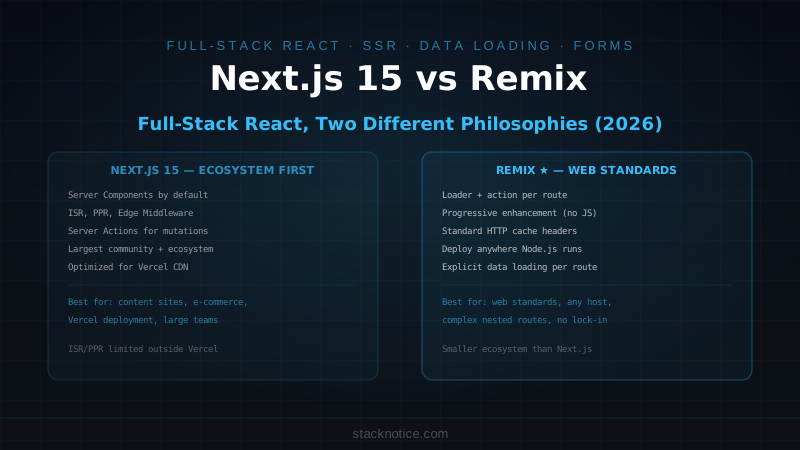
Next.js is built by Vercel and optimized for their platform — edge caching, partial prerendering, incremental static regeneration. It has the largest React ecosystem of any framework and the best tooling for deploying to CDNs. Remix is built around web standards — native Request/Response, HTML form actions, progressive enhancement. It runs anywhere Node.js runs, has no vendor lock-in, and its architecture forces you to think about how browsers actually work.
The choice between them isn't about which one is better. It's about which philosophy matches what you're building.
Routing
Both use file-based routing, but the mental model is different.
Next.js 15: Segment-Based, Special Files
app/
├── layout.tsx          ← wraps every route
├── page.tsx            ← /
├── loading.tsx         ← suspense fallback for this segment
├── error.tsx           ← error boundary for this segment
├── not-found.tsx       ← 404 for this segment
├── dashboard/
│   ├── layout.tsx      ← wraps /dashboard/* routes
│   ├── page.tsx        ← /dashboard
│   └── settings/
│       └── page.tsx    ← /dashboard/settings
└── blog/
    └── [slug]/
        └── page.tsx    ← /blog/[slug]
Each segment in the URL maps to a folder. Special files (layout.tsx, loading.tsx, error.tsx) control the behavior of that segment and all its children. Server Components are the default — components opt into being client-side with 'use client'.
// app/blog/[slug]/page.tsx — Server Component, no boilerplate
export default async function BlogPost({ params }: { params: Promise<{ slug: string }> }) {
  const { slug } = await params
  const post = await db.post.findUnique({ where: { slug } })

  if (!post) notFound()  // triggers not-found.tsx

  return (
    <article>
      <h1>{post.title}</h1>
      <div dangerouslySetInnerHTML={{ __html: post.content }} />
    </article>
  )
}

// Metadata for SEO — co-located with the page
export async function generateMetadata({ params }: { params: Promise<{ slug: string }> }) {
  const { slug } = await params
  const post = await db.post.findUnique({ where: { slug }, select: { title: true, description: true } })
  return {
    title: post?.title,
    description: post?.description
  }
}
Remix: Nested Routes with Loaders
app/
├── root.tsx            ← root layout (equivalent to app/layout.tsx)
├── routes/
│   ├── _index.tsx      ← /
│   ├── dashboard.tsx   ← /dashboard (parent layout)
│   ├── dashboard.settings.tsx  ← /dashboard/settings (nested)
│   └── blog.$slug.tsx  ← /blog/:slug
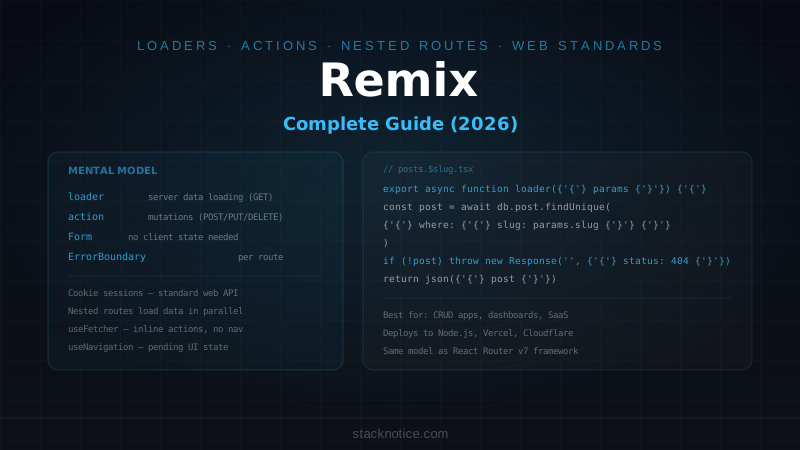
Each route file exports a loader for data fetching, an action for mutations, and a default component. Everything that a route needs lives in one file.
// app/routes/blog.$slug.tsx
import { json, type LoaderFunctionArgs, type MetaFunction } from '@remix-run/node'
import { useLoaderData } from '@remix-run/react'

export async function loader({ params }: LoaderFunctionArgs) {
  const post = await db.post.findUnique({ where: { slug: params.slug } })
  if (!post) throw new Response('Not Found', { status: 404 })
  return json({ post })
}

export const meta: MetaFunction<typeof loader> = ({ data }) => {
  return [
    { title: data?.post.title },
    { name: 'description', content: data?.post.description }
  ]
}

export default function BlogPost() {
  const { data } = useLoaderData<typeof loader>()
  return (
    <article>
      <h1>{data.post.title}</h1>
      <div dangerouslySetInnerHTML={{ __html: data.post.content }} />
    </article>
  )
}
The Remix pattern is explicit: loader runs on the server, component renders the result. There's no magic — you can read the file top to bottom and understand exactly what happens when a user visits the route.
Data Loading
This is where the philosophies diverge most clearly.
Next.js: Server Components Fetch Directly
// app/dashboard/page.tsx
// This component runs on the server — direct database access, no API layer needed
export default async function Dashboard() {
  // All three fetch in parallel — Promise.all at the framework level
  const [user, stats, recentOrders] = await Promise.all([
    db.user.findUnique({ where: { id: getCurrentUserId() } }),
    db.order.aggregate({ _count: true, _sum: { amount: true } }),
    db.order.findMany({ take: 10, orderBy: { createdAt: 'desc' } })
  ])

  return (
    <div>
      <h1>Welcome, {user.name}</h1>
      <Stats data={stats} />
      <RecentOrders orders={recentOrders} />
    </div>
  )
}

// Child components can also fetch independently — no prop drilling
async function UserProfile({ userId }: { userId: string }) {
  const profile = await db.profile.findUnique({ where: { userId } })
  return <div>{profile?.bio}</div>
}
Next.js deduplicates identical fetch calls across the render tree — if two Server Components call the same database query, it runs once. This is built into the framework.
Remix: Loaders Fetch, Components Consume
// app/routes/dashboard.tsx
export async function loader({ request }: LoaderFunctionArgs) {
  const userId = await getUserId(request)  // reads session from cookie

  const [user, stats, recentOrders] = await Promise.all([
    db.user.findUnique({ where: { id: userId } }),
    db.order.aggregate({ _count: true, _sum: { amount: true } }),
    db.order.findMany({ take: 10, orderBy: { createdAt: 'desc' } })
  ])

  return json({ user, stats, recentOrders })
}

export default function Dashboard() {
  const { user, stats, recentOrders } = useLoaderData<typeof loader>()

  return (
    <div>
      <h1>Welcome, {user.name}</h1>
      <Stats data={stats} />
      <RecentOrders orders={recentOrders} />
    </div>
  )
}
The explicit separation means your data loading is testable in isolation — you can call loader({ request }) directly in tests without rendering any UI. It also means the data requirements of a route are always visible at the top of the file, not scattered across component trees.
Mutations and Forms
This is Remix's strongest differentiator.
Next.js: Server Actions
// app/actions/posts.ts
'use server'
import { revalidatePath } from 'next/cache'

export async function createPost(formData: FormData) {
  const title = formData.get('title') as string
  const body = formData.get('body') as string

  const parsed = createPostSchema.safeParse({ title, body })
  if (!parsed.success) {
    return { error: parsed.error.flatten().fieldErrors }
  }

  await db.post.create({ data: parsed.data })
  revalidatePath('/blog')
}

// app/blog/new/page.tsx
'use client'
import { createPost } from '@/app/actions/posts'
import { useActionState } from 'react'

export default function NewPost() {
  const [state, action, isPending] = useActionState(createPost, null)

  return (
    <form action={action}>
      <input name="title" />
      {state?.error?.title && <p>{state.error.title[0]}</p>}
      <textarea name="body" />
      <button disabled={isPending}>
        {isPending ? 'Saving...' : 'Create Post'}
      </button>
    </form>
  )
}
Server Actions are powerful but require 'use client' for interactive forms and useActionState for pending states and error handling. The action function is server-side, the form coordination is client-side.
Remix: Native Form Actions
// app/routes/blog.new.tsx
import { json, redirect, type ActionFunctionArgs } from '@remix-run/node'
import { Form, useActionData, useNavigation } from '@remix-run/react'

export async function action({ request }: ActionFunctionArgs) {
  const formData = await request.formData()
  const title = formData.get('title') as string
  const body = formData.get('body') as string

  const parsed = createPostSchema.safeParse({ title, body })
  if (!parsed.success) {
    return json({ errors: parsed.error.flatten().fieldErrors }, { status: 400 })
  }

  await db.post.create({ data: parsed.data })
  return redirect('/blog')
}

export default function NewPost() {
  const actionData = useActionData<typeof action>()
  const navigation = useNavigation()
  const isSubmitting = navigation.state === 'submitting'

  return (
    <Form method="post">
      <input name="title" />
      {actionData?.errors?.title && <p>{actionData.errors.title[0]}</p>}
      <textarea name="body" />
      <button disabled={isSubmitting}>
        {isSubmitting ? 'Saving...' : 'Create Post'}
      </button>
    </Form>
  )
}
The key difference: Remix's <Form> works without JavaScript. Before hydration, it submits as a native HTML form. The action runs, redirects, and the page updates. This is progressive enhancement — JavaScript improves the experience but isn't required for basic functionality.
Next.js Server Actions require JavaScript to intercept the submit event and call the action function. Without JavaScript, the form doesn't submit (by default).
Error Handling
Next.js: error.tsx Per Segment
// app/blog/[slug]/error.tsx
'use client'  // Error components must be client components
export default function BlogError({
  error,
  reset
}: {
  error: Error & { digest?: string }
  reset: () => void
}) {
  return (
    <div>
      <h2>Something went wrong loading this post</h2>
      <p>{error.message}</p>
      <button onClick={reset}>Try again</button>
    </div>
  )
}
Error boundaries are scoped to segments. An error in /blog/[slug] doesn't break the rest of the layout.
Remix: ErrorBoundary Per Route
// app/routes/blog.$slug.tsx
export function ErrorBoundary() {
  const error = useRouteError()

  if (isRouteErrorResponse(error)) {
    if (error.status === 404) return <h2>Post not found</h2>
    return <h2>Error {error.status}: {error.data}</h2>
  }

  return <h2>Something went wrong: {(error as Error).message}</h2>
}
Remix's ErrorBoundary handles both thrown Response objects (from loaders) and unexpected errors. The isRouteErrorResponse check lets you differentiate — a 404 thrown from the loader vs an unexpected database error both land in the same ErrorBoundary, handled differently.
Caching and Performance
This is where Next.js has a genuine architectural advantage — if you're deploying to Vercel.
Next.js: Multiple Caching Layers
// Static generation — page cached at build time
export const dynamic = 'force-static'

// ISR — regenerate every 60 seconds
export const revalidate = 60

// On-demand revalidation — purge cache when data changes
import { revalidatePath, revalidateTag } from 'next/cache'
await revalidatePath('/blog')
await revalidateTag('posts')  // invalidates all fetches tagged 'posts'

// Per-fetch cache control
const posts = await fetch('/api/posts', {
  next: { revalidate: 300, tags: ['posts'] }
})

// Partial Prerendering — static shell + dynamic streams
export const experimental_ppr = true
// Static content serves instantly, dynamic parts stream in
Next.js's caching model is powerful but requires Vercel to take full advantage — ISR, edge caching, and PPR are first-class on Vercel and significantly more work on other platforms.
Remix: HTTP Cache Headers
// app/routes/blog.$slug.tsx
export function headers() {
  return {
    'Cache-Control': 'max-age=300, stale-while-revalidate=60',
  }
}

export async function loader({ params }: LoaderFunctionArgs) {
  const post = await db.post.findUnique({ where: { slug: params.slug } })
  if (!post) throw new Response('Not Found', { status: 404 })
  return json({ post })
}
Remix uses standard HTTP caching. No framework-specific cache layer, no vendor dependency — works the same on Cloudflare, Fly.io, Railway, or your own VPS. The trade-off: no ISR or on-demand revalidation without building it yourself.
Deployment
Next.js: Optimized for Vercel
Self-hosting Next.js works — the standalone output mode and Docker support are real. But ISR, PPR, Edge Middleware with geo/IP, and on-demand revalidation are either missing or significantly more complex outside Vercel. If you're not deploying to Vercel, you lose a meaningful portion of the framework's value proposition.
# Next.js standalone mode for Docker
FROM node:22-alpine
COPY .next/standalone ./
COPY .next/static ./.next/static
CMD ["node", "server.js"]
Remix: Any Node.js Server
// server.ts — Remix as Express middleware
import { createRequestHandler } from '@remix-run/express'
import express from 'express'

const app = express()
app.use(express.static('public'))
app.all('*', createRequestHandler({ build: require('./build') }))
app.listen(3000)
Remix adapters exist for Express, Fastify, Cloudflare Workers, Netlify, Vercel, and Fly.io. The same application code deploys everywhere with a one-line adapter swap. No caching features disappear when you change your host.
Decision Framework
Choose Next.js 15 if:
- You're deploying to Vercel and want ISR, PPR, or Edge Middleware
- Your team is already familiar with Next.js (migration cost isn't worth it)
- You need the full ecosystem:
next/image,next/font, commerce integrations, auth libraries with Next.js adapters - You're building a content site or e-commerce app where CDN caching at the framework level matters
- You want the largest community, the most Stack Overflow answers, the most tutorials
Choose Remix if:
- You want progressive enhancement — forms that work before JavaScript loads
- You're deploying to multiple platforms or need to avoid Vercel lock-in
- Your team comes from a web standards background (Rails, PHP, Django) — the mental model maps directly
- You want explicit data loading: every route's data requirements visible at the top of its file
- You're building an app with complex nested layouts where Remix's nested routing is a natural fit
The honest assessment: Next.js wins on ecosystem and CDN performance. Remix wins on web fundamentals and deployment flexibility. If you're starting a new project and you're not sure which you'll need more — ecosystem or portability — Next.js is the lower-risk choice. If you're frustrated with Next.js caching complexity and want a framework that respects HTTP standards, Remix is worth the learning curve.
For the deep Next.js setup, including App Router architecture, caching, and Partial Prerendering, see the Next.js App Router complete guide. For the full Remix picture, including nested routes, resource routes, and deployment adapters, see the Remix complete guide. For forms specifically, the React Server Actions guide covers the Next.js mutations model in depth.