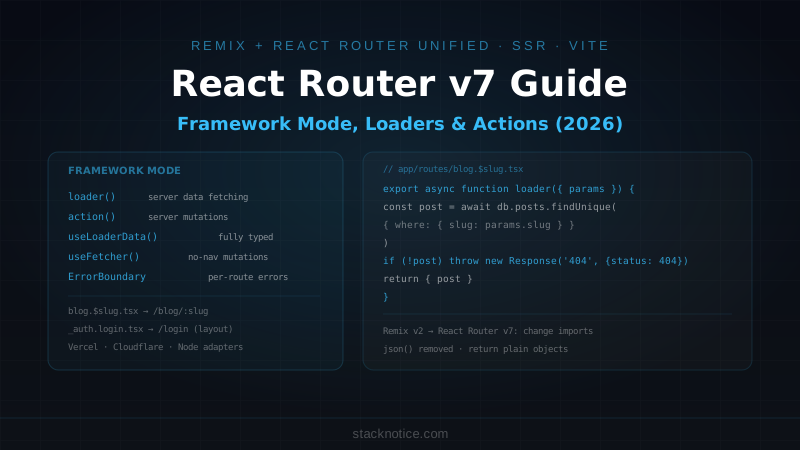
React Router v7 is the most significant release in the library's history. Remix — the full-stack React framework — was merged directly into React Router, creating a unified package that works both as a simple client-side router and as a full SSR framework. If you're coming from Remix v2, your app is already essentially React Router v7. If you're coming from React Router v6, you now have access to server rendering, data loading, and form actions without adding any new dependencies.
This guide covers everything: framework mode setup, file routing, loaders, actions, SSR, and both migration paths.
Two Modes
React Router v7 ships in two modes:
Library mode — classic React Router. Client-side routing, <Routes>, <Route>, useNavigate. Works exactly like v6. No new concepts required. Upgrade is usually npm install react-router@latest.
Framework mode — Remix. File-based routing, server loaders, server actions, SSR, adapters for Vercel/Cloudflare/Node. This is where the new capabilities live.
This guide focuses on framework mode since that's where the interesting changes are and what most teams are moving toward.
Creating a New Project
npx create-react-router@latest my-app
cd my-app
npm run dev
The CLI asks about TypeScript (say yes), testing, and deployment target. Project structure:
my-app/
  app/
    routes/
      home.tsx         ← / route
      about.tsx        ← /about route
    root.tsx           ← root layout
    app.css
  react-router.config.ts
  vite.config.ts
  package.json
react-router.config.ts configures SSR, adapters, and route conventions:
import type { Config } from '@react-router/dev/config'

export default {
  ssr: true,  // false for SPA mode
} satisfies Config
File-Based Routing
Routes live in app/routes/. The filename determines the URL:
app/routes/
  home.tsx            → /
  blog.tsx            → /blog (layout route)
  blog._index.tsx     → /blog (index, renders inside blog.tsx)
  blog.$slug.tsx      → /blog/:slug
  blog.$slug.edit.tsx → /blog/:slug/edit
  _auth.tsx           → layout with no URL segment
  _auth.login.tsx     → /login (inside _auth layout)
  _auth.signup.tsx    → /signup (inside _auth layout)
  $.tsx               → catch-all (404 handler)
Route naming rules:
.separates URL segments (blog.about→/blog/about)$marks dynamic segments (blog.$slug→/blog/:slug)_prefix makes a layout with no URL impact (_auth.login→/logininside_authlayout)_indexis the index route for a parent (blog._indexrenders at/blog)
Route configuration alternative
If you prefer explicit routes over filename conventions, use app/routes.ts:
import { type RouteConfig, route, index, layout, prefix } from '@react-router/dev/routes'

export default [
  index('routes/home.tsx'),
  route('about', 'routes/about.tsx'),

  layout('routes/_auth.tsx', [
    route('login', 'routes/login.tsx'),
    route('signup', 'routes/signup.tsx'),
  ]),

  ...prefix('blog', [
    index('routes/blog._index.tsx'),
    route(':slug', 'routes/blog.$slug.tsx'),
  ]),
] satisfies RouteConfig
Both approaches work — mix them if you have a specific structure in mind.
Loaders: Server Data Fetching
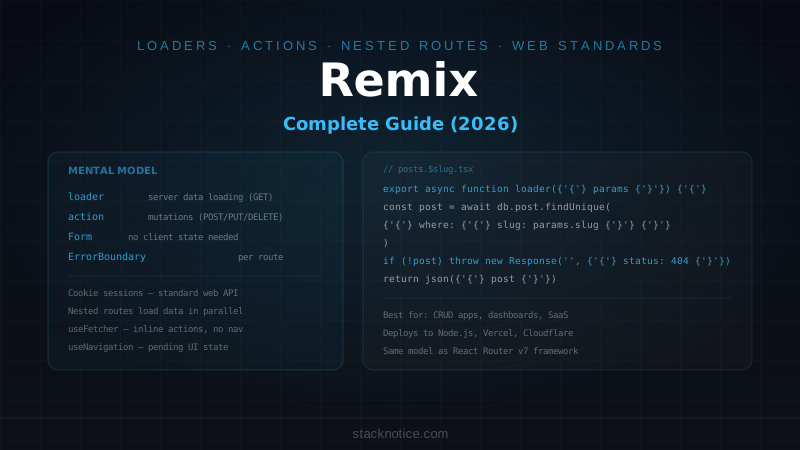
A loader function runs on the server before the component renders. It's where you fetch data, check auth, and set headers:
// app/routes/blog.$slug.tsx
import { useLoaderData, redirect } from 'react-router'
import type { Route } from './+types/blog.$slug'
import { db } from '~/lib/db.server'

export async function loader({ params, request }: Route.LoaderArgs) {
  const post = await db.posts.findUnique({
    where: { slug: params.slug, published: true },
    include: { author: true, tags: true }
  })

  if (!post) {
    throw new Response('Not Found', { status: 404 })
  }

  return {
    post,
    meta: {
      title: post.title,
      description: post.excerpt
    }
  }
}

export function meta({ data }: Route.MetaArgs) {
  return [
    { title: data?.meta.title ?? 'Blog' },
    { name: 'description', content: data?.meta.description }
  ]
}

export default function BlogPost() {
  const { post } = useLoaderData<typeof loader>()

  return (
    <article>
      <h1>{post.title}</h1>
      <p>By {post.author.name}</p>
      <div dangerouslySetInnerHTML={{ __html: post.content }} />
    </article>
  )
}
useLoaderData<typeof loader>() is fully typed — TypeScript knows the exact shape of post without any manual type annotation.
The Route.LoaderArgs type is auto-generated by React Router based on your route file path. It includes typed params — params.slug is a string, not string | undefined.
Throwing responses from loaders
export async function loader({ params, request }: Route.LoaderArgs) {
  const session = await getSession(request)

  if (!session.userId) {
    throw redirect('/login?next=' + new URL(request.url).pathname)
  }

  const user = await db.users.findUnique({ where: { id: session.userId } })

  if (!user) {
    throw new Response('User not found', { status: 404 })
  }

  return { user }
}
throw redirect() and throw new Response() immediately stop the loader and return the appropriate response. React Router catches these and handles them — no try/catch needed in the component.
Parallel data fetching in layout loaders
The root layout and nested route loaders run in parallel:
// app/root.tsx
export async function loader({ request }: Route.LoaderArgs) {
  const session = await getSession(request)
  return {
    user: session.userId ? await db.users.findUnique({ where: { id: session.userId } }) : null
  }
}
// app/routes/dashboard.tsx
export async function loader({ request }: Route.LoaderArgs) {
const { user } = await requireAuth(request) // throws redirect if not authed
const stats = await db.analytics.getDashboardStats(user.id)
return { stats, user }
}Both loaders fetch in parallel. The page only renders when both resolve. This is equivalent to Promise.all but without writing it explicitly.
Actions: Handling Mutations
Actions handle form submissions and POST requests. They run on the server:
// app/routes/blog.$slug.edit.tsx
import { Form, useActionData, redirect } from 'react-router'
import type { Route } from './+types/blog.$slug.edit'
import { z } from 'zod'
import { db } from '~/lib/db.server'
import { requireAuth } from '~/lib/auth.server'

const updatePostSchema = z.object({
  title: z.string().min(1).max(200),
  content: z.string().min(1),
  published: z.coerce.boolean().default(false)
})

export async function loader({ params, request }: Route.LoaderArgs) {
  const { user } = await requireAuth(request)

  const post = await db.posts.findUnique({ where: { slug: params.slug } })
  if (!post || post.authorId !== user.id) {
    throw new Response('Not Found', { status: 404 })
  }

  return { post }
}

export async function action({ params, request }: Route.ActionArgs) {
  const { user } = await requireAuth(request)
  const formData = await request.formData()

  const parsed = updatePostSchema.safeParse(Object.fromEntries(formData))

  if (!parsed.success) {
    return {
      errors: parsed.error.flatten().fieldErrors,
      values: Object.fromEntries(formData)
    }
  }

  const post = await db.posts.update({
    where: { slug: params.slug, authorId: user.id },
    data: parsed.data
  })

  throw redirect(`/blog/${post.slug}`)
}

export default function EditPost() {
  const { post } = useLoaderData<typeof loader>()
  const actionData = useActionData<typeof action>()

  return (
    <Form method="post">
      <div>
        <label htmlFor="title">Title</label>
        <input
          id="title"
          name="title"
          defaultValue={actionData?.values?.title ?? post.title}
        />
        {actionData?.errors?.title && (
          <p className="error">{actionData.errors.title[0]}</p>
        )}
      </div>

      <div>
        <label htmlFor="content">Content</label>
        <textarea
          id="content"
          name="content"
          defaultValue={actionData?.values?.content ?? post.content}
        />
      </div>

      <label>
        <input type="checkbox" name="published" value="true" defaultChecked={post.published} />
        Published
      </label>

      <button type="submit">Save</button>
    </Form>
  )
}
Key points:
<Form method="post">submits to the current route's actionuseActionData<typeof action>()is fully typed- The action receives
request.formData()— no JSON parsing needed for forms throw redirect()after a successful mutation prevents re-submission on back navigation
Multiple actions with intent
When a route has multiple actions (save, delete, publish), use a hidden intent field:
export async function action({ params, request }: Route.ActionArgs) {
  const { user } = await requireAuth(request)
  const formData = await request.formData()
  const intent = formData.get('intent')

  switch (intent) {
    case 'publish': {
      await db.posts.update({
        where: { slug: params.slug },
        data: { published: true, publishedAt: new Date() }
      })
      return { success: true, message: 'Post published' }
    }

    case 'delete': {
      await db.posts.delete({ where: { slug: params.slug, authorId: user.id } })
      throw redirect('/blog')
    }

    case 'update': {
      // ... update logic
    }

    default:
      throw new Response('Invalid intent', { status: 400 })
  }
}<Form method="post">
<button name="intent" value="publish">Publish</button>
<button name="intent" value="delete">Delete</button>
</Form>useFetcher: Non-Navigation Mutations
<Form> triggers a page navigation after the action. useFetcher runs an action without navigating — useful for likes, toggles, and inline edits:
// Like button component
import { useFetcher } from 'react-router'

export function LikeButton({ postId, initialLikes, isLiked }: Props) {
  const fetcher = useFetcher()

  const optimisticLiked = fetcher.formData
    ? fetcher.formData.get('liked') === 'true'
    : isLiked

  const optimisticCount = fetcher.formData
    ? initialLikes + (optimisticLiked ? 1 : -1)
    : initialLikes

  return (
    <fetcher.Form method="post" action="/api/likes">
      <input type="hidden" name="postId" value={postId} />
      <input type="hidden" name="liked" value={String(!optimisticLiked)} />
      <button type="submit">
        {optimisticLiked ? '❤️' : '🤍'} {optimisticCount}
      </button>
    </fetcher.Form>
  )
}
fetcher.formData gives you the in-flight form data — use it for optimistic UI without any extra state management. The component reads fetcher.formData while the request is in flight and falls back to the server data once it resolves.
Error Boundaries
React Router catches errors from loaders and actions and renders the nearest ErrorBoundary:
// app/routes/blog.$slug.tsx
export function ErrorBoundary() {
  const error = useRouteError()

  if (isRouteErrorResponse(error)) {
    return (
      <div>
        <h1>{error.status} {error.statusText}</h1>
        <p>{error.data}</p>
      </div>
    )
  }

  return (
    <div>
      <h1>Something went wrong</h1>
      <p>{error instanceof Error ? error.message : 'Unknown error'}</p>
    </div>
  )
}
isRouteErrorResponse narrows the error to responses thrown explicitly (throw new Response(...)). Everything else is an unexpected error.
The root ErrorBoundary in app/root.tsx catches errors from any route that doesn't define its own.
SSR Adapters
React Router v7 deploys anywhere via adapters:
# Vercel
npm install @react-router/serve @vercel/react-router

# Node.js (express-compatible)
npm install @react-router/express

# Cloudflare Workers
npm install @react-router/cloudflare
// react-router.config.ts — Vercel
import type { Config } from '@react-router/dev/config'
import { vercelPreset } from '@vercel/react-router/vite'
export default {
ssr: true,
presets: [vercelPreset()]
} satisfies ConfigFor Node.js (Railway, Fly.io, your own VPS):
// server.ts
import { createRequestHandler } from '@react-router/express'
import express from 'express'
import * as build from './build/server/index.js'

const app = express()

app.use(express.static('build/client'))
app.all('*', createRequestHandler({ build }))

app.listen(3000)
Build and run:
npm run build
node server.ts  # or node --env-file=.env server.ts
Migrating from React Router v6
Most v6 apps migrate with minimal changes. The main API differences:
// v6
import { BrowserRouter, Routes, Route } from 'react-router-dom'

function App() {
  return (
    <BrowserRouter>
      <Routes>
        <Route path="/" element={<Home />} />
        <Route path="/blog/:slug" element={<BlogPost />} />
      </Routes>
    </BrowserRouter>
  )
}

// v7 library mode — almost identical
import { createBrowserRouter, RouterProvider } from 'react-router'

const router = createBrowserRouter([
  { path: '/', element: <Home /> },
  { path: '/blog/:slug', element: <BlogPost /> }
])

function App() {
  return <RouterProvider router={router} />
}
react-router-dom and react-router are unified in v7 — import from react-router for everything.
Breaking changes from v6:
<Await>component signature changeddefer()removed — use direct async/await in loadersjson()helper removed — return plain objects from loadersuseNavigatestill works,redirect()from the loader is preferred for server redirects
Migrating from Remix v2
This is the straightforward path — Remix v2 apps are already React Router v7 apps structurally:
# In your existing Remix v2 project
npm install react-router @react-router/node @react-router/serve
npm uninstall @remix-run/react @remix-run/node @remix-run/serve
Update imports:
// Before (Remix v2)
import { json, redirect, useLoaderData } from '@remix-run/react'
import type { LoaderFunctionArgs } from '@remix-run/node'

// After (React Router v7)
import { redirect, useLoaderData } from 'react-router'
import type { Route } from './+types/your-route'
The json() helper is gone — just return objects directly:
// Before
return json({ user })

// After
return { user }
Most Remix v2 apps complete this migration in a few hours. The route conventions, loader/action patterns, and component APIs are identical.
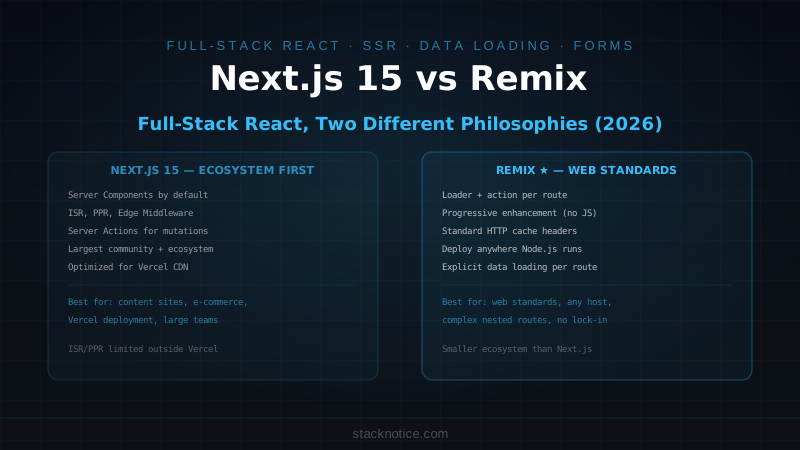
React Router v7 vs Next.js
Both are full-stack React frameworks with SSR and file routing. The differences come down to ecosystem and mental model:
| Feature | React Router v7 | Next.js 15 |
|---|---|---|
| Data fetching | loader functions | Server Components + fetch |
| Mutations | action functions | Server Actions |
| Routing | file-based or config | file-based only |
| Caching | explicit | aggressive (often surprising) |
| Learning curve | Lower (familiar patterns) | Higher (RSC mental model) |
| Ecosystem | React Router community | Vercel ecosystem |
| Edge support | Via adapters | Native on Vercel |
| Bundle splitting | Automatic per route | Automatic per route |
React Router v7 is the better fit if you're coming from Remix, want predictable data fetching without caching surprises, or prefer loaders/actions over Server Components. If you're already deep in the Next.js ecosystem — particularly Next.js caching, Server Actions, and the Vercel platform — switching has diminishing returns.
The Next.js App Router and React Router v7 framework mode solve the same problems differently. Neither is strictly better — they reflect different opinions about where complexity should live.
Type Safety with Generated Types
React Router v7 generates types for every route file. Run npm run typecheck to trigger generation, or they update automatically during npm run dev.
// Generated: app/routes/+types/blog.$slug.ts (auto-generated, don't edit)
export namespace Route {
  export interface LoaderArgs {
    request: Request
    params: { slug: string }
    context: AppLoadContext
  }
  export interface ActionArgs {
    request: Request
    params: { slug: string }
    context: AppLoadContext
  }
  export type LoaderData = Awaited<ReturnType<typeof import('../blog.$slug').loader>>
}
This means params.slug is typed as string (not string | undefined), useLoaderData() returns the exact shape your loader returns, and useActionData() returns the exact union of what your action can return. No manual type maintenance.
React Router v7 closes the gap between client-side routing and full-stack frameworks. If you've been hesitant about SSR or server data fetching because of the complexity cost, the loader/action model is significantly simpler than the Server Components mental model — and the migration from either v6 or Remix v2 is straightforward enough to do in a single afternoon.