Suspense has been in React since version 16.6, but for most of that time it only did one thing well: code splitting with React.lazy. Data fetching with Suspense required opinionated libraries and was technically experimental. In React 18 and 19, that changed — Suspense is now a first-class coordination primitive for async UI, and the new use() hook gives you a direct way to integrate it without a library.
This guide covers what Suspense actually does, how use() works, error boundaries, nested Suspense patterns, and how all of this fits together with Next.js Server Components.
What Suspense Actually Does
Suspense doesn't know anything about fetching. It's a coordination primitive — it lets a child component signal "I'm not ready yet" and temporarily renders a fallback in its place.
The signal is a thrown Promise. When a component throws a Promise during render, React catches it, renders the nearest <Suspense> boundary's fallback, and retries the component when the Promise resolves. This is the mechanism — libraries and the use() hook both work by throwing Promises.
// Conceptually, what libraries do:
function fetchUser(id: string) {
  if (cache.has(id)) return cache.get(id)

  const promise = fetch(`/api/users/${id}`).then(r => r.json())
  cache.set(id, promise)
  throw promise  // ← Suspense catches this
}

function UserCard({ id }: { id: string }) {
  const user = fetchUser(id) // may throw a Promise
  return <div>{user.name}</div>
}

// Suspense catches the thrown Promise and shows fallback
<Suspense fallback={<Skeleton />}>
  <UserCard id="123" />
</Suspense>
This is why libraries that "support Suspense" work with it: they throw a pending Promise when data isn't ready yet, and resolve it when it is.
The use() Hook
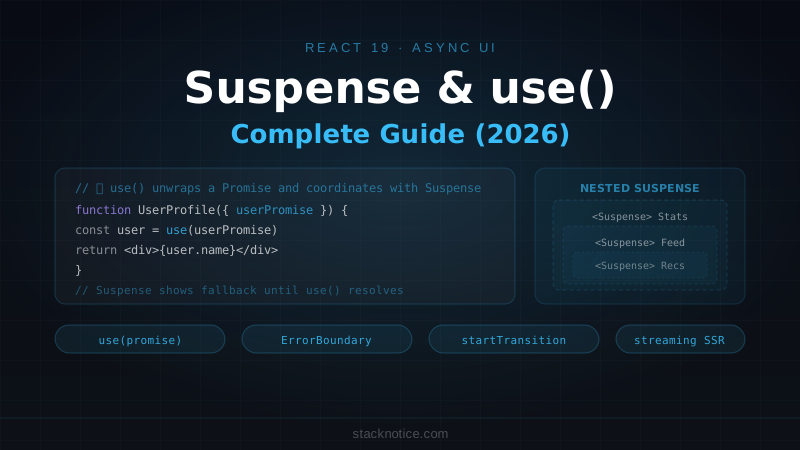
React 19 introduced use() — a hook that unwraps a Promise (or Context) inline during render. Unlike useEffect or useState, use() can be called inside loops and conditionals, and it integrates with Suspense automatically.
import { use, Suspense } from 'react'

// A component that uses use() to unwrap a Promise
function UserProfile({ userPromise }: { userPromise: Promise<User> }) {
  const user = use(userPromise) // suspends until the promise resolves
  return (
    <div>
      <h2>{user.name}</h2>
      <p>{user.email}</p>
    </div>
  )
}

// Usage — the promise is created outside the component
function Page() {
  const userPromise = fetchUser('123') // created once, passed down

  return (
    <Suspense fallback={<ProfileSkeleton />}>
      <UserProfile userPromise={userPromise} />
    </Suspense>
  )
}
Critical: where you create the Promise matters. If you create it inside the component, you get a new Promise on every render, which means an infinite suspense loop:
// ❌ New Promise every render — infinite loop
function UserProfile({ id }: { id: string }) {
  const user = use(fetchUser(id)) // fetchUser() called on every render
}

// ✅ Promise created once, passed as prop
function Page({ id }: { id: string }) {
  const userPromise = useMemo(() => fetchUser(id), [id]) // stable reference
  return (
    <Suspense fallback={<Skeleton />}>
      <UserProfile userPromise={userPromise} />
    </Suspense>
  )
}
Or create the Promise outside React entirely (in a module-level cache or a server function).
use() with Context
use() also works as a context reader — identical to useContext() but callable inside conditions:
import { use } from 'react'
import { ThemeContext } from '@/contexts/theme'

function Button({ disabled }: { disabled?: boolean }) {
  // ✅ Can call use() inside a condition (unlike useContext)
  if (disabled) {
    return <button disabled>...</button>
  }

  const theme = use(ThemeContext)
  return <button className={theme.buttonClass}>...</button>
}
Error Boundaries: Handling Failures
When a suspended component's Promise rejects (network error, server error), Suspense doesn't help — you need an Error Boundary. Error boundaries catch thrown errors during render, including rejected promises unwrapped by use().
React doesn't ship a class component error boundary — you write your own or use react-error-boundary:
npm install react-error-boundaryimport { Suspense } from 'react'
import { ErrorBoundary } from 'react-error-boundary'
function UserSection({ userPromise }: { userPromise: Promise<User> }) {
const user = use(userPromise)
return <UserCard user={user} />
}
function FallbackUI({ error, resetErrorBoundary }: { error: Error, resetErrorBoundary: () => void }) {
return (
<div className="rounded-lg border border-destructive p-4">
<p className="text-destructive">Failed to load user: {error.message}</p>
<button onClick={resetErrorBoundary} className="mt-2 text-sm underline">
Try again
</button>
</div>
)
}
// Wrap with both — ErrorBoundary outside, Suspense inside
export function UserSectionWithFallbacks({ userPromise }: { userPromise: Promise<User> }) {
return (
<ErrorBoundary FallbackComponent={FallbackUI}>
<Suspense fallback={<UserSkeleton />}>
<UserSection userPromise={userPromise} />
</Suspense>
</ErrorBoundary>
)
}The error boundary must be outside the Suspense boundary. If you put Suspense outside ErrorBoundary, rejections bypass the error boundary.
Reset after error
react-error-boundary provides resetErrorBoundary to clear the error state (useful when the user clicks "retry"):
function FallbackUI({ error, resetErrorBoundary }: FallbackProps) {
  return (
    <div>
      <p>{error.message}</p>
      <button
        onClick={resetErrorBoundary}
        // Optional: also pass resetKeys to auto-reset when these values change
      >
        Retry
      </button>
    </div>
  )
}

// resetKeys: auto-reset boundary when userId changes
<ErrorBoundary
  FallbackComponent={FallbackUI}
  resetKeys={[userId]}
>
Nested Suspense: Granular Loading States
Instead of one giant loading state for the whole page, nest Suspense boundaries to give each section its own loading state. Sections that load faster appear immediately; slower sections show their own skeletons independently.
export default function DashboardPage() {
  const statsPromise = fetchStats()
  const activityPromise = fetchActivity()
  const recommendationsPromise = fetchRecommendations() // slow

  return (
    <main className="grid gap-6">
      {/* Stats load fast — show immediately */}
      <Suspense fallback={<StatsSkeleton />}>
        <StatsSection statsPromise={statsPromise} />
      </Suspense>

      {/* Activity is medium speed */}
      <Suspense fallback={<ActivitySkeleton />}>
        <ActivityFeed activityPromise={activityPromise} />
      </Suspense>

      {/* Recommendations are slow — show their own skeleton independently */}
      <Suspense fallback={<RecommendationsSkeleton />}>
        <Recommendations recommendationsPromise={recommendationsPromise} />
      </Suspense>
    </main>
  )
}
Without nested Suspense, you'd have to wait for the slowest section before showing anything. With nested boundaries, users see content progressively as each section resolves.
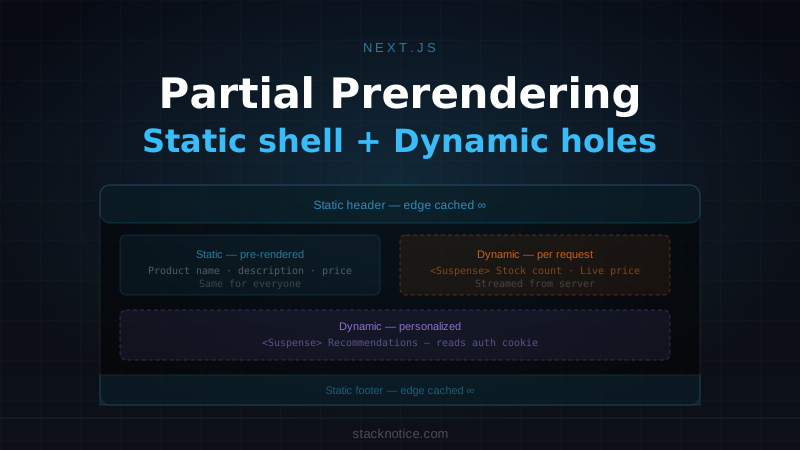
Tip from the PPR article: This is exactly the model Next.js Partial Prerendering uses — the static shell (the page structure) is served immediately, and each <Suspense> boundary is a slot that streams in when its data is ready. See the Next.js PPR guide for how this works in the Next.js App Router.
Suspense in Next.js Server Components
In the Next.js App Router, Server Components can be async — they await data directly without any client-side fetching. Suspense coordinates streaming:
// app/dashboard/page.tsx — Server Component (no 'use client')

async function StatsSection() {
  const stats = await fetchStats() // awaited on the server
  return <StatsGrid stats={stats} />
}

async function ActivityFeed() {
  await new Promise(r => setTimeout(r, 2000)) // simulate slow query
  const activity = await fetchActivity()
  return <ActivityList items={activity} />
}

export default function DashboardPage() {
  return (
    <main>
      {/* Server-side Suspense: HTML streams to the client as each section completes */}
      <Suspense fallback={<StatsSkeleton />}>
        <StatsSection />
      </Suspense>

      <Suspense fallback={<ActivitySkeleton />}>
        <ActivityFeed />
      </Suspense>
    </main>
  )
}
The HTML is streamed to the browser. <StatsSection /> arrives first (fast query), then <ActivityFeed /> streams in 2 seconds later — no client-side JavaScript needed, no useEffect, no re-fetching on hydration.
Server Components vs Client Components with use()
| Server Component (async) | Client Component (use()) | |
|---|---|---|
| Where data is fetched | Server | Server or client |
| Syntax | const data = await fetch(...) | const data = use(promise) |
| Streaming | Yes, with <Suspense> | Yes, with <Suspense> |
| Access to browser APIs | No | Yes |
| Access to secrets | Yes | No |
| Error handling | Error boundary or try/catch | Error boundary |
Use Server Components + async/await as the default in Next.js. Reach for use() in Client Components when you need to pass a Promise from a Server Component down to a client component for progressive enhancement.
Passing Promises from Server to Client
A useful pattern: kick off data fetching on the server, pass the Promise to a Client Component, let use() unwrap it. The fetch starts immediately on the server, and the client-side component shows a skeleton until it resolves:
// Server Component — starts the fetch immediately
export default async function ProductPage({ params }: { params: { id: string } }) {
  // Don't await — pass the Promise directly
  const reviewsPromise = fetchReviews(params.id)

  return (
    <div>
      <ProductInfo id={params.id} />  {/* Server-rendered immediately */}

      <Suspense fallback={<ReviewsSkeleton />}>
        <ReviewsSection reviewsPromise={reviewsPromise} />
      </Suspense>
    </div>
  )
}

// Client Component — unwraps the Promise
'use client'
import { use } from 'react'

function ReviewsSection({ reviewsPromise }: { reviewsPromise: Promise<Review[]> }) {
  const reviews = use(reviewsPromise) // suspends until resolved
  return <ReviewsList reviews={reviews} />
}
The fetch starts on the server before the client even hydrates. By the time hydration happens, the Promise may already be resolved.
useTransition + Suspense: Avoiding Fallback Flicker
When you navigate or update something and Suspense kicks in, you get a flash: the old content disappears and the skeleton appears while new content loads. useTransition lets you keep the old content visible during the transition:
'use client'

import { useTransition, Suspense } from 'react'

function ProductList() {
  const [isPending, startTransition] = useTransition()
  const [category, setCategory] = useState('all')

  function handleCategoryChange(newCategory: string) {
    startTransition(() => {
      setCategory(newCategory)
    })
  }

  return (
    <div>
      <CategoryFilter
        value={category}
        onChange={handleCategoryChange}
        disabled={isPending}
      />

      {/* No skeleton flash — old products stay visible while new ones load */}
      <Suspense fallback={<ProductsSkeleton />}>
        <Products category={category} />
      </Suspense>
    </div>
  )
}
Inside a startTransition, React won't show the Suspense fallback for the new content — it keeps the current UI visible and marks it as "stale" (you can show a pending indicator via isPending) until the new content is ready.
Without startTransition: category changes → skeleton flicker → new products.
With startTransition: category changes → old products stay (slightly faded) → new products appear.
See the React 19 Transitions guide for the full useTransition and useDeferredValue breakdown.
Common Mistakes
Creating Promises inside the component body:
// ❌ New Promise on every render
function ProductCard({ id }: { id: string }) {
  const data = use(fetch(`/api/products/${id}`).then(r => r.json()))
}

// ✅ Stable Promise reference
function ProductCard({ dataPromise }: { dataPromise: Promise<Product> }) {
  const data = use(dataPromise)
}
Putting ErrorBoundary inside Suspense:
// ❌ Rejections won't reach the error boundary
<Suspense fallback={<Skeleton />}>
  <ErrorBoundary fallback={<Error />}>
    <Component />
  </ErrorBoundary>
</Suspense>

// ✅ ErrorBoundary outside Suspense
<ErrorBoundary fallback={<Error />}>
  <Suspense fallback={<Skeleton />}>
    <Component />
  </Suspense>
</ErrorBoundary>
No Suspense boundary around a component that uses use():
// ❌ React throws: "A component suspended while rendering, but no fallback UI was specified"
function Page() {
  return <UserProfile userPromise={promise} />
}

// ✅ Always wrap with Suspense
function Page() {
  return (
    <Suspense fallback={<Skeleton />}>
      <UserProfile userPromise={promise} />
    </Suspense>
  )
}
Quick Reference
// use() for Promises — suspends until resolved
const data = use(dataPromise)

// use() for Context — same as useContext, but works in conditions
const theme = use(ThemeContext)

// Standard Suspense wrapper
<Suspense fallback={<Skeleton />}>
  <Component />
</Suspense>

// Full pattern with error handling
<ErrorBoundary FallbackComponent={ErrorFallback}>
  <Suspense fallback={<Loading />}>
    <AsyncComponent />
  </Suspense>
</ErrorBoundary>

// Avoid fallback flicker on updates
startTransition(() => setState(newValue))

// Server Component — async/await directly
async function ServerComponent() {
  const data = await fetchData()
  return <div>{data.title}</div>
}

// Pass Promise from Server to Client Component
// Server: const promise = fetchData() — don't await
// Client: const data = use(promise)
Suspense and use() work best when you think of them as coordination primitives rather than data fetching tools. They answer one question: "is this part of the UI ready to render?" If not, show the fallback. When it is, swap in the real content. The data layer — whether that's React Query, SWR, server actions, or raw promises — plugs into this mechanism, but the coordination logic stays in React.