Every data table, search page, and filtered list in a real app has the same problem: the user applies a filter, the results update, they share the URL with a colleague — and the colleague lands on an empty page because the filter lived in useState and died with the component.
URL state is the right home for anything the user might want to bookmark, share, or return to via the back button. The problem is that URLSearchParams and router.push are painful to work with: manual parsing, string coercion, sync complexity with React state. nuqs solves this with a useState-compatible API where the URL is the state container.
What nuqs Does
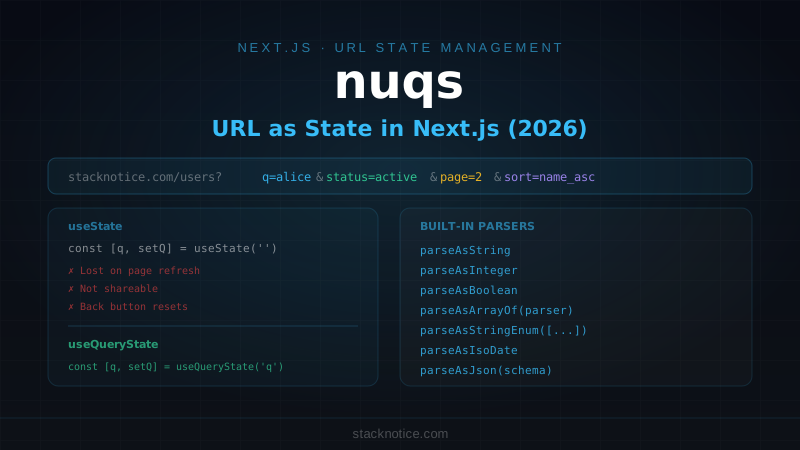
nuqs gives you useQueryState — a hook with the exact same interface as useState, but the value is stored in the URL query string instead of component memory:
// Regular state — lost on reload, not shareable
const [search, setSearch] = useState('')

// URL state — survives reload, shareable, bookmarkable
const [search, setSearch] = useQueryState('q')
Type a few characters and the URL becomes ?q=keyboard. Refresh — the input still has its value. Copy the URL and send it to someone — they see the same filtered results.
Setup
npm install nuqsWrap your root layout with the adapter:
// app/layout.tsx
import { NuqsAdapter } from 'nuqs/adapters/next/app'

export default function RootLayout({ children }: { children: React.ReactNode }) {
  return (
    <html>
      <body>
        <NuqsAdapter>{children}</NuqsAdapter>
      </body>
    </html>
  )
}
That's all the setup. The adapter connects nuqs to Next.js's router so URL updates trigger navigation correctly.
useQueryState: Single Parameter
'use client'

import { useQueryState } from 'nuqs'

export function SearchInput() {
  const [query, setQuery] = useQueryState('q')

  return (
    <input
      value={query ?? ''}
      onChange={(e) => setQuery(e.target.value || null)}
      placeholder="Search..."
    />
  )
}
Setting the value to null removes the parameter from the URL entirely — the equivalent of "clear this filter." The URL goes from ?q=keyboard back to the clean path.
Parsers: Type Safety Beyond Strings
Search params are strings at the HTTP level. Parsers handle the conversion to the type you actually want:
import {
  useQueryState,
  parseAsInteger,
  parseAsFloat,
  parseAsBoolean,
  parseAsArrayOf,
  parseAsString,
  parseAsStringEnum,
  parseAsIsoDate,
} from 'nuqs'

// Page number — URL: ?page=3
const [page, setPage] = useQueryState('page', parseAsInteger.withDefault(1))

// Price filter — URL: ?maxPrice=99.99
const [maxPrice, setMaxPrice] = useQueryState('maxPrice', parseAsFloat)

// Sidebar open — URL: ?sidebar=true
const [sidebarOpen, setSidebarOpen] = useQueryState('sidebar', parseAsBoolean.withDefault(false))

// Multi-select tags — URL: ?tags=react,typescript,nextjs
const [tags, setTags] = useQueryState('tags', parseAsArrayOf(parseAsString).withDefault([]))

// Enum — URL: ?sort=price_asc
const [sort, setSort] = useQueryState(
  'sort',
  parseAsStringEnum(['name_asc', 'name_desc', 'price_asc', 'price_desc'] as const).withDefault('name_asc')
)

// Date — URL: ?from=2026-01-01
const [from, setFrom] = useQueryState('from', parseAsIsoDate)
.withDefault(value) means the hook returns the default when the parameter is absent, instead of null. This keeps your component code clean — no null-checks everywhere.
useQueryStates: Multiple Parameters Together
When parameters belong together (sort column + sort direction, page + page size), update them atomically to avoid two URL writes:
import { useQueryStates, parseAsInteger, parseAsString, parseAsStringEnum } from 'nuqs'

const sortFields = ['name', 'email', 'createdAt', 'status'] as const
type SortField = typeof sortFields[number]

export function useTableState() {
  return useQueryStates({
    page: parseAsInteger.withDefault(1),
    perPage: parseAsInteger.withDefault(20),
    q: parseAsString.withDefault(''),
    sortBy: parseAsStringEnum(sortFields).withDefault('createdAt'),
    sortDir: parseAsStringEnum(['asc', 'desc'] as const).withDefault('desc'),
  })
}
function UsersTable() {
const [{ page, perPage, q, sortBy, sortDir }, setTableState] = useTableState()
function handleSort(field: SortField) {
setTableState({
sortBy: field,
sortDir: sortBy === field && sortDir === 'asc' ? 'desc' : 'asc',
page: 1, // reset page on sort change
})
}
// ...
}setTableState accepts a partial object — only the specified keys are updated, others stay as-is.
Navigation Options
By default, nuqs updates the URL with history.replace (shallow navigation — no new history entry, doesn't trigger a full re-render of Server Components). You can change this per-call:
// Push to history — back button returns to previous filter state
setQuery(value, { history: 'push' })

// Default — replace current entry (for live-search while typing)
setQuery(value, { history: 'replace' })

// Trigger a full server re-render (re-fetches Server Components with new searchParams)
setQuery(value, { shallow: false })

// Throttle URL updates (useful for inputs — don't write every keystroke)
const [search, setSearch] = useQueryState('q', parseAsString.withDefault(''))
// Throttle to avoid rewriting URL on every keypress:
setSearch(value, { throttleMs: 200 })
shallow: false is the critical option for App Router: it makes the URL update trigger a full server navigation, so any Server Components that read searchParams get the new values.
Server Component Integration
Server Components can't use hooks, but they can read searchParams directly. For type safety and reuse, define the parsers in a shared cache:
// lib/search-params.ts
import { createSearchParamsCache, parseAsInteger, parseAsString, parseAsStringEnum } from 'nuqs/server'

export const searchParamsCache = createSearchParamsCache({
  page: parseAsInteger.withDefault(1),
  perPage: parseAsInteger.withDefault(20),
  q: parseAsString.withDefault(''),
  status: parseAsStringEnum(['active', 'inactive', 'all'] as const).withDefault('all'),
})

export type SearchParams = ReturnType<typeof searchParamsCache.parse>
// app/users/page.tsx (Server Component)
import { searchParamsCache } from '@/lib/search-params'
type Props = {
searchParams: Promise<Record<string, string | string[]>>
}
export default async function UsersPage({ searchParams }: Props) {
const { page, perPage, q, status } = searchParamsCache.parse(await searchParams)
const users = await db.query.users.findMany({
where: and(
q ? ilike(users.name, `%${q}%`) : undefined,
status !== 'all' ? eq(users.status, status) : undefined,
),
offset: (page - 1) * perPage,
limit: perPage,
orderBy: desc(users.createdAt),
})
return <UsersTable initialUsers={users} />
}The same parsers are used both server-side (for the DB query) and client-side (for the filter controls). If you rename a param or change its type, you fix it in one place.
Real Pattern: Search + Filter + Pagination
Putting it all together in a complete data browser:
// components/users/UserFilters.tsx
'use client'

import { useQueryStates, parseAsString, parseAsStringEnum, parseAsInteger } from 'nuqs'
import { useTransition } from 'react'

export function UserFilters() {
  const [isPending, startTransition] = useTransition()

  const [filters, setFilters] = useQueryStates({
    q: parseAsString.withDefault(''),
    status: parseAsStringEnum(['all', 'active', 'inactive'] as const).withDefault('all'),
    role: parseAsStringEnum(['all', 'admin', 'user', 'viewer'] as const).withDefault('all'),
    page: parseAsInteger.withDefault(1),
  })

  function updateFilter<K extends keyof typeof filters>(
    key: K,
    value: typeof filters[K]
  ) {
    startTransition(() => {
      setFilters(
        { [key]: value, page: 1 },  // always reset to page 1 on filter change
        { shallow: false }          // trigger server re-render
      )
    })
  }

  return (
    <div className={cn('flex flex-wrap items-center gap-3', isPending && 'opacity-60 pointer-events-none')}>
      <Input
        placeholder="Search users..."
        value={filters.q}
        onChange={(e) => updateFilter('q', e.target.value || '')}
        className="max-w-xs"
      />

      <Select
        value={filters.status}
        onValueChange={(v) => updateFilter('status', v as typeof filters.status)}
      >
        <SelectTrigger className="w-36">
          <SelectValue placeholder="Status" />
        </SelectTrigger>
        <SelectContent>
          <SelectItem value="all">All status</SelectItem>
          <SelectItem value="active">Active</SelectItem>
          <SelectItem value="inactive">Inactive</SelectItem>
        </SelectContent>
      </Select>

      <Select
        value={filters.role}
        onValueChange={(v) => updateFilter('role', v as typeof filters.role)}
      >
        <SelectTrigger className="w-32">
          <SelectValue placeholder="Role" />
        </SelectTrigger>
        <SelectContent>
          <SelectItem value="all">All roles</SelectItem>
          <SelectItem value="admin">Admin</SelectItem>
          <SelectItem value="user">User</SelectItem>
          <SelectItem value="viewer">Viewer</SelectItem>
        </SelectContent>
      </Select>

      {(filters.q || filters.status !== 'all' || filters.role !== 'all') && (
        <Button
          variant="ghost"
          size="sm"
          onClick={() => setFilters(
            { q: '', status: 'all', role: 'all', page: 1 },
            { shallow: false }
          )}
        >
          Clear filters
        </Button>
      )}
    </div>
  )
}
// components/users/UserPagination.tsx
'use client'
import { useQueryStates, parseAsInteger } from 'nuqs'
export function UserPagination({ totalPages }: { totalPages: number }) {
const [{ page }, setPage] = useQueryStates({
page: parseAsInteger.withDefault(1),
})
return (
<div className="flex items-center justify-between">
<Button
variant="outline"
disabled={page <= 1}
onClick={() => setPage({ page: page - 1 }, { shallow: false })}
>
Previous
</Button>
<span className="text-sm text-muted-foreground">
Page {page} of {totalPages}
</span>
<Button
variant="outline"
disabled={page >= totalPages}
onClick={() => setPage({ page: page + 1 }, { shallow: false })}
>
Next
</Button>
</div>
)
}The result: filters and pagination live in the URL. Share ?q=alice&status=active&page=2 with a teammate — they land on exactly the right view. Hit the back button — the previous filter state is restored.
Custom Parser
For types that don't have a built-in parser:
import { parseAsJson } from 'nuqs'
import { z } from 'zod'

const dateRangeSchema = z.object({
  from: z.string(),
  to: z.string(),
})

// JSON-serialized object in the URL: ?range=%7B"from":"2026-01-01","to":"2026-06-30"%7D
const [range, setRange] = useQueryState(
  'range',
  parseAsJson(dateRangeSchema.parse).withDefault({ from: '', to: '' })
)
parseAsJson serializes as JSON in the URL. Use it sparingly — JSON in URLs is ugly, but it works for complex objects that don't fit neatly into key-value pairs.
Quick Reference
// Setup: wrap root layout
<NuqsAdapter>{children}</NuqsAdapter>

// Single param
const [value, setValue] = useQueryState('key', parser.withDefault(defaultVal))

// Multiple params (atomic update)
const [state, setState] = useQueryStates({ key1: parser1, key2: parser2 })

// Common parsers
parseAsString          // string (default)
parseAsInteger         // number, integer
parseAsFloat           // number, decimal
parseAsBoolean         // 'true' | 'false'
parseAsArrayOf(p)      // comma-separated list
parseAsStringEnum([])  // typed string union
parseAsIsoDate         // Date object
parseAsJson(schema)    // JSON-encoded object

// Options per setter call
setValue(v, { shallow: false })     // trigger server re-render
setValue(v, { history: 'push' })    // add to browser history
setValue(v, { throttleMs: 300 })    // debounce URL writes

// Server Components
import { createSearchParamsCache } from 'nuqs/server'
const cache = createSearchParamsCache({ page: parseAsInteger.withDefault(1) })
const { page } = cache.parse(await searchParams)
nuqs pairs naturally with TanStack Table for the table state (sorting, pagination, column filters) and next-safe-action for the mutations that follow a filtered list action. If your users ever need to share a link to a specific filtered view — and they always do — URL state is the right answer.