Next.js apps have a broader attack surface than classic server-rendered apps: Server Components, Client Components, Server Actions, API Routes, and middleware all run in different environments with different security considerations. A misconfigured header, a missing CORS check, or dangerouslySetInnerHTML in the wrong place can expose your users.
This guide covers the concrete security measures every production Next.js app should have — with copy-paste configuration, not theoretical advice.
Security Headers in next.config.ts
HTTP security headers are the first line of defense. Next.js lets you set them globally via next.config.ts:
// next.config.ts
import type { NextConfig } from 'next'

const securityHeaders = [
  // Prevents clickjacking — disallows your site from being embedded in iframes
  {
    key: 'X-Frame-Options',
    value: 'SAMEORIGIN',
  },
  // Prevents MIME type sniffing
  {
    key: 'X-Content-Type-Options',
    value: 'nosniff',
  },
  // Controls how much referrer info is sent
  {
    key: 'Referrer-Policy',
    value: 'strict-origin-when-cross-origin',
  },
  // Restricts browser features your app doesn't need
  {
    key: 'Permissions-Policy',
    value: 'camera=(), microphone=(), geolocation=(), interest-cohort=()',
  },
  // Forces HTTPS for 2 years, includes subdomains
  {
    key: 'Strict-Transport-Security',
    value: 'max-age=63072000; includeSubDomains; preload',
  },
]

const config: NextConfig = {
  async headers() {
    return [
      {
        source: '/(.*)',
        headers: securityHeaders,
      },
    ]
  },
}

export default config
Content Security Policy (CSP)
CSP is the most powerful XSS mitigation — it tells the browser exactly which sources of content are allowed to load and execute. It's also the most complex to configure correctly with Next.js because React's inline scripts and next/script need explicit allowances.
Static CSP (simpler, but less secure)
const securityHeaders = [
  {
    key: 'Content-Security-Policy',
    value: [
      "default-src 'self'",
      "script-src 'self' 'unsafe-eval' 'unsafe-inline'", // Next.js dev requires unsafe-eval
      "style-src 'self' 'unsafe-inline'",                // Tailwind inline styles need this
      "img-src 'self' data: https:",
      "font-src 'self'",
      "connect-src 'self' https://api.yourdomain.com",
      "frame-ancestors 'none'",                          // Prevents clickjacking (stronger than X-Frame-Options)
    ].join('; '),
  },
]
'unsafe-inline' for scripts defeats a lot of CSP's XSS protection. The proper fix is nonces.
Nonce-based CSP (the correct approach)
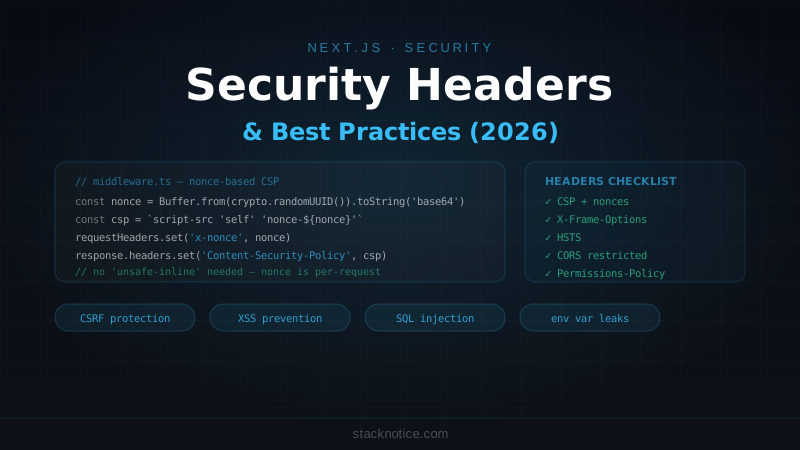
A nonce is a random value generated per-request. Inline scripts are only allowed if they have the matching nonce attribute. This makes 'unsafe-inline' unnecessary.
Step 1: Generate nonce in middleware
// middleware.ts
import { NextRequest, NextResponse } from 'next/server'

export function middleware(request: NextRequest) {
  // Generate a cryptographically random nonce
  const nonce = Buffer.from(crypto.randomUUID()).toString('base64')

  const csp = [
    "default-src 'self'",
    `script-src 'self' 'nonce-${nonce}' 'strict-dynamic'`,
    "style-src 'self' 'unsafe-inline'", // Tailwind requires unsafe-inline for styles
    "img-src 'self' data: blob: https:",
    "font-src 'self'",
    `connect-src 'self' https://o*.ingest.sentry.io`, // Sentry
    "frame-ancestors 'none'",
    "object-src 'none'",
    "base-uri 'self'",
  ].join('; ')

  const requestHeaders = new Headers(request.headers)
  // Pass nonce to the page via request header
  requestHeaders.set('x-nonce', nonce)
  requestHeaders.set('Content-Security-Policy', csp)

  const response = NextResponse.next({ request: { headers: requestHeaders } })
  // Set CSP in the response header
  response.headers.set('Content-Security-Policy', csp)

  return response
}

export const config = {
  matcher: [
    // Skip static files and API routes if you don't need CSP there
    '/((?!_next/static|_next/image|favicon.ico).*)',
  ],
}
Step 2: Read nonce in the root layout
// app/layout.tsx
import { headers } from 'next/headers'
import Script from 'next/script'

export default async function RootLayout({
  children,
}: {
  children: React.ReactNode
}) {
  const nonce = (await headers()).get('x-nonce') ?? ''

  return (
    <html lang="en">
      <head>
        {/* Pass nonce to Script components */}
        <Script
          src="/scripts/analytics.js"
          nonce={nonce}
          strategy="afterInteractive"
        />
      </head>
      <body>{children}</body>
    </html>
  )
}
Next.js's built-in scripts automatically use the nonce when you pass it to <Script>. Third-party scripts loaded via next/script without a nonce won't execute — which is what you want.
CORS for API Routes
By default, Next.js API Routes don't set CORS headers — any origin can make requests. Restrict this in production:
// lib/cors.ts
const ALLOWED_ORIGINS = [
  'https://myapp.com',
  'https://www.myapp.com',
  process.env.NODE_ENV === 'development' ? 'http://localhost:3000' : '',
].filter(Boolean)

export function corsHeaders(request: Request): HeadersInit {
  const origin = request.headers.get('origin') ?? ''

  return {
    'Access-Control-Allow-Origin': ALLOWED_ORIGINS.includes(origin) ? origin : '',
    'Access-Control-Allow-Methods': 'GET, POST, PUT, DELETE, OPTIONS',
    'Access-Control-Allow-Headers': 'Content-Type, Authorization',
    'Access-Control-Max-Age': '86400',
  }
}

// Handle preflight requests
export function handlePreflight(request: Request): Response | null {
  if (request.method === 'OPTIONS') {
    return new Response(null, {
      status: 204,
      headers: corsHeaders(request),
    })
  }
  return null
}
// app/api/data/route.ts
import { corsHeaders, handlePreflight } from '@/lib/cors'
export async function OPTIONS(request: Request) {
return handlePreflight(request) ?? new Response(null, { status: 405 })
}
export async function GET(request: Request) {
const data = await fetchData()
return Response.json(data, { headers: corsHeaders(request) })
}For public APIs where any origin is allowed, use 'Access-Control-Allow-Origin': '*' — but then never include credentials (cookies, auth headers) in those requests.
Server Actions: CSRF Protection
Next.js Server Actions have built-in CSRF protection via Origin header checking — the framework rejects requests where the Origin header doesn't match the app's domain. This is automatic and enabled by default in Next.js 14+.
What this means in practice:
- A malicious site cannot trigger your Server Actions via a form submit from another origin
- Fetch requests to your Server Actions from other domains are rejected
However, there are cases where you still need to be careful:
// ❌ Dangerous: accepting arbitrary user input as a URL to fetch
'use server'
export async function importFromUrl(url: string) {
  // This is a Server-Side Request Forgery (SSRF) vulnerability
  const data = await fetch(url).then(r => r.json())
  return data
}

// ✅ Safe: validate the URL against an allowlist
'use server'
const ALLOWED_IMPORT_DOMAINS = ['api.github.com', 'api.stripe.com']

export async function importFromUrl(url: string) {
  const parsed = new URL(url)
  if (!ALLOWED_IMPORT_DOMAINS.includes(parsed.hostname)) {
    throw new Error('Domain not allowed')
  }
  const data = await fetch(url).then(r => r.json())
  return data
}
Server Action input validation
Always validate Server Action inputs with Zod — treat them as untrusted user input:
'use server'

import { z } from 'zod'
import { auth } from '@/lib/auth'

const updateProfileSchema = z.object({
  name: z.string().min(1).max(100),
  bio: z.string().max(500).optional(),
  website: z.string().url().optional().or(z.literal('')),
})

export async function updateProfile(formData: FormData) {
  const session = await auth()
  if (!session) throw new Error('Unauthorized')

  const parsed = updateProfileSchema.safeParse({
    name: formData.get('name'),
    bio: formData.get('bio'),
    website: formData.get('website'),
  })

  if (!parsed.success) {
    return { error: parsed.error.flatten().fieldErrors }
  }

  await db.update(users)
    .set(parsed.data)
    .where(eq(users.id, session.user.id))

  return { success: true }
}
XSS Prevention
React escapes HTML by default — {userInput} renders safely. The only place you can introduce XSS in React is dangerouslySetInnerHTML:
// ❌ XSS vulnerability — user controls the HTML
function PostContent({ html }: { html: string }) {
  return <div dangerouslySetInnerHTML={{ __html: html }} />
}

// ✅ Sanitize before rendering
import DOMPurify from 'isomorphic-dompurify'

function PostContent({ html }: { html: string }) {
  const clean = DOMPurify.sanitize(html, {
    ALLOWED_TAGS: ['p', 'br', 'strong', 'em', 'a', 'ul', 'ol', 'li', 'h2', 'h3'],
    ALLOWED_ATTR: ['href', 'target', 'rel'],
  })
  return <div dangerouslySetInnerHTML={{ __html: clean }} />
}
npm install isomorphic-dompurify @types/dompurifyFor rich text editors (TipTap, Quill), always sanitize the HTML output before storing and before rendering — the editor generates safe HTML during editing, but stored content should be treated as untrusted.
SQL Injection with ORMs
Drizzle and Prisma use parameterized queries by default — standard ORM usage is safe:
// ✅ Safe — parameterized query
const user = await db.select().from(users).where(eq(users.email, email))

// ✅ Also safe with Prisma
const user = await prisma.user.findUnique({ where: { email } })
The vulnerability appears when using raw SQL with string interpolation:
// ❌ SQL injection — never do this
const results = await db.execute(
  sql`SELECT * FROM users WHERE email = '${email}'` // direct interpolation
)

// ✅ Drizzle parameterized raw SQL
const results = await db.execute(
  sql`SELECT * FROM users WHERE email = ${email}` // Drizzle's sql tag handles escaping
)

// ✅ Prisma raw SQL
const results = await prisma.$queryRaw`
  SELECT * FROM users WHERE email = ${email}
`
The rule: never use JavaScript string templates (${}) inside raw SQL strings. Always use the ORM's tagged template literals which handle parameterization.
Authentication Checks in Server Components
Server Components run on the server but that doesn't mean they're automatically protected — you need to verify authentication explicitly:
// ❌ Assumes middleware handles auth — but middleware can be bypassed
export default async function AdminPage() {
  const data = await fetchAdminData() // no auth check!
  return <AdminDashboard data={data} />
}

// ✅ Check auth in every protected Server Component
import { auth } from '@/lib/auth'
import { redirect } from 'next/navigation'

export default async function AdminPage() {
  const session = await auth()

  if (!session) {
    redirect('/login')
  }

  if (session.user.role !== 'admin') {
    redirect('/unauthorized')
  }

  const data = await fetchAdminData()
  return <AdminDashboard data={data} />
}
Middleware is not the right place for sole authorization — it runs at the edge and has limited access to your database. Use it for redirects and lightweight checks (is the user logged in at all?). Do the real authorization check in the Server Component or API route.
Environment Variable Leaks
Accidentally exposing a server-side secret in client code is a common Next.js mistake:
'use client'
// ❌ Exposes the secret key in the browser bundle
const apiKey = process.env.STRIPE_SECRET_KEY // returns undefined, but the string is in the source

// ❌ Even more dangerous — in a Server Component that passes it to a Client Component
export default async function Page() {
  return <ClientComponent secretKey={process.env.STRIPE_SECRET_KEY} />
}
The second example is the dangerous one: the secretKey prop gets serialized and sent to the browser as part of the component's data.
// ✅ Never pass secrets as props to Client Components
export default async function Page() {
  // Do the secret-dependent work on the server
  const { last4, brand } = await getPaymentMethod(process.env.STRIPE_SECRET_KEY!)
  // Pass only the safe result
  return <ClientComponent last4={last4} brand={brand} />
}
See the Next.js environment variables guide for the full NEXT_PUBLIC_ prefix rules and t3-env setup.
Dependency Security
# Check for known vulnerabilities in your dependencies
npm audit

# Fix automatically where possible
npm audit fix

# Or use a more detailed report
npx better-npm-audit audit
Set this up in CI — fail the build if high-severity vulnerabilities are found:
# .github/workflows/security.yml
- name: Security audit
  run: npm audit --audit-level=high
Security Checklist
Headers (next.config.ts):
☐ X-Content-Type-Options: nosniff
☐ X-Frame-Options: SAMEORIGIN (or frame-ancestors in CSP)
☐ Referrer-Policy: strict-origin-when-cross-origin
☐ Strict-Transport-Security (HSTS)
☐ Permissions-Policy (disable unused browser features)
☐ Content-Security-Policy (nonce-based for full protection)

API Routes:
☐ CORS restricted to your domains only
☐ Input validation with Zod on every route
☐ Authentication check before accessing data
☐ Rate limiting (see the Upstash rate limiting guide)

Server Actions:
☐ Auth check at the start of every action
☐ Zod validation on all inputs
☐ No SSRF — validate URLs against an allowlist

Data:
☐ Using ORM parameterized queries (no raw string SQL)
☐ DOMPurify before dangerouslySetInnerHTML
☐ Never pass secrets as props to Client Components

Dependencies:
☐ npm audit in CI
☐ Dependabot or Renovate for automated updates
Most Next.js security issues aren't exotic — they're missing auth checks, unvalidated inputs, and accidental secret exposure. These are the boring ones to fix, but also the ones that actually get exploited.
For rate limiting setup, see the Upstash rate limiting guide. For authentication best practices, the Better Auth guide covers session management and secure defaults.