Environment variables in Next.js have more rules than most frameworks — and breaking them costs you either a runtime crash or a leaked secret. The NEXT_PUBLIC_ prefix, the .env file hierarchy, the build-time vs runtime distinction, the Docker baking problem — every one of these has caught developers in production.
This guide covers every environment variable pattern in Next.js 15, with type-safe validation so your app fails at startup instead of silently serving undefined.
The Two Environments: Build Time vs Runtime
The first thing to understand about Next.js env vars is that they exist in two completely separate contexts:
Build time — when next build runs on your CI server or Vercel. Server-side env vars are available here.
Runtime — when your server handles a request. Again, server-side env vars are available here.
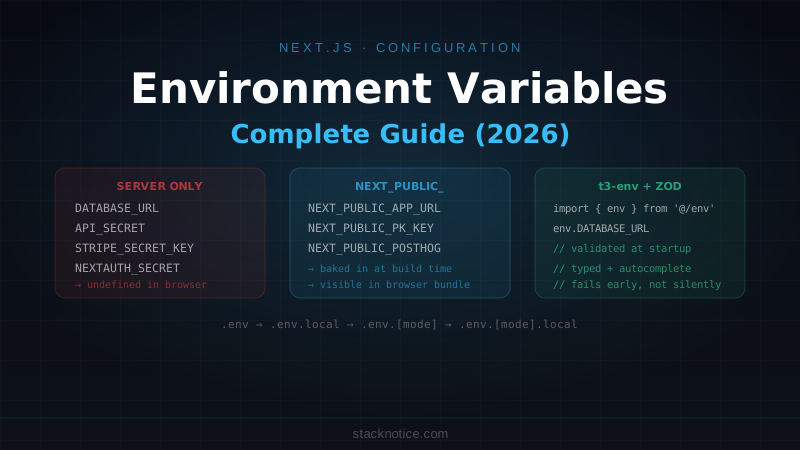
Browser — when the JavaScript bundle runs in a user's browser. Only NEXT_PUBLIC_ prefixed vars are available here, and they're baked into the bundle at build time.
This last point is the one that bites people: NEXT_PUBLIC_ variables are not read from the environment at runtime — they're embedded as string literals in your JavaScript bundle during next build. If you change them, you need to rebuild.
# This runs at build time and gets embedded in the bundle
NEXT_PUBLIC_API_URL=https://api.myapp.com

# After build, the bundle literally contains:
# const apiUrl = "https://api.myapp.com"
# You cannot change it without rebuilding
Server-side variables (DATABASE_URL, API_SECRET, etc.) are different — they're read from the process environment at request time, so you can update them without rebuilding.
The .env File Hierarchy
Next.js loads environment files in this order, with later files taking precedence:
.env                   # Shared defaults, committed to git
.env.local             # Local overrides, never committed (in .gitignore)
.env.development       # Development-specific, committed
.env.development.local # Local dev overrides, never committed
.env.test              # Test environment, committed
.env.production        # Production defaults, committed
.env.production.local  # Production overrides, never committed
For most projects, you only need two files:
# .env (committed — safe defaults and documentation)
DATABASE_URL=postgresql://localhost:5432/myapp
NEXT_PUBLIC_APP_NAME=MyApp

# .env.local (not committed — real secrets)
DATABASE_URL=postgresql://user:realpassword@prod-host:5432/myapp
NEXTAUTH_SECRET=your-real-secret-here
What goes in .env vs .env.local:
.env — non-secret configuration, structure documentation, localhost defaults. Safe to commit.
.env.local — real secrets, passwords, API keys with billing implications. Never commit.
# .gitignore — make sure these are excluded
.env*.local
NEXT_PUBLIC_: The Client-Side Prefix
Any variable you want to read in Client Components, browser code, or static content must be prefixed with NEXT_PUBLIC_:
# Available in the browser
NEXT_PUBLIC_STRIPE_PUBLISHABLE_KEY=pk_live_...
NEXT_PUBLIC_APP_URL=https://myapp.com
NEXT_PUBLIC_POSTHOG_KEY=phc_...

# Server-only (no prefix)
STRIPE_SECRET_KEY=sk_live_...
DATABASE_URL=postgresql://...
NEXTAUTH_SECRET=...
Accessing an unprefixed variable in a Client Component:
'use client'

// ❌ This returns undefined in the browser — no NEXT_PUBLIC_ prefix
const secret = process.env.MY_SECRET

// ✅ This works — prefixed and baked into the bundle
const appUrl = process.env.NEXT_PUBLIC_APP_URL
Server Components can access both:
// Server Component — no 'use client'
export default async function Page() {
  // ✅ Both available
  const dbUrl = process.env.DATABASE_URL
  const appUrl = process.env.NEXT_PUBLIC_APP_URL

  return <div>{appUrl}</div>
}
Type-Safe Environment Variables with t3-env
Raw process.env returns string | undefined for everything. You have no type safety, no validation at startup, and no autocomplete. t3-env (from the T3 stack) fixes this:
npm install @t3-oss/env-nextjs zodCreate env.ts at the root of your project:
// env.ts
import { createEnv } from '@t3-oss/env-nextjs'
import { z } from 'zod'

export const env = createEnv({
  server: {
    DATABASE_URL: z.string().url(),
    NEXTAUTH_SECRET: z.string().min(32),
    STRIPE_SECRET_KEY: z.string().startsWith('sk_'),
    RESEND_API_KEY: z.string().startsWith('re_'),
    NODE_ENV: z.enum(['development', 'test', 'production']),
  },
  client: {
    NEXT_PUBLIC_APP_URL: z.string().url(),
    NEXT_PUBLIC_STRIPE_PUBLISHABLE_KEY: z.string().startsWith('pk_'),
    NEXT_PUBLIC_POSTHOG_KEY: z.string().optional(),
  },
  // For t3-env to pick up the values
  runtimeEnv: {
    DATABASE_URL: process.env.DATABASE_URL,
    NEXTAUTH_SECRET: process.env.NEXTAUTH_SECRET,
    STRIPE_SECRET_KEY: process.env.STRIPE_SECRET_KEY,
    RESEND_API_KEY: process.env.RESEND_API_KEY,
    NODE_ENV: process.env.NODE_ENV,
    NEXT_PUBLIC_APP_URL: process.env.NEXT_PUBLIC_APP_URL,
    NEXT_PUBLIC_STRIPE_PUBLISHABLE_KEY: process.env.NEXT_PUBLIC_STRIPE_PUBLISHABLE_KEY,
    NEXT_PUBLIC_POSTHOG_KEY: process.env.NEXT_PUBLIC_POSTHOG_KEY,
  },
})
Now import env instead of process.env everywhere:
// ✅ Type-safe, validated at startup, autocomplete works
import { env } from '@/env'

const db = new Client({ connectionString: env.DATABASE_URL })
const stripe = new Stripe(env.STRIPE_SECRET_KEY)
If a required variable is missing or invalid, the app throws at startup with a clear error instead of failing silently at runtime:
❌ Invalid environment variables:
  - DATABASE_URL: Invalid url
  - NEXTAUTH_SECRET: String must contain at least 32 character(s)
Manual Zod validation (without t3-env)
If you don't want the dependency:
// lib/env.ts
import { z } from 'zod'

const serverSchema = z.object({
  DATABASE_URL: z.string().url(),
  NEXTAUTH_SECRET: z.string().min(32),
  NODE_ENV: z.enum(['development', 'test', 'production']),
})

const clientSchema = z.object({
  NEXT_PUBLIC_APP_URL: z.string().url(),
})

// Validate on import — throws if invalid
export const serverEnv = serverSchema.parse(process.env)
export const clientEnv = clientSchema.parse({
  NEXT_PUBLIC_APP_URL: process.env.NEXT_PUBLIC_APP_URL,
})
Import the client schema only in client code to avoid leaking server vars to the browser.
Accessing Env Vars in Different Contexts
Server Components and API Routes
// app/api/webhook/route.ts
import { env } from '@/env'

export async function POST(request: Request) {
  const signature = request.headers.get('stripe-signature')
  const event = stripe.webhooks.constructEvent(
    await request.text(),
    signature!,
    env.STRIPE_WEBHOOK_SECRET // ✅ server-only, not in bundle
  )
  // ...
}
Client Components
'use client'

import { env } from '@/env'

export function AnalyticsProvider({ children }: { children: React.ReactNode }) {
  useEffect(() => {
    if (env.NEXT_PUBLIC_POSTHOG_KEY) {
      posthog.init(env.NEXT_PUBLIC_POSTHOG_KEY, {
        api_host: 'https://app.posthog.com',
      })
    }
  }, [])

  return <>{children}</>
}
Middleware
Middleware runs on the Edge Runtime, which has access to environment variables but not Node.js APIs:
// middleware.ts
import { NextRequest } from 'next/server'

export function middleware(request: NextRequest) {
  // ✅ Available in Edge Runtime
  const appUrl = process.env.NEXT_PUBLIC_APP_URL

  // ✅ Server-side vars available too (this code runs on your server, not the browser)
  const secret = process.env.AUTH_SECRET
}
Vercel Environment Variable Management
Vercel has three environments — Development, Preview, and Production — each with separate values:
Development → .env.local on your machine (or Vercel Dev)
Preview     → PR deployments and branch deploys
Production  → your main domain
The Vercel dashboard lets you set values per-environment. The CLI syncs them locally:
# Pull env vars for local development
vercel env pull .env.local

# Add a secret to production only
vercel env add DATABASE_URL production

# List all env vars
vercel env ls
Secrets vs plain text in Vercel:
Sensitive values (API keys, database passwords) should be marked as "Sensitive" — Vercel encrypts them and won't show the plaintext after saving. Non-sensitive config (app URLs, feature flags) can be plain text.
Preview environments and secrets:
Preview deployments (from PRs) often need to connect to a staging database, not production. Use Preview-only values:
# Set DATABASE_URL for preview deployments only
vercel env add DATABASE_URL preview
# Enter your staging database URL when prompted
The Docker Build-Time Problem
When you build a Next.js app in Docker, NEXT_PUBLIC_ variables are baked in during docker build. If you pass them as environment variables at docker run time, they're too late — the build already happened.
# ❌ Won't work for NEXT_PUBLIC_ vars — they're already baked in
FROM node:20-alpine
COPY . .
RUN npm run build
CMD ["npm", "start"]
# Too late — NEXT_PUBLIC_API_URL is already "" in the bundle
docker run -e NEXT_PUBLIC_API_URL=https://api.myapp.com myappSolution 1: Build args (simple)
Pass public vars as build args:
FROM node:20-alpine AS builder
ARG NEXT_PUBLIC_API_URL
ENV NEXT_PUBLIC_API_URL=$NEXT_PUBLIC_API_URL
COPY . .
RUN npm run build
docker build --build-arg NEXT_PUBLIC_API_URL=https://api.myapp.com -t myapp .This means different docker images per environment.
Solution 2: Runtime config for public vars (flexible)
Use a server-rendered route to expose config at runtime:
// app/api/config/route.ts
export async function GET() {
  return Response.json({
    apiUrl: process.env.API_URL, // server-side, readable at runtime
    appName: process.env.APP_NAME,
  })
}
Fetch this config on the client once at startup. More complexity, but one Docker image works everywhere.
Solution 3: Keep NEXT_PUBLIC_ vars for truly static config only
Reserve NEXT_PUBLIC_ for values that genuinely don't change between environments (your app's name, a CDN base URL that's the same everywhere). For anything environment-specific, use a Server Component to pass it down as props.
See the Docker + Next.js production guide for the full containerization setup.
next.config.ts: Hardcoded Env Vars
You can inject env vars into the build via next.config.ts. These are always available in client code without NEXT_PUBLIC_:
// next.config.ts
import type { NextConfig } from 'next'

const config: NextConfig = {
  env: {
    // Available in all components, client and server
    // But these are build-time constants — can't change without rebuild
    APP_VERSION: process.env.npm_package_version ?? '0.0.0',
    BUILD_TIME: new Date().toISOString(),
  },
}

export default config
Use sparingly — this pattern bypasses the security model that NEXT_PUBLIC_ provides (visibility). Prefer explicit NEXT_PUBLIC_ prefixes so it's obvious what's client-accessible.
Exposing Env Vars to Turbopack and Tests
Turbopack (Next.js dev with --turbopack)
Turbopack reads .env files the same way Webpack does. No extra configuration needed.
Vitest
Vitest doesn't load .env files automatically. Use dotenv or the built-in Node --env-file flag:
// vitest.config.ts
import { defineConfig } from 'vitest/config'
import { loadEnv } from 'vite'

export default defineConfig(({ mode }) => ({
  test: {
    env: loadEnv(mode, process.cwd(), ''),
    // or: setupFiles: ['./tests/setup-env.ts']
  },
}))
// tests/setup-env.ts
import { config } from 'dotenv'
config({ path: '.env.test' })Common Mistakes
Mistake 1: Accessing process.env in a Client Component without NEXT_PUBLIC_
'use client'
// ❌ Returns undefined — no prefix, not baked into bundle
const apiUrl = process.env.API_URL

// ✅
const apiUrl = process.env.NEXT_PUBLIC_API_URL
Mistake 2: Destructuring process.env
Next.js replaces process.env.VARIABLE_NAME at build time with the actual value. Destructuring breaks this:
// ❌ Doesn't work — Next.js can't statically analyze this
const { NEXT_PUBLIC_API_URL } = process.env

// ✅
const apiUrl = process.env.NEXT_PUBLIC_API_URL
Mistake 3: Committing .env.local
# .gitignore — double-check this exists
.env.local
.env*.local
Mistake 4: Missing validation — silent undefined
// ❌ Fails silently — stripe is initialized with undefined
const stripe = new Stripe(process.env.STRIPE_SECRET_KEY!)

// ✅ Fails loudly at startup
import { env } from '@/env'
const stripe = new Stripe(env.STRIPE_SECRET_KEY)
Quick Reference
# Pattern         | Available in browser | Available on server | Baked at build?
# NEXT_PUBLIC_X   | ✅                   | ✅                  | ✅ yes
# X (no prefix)   | ❌                   | ✅                  | ❌ read at runtime

# .env file precedence (later overrides earlier)
# .env → .env.local → .env.[mode] → .env.[mode].local

# Best practice structure
.env          # Committed — safe defaults, localhost values
.env.local    # Not committed — real secrets, prod credentials

# t3-env validation
import { env } from '@/env'  # validated at startup, typed

# Vercel CLI
vercel env pull .env.local   # sync from Vercel dashboard
vercel env add KEY production # add to specific environment
The main rule: never put secrets in NEXT_PUBLIC_ (they end up in the browser bundle visible to anyone), never access server-only vars in Client Components (they return undefined), and always validate at startup so you fail early with a clear error message instead of silently in production.
For authentication-specific env vars, see the Better Auth + Next.js guide or the Clerk authentication guide — both cover their respective setup requirements in detail.