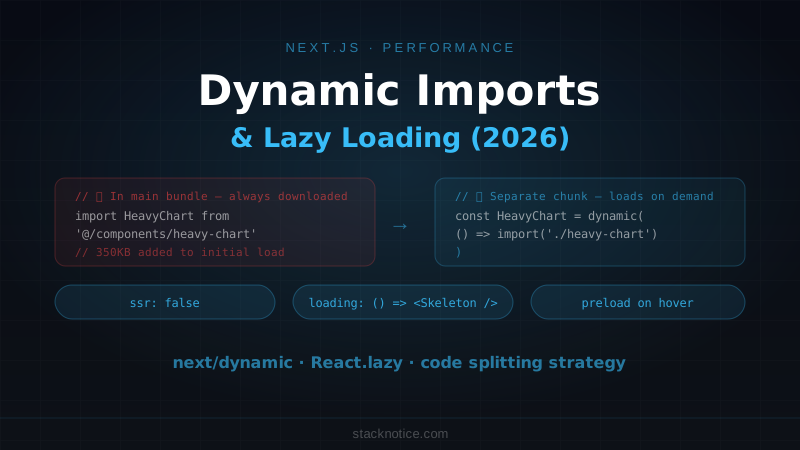
Every Next.js app has the same performance trap: you ship a heavy component that every user has to download, even when most users never interact with it. A rich text editor on an admin page. A chart library on a dashboard that half the users never open. A date picker that appears behind a modal.
Dynamic imports are the fix. They split these components into separate chunks that only load when needed. Less JavaScript on initial load, faster first paint, better Core Web Vitals.
This guide covers every dynamic import pattern in Next.js 15, when to use each, and how to measure the impact.
The Problem: Bundle Size
A Next.js page has two phases: the initial HTML from the server and the JavaScript bundle the browser has to parse and execute. The larger that bundle, the longer the Time to Interactive.
A single heavy library can add hundreds of kilobytes. Common offenders:
- Chart libraries (Recharts, Chart.js, Victory) — 200–400KB each
- Rich text editors (TipTap, Slate, Quill) — 300–600KB
- Date pickers with locale data — 100–200KB
- Map libraries (Leaflet, MapboxGL) — 300KB+
- PDF renderers — 500KB+
If these are statically imported at the top of a file, every visitor downloads them on first load — including visitors who never see that component.
next/dynamic: The Next.js Approach
next/dynamic is Next.js's built-in wrapper around React.lazy with extra features for SSR control.
import dynamic from 'next/dynamic'

// Static import — included in main bundle
// import { HeavyChart } from '@/components/heavy-chart'

// Dynamic import — loaded only when rendered
const HeavyChart = dynamic(() => import('@/components/heavy-chart'), {
  loading: () => <div className="h-64 animate-pulse bg-muted rounded-lg" />,
})

export default function DashboardPage() {
  return (
    <main>
      <h1>Dashboard</h1>
      <HeavyChart data={data} />
    </main>
  )
}
When Next.js builds this page, HeavyChart is split into a separate JavaScript chunk. The browser only fetches that chunk when DashboardPage renders and HeavyChart is actually in the tree.
The loading prop
The loading prop renders while the chunk is fetching. Design it to match the real component's dimensions to avoid layout shift:
const RevenueChart = dynamic(() => import('@/components/revenue-chart'), {
  loading: () => (
    <div className="flex h-64 items-center justify-center rounded-lg border bg-muted/30">
      <div className="flex flex-col items-center gap-2 text-muted-foreground">
        <div className="h-4 w-4 animate-spin rounded-full border-2 border-current border-t-transparent" />
        <span className="text-sm">Loading chart...</span>
      </div>
    </div>
  ),
})
ssr: false — Client-Only Components
Some components can't render on the server at all: they use window, document, browser APIs, or libraries that aren't SSR-compatible.
Without ssr: false, these cause hydration errors or server-side exceptions. With it, Next.js skips server rendering entirely and renders only on the client:
// ❌ Breaks on the server — window is not defined
import { Map } from '@/components/map'

// ✅ Server renders nothing, client loads and renders normally
const Map = dynamic(() => import('@/components/map'), {
  ssr: false,
  loading: () => <div className="h-64 bg-muted rounded-lg" />,
})
Common use cases for ssr: false:
// Rich text editor
const RichTextEditor = dynamic(() => import('@/components/rich-text-editor'), {
  ssr: false,
  loading: () => <div className="h-48 animate-pulse bg-muted rounded-lg" />,
})

// Interactive map
const InteractiveMap = dynamic(() => import('@/components/map'), {
  ssr: false,
  loading: () => <div className="h-96 bg-muted rounded-lg" />,
})

// QR code generator (uses Canvas API)
const QRGenerator = dynamic(() => import('@/components/qr-generator'), {
  ssr: false,
})

// Browser extension detector
const ExtensionChecker = dynamic(() => import('@/components/extension-checker'), {
  ssr: false,
})When you use ssr: false, the component is excluded from the server-rendered HTML entirely. The loading placeholder is what users with slow connections or JS disabled will see. Make sure it communicates something meaningful, not just a blank space.
Dynamic Imports with Named Exports
import() returns the default export. For named exports, map them in the promise:
// Named export: export function BarChart() { ... }
const BarChart = dynamic(
  () => import('@/components/charts').then((mod) => mod.BarChart),
  { loading: () => <ChartSkeleton /> }
)

// Or use a re-export file
// lib/dynamic-charts.ts
export const DynamicBarChart = dynamic(
  () => import('@/components/charts').then((mod) => mod.BarChart),
  { ssr: false }
)
For a module with many named exports where you only need one:
// Only loads the specific icon set, not the entire icon library
const ArrowIcon = dynamic(
  () => import('lucide-react').then((mod) => ({ default: mod.ArrowRight })),
)
Note: for icon libraries, tree-shaking on static imports is often more efficient than dynamic imports. Measure before reaching for dynamic imports.
next/dynamic vs React.lazy
Both lazy-load components, but they're different tools:
next/dynamic | React.lazy | |
|---|---|---|
| SSR control | ssr: false option | No SSR support |
| Loading state | loading prop | Requires <Suspense> |
| Works in Server Components | No (use in Client Components) | No |
| Named exports | .then((mod) => mod.Export) | Same pattern |
| Next.js integration | Yes — chunk naming, preloading | Partial |
In the Next.js App Router, both work in Client Components. next/dynamic is more ergonomic for Next.js-specific patterns (especially ssr: false). React.lazy is fine for pure React component lazy loading where you don't need SSR control.
// React.lazy — fine for App Router Client Components
'use client'

import { lazy, Suspense } from 'react'

const HeavyComponent = lazy(() => import('@/components/heavy-component'))

export function Section() {
  return (
    <Suspense fallback={<div className="h-32 animate-pulse bg-muted rounded" />}>
      <HeavyComponent />
    </Suspense>
  )
}
Conditional Loading: Load Only When Needed
The biggest win is loading components only when the user actually needs them:
'use client'

import { useState } from 'react'
import dynamic from 'next/dynamic'

const PDFViewer = dynamic(() => import('@/components/pdf-viewer'), {
  ssr: false,
  loading: () => <div className="h-96 animate-pulse bg-muted rounded" />,
})

export function DocumentCard({ url }: { url: string }) {
  const [showPreview, setShowPreview] = useState(false)

  return (
    <div>
      <button onClick={() => setShowPreview(true)}>
        Preview document
      </button>

      {/* PDFViewer chunk only downloads when the user clicks */}
      {showPreview && <PDFViewer url={url} />}
    </div>
  )
}
The PDF viewer library — often 500KB+ — doesn't download until the user explicitly requests a preview.
Same pattern for modals, drawers, and other toggled UI:
const EditProfileModal = dynamic(() => import('@/components/edit-profile-modal'))

export function ProfilePage() {
  const [modalOpen, setModalOpen] = useState(false)

  return (
    <>
      <button onClick={() => setModalOpen(true)}>Edit profile</button>
      {modalOpen && (
        <EditProfileModal onClose={() => setModalOpen(false)} />
      )}
    </>
  )
}
Dynamic Imports for Heavy Libraries
When the heavy thing is a library rather than a component, use the dynamic import() function directly:
'use client'

import { useState } from 'react'

export function ExportButton({ data }: { data: unknown[] }) {
  const [isExporting, setIsExporting] = useState(false)

  async function handleExport() {
    setIsExporting(true)

    // xlsx only loads when the user clicks Export
    const { utils, writeFile } = await import('xlsx')

    const ws = utils.json_to_sheet(data)
    const wb = utils.book_new()
    utils.book_append_sheet(wb, ws, 'Data')
    writeFile(wb, 'export.xlsx')

    setIsExporting(false)
  }

  return (
    <button onClick={handleExport} disabled={isExporting}>
      {isExporting ? 'Exporting...' : 'Export to Excel'}
    </button>
  )
}
// Same pattern for image processing
async function compressImage(file: File): Promise<Blob> {
const { default: imageCompression } = await import('browser-image-compression')
return imageCompression(file, {
maxSizeMB: 1,
maxWidthOrHeight: 1920,
})
}The library only downloads when the function is called. If the user never clicks Export, they never download the xlsx library.
Preloading: Anticipate Before the User Clicks
If you know the user is likely to trigger a dynamic import (hovering over a button, scrolling near a component), preload the chunk early:
import dynamic from 'next/dynamic'

const EditModal = dynamic(() => import('@/components/edit-modal'))

// Preload the chunk when the user hovers
function EditButton() {
  return (
    <button
      onMouseEnter={() => {
        // Starts fetching the chunk — by the time they click, it's ready
        import('@/components/edit-modal')
      }}
      onClick={() => setModalOpen(true)}
    >
      Edit
    </button>
  )
}
This pattern eliminates the loading flash for fast users: the chunk starts downloading on hover and is usually ready by the time they click.
What to Dynamically Import (and What Not To)
Good candidates for dynamic imports:
- Heavy third-party libraries used conditionally (chart libraries, editors, PDF viewers)
- Components behind user interaction (modals, drawers, expanded sections)
- Components at the bottom of long pages (below the fold)
- Admin/settings pages that regular users rarely visit
- Anything with
windowordocumentaccess
Bad candidates for dynamic imports:
- Core UI components used everywhere (buttons, inputs, layout)
- Components needed for initial render (hero sections, navigation)
- Small utilities where the dynamic import overhead outweighs the savings
- Components used immediately on every page load
The test: if the user can complete their primary action on the page without ever rendering the component, it's a candidate for lazy loading.
Measuring the Impact
Two tools:
Bundle analyzer — see what's in your bundles before and after:
npm install --save-dev @next/bundle-analyzer// next.config.ts
import withBundleAnalyzer from '@next/bundle-analyzer'
const config = withBundleAnalyzer({
enabled: process.env.ANALYZE === 'true',
})
export default configANALYZE=true npm run buildOpen the visualization and look for large modules in your initial bundle that could be deferred.
Lighthouse — measure the effect on real performance metrics. A meaningful lazy load improvement shows up in Total Blocking Time and TTI. For a full Lighthouse workflow, see the Next.js performance optimization guide.
Dynamic Imports and Partial Prerendering
With PPR enabled, dynamic imports work alongside Suspense boundaries. A dynamically imported component inside a <Suspense> boundary becomes part of a dynamic hole — it streams in at request time and its chunk loads on the client when it renders:
export const experimental_ppr = true

export default function Page() {
  return (
    <>
      {/* Static — pre-rendered */}
      <PageHeader />

      {/* Dynamic hole — streams at request time */}
      <Suspense fallback={<ChartSkeleton />}>
        {/* Also lazily loaded — chunk downloads client-side when it renders */}
        <DynamicChart />
      </Suspense>
    </>
  )
}
PPR and dynamic imports solve different problems: PPR controls when server rendering happens, dynamic imports control when the JavaScript bundle downloads. They complement each other. For the full PPR picture, see the Next.js Partial Prerendering guide.
Quick Reference
// Basic dynamic import with loading state
const Component = dynamic(() => import('./component'), {
  loading: () => <Skeleton />,
})

// Client-only component
const BrowserComponent = dynamic(() => import('./browser-component'), {
  ssr: false,
  loading: () => <Placeholder />,
})

// Named export
const NamedExport = dynamic(
  () => import('./module').then((m) => m.NamedExport)
)

// Conditional render (most impactful pattern)
{isOpen && <DynamicModal />}

// Preload on hover
onMouseEnter={() => import('./component')}

// Dynamic library import in a function
const { default: heavyLib } = await import('heavy-lib')
The principle is the same throughout: defer downloading JavaScript until it's actually needed. The browser does less work on initial load, the user gets an interactive page sooner, and the code that most users never see doesn't cost them anything.