The MongoDB vs PostgreSQL debate has a specific shape: people who chose MongoDB early often wish they had PostgreSQL for complex queries, and people who chose PostgreSQL often reach for JSONB when they need flexible schemas. Both communities have a point.
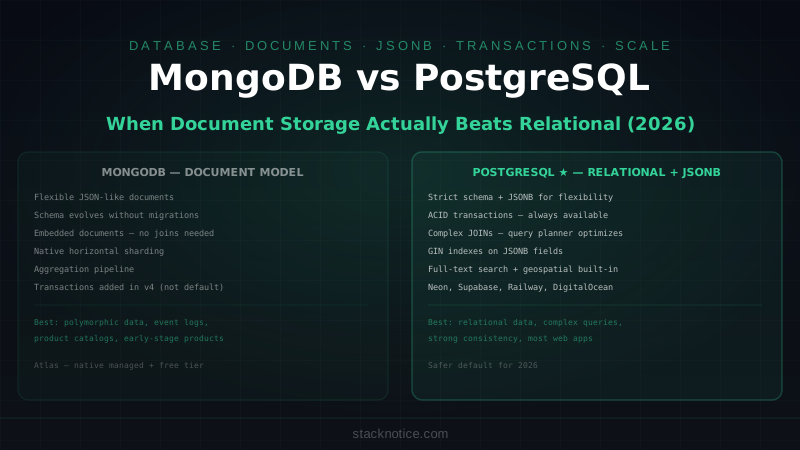
MongoDB is a document database — data lives in JSON-like documents, collections replace tables, and there's no enforced schema by default. PostgreSQL is a relational database with a strict schema, ACID transactions, and JSONB support that lets you store and query document-shaped data inside a relational model.
The question isn't which is universally better. It's which fits your access patterns.
The Data Model
MongoDB: Documents in Collections
// A MongoDB document — arbitrary nesting, no fixed schema
{
  _id: ObjectId("64abc123"),
  name: "Alice Chen",
  email: "alice@example.com",
  profile: {
    bio: "Full-stack developer",
    location: { city: "Berlin", country: "DE" },
    skills: ["TypeScript", "React", "Node.js"]
  },
  preferences: {
    theme: "dark",
    notifications: { email: true, push: false }
  },
  createdAt: ISODate("2026-01-15T10:30:00Z")
}
No migration needed to add a preferences field to some documents and not others. No ALTER TABLE. Each document can have a different shape. This is the actual value of schema flexibility — not that schemas are bad, but that evolving a schema during early product development costs zero friction.
PostgreSQL: Structured Rows with Optional JSONB
CREATE TABLE users (
  id          UUID DEFAULT gen_random_uuid() PRIMARY KEY,
  name        TEXT NOT NULL,
  email       TEXT UNIQUE NOT NULL,
  -- Structured fields for known, queryable data
  city        TEXT,
  country     CHAR(2),
  skills      TEXT[] DEFAULT '{}',
  -- JSONB for flexible, extensible data
  preferences JSONB DEFAULT '{}',
  metadata    JSONB DEFAULT '{}',
  created_at  TIMESTAMPTZ DEFAULT NOW()
);

-- Index into JSONB fields
CREATE INDEX users_preferences_theme_idx
  ON users ((preferences->>'theme'));

-- Partial index — only users who have push enabled
CREATE INDEX users_push_enabled_idx
  ON users ((preferences->'notifications'->>'push'))
  WHERE (preferences->'notifications'->>'push')::boolean = true;
PostgreSQL doesn't force you to choose between structured and flexible — you can use both in the same table. Known, frequently queried fields get columns with indexes. Variable, extensible data goes in JSONB.
Queries: Where PostgreSQL Wins for Complex Data
The Same Query in Both
Find users in Germany who have TypeScript as a skill, with their post count, ordered by most active:
// MongoDB aggregation pipeline
db.users.aggregate([
  // Stage 1: filter
  { $match: {
    "profile.location.country": "DE",
    "profile.skills": "TypeScript"
  }},
  // Stage 2: join with posts collection
  { $lookup: {
    from: "posts",
    localField: "_id",
    foreignField: "authorId",
    as: "posts"
  }},
  // Stage 3: add computed field
  { $addFields: {
    postCount: { $size: "$posts" }
  }},
  // Stage 4: sort and limit
  { $sort: { postCount: -1 } },
  { $limit: 20 },
  // Stage 5: project only needed fields
  { $project: {
    name: 1,
    email: 1,
    "profile.location.city": 1,
    postCount: 1
  }}
])
-- PostgreSQL — standard SQL with array operators
SELECT
u.id,
u.name,
u.email,
u.city,
COUNT(p.id) AS post_count
FROM users u
LEFT JOIN posts p ON p.author_id = u.id
WHERE
u.country = 'DE'
AND 'TypeScript' = ANY(u.skills)
GROUP BY u.id, u.name, u.email, u.city
ORDER BY post_count DESC
LIMIT 20;The SQL is shorter, more readable to anyone who knows SQL (which is most developers), and the query planner can optimize it with standard indexes. MongoDB's aggregation pipeline is powerful but verbose — each stage adds a layer of indirection.
JSONB Queries in PostgreSQL
When data is dynamic, PostgreSQL's JSONB operators let you query inside JSON without giving up relational power:
-- Find users who prefer dark theme AND have email notifications enabled
SELECT name, email, preferences
FROM users
WHERE
  preferences->>'theme' = 'dark'
  AND (preferences->'notifications'->>'email')::boolean = true;

-- Find users who have ANY of a set of skills (array stored as JSONB)
SELECT name, metadata->'skills' AS skills
FROM users
WHERE metadata->'skills' @> '["TypeScript"]'::jsonb;

-- Update a nested key without replacing the whole document
UPDATE users
SET preferences = jsonb_set(preferences, '{notifications, push}', 'true')
WHERE id = $1;

-- Aggregate over JSONB array elements
SELECT
  skill,
  COUNT(*) as developer_count
FROM users,
  jsonb_array_elements_text(metadata->'skills') AS skill
GROUP BY skill
ORDER BY developer_count DESC;
This is the nuance most comparisons miss: PostgreSQL with JSONB is not a pure relational database. It's a relational database that handles document-shaped data well when you need it.
Schema Flexibility in Practice
MongoDB's schema-free design is most valuable in two phases: early product development (when the schema changes weekly) and domains where documents genuinely vary (user-generated content, event logs, product catalogs with heterogeneous attributes).
// MongoDB with Mongoose — schema-on-read, validate in the ODM
import mongoose, { Schema, Document } from 'mongoose'

interface IProduct extends Document {
  name: string
  category: string
  price: number
  attributes: Record<string, unknown>  // varies by category
}

const ProductSchema = new Schema<IProduct>({
  name: { type: String, required: true },
  category: { type: String, required: true },
  price: { type: Number, required: true },
  attributes: { type: Schema.Types.Mixed }  // anything goes
}, { timestamps: true })

// Electronics: { "wattage": 65, "voltage": "110V", "connector": "USB-C" }
// Clothing: { "sizes": ["S", "M", "L"], "material": "cotton", "care": "machine wash" }
// Books: { "isbn": "978-...", "pages": 320, "language": "en" }
// All in the same collection with no migration
-- PostgreSQL equivalent for heterogeneous products
CREATE TABLE products (
id UUID PRIMARY KEY DEFAULT gen_random_uuid(),
name TEXT NOT NULL,
category TEXT NOT NULL,
price NUMERIC(10, 2) NOT NULL,
-- Known fields for all products
-- Category-specific data in JSONB
attributes JSONB DEFAULT '{}',
created_at TIMESTAMPTZ DEFAULT NOW()
);
-- Index electronics by wattage
CREATE INDEX products_wattage_idx
ON products ((attributes->>'wattage'))
WHERE category = 'electronics';
-- Full-text search across all text attributes
CREATE INDEX products_attrs_fts_idx
ON products USING gin(to_tsvector('english', attributes::text));For genuinely polymorphic data, MongoDB is still simpler. For data that's mostly structured with some variable parts, PostgreSQL's JSONB handles it cleanly.
Transactions
MongoDB added multi-document ACID transactions in version 4.0, but they're not the default behavior and come with overhead. The document model encourages embedding related data to avoid transactions entirely.
// MongoDB: embed to avoid multi-document transactions
// Instead of separate orders + items collections (needing a transaction),
// embed items in the order document

await db.orders.insertOne({
  customerId: ObjectId("..."),
  status: "pending",
  items: [                          // embedded — one atomic write
    { productId: ObjectId("..."), name: "Keyboard", price: 89.99, qty: 1 },
    { productId: ObjectId("..."), name: "Mouse", price: 49.99, qty: 2 }
  ],
  total: 189.97,
  createdAt: new Date()
})

// Multi-document transaction when you really need it
const session = client.startSession()
try {
  await session.withTransaction(async () => {
    await db.orders.insertOne({ ... }, { session })
    await db.inventory.updateMany(
      { productId: { $in: productIds } },
      { $inc: { quantity: -1 } },
      { session }
    )
  })
} finally {
  await session.endSession()
}
-- PostgreSQL: transactions are the default, always available
BEGIN;
INSERT INTO orders (customer_id, status, total)
VALUES ($1, 'pending', $2)
RETURNING id INTO order_id;
INSERT INTO order_items (order_id, product_id, name, price, quantity)
SELECT order_id, product_id, name, price, $qty
FROM products
WHERE product_id = ANY($product_ids);
UPDATE inventory
SET quantity = quantity - $qty
WHERE product_id = ANY($product_ids)
AND quantity >= $qty; -- will fail if stock is too low, rolling back everything
COMMIT;PostgreSQL's transactional model is simpler to reason about. Every statement is atomic by default, multi-statement transactions are straightforward, and the behavior is predictable. MongoDB's embedding-first approach can reduce the need for transactions, but forces a different data modeling discipline.
TypeScript Integration
Both have mature TypeScript support through ORMs and ODMs.
// MongoDB with Mongoose — typed but runtime schema enforcement is separate from TypeScript
import { Schema, model, InferSchemaType } from 'mongoose'

const userSchema = new Schema({
  name: { type: String, required: true },
  email: { type: String, required: true, unique: true },
  skills: [String]
})

type User = InferSchemaType<typeof userSchema>
const UserModel = model('User', userSchema)

const user = await UserModel.findOne({ email: 'alice@example.com' })
// user is typed, but the runtime validation only runs on save/validate

// MongoDB with Prisma (also supported)
const user = await prisma.user.findUnique({
  where: { email: 'alice@example.com' },
  include: { posts: true }
})
// Prisma provides the same ergonomics for MongoDB as for PostgreSQL

// PostgreSQL with Drizzle
import { pgTable, uuid, text, timestamp } from 'drizzle-orm/pg-core'

const users = pgTable('users', {
  id: uuid('id').primaryKey().defaultRandom(),
  name: text('name').notNull(),
  email: text('email').notNull().unique(),
  createdAt: timestamp('created_at').defaultNow()
})

const user = await db.query.users.findFirst({
  where: eq(users.email, 'alice@example.com'),
  with: { posts: true }
})
// Fully typed — schema IS the type
Drizzle and Prisma both support MongoDB, so the TypeScript ergonomics are comparable. The schema definition differs — Drizzle reflects the SQL structure directly, Mongoose reflects MongoDB's document structure.
Performance Characteristics
Neither database is universally faster. Performance depends on the query.
MongoDB tends to be faster for:
- Read-heavy workloads on single documents (no joins needed)
- Write-heavy workloads where sharding distributes the load
- Queries on nested fields within a document
- Horizontal scaling — MongoDB's sharding is built-in and more automatic
PostgreSQL tends to be faster for:
- Complex joins across multiple tables
- Aggregation queries that benefit from the query planner's statistics
- Read replicas for read scaling (simpler to set up than MongoDB sharding)
- JSONB queries with GIN indexes (often faster than MongoDB for specific patterns)
For most web applications serving under 100k users, the performance difference is irrelevant — both databases handle the load comfortably. Performance only becomes a meaningful differentiator at significant scale, and by then you'll have profiling data to guide the decision.
Managed Hosting
| Provider | MongoDB | PostgreSQL |
|---|---|---|
| MongoDB Atlas | ✅ Native (free tier available) | — |
| Neon | — | ✅ Serverless PostgreSQL |
| Supabase | — | ✅ Managed + auth + realtime |
| PlanetScale | — | ✅ (MySQL-compatible, similar model) |
| Railway | ✅ | ✅ |
| Render | ✅ | ✅ |
| DigitalOcean | ✅ Managed | ✅ Managed |
MongoDB Atlas is the dominant managed option for MongoDB — generous free tier, global clusters, search built in. PostgreSQL has more managed hosting options at competitive prices.
Decision Framework
Choose MongoDB if:
- Early product with rapidly changing data model
- Data is genuinely document-shaped (deeply nested, no natural relational structure)
- You need horizontal sharding across multiple servers at scale
- Content management, product catalogs, or event logs with heterogeneous schemas
- Your team is more comfortable with JSON than SQL
Choose PostgreSQL if:
- Data has clear relational structure with known relationships
- You need reliable multi-document transactions
- Complex queries with multiple joins are a core use case
- Full-text search, geospatial queries, or analytical aggregations matter
- You want one database that handles both structured and semi-structured data (JSONB)
- Strong consistency is non-negotiable
The honest assessment: For most web applications built in 2026, PostgreSQL is the safer default. Its JSONB support handles most use cases where MongoDB's flexibility would have been the argument, the tooling ecosystem (Prisma, Drizzle, Supabase, Neon) is excellent, and the relational model scales cleanly to complex domains. MongoDB remains the right choice for genuinely document-shaped domains and teams that don't need relational queries.
For PostgreSQL query optimization including indexes and execution plans, see the PostgreSQL indexes guide. For ORM choices that work with PostgreSQL, Drizzle vs Prisma covers the trade-offs in depth. For hosted PostgreSQL with auth and real-time built in, the Supabase + Next.js guide is the full setup.