Most slow PostgreSQL queries are slow for one reason: the database is reading rows it doesn't need to. Indexes fix this — but only if you use the right type in the right place.
This guide covers every index type you'll actually encounter, how to read query plans, when to add an index, and when adding one makes things worse.
How Indexes Work
Without an index, PostgreSQL does a sequential scan: it reads every row in the table and filters the ones that match your WHERE clause. For a table with 10 million rows and a query that returns 50, that's a lot of unnecessary work.
An index is a separate data structure that maps values to physical row locations. Instead of reading every row, PostgreSQL looks up the value in the index, gets the row addresses, and fetches only those rows.
The tradeoff: indexes take disk space, and every INSERT, UPDATE, and DELETE must update all relevant indexes. More indexes = faster reads, slower writes.
Reading EXPLAIN ANALYZE
Before adding any index, understand what the query is doing:
EXPLAIN ANALYZE
SELECT * FROM orders WHERE user_id = 42 AND status = 'pending';
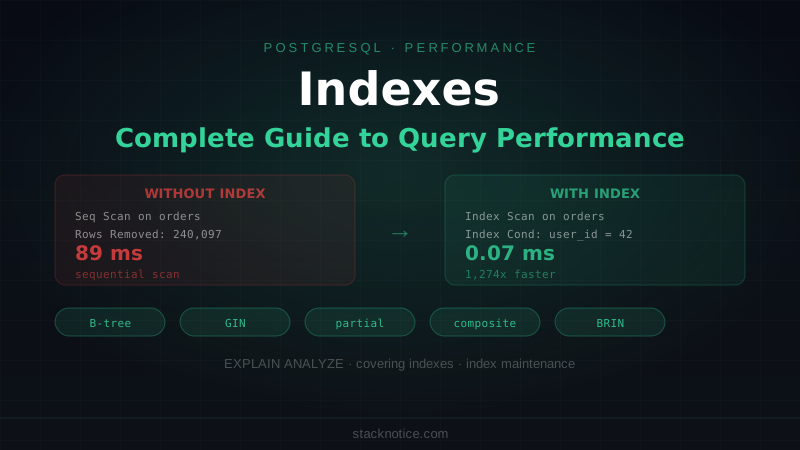
Seq Scan on orders (cost=0.00..4821.00 rows=3 width=156)
(actual time=0.082..89.431 rows=3 loops=1)
Filter: ((user_id = 42) AND (status = 'pending'::text))
Rows Removed by Filter: 240097
Planning Time: 0.412 ms
Execution Time: 89.456 ms
Key things to look at:
- Seq Scan — reading every row. Usually means no usable index.
- cost=0.00..4821.00 — estimated cost in abstract units (higher = more work).
- actual time=89.431 ms — real execution time.
- Rows Removed by Filter: 240097 — discarded 240,097 rows to return 3. Expensive.
After adding the right index:
Index Scan using idx_orders_user_status on orders
  (cost=0.42..12.47 rows=3 width=156)
  (actual time=0.031..0.044 rows=3 loops=1)
  Index Cond: ((user_id = 42) AND (status = 'pending'::text))
Planning Time: 0.389 ms
Execution Time: 0.068 ms
89ms → 0.068ms. That's what the right index does.
B-tree Indexes: The Default
B-tree is the default index type for good reason — it works for equality (=), range (<, >, BETWEEN), sorting (ORDER BY), and IS NULL / IS NOT NULL.
-- Single column
CREATE INDEX idx_orders_user_id ON orders(user_id);

-- This is equivalent
CREATE INDEX idx_orders_user_id ON orders USING btree(user_id);
When a B-tree index is used
-- Equality — uses index
SELECT * FROM orders WHERE user_id = 42;

-- Range — uses index
SELECT * FROM orders WHERE created_at > '2026-01-01';

-- Sorted output — uses index to avoid sort step
SELECT * FROM orders WHERE user_id = 42 ORDER BY created_at DESC;

-- Between — uses index
SELECT * FROM orders WHERE amount BETWEEN 100 AND 500;
When a B-tree index is NOT used
-- Leading wildcard — can't use index
SELECT * FROM users WHERE email LIKE '%@example.com';

-- Function on indexed column — bypasses index
SELECT * FROM orders WHERE LOWER(status) = 'pending';

-- Implicit type cast — may bypass index
SELECT * FROM orders WHERE user_id = '42';  -- user_id is integer
For the function case, the fix is a functional index:
CREATE INDEX idx_users_email_lower ON users(LOWER(email));

-- Now this uses the index
SELECT * FROM users WHERE LOWER(email) = 'alice@example.com';
Composite Indexes: Column Order Matters
A composite index covers multiple columns. Column order determines what queries can use it.
CREATE INDEX idx_orders_user_status ON orders(user_id, status);This index satisfies queries that filter on:
user_idalone (leading column)user_idANDstatus(both columns)
It does NOT satisfy queries that filter on:
statusalone (skips leading column)
-- Uses index (user_id is the leading column)
SELECT * FROM orders WHERE user_id = 42;

-- Uses index (both columns covered)
SELECT * FROM orders WHERE user_id = 42 AND status = 'pending';

-- Does NOT use this index (status is not the leading column)
SELECT * FROM orders WHERE status = 'pending';
Ordering composite index columns
Put the most selective column first if you filter on it alone. Put equality columns before range columns:
-- If you often filter by user_id and then range-filter by created_at:
CREATE INDEX idx_orders_user_created ON orders(user_id, created_at);

-- Correct: equality first, then range
-- user_id = 42 AND created_at > '2026-01-01' — uses both columns
-- user_id = 42 — uses first column
-- created_at > '2026-01-01' alone — does NOT use this index
Partial Indexes: Index Only What You Query
A partial index covers only rows that match a WHERE clause. Smaller index, faster lookups, less write overhead.
-- Instead of indexing all 10M orders, only index the unprocessed ones
CREATE INDEX idx_orders_pending ON orders(created_at)
  WHERE status = 'pending';
This index is tiny if pending orders are a small fraction of the table. Queries that filter on status = 'pending' use it automatically:
-- Uses the partial index — fast
SELECT * FROM orders WHERE status = 'pending' ORDER BY created_at;

-- Does NOT use the partial index (wrong status value)
SELECT * FROM orders WHERE status = 'shipped' ORDER BY created_at;
Real-world patterns:
-- Index only soft-deleted records that aren't deleted yet
CREATE INDEX idx_users_active ON users(email)
  WHERE deleted_at IS NULL;

-- Index only high-value orders worth fast lookups
CREATE INDEX idx_orders_high_value ON orders(customer_id)
  WHERE amount > 1000;

-- Index only failed jobs (usually a small subset)
CREATE INDEX idx_jobs_failed ON background_jobs(created_at)
  WHERE status = 'failed';
GIN Indexes: Arrays, JSONB, and Full-Text Search
GIN (Generalized Inverted Index) is for searching inside composite values: arrays, JSONB documents, and tsvector full-text columns.
Indexing arrays
-- Table with array column
CREATE TABLE articles (
  id SERIAL PRIMARY KEY,
  tags TEXT[]
);

CREATE INDEX idx_articles_tags ON articles USING GIN(tags);

-- Find articles with specific tags
SELECT * FROM articles WHERE tags @> ARRAY['postgresql', 'performance'];
Indexing JSONB
CREATE TABLE events (
  id SERIAL PRIMARY KEY,
  payload JSONB
);

CREATE INDEX idx_events_payload ON events USING GIN(payload);

-- Query any key inside the JSONB
SELECT * FROM events WHERE payload @> '{"type": "purchase"}';
SELECT * FROM events WHERE payload ? 'user_id';
For querying a specific known key path frequently, a functional B-tree index on that path is faster than a full GIN index:
-- More efficient if you always query the same key
CREATE INDEX idx_events_type ON events((payload->>'type'));

-- Now this uses the B-tree index
SELECT * FROM events WHERE payload->>'type' = 'purchase';
Full-text search
-- Add a tsvector column or index a generated one
CREATE INDEX idx_articles_search ON articles
  USING GIN(to_tsvector('english', title || ' ' || body));

-- Full-text search query
SELECT * FROM articles
WHERE to_tsvector('english', title || ' ' || body) @@ to_tsquery('postgresql & index');
BRIN Indexes: Very Large Tables with Natural Order
BRIN (Block Range Index) stores min/max values per block of pages. Tiny size (a few KB vs potentially GB for B-tree on the same column), but only works well when values are physically stored in order — which is true for created_at, id sequences, and sensor timestamps.
-- 10GB events table with timestamp column
CREATE INDEX idx_events_created_brin ON events USING BRIN(created_at);
For time-series data where you always query recent records, this can be dramatically smaller than a B-tree while still filtering out most of the table:
-- Last 30 days — BRIN eliminates most blocks without reading them
SELECT * FROM events
WHERE created_at > NOW() - INTERVAL '30 days';
Don't use BRIN for randomly ordered data (like user_id with frequent inserts) — it won't eliminate many blocks.
Covering Indexes: Index-Only Scans
If a query only needs columns that are all in the index, PostgreSQL can answer it without touching the main table at all (an index-only scan). This is significantly faster.
-- Query only needs user_id and status — both in the index
CREATE INDEX idx_orders_user_status ON orders(user_id, status);

-- Index-only scan: never touches the orders table
SELECT user_id, status FROM orders WHERE user_id = 42;
PostgreSQL 11+ added INCLUDE to add non-search columns to the index without using them as search keys:
-- Search by user_id, but also cover amount for index-only scans
CREATE INDEX idx_orders_user_covering ON orders(user_id) INCLUDE (amount, status);

-- Index-only scan — no heap access needed
SELECT user_id, amount, status FROM orders WHERE user_id = 42;
Unique Indexes
CREATE UNIQUE INDEX and UNIQUE constraint both create a unique B-tree index. Use UNIQUE INDEX when you want the index without the constraint semantics:
-- Most common: unique constraint (creates index automatically)
ALTER TABLE users ADD CONSTRAINT users_email_unique UNIQUE(email);

-- Explicit unique index
CREATE UNIQUE INDEX idx_users_email ON users(email);

-- Unique partial index — unique only among active users
CREATE UNIQUE INDEX idx_users_email_active ON users(email)
  WHERE deleted_at IS NULL;
The partial unique index is a common pattern: you want uniqueness for active records but allow soft-deleted emails to be reused.
Concurrent Index Creation
By default, CREATE INDEX locks the table for writes. On a production table, this is unacceptable. Use CONCURRENTLY:
-- Builds without a full table lock — safe for production
CREATE INDEX CONCURRENTLY idx_orders_created ON orders(created_at);
CONCURRENTLY takes longer and uses more CPU, but doesn't block INSERT/UPDATE/DELETE during the build. It also can't run inside a transaction.
-- WRONG — can't combine with a transaction
BEGIN;
CREATE INDEX CONCURRENTLY idx_foo ON foo(bar); -- ERROR
COMMIT;
Finding Indexes That Hurt More Than Help
Unused indexes
SELECT
  schemaname,
  tablename,
  indexname,
  idx_scan,
  idx_tup_read,
  pg_size_pretty(pg_relation_size(indexrelid)) AS index_size
FROM pg_stat_user_indexes
WHERE idx_scan = 0
  AND schemaname = 'public'
ORDER BY pg_relation_size(indexrelid) DESC;
An index with idx_scan = 0 since the last stats reset is never used. It's consuming disk space and slowing down writes with no benefit. Drop it.
Duplicate and overlapping indexes
SELECT
  t.relname AS table_name,
  ix.relname AS index_name,
  array_agg(a.attname ORDER BY array_position(i.indkey, a.attnum)) AS columns
FROM
  pg_index i
  JOIN pg_class t ON t.oid = i.indrelid
  JOIN pg_class ix ON ix.oid = i.indexrelid
  JOIN pg_attribute a ON a.attrelid = t.oid AND a.attnum = ANY(i.indkey)
WHERE
  t.relkind = 'r'
  AND NOT i.indisprimary
GROUP BY t.relname, ix.relname
ORDER BY t.relname, columns;
If two indexes share a leading column, the more specific one may make the less specific one redundant. Review and remove the redundant one.
Index Maintenance
Bloat from updates and deletes
PostgreSQL uses MVCC, which means old row versions accumulate after updates and deletes. Index entries for dead rows aren't immediately removed — they're cleaned up by autovacuum. If autovacuum can't keep up, indexes bloat and slow down.
Check index bloat:
SELECT
  relname,
  pg_size_pretty(pg_relation_size(oid)) AS total,
  pg_size_pretty(pg_total_relation_size(oid)) AS total_with_indexes
FROM pg_class
WHERE relkind = 'r'
ORDER BY pg_total_relation_size(oid) DESC
LIMIT 20;
For badly bloated indexes:
-- Rebuilds the index — takes a full lock, use CONCURRENTLY in production
REINDEX INDEX CONCURRENTLY idx_orders_user_id;
VACUUM and ANALYZE
-- Manual vacuum + analyze on a specific table
VACUUM ANALYZE orders;

-- Check when a table was last vacuumed
SELECT relname, last_vacuum, last_autovacuum, last_analyze, last_autoanalyze
FROM pg_stat_user_tables
WHERE relname = 'orders';
PostgreSQL's query planner uses statistics collected by ANALYZE to decide whether to use an index. After a large data load, run ANALYZE tablename to update statistics — otherwise the planner may choose a sequential scan even when an index would be faster.
Common Patterns
Multi-tenancy: always prefix with tenant ID
-- Every query filters by organization_id first
CREATE INDEX idx_orders_org_created ON orders(organization_id, created_at DESC);
CREATE INDEX idx_orders_org_status ON orders(organization_id, status);
Audit tables: BRIN on the timestamp
-- Append-only audit log — BRIN is perfect here
CREATE INDEX idx_audit_log_created_brin ON audit_log USING BRIN(created_at);
Search: GIN on tsvector, B-tree on everything else
-- Separate search column with pre-computed tsvector
ALTER TABLE products ADD COLUMN search_vector tsvector;
CREATE INDEX idx_products_search ON products USING GIN(search_vector);

-- Regular filter columns use B-tree
CREATE INDEX idx_products_category_price ON products(category_id, price);
Foreign keys: always index them
-- PostgreSQL does NOT automatically create indexes on foreign key columns
-- Without this, cascading deletes and joins do full table scans
CREATE INDEX idx_orders_user_id ON orders(user_id);
CREATE INDEX idx_order_items_order_id ON order_items(order_id);
This is one of the most common PostgreSQL mistakes: foreign keys with no index. The constraint is enforced, but joining from the parent table to the child requires a sequential scan.
Index Decision Framework
Slow query?
│
├─ Check EXPLAIN ANALYZE first
│   ├─ Seq Scan with many rows removed → candidate for index
│   └─ Already using index → different problem (stats, query rewrite)
│
├─ What does the WHERE clause look like?
│   ├─ Equality/range on one column → B-tree
│   ├─ Equality + range on multiple columns → composite B-tree (equality first)
│   ├─ Only a subset of rows → partial index
│   ├─ JSONB/array containment → GIN
│   └─ Time-series, append-only → BRIN
│
├─ Only querying indexed columns? → add INCLUDE for index-only scan
│
└─ Check after adding:
    ├─ EXPLAIN ANALYZE shows Index Scan → success
    ├─ Still Seq Scan → check column types, implicit casts, leading column order
    └─ Monitor pg_stat_user_indexes for idx_scan after a week
The goal isn't maximum indexes — it's minimum indexes that cover your actual query patterns. Every index has a cost. Measure before and after, check usage statistics after a week, and remove anything that isn't earning its keep.
For database setup with hosted PostgreSQL, Neon provides a serverless Postgres with built-in branching that makes testing index changes on a copy of production data straightforward. See the Neon + Next.js guide for the full setup.