PocketBase and Supabase are both "backend-as-a-service" tools in the sense that they give you a database, auth, file storage, and real-time subscriptions without building each piece from scratch. They are not interchangeable.
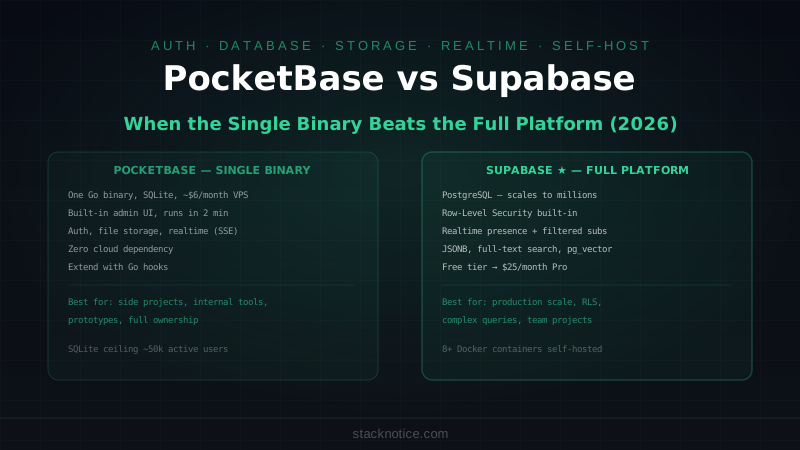
PocketBase is a single Go binary — download it, run it, and you have a full backend running on any Linux server in under two minutes. The database is SQLite. The admin UI is built in. There are no separate services, no Docker Compose, no connection pools to configure. The ceiling is roughly 50-100k concurrent users before SQLite becomes a constraint.
Supabase is a platform built on PostgreSQL. It adds auth, file storage, real-time subscriptions, and auto-generated REST and GraphQL APIs on top of a real relational database. It scales to millions of rows and handles production workloads that would break any SQLite setup. The trade-off is complexity — Supabase has more moving parts, more configuration, and a cloud dependency unless you self-host the entire Docker stack.
The choice between them depends on two things: your scale requirements and how much you want to own your infrastructure.
Setup and Self-Hosting
PocketBase: Download and Run
# Linux/macOS — the entire backend is one binary
wget https://github.com/pocketbase/pocketbase/releases/download/v0.22.0/pocketbase_0.22.0_linux_amd64.zip
unzip pocketbase_0.22.0_linux_amd64.zip
./pocketbase serve

# Admin UI available at http://localhost:8090/_/
# API available at http://localhost:8090/api/
That's the entire setup. No Docker, no environment variables required, no database migration tool. The SQLite file is created in the same directory.
For production on a $6/month VPS:
# Create a systemd service — PocketBase runs as a daemon
cat > /etc/systemd/system/pocketbase.service << 'EOF'
[Unit]
Description=PocketBase
After=network.target

[Service]
User=pocketbase
WorkingDirectory=/opt/pocketbase
ExecStart=/opt/pocketbase/pocketbase serve --http=0.0.0.0:8090
Restart=on-failure

[Install]
WantedBy=multi-user.target
EOF

systemctl enable --now pocketbase
Backups are a cp command on the SQLite file. Migrations are managed through the admin UI or Go code. No external database to back up separately.
Supabase: Docker or Hosted
Hosted (supabase.com):
npm install @supabase/supabase-js
# Point to project URL + anon key from dashboard — done
Self-hosted:
git clone --depth 1 https://github.com/supabase/supabase
cd supabase/docker
cp .env.example .env
# Edit .env with your secrets (POSTGRES_PASSWORD, JWT_SECRET, etc.)
docker compose up -d
# Starts: postgres, postgrest, gotrue, realtime, storage, kong, studio
Self-hosted Supabase runs 8+ Docker containers. It requires a server with at least 4GB RAM to run comfortably. The operational overhead is real compared to a single binary. The upside: you have a full PostgreSQL database with all its capabilities.
Data Modeling
PocketBase: Collections via UI or Code
PocketBase has a schema builder in the admin UI. You create collections (tables) with typed fields — text, number, bool, date, select, file, relation. Or you define collections in Go code:
// main.go — Go extends PocketBase at startup
package main

import (
    "log"
    "github.com/pocketbase/pocketbase"
    "github.com/pocketbase/pocketbase/core"
    "github.com/pocketbase/pocketbase/tools/migrate"
)

func main() {
    app := pocketbase.New()

    // Hook into the bootstrap process to define collections
    app.OnBeforeServe().Add(func(e *core.ServeEvent) error {
        // Register custom API routes
        e.Router.GET("/api/custom/stats", func(c echo.Context) error {
            stats := map[string]int{
                "users": app.Dao().TotalUsers(),
                "posts": // query...
            }
            return c.JSON(http.StatusOK, stats)
        })
        return nil
    })

    if err := app.Start(); err != nil {
        log.Fatal(err)
    }
}
The schema is SQLite underneath — relations work, indexes work, but complex SQL queries, CTEs, and PostgreSQL-specific types (UUID, JSONB, arrays, enums) are not available.
Supabase: Full PostgreSQL with Migrations
-- supabase/migrations/20260812_create_posts.sql
CREATE TABLE posts (
  id UUID DEFAULT gen_random_uuid() PRIMARY KEY,
  title TEXT NOT NULL CHECK (char_length(title) BETWEEN 1 AND 200),
  body TEXT NOT NULL,
  author_id UUID NOT NULL REFERENCES auth.users(id) ON DELETE CASCADE,
  tags TEXT[] DEFAULT '{}',
  metadata JSONB DEFAULT '{}',
  published_at TIMESTAMPTZ,
  created_at TIMESTAMPTZ DEFAULT NOW()
);

-- Row-Level Security — users only see their own posts
ALTER TABLE posts ENABLE ROW LEVEL SECURITY;

CREATE POLICY "Users can read their own posts"
  ON posts FOR SELECT
  USING (auth.uid() = author_id);

CREATE POLICY "Users can insert their own posts"
  ON posts FOR INSERT
  WITH CHECK (auth.uid() = author_id);

-- Index for common query pattern
CREATE INDEX posts_author_published_idx ON posts(author_id, published_at DESC)
  WHERE published_at IS NOT NULL;
supabase db push # applies migrations to hosted project
supabase db diff # generates migration from schema changesPostgreSQL's full feature set is available: CTEs, window functions, full-text search, JSONB operators, PostGIS for geo queries, pg_vector for embeddings. Supabase is the right choice when your data model needs SQL to be productive.
Auth
Both include auth out of the box, with different approaches.
PocketBase Auth
// PocketBase JS SDK
import PocketBase from 'pocketbase'

const pb = new PocketBase('http://localhost:8090')

// Email/password
const authData = await pb.collection('users').authWithPassword('user@example.com', 'password123')
console.log(pb.authStore.isValid)  // true
console.log(pb.authStore.model)    // user record

// OAuth2 — Google, GitHub, Discord, etc.
const authData = await pb.collection('users').authWithOAuth2({ provider: 'google' })

// The auth token is stored in pb.authStore and sent automatically in subsequent requests
// Auto-refresh on expiry is built in

// Check auth in custom routes
app.OnBeforeServe().Add(func(e *core.ServeEvent) error {
    e.Router.GET("/api/private", func(c echo.Context) error {
        info, err := e.App.Dao().FindAdminByToken(c.Request().Header.Get("Authorization"), e.App.Settings().AdminAuthToken.Secret)
        if err != nil {
            return apis.NewUnauthorizedError("Not authenticated", nil)
        }
        return c.JSON(200, info)
    }, apis.RequireAdminOrRecordAuth())
    return nil
})
Supabase Auth
// Supabase JS SDK
import { createClient } from '@supabase/supabase-js'

const supabase = createClient(process.env.NEXT_PUBLIC_SUPABASE_URL!, process.env.NEXT_PUBLIC_SUPABASE_ANON_KEY!)

// Email/password
const { data, error } = await supabase.auth.signInWithPassword({
  email: 'user@example.com',
  password: 'password123'
})

// OAuth2
await supabase.auth.signInWithOAuth({ provider: 'google' })

// Magic link
await supabase.auth.signInWithOtp({ email: 'user@example.com' })

// Get current user in Next.js Server Component
import { createServerClient } from '@supabase/ssr'

const supabase = createServerClient(url, key, { cookies: cookieStore })
const { data: { user } } = await supabase.auth.getUser()

// RLS automatically filters data by auth.uid() — no manual auth checks in queries
const { data: posts } = await supabase.from('posts').select('*')
// Only returns posts where author_id = auth.uid() (enforced by RLS policy)
Supabase's Row-Level Security is the key auth differentiator. You define access rules at the database level — the API layer can't return data the user isn't allowed to see, even if the application code has a bug. PocketBase has collection-level rules but they're less fine-grained.
Real-Time
Both support real-time subscriptions. Different implementations.
PocketBase Real-Time
// Subscribe to a collection — any change triggers the callback
pb.collection('posts').subscribe('*', function(e) {
  console.log(e.action)  // 'create' | 'update' | 'delete'
  console.log(e.record)  // the changed record
  setPosts(prev => {
    if (e.action === 'create') return [e.record, ...prev]
    if (e.action === 'update') return prev.map(p => p.id === e.record.id ? e.record : p)
    if (e.action === 'delete') return prev.filter(p => p.id !== e.record.id)
    return prev
  })
})

// Subscribe to a specific record
pb.collection('posts').subscribe('RECORD_ID', callback)

// Cleanup
return () => pb.collection('posts').unsubscribe()
PocketBase uses SSE (Server-Sent Events) for real-time — efficient for read-heavy use cases. Works well for live dashboards, notifications, and collaborative viewing. Limited for bi-directional real-time (e.g., multiplayer editing).
Supabase Real-Time
// Supabase Realtime — PostgreSQL-level subscriptions via logical replication
const channel = supabase
  .channel('posts-changes')
  .on(
    'postgres_changes',
    {
      event: '*',
      schema: 'public',
      table: 'posts',
      filter: 'published_at=not.is.null'  // subscribe to only published posts
    },
    (payload) => {
      console.log('Change received:', payload.new, payload.old)
    }
  )
  .subscribe()

// Presence — track which users are online
const roomChannel = supabase.channel('room-1')
roomChannel
  .on('presence', { event: 'sync' }, () => {
    const state = roomChannel.presenceState()
    console.log('Online users:', state)
  })
  .subscribe(async (status) => {
    if (status === 'SUBSCRIBED') {
      await roomChannel.track({ user: currentUser.id })
    }
  })
Supabase's real-time is built on PostgreSQL logical replication — you subscribe to actual database changes at the row level, with filters. Presence tracking is built in. For collaborative apps, Supabase's real-time is more capable.
SDK and JavaScript Integration
// PocketBase — SDK wraps the REST API
import PocketBase from 'pocketbase'
const pb = new PocketBase('https://your-instance.com')

const posts = await pb.collection('posts').getList(1, 20, {
  filter: 'published = true',
  sort: '-created',
  expand: 'author'  // joins related records
})

const post = await pb.collection('posts').create({
  title: 'Hello World',
  body: 'Content here',
  published: true
})

// File upload
const formData = new FormData()
formData.append('avatar', file)
await pb.collection('users').update(userId, formData)

// Supabase — PostgREST query builder
import { createClient } from '@supabase/supabase-js'
const supabase = createClient(url, key)

const { data: posts, error } = await supabase
  .from('posts')
  .select('*, author:users(name, avatar_url)')
  .eq('published', true)
  .order('created_at', { ascending: false })
  .range(0, 19)

const { data: post, error } = await supabase
  .from('posts')
  .insert({ title: 'Hello World', body: 'Content here', published: true })
  .select()
  .single()
Both SDKs are TypeScript-first and generate types from your schema. Supabase's supabase gen types typescript generates full TypeScript types from your PostgreSQL schema. PocketBase has community-maintained type generators.
Scale and Production Limits
| Factor | PocketBase | Supabase |
|---|---|---|
| Database | SQLite (one file) | PostgreSQL |
| Concurrent connections | ~100-500 practical | Thousands (connection pooling) |
| Storage | Disk space only | Platform limits / S3-compatible |
| Suitable for | Up to ~50k active users | Millions of users |
| Horizontal scaling | Single node only | Multiple replicas |
PocketBase's SQLite ceiling is real. SQLite writes are serialized — high write concurrency degrades performance. For a read-heavy app (blog, docs, personal tool), this rarely matters. For an app where thousands of users write simultaneously, PostgreSQL is necessary.
Cost
| PocketBase | Supabase | |
|---|---|---|
| Self-hosted | $6-10/month VPS | $20-50/month (min 4GB RAM) |
| Managed | No official managed service | Free tier → $25/month Pro |
| At scale | VPS upgrade as needed | $25+/month per project |
PocketBase has no managed hosting — you own the server. Supabase's free tier covers most side projects. At $25/month, Supabase Pro includes 8GB database, 100GB storage, and 50GB bandwidth.
Decision Framework
Choose PocketBase if:
- Building a side project, internal tool, or prototype where scale isn't a concern
- You want full infrastructure ownership with zero cloud dependency
- Budget is a constraint — a $6 VPS with PocketBase covers a lot
- The team includes one developer comfortable with Linux basics
- Your data model fits within SQLite's capabilities (no JSONB queries, no full-text search at scale)
Choose Supabase if:
- You're building for production scale from the start
- Row-Level Security is important — data access controlled at the database level
- Your queries benefit from PostgreSQL's feature set: JSONB, full-text search, geo queries
- You want a managed database without server maintenance
- Real-time with presence tracking and filtered subscriptions matters
The honest line: PocketBase is genuinely impressive for what it is. A solo developer or small team can ship a complete product on it in days. But it's a tool for a specific scale range. Once you need horizontal scaling, complex SQL, or RLS as a security layer, PostgreSQL — whether via Supabase or another host — is the right choice.
For the full Supabase setup with Next.js including auth, storage, and RLS, see the Supabase + Next.js guide. For PostgreSQL specifically — indexes, query optimization, and schema design — see the PostgreSQL indexes guide. If you're evaluating SQLite for production use cases, Turso's libSQL is worth knowing — it's distributed SQLite that solves several of PocketBase's scaling constraints.