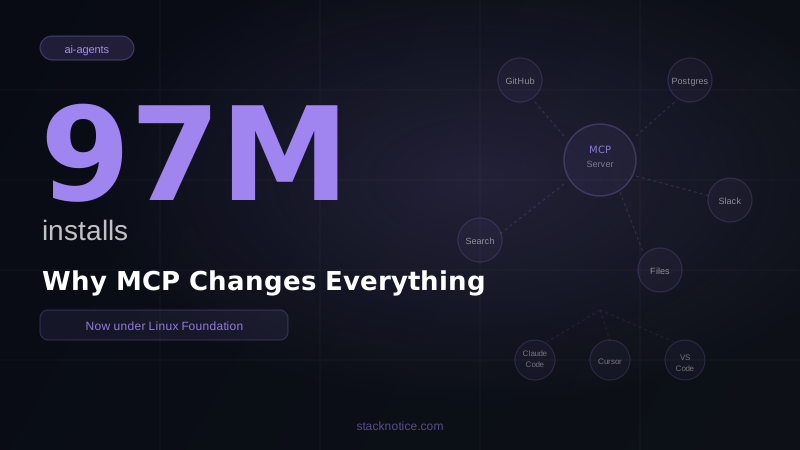
Eighteen months ago, Model Context Protocol was an interesting open-source release from Anthropic. Today it's the default integration layer between AI systems and external tools across every major vendor. OpenAI uses it. Google uses it. Microsoft ships it in Copilot. Cursor, Windsurf, and VS Code all support it natively. The thing that rarely happens in developer tooling — a protocol winning decisively before the market fragments — happened.
This is the current state of MCP: what it is in 2026, what you can build with it, and why the decision to write MCP servers instead of custom integrations is now obvious rather than speculative.
What MCP Is and Why It Matters
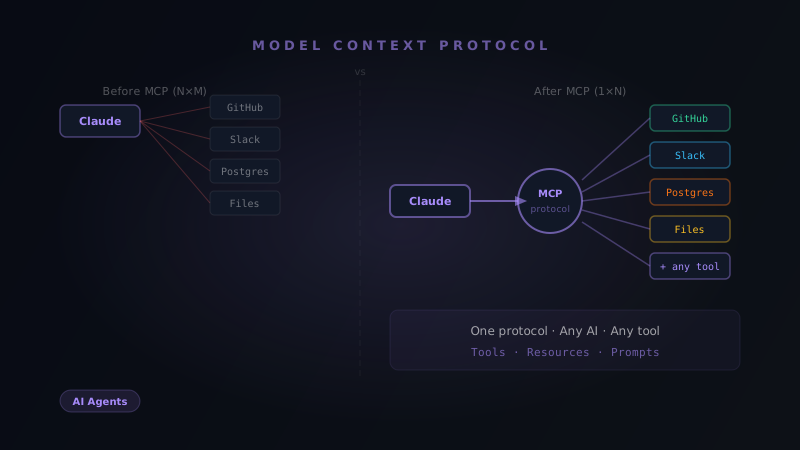
The fundamental problem MCP solves: every AI tool that wants to access external data needs a custom integration for every data source. Before MCP, if you wanted Claude, GPT-4o, and Copilot to all be able to query your database, you'd write three separate integrations. That doesn't scale.
MCP is the standardization layer. Write one server for your database, and every MCP-compatible AI client can use it. The protocol defines three primitives:
Tools — functions the AI can call, with parameters and return values. "Query the database", "create a GitHub issue", "read a file".
Resources — data the AI can read, identified by URI. "The contents of this file", "the current state of this database record".
Prompts — reusable prompt templates the server exposes to the client.
The transport is JSON-RPC 2.0 over stdio or HTTP with SSE. Deliberately simple. A minimal MCP server is about 40 lines of TypeScript.
The Ecosystem in 2026
The official @modelcontextprotocol packages include production-ready servers for the tools developers actually use:
Databases and storage
server-postgres— full Postgres access: queries, schema inspection, transactionsserver-sqlite— SQLite with built-in query analysisserver-filesystem— sandboxed file system access with configurable roots
Developer tools
server-github— repositories, issues, PRs, code search, file operationsserver-gitlab— equivalent for GitLabserver-git— local git: diffs, history, branches, blame
Web and search
server-brave-search— web search and local business searchserver-fetch— web content with HTML-to-Markdown conversionserver-puppeteer— full browser automation
Productivity and comms
server-slack— channel history, message posting, user lookupserver-google-drive— file reading and search
Beyond official servers, the community has built MCP servers for virtually every SaaS tool developers use: Notion, Linear, Jira, Figma, Stripe, Supabase, Neon, Upstash, PagerDuty, Datadog.
The list of compatible clients is equally broad: Claude Desktop, Claude Code, Cursor, Windsurf, VS Code, GitHub Copilot, Zed, and increasingly any application using the major AI APIs directly.
Who Uses It
The vendor adoption story is what converted MCP from "interesting protocol" to "actual standard":
OpenAI added MCP support to their APIs and desktop tooling. When the maker of GPT-4o implements a protocol created by a direct competitor, the protocol has won on technical merit.
Google integrated MCP into Gemini's Agent Development Kit. Gemini agents can consume MCP servers written for Claude.
Microsoft ships MCP support in GitHub Copilot's agent mode and VS Code's AI tooling. Copilot agents use MCP servers to access external data.
The governance move to the Linux Foundation in early 2026 was the structural reason this happened. Companies building on Anthropic-owned infrastructure had legitimate concerns about vendor lock-in. Building on Linux Foundation infrastructure — the same body that governs Kubernetes, OpenTelemetry, and the Linux kernel — doesn't create those concerns.
The practical result: you write an MCP server once and it works with Claude, GPT-4o, Gemini, and Copilot. That's the definition of a standard.
Using MCP with Claude Code
If you're using Claude Code, adding MCP servers is the fastest way to extend what it can do.
# Add a server globally — available in all Claude Code sessions
claude mcp add github -- npx -y @modelcontextprotocol/server-github

# Add a server scoped to one project
claude mcp add postgres -- npx -y @modelcontextprotocol/server-postgres postgresql://localhost/myapp
The project-scoped server gets added to .claude/settings.json so it only activates in that project directory. Your teammates get the same configuration when they pull the project.
# Check what's connected
claude mcp list
# github: connected
# postgres: connected
Once connected, Claude Code uses them automatically. Ask "what issues are open in this repo?" and it queries GitHub. Ask "show me the users table schema" and it inspects Postgres. You don't tell it when to use which server — it figures that out from context.
For more complex setups, edit ~/.claude/settings.json directly:
{
  "mcpServers": {
    "filesystem": {
      "command": "npx",
      "args": ["-y", "@modelcontextprotocol/server-filesystem", "/Users/you/projects"],
      "env": {}
    },
    "github": {
      "command": "npx",
      "args": ["-y", "@modelcontextprotocol/server-github"],
      "env": {
        "GITHUB_PERSONAL_ACCESS_TOKEN": "ghp_your_token"
      }
    },
    "postgres": {
      "command": "npx",
      "args": ["-y", "@modelcontextprotocol/server-postgres", "postgresql://localhost:5432/myapp"],
      "env": {}
    }
  }
}
Building a Custom MCP Server
The TypeScript SDK is mature and the pattern is consistent across implementations.
npm install @modelcontextprotocol/sdkA minimal server that exposes your application's data:
import { Server } from '@modelcontextprotocol/sdk/server/index.js'
import { StdioServerTransport } from '@modelcontextprotocol/sdk/server/stdio.js'
import {
  CallToolRequestSchema,
  ListToolsRequestSchema,
} from '@modelcontextprotocol/sdk/types.js'
import { db } from './lib/db.js'
import { orders, customers } from './lib/db/schema.js'
import { eq, desc } from 'drizzle-orm'

const server = new Server(
  { name: 'myapp-mcp', version: '1.0.0' },
  { capabilities: { tools: {} } }
)

server.setRequestHandler(ListToolsRequestSchema, async () => ({
  tools: [
    {
      name: 'get_customer',
      description: 'Get customer profile and order history by email',
      inputSchema: {
        type: 'object',
        properties: {
          email: { type: 'string', description: 'Customer email address' },
        },
        required: ['email'],
      },
    },
    {
      name: 'list_recent_orders',
      description: 'List the most recent orders, optionally filtered by status',
      inputSchema: {
        type: 'object',
        properties: {
          status: {
            type: 'string',
            enum: ['pending', 'processing', 'shipped', 'delivered', 'canceled'],
            description: 'Filter by order status',
          },
          limit: { type: 'number', default: 10 },
        },
      },
    },
  ],
}))

server.setRequestHandler(CallToolRequestSchema, async (request) => {
  const { name, arguments: args } = request.params

  if (name === 'get_customer') {
    const customer = await db.query.customers.findFirst({
      where: eq(customers.email, args.email as string),
      with: {
        orders: {
          limit: 5,
          orderBy: [desc(orders.createdAt)],
        },
      },
    })

    if (!customer) {
      return {
        content: [{ type: 'text', text: `No customer found with email: ${args.email}` }],
      }
    }

    return {
      content: [{
        type: 'text',
        text: JSON.stringify({
          id: customer.id,
          name: customer.name,
          email: customer.email,
          totalOrders: customer.orders.length,
          recentOrders: customer.orders.map((o) => ({
            id: o.id,
            status: o.status,
            total: o.total,
            date: o.createdAt,
          })),
        }, null, 2),
      }],
    }
  }

  if (name === 'list_recent_orders') {
    const recentOrders = await db.query.orders.findMany({
      where: args.status ? eq(orders.status, args.status as string) : undefined,
      orderBy: [desc(orders.createdAt)],
      limit: (args.limit as number) ?? 10,
      with: { customer: { columns: { email: true, name: true } } },
    })

    return {
      content: [{
        type: 'text',
        text: JSON.stringify(recentOrders, null, 2),
      }],
    }
  }

  throw new Error(`Unknown tool: ${name}`)
})

const transport = new StdioServerTransport()
await server.connect(transport)
Connect it to Claude Code:
claude mcp add myapp -- node /path/to/myapp-mcp/dist/index.jsNow when you ask Claude Code "what's the order status for customer john@example.com?" it calls your server, queries your database, and answers from real data. No context switching, no copy-pasting from dashboards.
The most useful MCP servers aren't generic database access — they're tools that know your domain. A get_customer tool that returns the customer plus their last 5 orders plus their current subscription status is more useful than raw SQL access. Think in terms of what questions you ask your database repeatedly, and expose those as tools.
The Python SDK
If your tooling is in Python, the SDK is equivalent:
from mcp.server import Server
from mcp.server.stdio import stdio_server
from mcp.types import Tool, TextContent
import json
import asyncio

app = Server("myapp-mcp")

@app.list_tools()
async def list_tools():
    return [
        Tool(
            name="search_knowledge_base",
            description="Search the internal knowledge base for documentation",
            inputSchema={
                "type": "object",
                "properties": {
                    "query": {"type": "string", "description": "Search query"},
                    "category": {
                        "type": "string",
                        "enum": ["api", "deployment", "billing", "general"],
                        "description": "Category to search within"
                    }
                },
                "required": ["query"]
            }
        )
    ]

@app.call_tool()
async def call_tool(name: str, arguments: dict):
    if name == "search_knowledge_base":
        results = await search_docs(
            query=arguments["query"],
            category=arguments.get("category")
        )
        return [TextContent(type="text", text=json.dumps(results, indent=2))]

async def main():
    async with stdio_server() as streams:
        await app.run(*streams, app.create_initialization_options())

if __name__ == "__main__":
    asyncio.run(main())
What's in the Roadmap
The Linux Foundation Technical Steering Committee has several active items:
Native OAuth 2.0. Right now auth is handled out-of-band — tokens in environment variables, manual configuration. The roadmap adds OAuth flows to the protocol itself, so MCP servers can participate in enterprise auth without workarounds.
Server discovery. Currently you configure each server manually. The roadmap adds a registry mechanism so clients can discover available servers programmatically.
Streaming tools. The current model is request/response. The roadmap extends this with streaming for tools that produce incremental output and long-running operations that report progress.
Server-side LLM sampling. MCP servers will be able to request completions from the host client. This enables server logic that incorporates model reasoning without requiring the server to manage its own AI API access.
These aren't speculative — they're tracked issues in the Linux Foundation specification repository.
The Decision This Creates
The practical question for developers is no longer "should I use MCP?" — it's "should I write this integration as an MCP server or something custom?"
The answer is almost always MCP server. Custom integrations work with one client and require maintenance as APIs change. An MCP server works with every MCP client — Claude Code, Claude Desktop, Cursor, Windsurf, Copilot — and the protocol is stable under Linux Foundation governance.
The analogy that fits: REST is not something you choose for API design, it's the default mental model. MCP is becoming that for AI tool integrations. When you're building a connector between AI systems and external data, the question of which protocol to use has a default answer now.
For developers who understand this early: the opportunity is building MCP servers for the data sources that don't have them yet, or building better versions of the ones that exist. Every company has internal data that their AI tools can't access. That gap is the problem MCP is designed to close — and it's now the standard way to close it.
If you're starting with MCP, the path is: Complete MCP Guide for the fundamentals → Add MCP to Claude Code for the setup → Build your own MCP server for custom integrations.