Token cost is the hidden tax on AI-assisted development. A focused coding session with Claude Code can consume thousands of tokens in minutes — and an unfocused one can consume ten times as many for the same output. The difference isn't random. It comes from habits that either burn tokens or preserve them.
This is the practical guide to using Claude Code efficiently. Not by using it less — by using it without waste.
The Biggest Lever: Model Selection
The single highest-impact thing you can do for token costs is use the right model for each task.
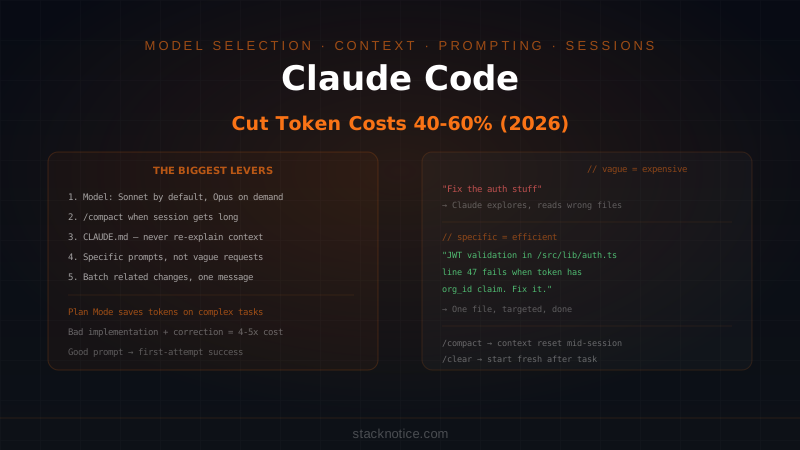
Sonnet 4.6 and Opus 4.6 produce nearly identical output for 80-90% of coding tasks. The tasks where Opus genuinely outperforms Sonnet — multi-file bugs with indirect causation, architecture decisions, security review — are a minority of what developers actually do day to day.
# Default: Sonnet (fast, cost-effective)
claude

# Only when you need deeper reasoning
claude --model claude-opus-4-6
The practical discipline: start every session in Sonnet, switch to Opus only when Sonnet fails on the same problem twice. Using Opus by default for ordinary tasks is the most common way Claude Code users overspend.
On Claude Max (the subscription plan), you're not paying per token — but you still hit usage limits faster with Opus. The same principle applies: Opus is a finite resource even on Max.
See the full breakdown in the Sonnet vs Opus for coding comparison.
Context Window: The Leak That Compounds
Every message you send in a Claude Code session includes the full conversation history up to that point. As a session grows longer, each subsequent message gets more expensive — not because the new message is bigger, but because the accumulated context is.
A session that started lean can be 5-10x more expensive per message by the time you've been working for an hour. This is the compounding problem most developers don't notice.
/compact — Summarize and Continue
When a session is getting long but you're not done with the task:
/compactThis replaces the conversation history with a compressed summary. You lose exact phrasing but keep the important decisions, progress, and context. Claude continues with a much smaller context window — dramatically cheaper per subsequent message.
Use /compact when:
- The session has been going for 45+ minutes
- You've finished one part of a task and are starting another
- You see response times getting noticeably slower (a proxy for large context)
/clear — Start Clean
When you've finished a task completely and want to start fresh:
/clearThis wipes the conversation entirely. The next message starts with zero accumulated context — only what's in your CLAUDE.md. This is appropriate when you're moving to an unrelated task, not just a new subtask.
New Session Discipline
The most expensive thing you can do is carry a massive context from a completed task into a new unrelated task. The old context adds no value but costs tokens on every message.
Develop the habit: task complete → /clear → new task. If the context from the old task is genuinely useful for the new one, use /compact instead.
CLAUDE.md: Tokens You Never Have to Spend Twice
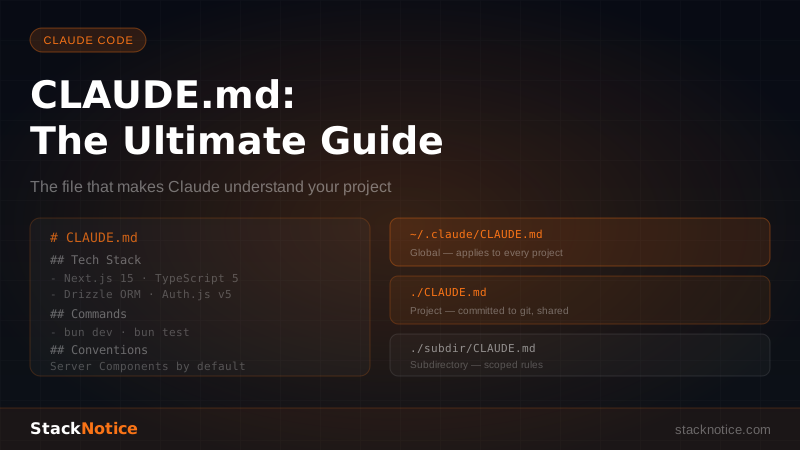
Every time you re-explain your stack, conventions, or file structure to Claude, you're spending tokens you already spent in a previous session. A good CLAUDE.md eliminates this.
# Project Context

## Stack
- Next.js 15, TypeScript strict, Drizzle ORM + Neon, Clerk auth, Bun

## Conventions
- Server actions in /src/actions/ — never inline mutations in components
- No Prisma, no NextAuth, no npm (use Bun)

## Key files
- /src/lib/db/schema.ts — full Drizzle schema
- /src/lib/auth.ts — Clerk session helpers
This file loads into every session automatically. You never spend tokens explaining "we use Drizzle not Prisma" again. Across dozens of sessions, a well-maintained CLAUDE.md saves thousands of tokens.
The ROI calculation: a 300-token CLAUDE.md that saves you from a 150-token re-explanation per session pays for itself in 2 sessions and has infinite return from session 3 onward.
Prompting Discipline: Specific Beats Vague
Vague prompts force Claude to explore before it executes. Exploration costs tokens.
Vague (expensive):
"Fix the auth stuff"
Claude has to figure out what "auth stuff" means, read multiple files trying to identify the problem, make assumptions, possibly go down the wrong path, and recover.
Specific (efficient):
"The JWT validation in /src/lib/auth.ts line 47 fails when the token
contains a custom claim. The claim key is 'org_id'. Fix the validation
to accept it."
Claude reads one file, makes one targeted change. Done.
The pattern: tell Claude exactly what file, what function, what the expected behavior is, and what the current failure is. The more context you provide upfront in the prompt, the less Claude has to spend tokens discovering it.
Plan Mode for Complex Tasks
For tasks that touch multiple files or have non-obvious scope, Plan Mode is more token-efficient than direct execution — even though it adds a planning step.
The reason: a botched implementation that requires correction and retry is far more expensive than a planned implementation that succeeds on the first attempt. One failed multi-file refactor with two correction rounds can cost 4-5x what a planned refactor would have.
claude --plan

# Review the plan before any tokens are spent on wrong code
# Redirect if the approach is wrong (costs almost nothing)
# Execute once you're confident → first-attempt success
/execute
Use Plan Mode for anything that touches 3+ files or has hidden dependencies. Skip it for simple, targeted changes.
Batching: Multiple Instructions per Message
Each message exchange has overhead — the context is re-sent, Claude processes the full history, generates a response. Sending 10 separate single-instruction messages costs roughly 10x the overhead of one message with 10 instructions.
Inefficient:
Message 1: "Add input validation to the email field"
Message 2: "Add input validation to the password field"
Message 3: "Add a loading state to the submit button"
Message 4: "Add an error message display below the form"
Efficient:
"Do these four things in the signup form:
1. Add email validation (format check + required)
2. Add password validation (min 8 chars + required)
3. Add loading state to the submit button during submission
4. Add error message display below each field"
Same output, roughly one-quarter the overhead. Batch related changes whenever you know what you want upfront.
Avoiding Re-Reads With File References
Claude Code reads files when it needs to understand them. If you reference the same files repeatedly across a long session, Claude may re-read them each time the context shifts. You can reduce this by being explicit about what Claude already knows:
"Based on the schema you already read, add a createdBy field to
the posts table. Don't re-read the file — just tell me the migration."
This only works reliably in shorter sessions where the file read is still in context. In longer sessions, it's often better to use /compact and let Claude re-read selectively.
What Costs More Than You Think
Asking Claude to explore: "What's the best way to handle X in this codebase?" requires Claude to read files, reason about options, and write a detailed answer — all expensive. Use this sparingly. It's valuable when you're genuinely uncertain, wasteful when you already have a direction.
Correction cycles: Every "no, not like that, do it this way" correction costs roughly as much as the original wrong response. Preventing wrong approaches with better prompts upfront is the cheapest correction.
Leaving sessions running: A session you started in the morning doesn't get cheaper as the day goes on — it gets more expensive per message as history accumulates. Close sessions you're not actively using.
Unnecessary file reads: Asking Claude to "read the whole codebase and tell me what it does" reads many files and produces a long summary. Only do this once per project, then capture the useful parts in CLAUDE.md.
The Session Cost Mental Model
Think of each Claude Code session as having two cost buckets:
Fixed cost: The CLAUDE.md, the initial task description, the setup. This is unavoidable and relatively small.
Variable cost: Every message exchange, every file read, every correction, every exploration. This is where 80% of token spend happens and where every efficiency gain shows up.
The best sessions have high output and low variable cost: Claude understands the task on the first message (good prompt), reads the minimum files needed (specific prompt), produces correct code on the first attempt (Plan Mode or good spec), and is closed when the task is done (session discipline).
The Token Efficiency Checklist
Before starting a task:
- Am I using Sonnet? (switch to Opus only if needed)
- Is CLAUDE.md up to date so I don't have to re-explain context?
- Is my prompt specific enough that Claude won't have to explore?
- Should I use Plan Mode? (3+ files, non-obvious scope)
- Can I batch multiple related changes into one message?
During a long session:
- Has this session been running 45+ minutes? →
/compact - Am I starting an unrelated task? →
/clear
After a task:
- Did Claude make any wrong assumptions I should add to CLAUDE.md?
- Close the session if done
Applied consistently, these habits reduce token consumption by 40-60% compared to unstructured usage — with no reduction in output quality. The cost of AI-assisted development is real, but it's largely a discipline problem, not a tool problem.