Starting a new project with Claude Code is straightforward. Starting with an existing 50,000-line codebase is a different challenge entirely. The model has no idea what "our auth middleware" means, why you chose this particular folder structure, or that you migrated away from Redux six months ago and there are still old patterns scattered around.
The teams that get real value from Claude Code on existing projects fast are the ones who treat onboarding like documentation — not for humans, for the model.
Why Existing Codebases Are Harder
When you start fresh, Claude builds context as you go. Everything it sees is current. There are no legacy patterns, no "we used to do it this way" traps, no half-migrated features.
An existing codebase has all of that, plus:
- Accumulated decisions that aren't obvious from the code ("we chose Zustand over Redux because our state is mostly UI-local")
- Inconsistencies where older modules use different patterns than newer ones
- Dead code that looks active but isn't called anywhere
- Hidden dependencies that aren't in the imports — environment variables, database triggers, third-party webhooks that assume specific data shapes
Without this context, Claude writes code that compiles but doesn't fit. It suggests patterns you've moved away from, adds abstractions you already have elsewhere, or misses that a certain function has a side effect that matters.
The /init Command
The first thing to run when bringing Claude Code into an existing project:
cd your-project
claude
> /init
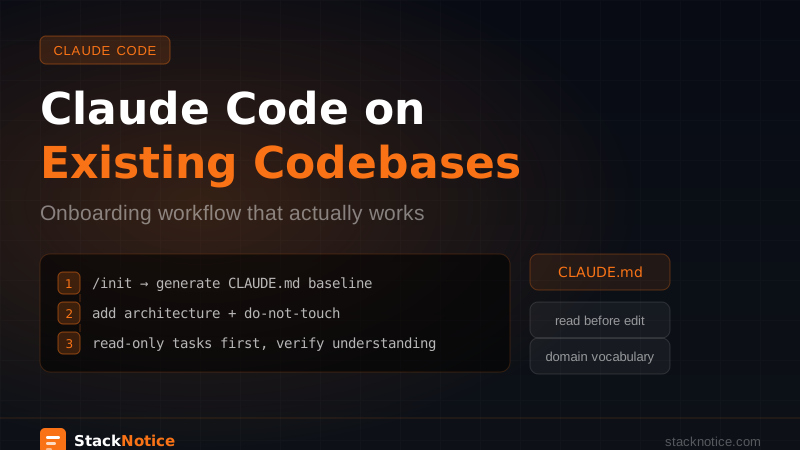
/init reads your project structure and generates a starting CLAUDE.md. It looks at your package.json, folder structure, existing README, and common patterns to produce a baseline.
This is a starting point, not a finished document. What it generates will be generic — it won't know your team's conventions, your architecture decisions, or what's currently in progress. You'll need to edit it.
But it's a useful foundation. It catches things like "this is a Next.js project with TypeScript and Prisma" that you'd otherwise write manually. Start here, then add the context that actually matters.
Writing a CLAUDE.md That Actually Helps
The CLAUDE.md complete guide covers the full format. For an existing codebase, the sections that matter most:
Architecture decisions and why:
## Architecture
- Next.js App Router with server components where possible
- Server actions for all mutations — no REST endpoints (migrated Q1 2025)
- Prisma for DB access — raw SQL only in /lib/db/queries.ts for complex aggregations
- No Redux — Zustand for global UI state, TanStack Query for server state
Current state of the codebase:
## Current state
- Auth: fully migrated to Clerk (old next-auth code in /archive/old-auth — ignore it)
- Payments: Stripe webhooks in /app/api/webhooks/stripe/route.ts
- Email: Resend with templates in /emails/ — do not use nodemailer (legacy)
- Background jobs: Inngest — see /inngest/ folder
Things to not touch:
## Do not modify
- /lib/generated/ — auto-generated by Prisma, changes get overwritten on next db push
- /public/static/ — managed by marketing, not in our deploy pipeline
- /legacy/reports/ — frozen, consumed by finance integration
Common patterns:
## Patterns we use
- All server actions in /lib/actions/[domain].ts
- All types in /types/ or co-located with the feature
- Error handling returns { ok: true/false } — never throw from server actions
- Loading states use Suspense, not isLoading boolean state
The "do not modify" section is often the most valuable one. Claude will try to be helpful and touch things it shouldn't. Explicit constraints prevent most of that.
The First Tasks: Small, High-Learning
Don't start with "refactor the auth system." Start with something that teaches Claude the codebase without risking anything important.
Good first tasks for a new codebase:
"Read the /lib/actions/ folder and describe what each action does.
Don't modify anything — just map what's there."
"Look at an existing component in /components/ui/ and write a new
one that follows the same patterns. Show me the output before saving."
"Read the Prisma schema and explain the data model. Identify any
relationships that aren't obvious from the field names."
These are low-risk but high-context. Claude reads the real code and builds an accurate model of how your project actually works — not how a generic Next.js project would work. After two or three of these, you can verify Claude understands your conventions before giving it a task that touches production code.
Always Read Before Editing
The most important habit to establish: Claude reads before it changes. Every time, no exceptions.
Add this to any editing prompt:
"Before making any changes, read [file] and [related file].
Summarize what you find so I can verify you understand the context."
This feels slow. It isn't. It prevents the two-hour debugging session that happens when Claude refactors a file it never actually read, based entirely on what the filename suggests.
For files with non-obvious dependencies, map them first:
"Read src/services/OrderService.ts. What does it import?
What other files import from it? I want to understand the
dependency graph before we make any changes."
See the refactoring guide for the full read-first workflow applied to larger changes.
Handling Legacy Patterns
Most existing codebases have two generations of patterns: the way things were done and the way things are done now. Claude sees both and can't tell which is current.
The CLAUDE.md current state section handles most of this, but for particularly ambiguous cases, explicit prompting helps:
"We're in the /components/ folder. Older components use class-based React,
newer ones use function components with hooks. We only write function
components. When you see a class component, treat it as legacy —
don't follow its patterns."
"Some files use CSS modules, some use Tailwind. We've standardized on
Tailwind for all new code. Ignore the CSS module files as pattern references."
The goal is to make the current convention unambiguous, even when the codebase itself isn't.
The Vocabulary Problem
Every codebase has its own vocabulary. "Order" might mean something specific. "User" might be different from "Member." "Processing" might refer to a specific internal state that triggers a webhook.
The first time Claude uses a term incorrectly, add it to CLAUDE.md:
## Domain vocabulary
- Order: a purchase record in the orders table (not a cart)
- Cart: temporary pre-purchase state in user session, not persisted to DB
- Member: a User who has an active subscription
- Processing: Order status between "placed" and "fulfilled" — triggers warehouse notification
- Workspace: a team account (not a user account)
This builds up over time. After a few weeks, your CLAUDE.md has a domain model that makes Claude significantly more accurate on business logic tasks — the ones where correctness actually matters.
Context Management on Large Codebases
Context management matters more on large codebases because there's more to read. Reading ten files before making a change puts a lot of tokens in the window before Claude has written a single line.
Read summaries, not full files:
"Read src/services/UserService.ts and give me a 5-sentence
summary of what it does and what its public interface looks like.
Don't show me the full implementation."
If the summary matches your mental model, you don't need to feed the full content. Only pull in the complete file when Claude actually needs to write code that touches specific lines.
Scope the reading:
"Read only the exported functions from /lib/actions/posts.ts —
just the signatures, not the implementations."
This keeps the context lean and focused on what matters for the current task.
Use /compact at natural checkpoints. After Claude has read a bunch of files and built its understanding, /compact before writing code. The summary preserves what it learned without carrying all the raw file content forward.
Incremental Trust
Don't let Claude commit autonomously on day one. Start with a review loop:
- Claude proposes changes
- You review the diff in the terminal or your editor
- You commit manually
After a week or two, you'll know which types of tasks Claude handles reliably on your codebase and which ones need more supervision. Then you can be selective about where you extend more autonomy.
This isn't distrust of Claude — it's how you learn what the model understands and doesn't understand about your specific project.
Updating CLAUDE.md Over Time
CLAUDE.md for an existing codebase is a living document. Every time Claude makes a mistake because it lacked context, that's a CLAUDE.md entry:
- Used the wrong pattern → add the right one with an example
- Touched something it shouldn't → add it to "do not modify"
- Used the wrong term → add it to domain vocabulary
- Missed a constraint → add it to architecture
After a month, your CLAUDE.md captures the institutional knowledge of the project in a form that survives session resets. It's useful documentation — not just for Claude, but for new engineers onboarding too.
The First Week Checklist
Generate a baseline CLAUDE.md from the existing project structure.
Add architecture decisions, current state, do-not-modify list, patterns in use, and domain vocabulary.
Have Claude read key areas of the codebase and summarize what it finds. Verify the summaries are accurate.
Something low-risk with a clear definition of done. Review the output carefully.
Every mistake or gap from step 4 becomes a new entry.
Each iteration makes Claude more accurate on your specific codebase.
The payoff isn't immediate. It comes after two or three weeks when Claude is writing code that fits your codebase so naturally that reviewers can't immediately tell which parts came from a model.
The mistake most teams make is giving up after the first session when Claude doesn't magically understand a decade of codebase history. The model needs context. Your job is to give it that context in a form it can use — and CLAUDE.md is how you do that.