Most Next.js apps go to production with no idea what's actually failing for users. console.error doesn't reach you, stack traces in Vercel logs point at minified bundles, and you find out about errors when a user reports them. Sentry fixes this — but the App Router setup has enough gotchas that a "quick install" turns into an afternoon.
This guide covers the full Sentry setup for Next.js 15, including App Router-specific patterns that the official docs underexplain.
Installation
The Sentry wizard handles most of the configuration automatically:
npx @sentry/wizard@latest -i nextjsThe wizard:
- Creates
sentry.client.config.ts,sentry.server.config.ts,sentry.edge.config.ts - Wraps
next.config.tswithwithSentryConfig - Creates example
instrumentation.tsandglobal-error.tsx - Sets
SENTRY_DSN,SENTRY_ORG,SENTRY_PROJECTin.env.local - Adds source map upload to CI
If you prefer manual setup:
npm install @sentry/nextjsThe Three Config Files
Sentry initializes separately for each runtime in Next.js:
// sentry.client.config.ts — runs in the browser
import * as Sentry from '@sentry/nextjs'

Sentry.init({
  dsn: process.env.NEXT_PUBLIC_SENTRY_DSN,

  // Percentage of transactions to sample for performance monitoring
  tracesSampleRate: process.env.NODE_ENV === 'production' ? 0.1 : 1.0,

  // Session replay: sample 10% of sessions, 100% of sessions with errors
  replaysSessionSampleRate: 0.1,
  replaysOnErrorSampleRate: 1.0,

  integrations: [
    Sentry.replayIntegration({
      // Mask all text and inputs by default (GDPR-friendly)
      maskAllText: true,
      blockAllMedia: false,
    }),
  ],

  // Don't send events in development
  enabled: process.env.NODE_ENV === 'production',
})
// sentry.server.config.ts — runs in Node.js (API routes, Server Components)
import * as Sentry from '@sentry/nextjs'
Sentry.init({
dsn: process.env.SENTRY_DSN,
tracesSampleRate: process.env.NODE_ENV === 'production' ? 0.1 : 1.0,
enabled: process.env.NODE_ENV === 'production',
})// sentry.edge.config.ts — runs in Edge Runtime (middleware)
import * as Sentry from '@sentry/nextjs'
Sentry.init({
dsn: process.env.SENTRY_DSN,
tracesSampleRate: 0.1,
enabled: process.env.NODE_ENV === 'production',
})next.config.ts: withSentryConfig
Wrap your Next.js config to enable source map uploads and tree-shaking of Sentry's debug code:
// next.config.ts
import type { NextConfig } from 'next'
import { withSentryConfig } from '@sentry/nextjs'

const nextConfig: NextConfig = {
  // your existing config
}

export default withSentryConfig(nextConfig, {
  org: process.env.SENTRY_ORG,
  project: process.env.SENTRY_PROJECT,

  // Silence Sentry CLI output during build
  silent: !process.env.CI,

  // Upload source maps to Sentry so stack traces are readable
  widenClientFileUpload: true,

  // Automatically annotate React components in replays
  reactComponentAnnotation: { enabled: true },

  // Hide source maps from the browser (they're only for Sentry)
  hideSourceMaps: true,

  // Remove Sentry debug logging from the production bundle
  disableLogger: true,
})
instrumentation.ts: Server-Side Initialization
Next.js 15 runs instrumentation.ts once when the server starts — this is where Sentry's server config is registered:
// instrumentation.ts (at the root, not inside app/)
export async function register() {
  if (process.env.NEXT_RUNTIME === 'nodejs') {
    await import('../sentry.server.config')
  }

  if (process.env.NEXT_RUNTIME === 'edge') {
    await import('../sentry.edge.config')
  }
}
Enable it in next.config.ts:
const nextConfig: NextConfig = {
  experimental: {
    instrumentationHook: true, // Next.js < 15.3 only — enabled by default in 15.3+
  },
}
Error Boundaries in the App Router
The App Router has three error file conventions that integrate with Sentry:
error.tsx — route segment errors
// app/dashboard/error.tsx
'use client'

import { useEffect } from 'react'
import * as Sentry from '@sentry/nextjs'

export default function DashboardError({
  error,
  reset,
}: {
  error: Error & { digest?: string }
  reset: () => void
}) {
  useEffect(() => {
    // Report to Sentry — include the digest for server-side correlation
    Sentry.captureException(error, {
      tags: { digest: error.digest },
    })
  }, [error])

  return (
    <div className="flex flex-col items-center gap-4 p-8">
      <h2 className="text-xl font-semibold">Something went wrong</h2>
      <p className="text-muted-foreground text-sm">
        Our team has been notified. Reference: {error.digest}
      </p>
      <button
        onClick={reset}
        className="rounded-md bg-primary px-4 py-2 text-primary-foreground"
      >
        Try again
      </button>
    </div>
  )
}
The error.digest is a hash that correlates the client-side error with the server-side log entry — useful when the actual error message is hidden from the client for security.
global-error.tsx — root layout errors
error.tsx doesn't catch errors in the root layout. For those you need global-error.tsx:
// app/global-error.tsx
'use client'

import { useEffect } from 'react'
import * as Sentry from '@sentry/nextjs'

export default function GlobalError({
  error,
  reset,
}: {
  error: Error & { digest?: string }
  reset: () => void
}) {
  useEffect(() => {
    Sentry.captureException(error)
  }, [error])

  // global-error.tsx replaces the root layout — must include <html> and <body>
  return (
    <html>
      <body>
        <div className="flex min-h-screen items-center justify-center">
          <div className="text-center">
            <h1 className="text-2xl font-bold">Application Error</h1>
            <button onClick={reset} className="mt-4 underline">
              Reload
            </button>
          </div>
        </div>
      </body>
    </html>
  )
}
not-found.tsx
not-found.tsx renders for 404s — not really an error, so don't capture to Sentry by default. If you want to track 404 rates, use a useEffect that logs to your analytics instead.
Server Actions: withServerActionInstrumentation
Server Actions errors in the App Router aren't automatically captured by Sentry because they run as server-side functions without a traditional request context. Wrap them explicitly:
// app/posts/actions.ts
'use server'

import * as Sentry from '@sentry/nextjs'
import { db } from '@/lib/db'
import { posts } from '@/lib/db/schema'

export const createPost = Sentry.withServerActionInstrumentation(
  'createPost', // action name, shows in Sentry traces
  {
    formData: undefined, // optionally pass formData for context
    recordResponse: true,
  },
  async (formData: FormData) => {
    const title = formData.get('title') as string
    const content = formData.get('content') as string

    await db.insert(posts).values({ title, content })
    return { success: true }
  }
)
This wraps the Server Action in a Sentry transaction, captures any thrown errors automatically, and links client and server traces together.
Adding Context: User, Tags, and Breadcrumbs
Sentry errors are much more useful when they include the user who experienced them:
// Set user context after authentication (e.g., in a layout or middleware)
import * as Sentry from '@sentry/nextjs'

// After auth check
Sentry.setUser({
  id: session.user.id,
  email: session.user.email,
  // Don't include PII you don't want stored in Sentry
})

// Add custom tags — filterable in the Sentry UI
Sentry.setTag('plan', 'pro')
Sentry.setTag('organization', session.user.orgSlug)

// Extra context — visible in the error detail but not filterable
Sentry.setContext('subscription', {
  plan: 'pro',
  seats: 25,
  renewsAt: subscription.currentPeriodEnd,
})
Clear user context on sign-out:
Sentry.setUser(null)Manual error capture with context
try {
  await processWebhook(payload)
} catch (error) {
  Sentry.captureException(error, {
    tags: { webhook_type: payload.type },
    extra: {
      payload_id: payload.id,
      received_at: new Date().toISOString(),
    },
  })
  // Still throw — let the error propagate
  throw error
}
Breadcrumbs
Sentry automatically captures navigation events. Add custom breadcrumbs for important user actions:
Sentry.addBreadcrumb({
  category: 'user.action',
  message: 'User clicked Export button',
  data: { format: 'csv', rows: selectedRows.length },
  level: 'info',
})
Performance Monitoring
With tracesSampleRate set, Sentry tracks the performance of every sampled request. To add custom spans inside Server Components or API routes:
import * as Sentry from '@sentry/nextjs'

export default async function PostsPage() {
  // Track a specific operation's duration
  const posts = await Sentry.startSpan(
    { name: 'db.query.posts', op: 'db.query' },
    () => db.select().from(postsTable).limit(20)
  )

  return <PostsList posts={posts} />
}
Source Maps in Production
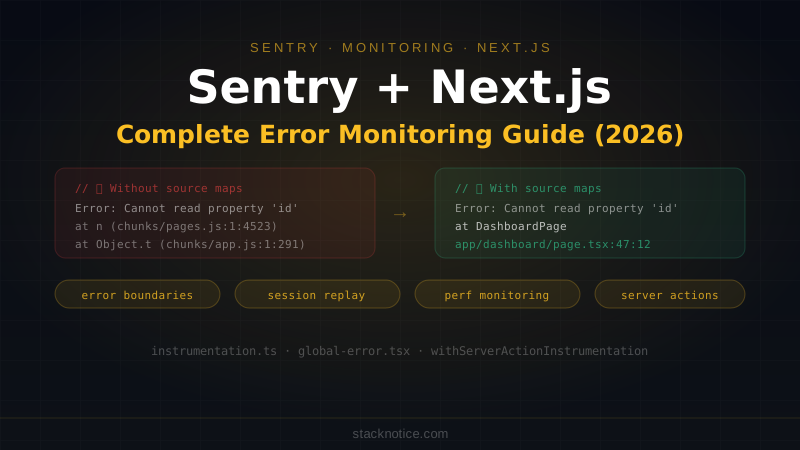
Without source maps, stack traces in Sentry point at minified bundle code:
Error: Cannot read property 'id' of undefined
  at n (/_next/static/chunks/pages/dashboard.js:1:4523)
With source maps:
Error: Cannot read property 'id' of undefined
  at DashboardPage (app/dashboard/page.tsx:47:12)
withSentryConfig uploads source maps to Sentry during next build automatically. You need SENTRY_AUTH_TOKEN in your environment:
# .env.local (and in Vercel environment variables)
SENTRY_AUTH_TOKEN=your-auth-token
SENTRY_ORG=your-org-slug
SENTRY_PROJECT=your-project-slug
Get the auth token from Sentry: Settings → API Keys → Create Token (with project:releases and org:read scopes).
Sampling Strategies
Sending every event to Sentry gets expensive at scale. Configure sampling carefully:
// sentry.client.config.ts
Sentry.init({
  tracesSampleRate: 0.05, // 5% of transactions

  // Or use tracesSampler for fine-grained control
  tracesSampler: (samplingContext) => {
    // Always trace errors
    if (samplingContext.transactionContext.sampled === true) return 1

    // Always trace slow requests caught by parent
    if (samplingContext.parentSampled) return 1

    // High-value pages — trace more
    const url = samplingContext.location?.href ?? ''
    if (url.includes('/checkout')) return 0.5
    if (url.includes('/api/webhooks')) return 1.0

    // Default: 5%
    return 0.05
  },

  // Error sampling: default is 1.0 (all errors) — usually keep this
  sampleRate: 1.0,
})
Alerts and Issue Routing
In the Sentry dashboard:
- Alerts → Create Alert Rule — trigger on new issues, spike in error rate, or performance regressions
- Slack integration — route alerts to the right channel (#alerts-prod, #on-call)
- Assignee rules — auto-assign issues by file path (
app/auth/*→ auth team)
A minimal useful alert setup:
- New issue in production → Slack #alerts-prod immediately
- Error rate spike (>10x baseline in 5 min) → page on-call
- P95 API response time > 3s → Slack #perf-alerts
Environment Separation
Don't mix production and staging errors in the same Sentry project:
Sentry.init({
  dsn: process.env.NEXT_PUBLIC_SENTRY_DSN,
  environment: process.env.NEXT_PUBLIC_VERCEL_ENV ?? 'development',
  // 'production', 'preview', 'development' — Vercel sets VERCEL_ENV automatically
})
This lets you filter by environment in the Sentry UI and set alert rules that only fire for production.
Quick Reference
// Capture exception with context
Sentry.captureException(error, { tags: { action: 'checkout' } })

// Capture a message (not an error)
Sentry.captureMessage('Payment provider unavailable', 'warning')

// Set user context (after auth)
Sentry.setUser({ id: user.id, email: user.email })

// Clear user on logout
Sentry.setUser(null)

// Custom span for performance tracking
await Sentry.startSpan({ name: 'myOperation', op: 'custom' }, async () => {
  await doWork()
})

// Wrap Server Action
export const myAction = Sentry.withServerActionInstrumentation(
  'myAction', {}, async (formData) => { ... }
)

// Error boundary in error.tsx
useEffect(() => { Sentry.captureException(error) }, [error])
The minimum viable Sentry setup for a Next.js app: run the wizard, set enabled: process.env.NODE_ENV === 'production' in all three config files, add error.digest correlation in your error.tsx files, and set user context after authentication. Everything else — performance monitoring, session replay, custom spans — can layer in as the app matures.
For the broader observability picture including PostHog and structured logging, see the SaaS observability guide.