SQLite has a reputation as a development-only database. That reputation is outdated. SQLite in production powers Cloudflare D1, Fly.io volumes, Litestream backups, and — with Turso — a globally replicated, serverless-compatible database layer that a surprising number of production apps are now running on.
Turso is libSQL: a fork of SQLite that adds a client-server mode, HTTP and WebSocket protocols (required for serverless), and database replication across regions. You get SQLite's zero-latency local reads, plus the distributed access a real app needs.
This guide covers when to use Turso, full setup with Drizzle ORM and Next.js 15, and Turso's standout feature: per-tenant databases.
When Turso Makes Sense (and When It Doesn't)
Good fit:
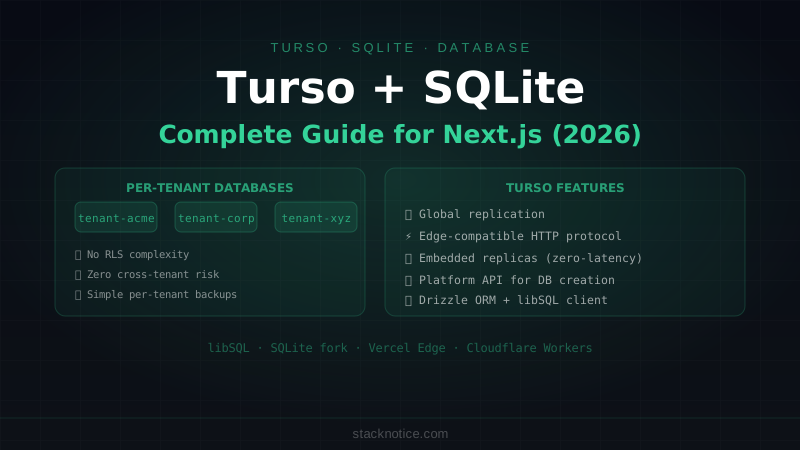
- Multi-tenant apps where tenants have small, isolated datasets — Turso lets you create a separate database per tenant programmatically. No Row-Level Security configuration, no cross-tenant query risks, simple backups per tenant. This is Turso's biggest differentiator.
- Edge deployments — Turso works with Cloudflare Workers, Vercel Edge, and Deno Deploy. Most Postgres-compatible databases can't run at the edge without a connection proxy. Turso's HTTP protocol works natively.
- Apps with mostly reads — SQLite is faster than Postgres for reads that hit the same replica, because there's no network round-trip to a separate database server when using embedded replicas.
- Prototypes and early-stage apps — generous free tier (500 databases, 9GB storage), zero configuration.
Not a good fit:
- High write throughput — SQLite's write concurrency is limited. If you have thousands of concurrent writes, Postgres handles it better.
- Heavy joins across large tables — Postgres's query planner handles complex analytical queries better.
- Apps that need Postgres extensions — PostGIS, pgvector, pg_trgm. SQLite has no extension ecosystem comparable to Postgres.
- Existing Postgres investment — if you're already on Neon or Supabase with pgvector or RLS, Turso doesn't offer a migration story worth the disruption.
The honest comparison: Turso vs Neon is largely a question of write patterns and whether per-tenant isolation matters to you.
Setup
Install the CLI and create a database
# Install Turso CLI
curl -sSfL https://get.tur.so/install.sh | bash

# Authenticate
turso auth login

# Create a database (picks the closest region automatically)
turso db create myapp

# Get the connection URL and auth token
turso db show myapp --url
turso db tokens create myapp
Install dependencies
npm install @libsql/client drizzle-orm
npm install --save-dev drizzle-kit
Environment variables
# .env.local
TURSO_DATABASE_URL=libsql://myapp-username.turso.io
TURSO_AUTH_TOKEN=your-token-here
Drizzle + Turso Schema
// lib/db/schema.ts
import { sqliteTable, text, integer, real } from 'drizzle-orm/sqlite-core'

export const users = sqliteTable('users', {
  id: text('id').primaryKey().$defaultFn(() => crypto.randomUUID()),
  email: text('email').notNull().unique(),
  name: text('name').notNull(),
  createdAt: integer('created_at', { mode: 'timestamp' })
    .$defaultFn(() => new Date()),
})

export const posts = sqliteTable('posts', {
  id: text('id').primaryKey().$defaultFn(() => crypto.randomUUID()),
  title: text('title').notNull(),
  content: text('content').notNull(),
  authorId: text('author_id').notNull().references(() => users.id),
  publishedAt: integer('published_at', { mode: 'timestamp' }),
  status: text('status', { enum: ['draft', 'published', 'archived'] })
    .notNull()
    .default('draft'),
})

export const comments = sqliteTable('comments', {
  id: text('id').primaryKey().$defaultFn(() => crypto.randomUUID()),
  content: text('content').notNull(),
  postId: text('post_id').notNull().references(() => posts.id),
  authorId: text('author_id').notNull().references(() => users.id),
  createdAt: integer('created_at', { mode: 'timestamp' })
    .$defaultFn(() => new Date()),
})
Database Client
// lib/db/index.ts
import { createClient } from '@libsql/client'
import { drizzle } from 'drizzle-orm/libsql'
import * as schema from './schema'

function createDb() {
  const client = createClient({
    url: process.env.TURSO_DATABASE_URL!,
    authToken: process.env.TURSO_AUTH_TOKEN!,
  })

  return drizzle(client, { schema })
}

// Singleton pattern — reuse connection in Next.js
const globalForDb = globalThis as unknown as { db: ReturnType<typeof createDb> }
export const db = globalForDb.db ?? createDb()
if (process.env.NODE_ENV !== 'production') globalForDb.db = db

export type DB = typeof db
Migrations with Drizzle Kit
// drizzle.config.ts
import type { Config } from 'drizzle-kit'

export default {
  schema: './lib/db/schema.ts',
  out: './drizzle',
  dialect: 'sqlite',
  driver: 'turso',
  dbCredentials: {
    url: process.env.TURSO_DATABASE_URL!,
    authToken: process.env.TURSO_AUTH_TOKEN!,
  },
} satisfies Config
# Generate migration files
npx drizzle-kit generate
# Apply migrations to Turso
npx drizzle-kit migrateUsing the DB in Next.js
Server Components
// app/posts/page.tsx
import { db } from '@/lib/db'
import { posts, users } from '@/lib/db/schema'
import { eq, desc } from 'drizzle-orm'

export default async function PostsPage() {
  const publishedPosts = await db
    .select({
      id: posts.id,
      title: posts.title,
      publishedAt: posts.publishedAt,
      authorName: users.name,
    })
    .from(posts)
    .innerJoin(users, eq(posts.authorId, users.id))
    .where(eq(posts.status, 'published'))
    .orderBy(desc(posts.publishedAt))
    .limit(20)

  return (
    <main>
      {publishedPosts.map(post => (
        <article key={post.id}>
          <h2>{post.title}</h2>
          <p>By {post.authorName}</p>
        </article>
      ))}
    </main>
  )
}
Server Actions
// app/posts/actions.ts
'use server'

import { db } from '@/lib/db'
import { posts } from '@/lib/db/schema'
import { eq } from 'drizzle-orm'
import { revalidatePath } from 'next/cache'
import { z } from 'zod'

const createPostSchema = z.object({
  title: z.string().min(1).max(200),
  content: z.string().min(1),
})

export async function createPost(authorId: string, formData: FormData) {
  const parsed = createPostSchema.safeParse({
    title: formData.get('title'),
    content: formData.get('content'),
  })

  if (!parsed.success) {
    return { error: parsed.error.flatten().fieldErrors }
  }

  await db.insert(posts).values({
    title: parsed.data.title,
    content: parsed.data.content,
    authorId,
  })

  revalidatePath('/posts')
  return { success: true }
}

export async function publishPost(postId: string, authorId: string) {
  await db
    .update(posts)
    .set({ status: 'published', publishedAt: new Date() })
    .where(eq(posts.id, postId))

  revalidatePath('/posts')
}
Turso's Killer Feature: Per-Tenant Databases
This is what makes Turso genuinely interesting for multi-tenant SaaS. Instead of putting all tenants in one database with Row-Level Security, you create a separate database per tenant. Each tenant's data is completely isolated at the storage level.
// lib/turso-admin.ts
// Turso Platform API — creates and manages databases programmatically

const TURSO_ORG = process.env.TURSO_ORG!
const TURSO_API_TOKEN = process.env.TURSO_PLATFORM_API_TOKEN!

async function createTenantDatabase(tenantId: string) {
  const response = await fetch(
    `https://api.turso.tech/v1/organizations/${TURSO_ORG}/databases`,
    {
      method: 'POST',
      headers: {
        Authorization: `Bearer ${TURSO_API_TOKEN}`,
        'Content-Type': 'application/json',
      },
      body: JSON.stringify({
        name: `tenant-${tenantId}`,
        group: 'default', // replica group
      }),
    }
  )

  const db = await response.json()
  return db
}

async function createTenantToken(dbName: string) {
  const response = await fetch(
    `https://api.turso.tech/v1/organizations/${TURSO_ORG}/databases/${dbName}/auth/tokens`,
    {
      method: 'POST',
      headers: { Authorization: `Bearer ${TURSO_API_TOKEN}` },
    }
  )
  const { jwt } = await response.json()
  return jwt
}
When a new organization signs up:
// app/api/organizations/route.ts
import { createTenantDatabase, createTenantToken } from '@/lib/turso-admin'
import { db as mainDb } from '@/lib/db'
import { organizations } from '@/lib/db/schema'

export async function POST(request: Request) {
  const { name, slug } = await request.json()

  // Create an isolated database for this tenant
  const tenantDb = await createTenantDatabase(slug)
  const tenantToken = await createTenantToken(tenantDb.name)

  // Run schema migrations on the new database
  const tenantClient = createClient({
    url: tenantDb.hostname,
    authToken: tenantToken,
  })
  await runMigrations(tenantClient)

  // Store the connection details in your main metadata database
  await mainDb.insert(organizations).values({
    name,
    slug,
    dbUrl: tenantDb.hostname,
    dbToken: tenantToken, // encrypt this in production
  })

  return Response.json({ success: true })
}
Per-request, look up the tenant's database and connect to it:
// lib/tenant-db.ts
import { createClient } from '@libsql/client'
import { drizzle } from 'drizzle-orm/libsql'
import { db as mainDb } from './db'
import { organizations } from './db/schema'
import { eq } from 'drizzle-orm'
import * as schema from './db/schema'

export async function getTenantDb(slug: string) {
  const org = await mainDb
    .select()
    .from(organizations)
    .where(eq(organizations.slug, slug))
    .get()

  if (!org) throw new Error('Organization not found')

  const client = createClient({
    url: org.dbUrl,
    authToken: org.dbToken,
  })

  return drizzle(client, { schema })
}
The result: zero risk of cross-tenant data leaks, simple per-tenant backups, trivially easy to delete all of a tenant's data (just drop the database), and no RLS complexity.
Embedded Replicas: Zero-Latency Reads
Turso's embedded replica mode syncs a local copy of the database to your server. Reads come from the local SQLite file — no network round-trip. Writes go to Turso's primary and sync back.
// For long-running servers (not serverless)
const client = createClient({
  url: process.env.TURSO_DATABASE_URL!,
  authToken: process.env.TURSO_AUTH_TOKEN!,
  syncUrl: process.env.TURSO_DATABASE_URL!, // same URL for sync
  syncInterval: 60, // sync every 60 seconds
})

// Manually sync before serving requests
await client.sync()
This is most useful on Fly.io or Railway where your server runs continuously near your users. On serverless, you don't have a persistent file system, so embedded replicas don't work — use the HTTP client directly.
Deploying on Vercel
Turso's HTTP protocol works with Vercel's serverless functions and Edge Runtime:
// For Edge Runtime (Vercel Edge Functions)
import { createClient } from '@libsql/client/web' // web variant, not Node

const client = createClient({
  url: process.env.TURSO_DATABASE_URL!,
  authToken: process.env.TURSO_AUTH_TOKEN!,
})
The @libsql/client/web import uses the fetch-based HTTP transport instead of the Node.js WebSocket transport — required for Edge Runtime.
For Vercel Edge Middleware:
// middleware.ts
import { createClient } from '@libsql/client/web'

export const config = { runtime: 'edge' }

export async function middleware(request: NextRequest) {
  const client = createClient({
    url: process.env.TURSO_DATABASE_URL!,
    authToken: process.env.TURSO_AUTH_TOKEN!,
  })

  // Fast auth check from the edge — no Postgres cold start
  const session = await client.execute({
    sql: 'SELECT id FROM sessions WHERE token = ? AND expires_at > ?',
    args: [getToken(request), Date.now()],
  })

  if (!session.rows.length) {
    return NextResponse.redirect(new URL('/login', request.url))
  }
}
SQLite Differences to Watch For
No native boolean type — use integer (0/1). Drizzle handles this with { mode: 'boolean' }:
isPublished: integer('is_published', { mode: 'boolean' }).default(false)No native UUID type — store as text. Generate with crypto.randomUUID().
No JSONB — SQLite has json_extract() but it's not indexed. If you need to query JSON fields frequently, denormalize into columns instead.
Case-insensitive LIKE by default for ASCII — but not for Unicode. Use UPPER() or LOWER() for consistent behavior.
No concurrent writes — SQLite uses WAL mode for some concurrency, but if your app has heavy concurrent writes, you'll hit lock contention. Turso's primary handles writes, so this is less of an issue than self-hosted SQLite.
Quick Reference
# CLI setup
turso auth login
turso db create myapp
turso db show myapp --url        # connection URL
turso db tokens create myapp     # auth token

# Schema and migrations
npx drizzle-kit generate         # create migration files
npx drizzle-kit migrate          # apply to Turso

# Per-tenant pattern
# 1. Create DB via Platform API on organization signup
# 2. Run migrations on new DB
# 3. Store connection details in metadata DB
# 4. Look up and connect per request

# Edge Runtime: use @libsql/client/web (HTTP transport)
# Server/Node: use @libsql/client (WebSocket transport)
# Embedded replicas: only on persistent servers, not serverless
Turso's practical sweet spot is multi-tenant SaaS where per-database isolation is more valuable than RLS, and apps targeting the edge where PostgreSQL's connection model causes cold-start issues. For everything else, Postgres (Neon, Supabase) is probably still the right call — but "SQLite is only for development" is no longer accurate.