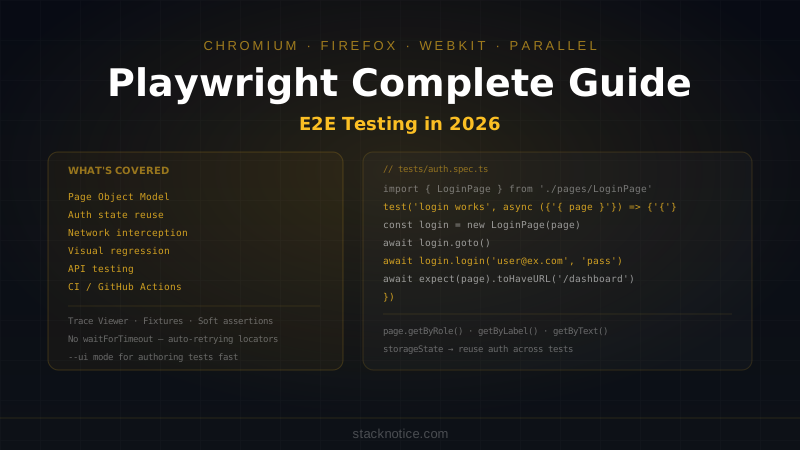
Playwright is the most capable browser automation tool available in 2026. It runs tests in Chromium, Firefox, and WebKit in parallel, handles modern auth flows, intercepts network requests, captures screenshots and traces, and has first-class TypeScript support. If you're still writing Cypress tests, Playwright's multi-browser support, faster execution, and better async handling are worth the migration.
This guide covers everything you need to test a real Next.js application — from setup to CI, including Page Object Model, visual regression, API testing, and authentication.
Setup
npm init playwright@latestThe CLI asks which browsers to install and whether to add a GitHub Actions workflow. Choose Chromium minimum, add Firefox if you need cross-browser coverage, and say yes to the GitHub Actions file.
Project structure after setup:
playwright.config.ts
tests/
  example.spec.ts
tests-examples/
  demo-todo-app.spec.ts
// playwright.config.ts
import { defineConfig, devices } from '@playwright/test'

export default defineConfig({
  testDir: './tests',
  fullyParallel: true,
  forbidOnly: !!process.env.CI,
  retries: process.env.CI ? 2 : 0,
  workers: process.env.CI ? 1 : undefined,
  reporter: [['html'], ['list']],
  use: {
    baseURL: 'http://localhost:3000',
    trace: 'on-first-retry',
    screenshot: 'only-on-failure',
    video: 'retain-on-failure',
  },
  projects: [
    {
      name: 'chromium',
      use: { ...devices['Desktop Chrome'] },
    },
    {
      name: 'firefox',
      use: { ...devices['Desktop Firefox'] },
    },
    {
      name: 'mobile-chrome',
      use: { ...devices['Pixel 7'] },
    },
  ],
  webServer: {
    command: 'npm run build && npm run start',
    url: 'http://localhost:3000',
    reuseExistingServer: !process.env.CI,
    timeout: 120000,
  },
})
The webServer config starts your app automatically before tests run and shuts it down after. reuseExistingServer: !process.env.CI reuses a running dev server locally but always starts fresh in CI.
Your First Test
// tests/home.spec.ts
import { test, expect } from '@playwright/test'

test('homepage loads with correct title', async ({ page }) => {
  await page.goto('/')
  await expect(page).toHaveTitle(/StackNotice/)
})

test('navigation links work', async ({ page }) => {
  await page.goto('/')

  // Click the blog link
  await page.getByRole('link', { name: 'Blog' }).click()
  await expect(page).toHaveURL('/blog')

  // Check posts loaded
  await expect(page.getByRole('article')).toHaveCount({ min: 1 })
})
Run tests:
npx playwright test               # all tests, headless
npx playwright test --ui          # interactive UI mode (best for authoring)
npx playwright test --headed      # visible browser
npx playwright test tests/home.spec.ts  # specific file
npx playwright test --debug       # pause on each step
The --ui mode is the fastest way to write and debug tests — it shows your app and test steps side by side, lets you pick locators by clicking, and reruns tests as you edit.
Locators: How to Find Elements
Playwright locators are auto-retrying — they wait up to the timeout for the element to appear. Never add manual waitFor calls:
// Prefer: role-based locators (most resilient)
page.getByRole('button', { name: 'Submit' })
page.getByRole('heading', { name: 'Dashboard' })
page.getByRole('link', { name: /blog/i })
page.getByRole('textbox', { name: 'Email' })
page.getByRole('checkbox', { name: 'Remember me' })

// Label-based (good for forms)
page.getByLabel('Email address')
page.getByLabel('Password')

// Text content
page.getByText('Welcome back')
page.getByText(/\d+ posts/)  // regex

// Placeholder
page.getByPlaceholder('Search...')

// Test ID (last resort — add data-testid to elements)
page.getByTestId('submit-button')

// CSS selector (avoid — brittle)
page.locator('.card-title')  // only if nothing else works
Avoid locator('div > span:nth-child(3)') — it breaks on any markup change. Role and label locators survive refactors.
Filtering and chaining
// Find a specific card by its heading
const card = page.getByRole('article').filter({ hasText: 'Claude Code' })

// Button inside a specific section
const form = page.getByRole('form', { name: 'Login' })
const submitButton = form.getByRole('button', { name: 'Log in' })

// List item matching text
const items = page.getByRole('listitem')
await expect(items.filter({ hasText: 'Playwright' })).toBeVisible()
Page Object Model
The Page Object Model (POM) encapsulates page interactions into reusable classes. Tests read like user stories, not CSS selectors:
// tests/pages/LoginPage.ts
import { type Page, type Locator, expect } from '@playwright/test'

export class LoginPage {
  private readonly emailInput: Locator
  private readonly passwordInput: Locator
  private readonly submitButton: Locator
  private readonly errorMessage: Locator

  constructor(private page: Page) {
    this.emailInput = page.getByLabel('Email')
    this.passwordInput = page.getByLabel('Password')
    this.submitButton = page.getByRole('button', { name: 'Log in' })
    this.errorMessage = page.getByRole('alert')
  }

  async goto() {
    await this.page.goto('/login')
  }

  async login(email: string, password: string) {
    await this.emailInput.fill(email)
    await this.passwordInput.fill(password)
    await this.submitButton.click()
  }

  async expectError(message: string) {
    await expect(this.errorMessage).toBeVisible()
    await expect(this.errorMessage).toContainText(message)
  }

  async expectRedirectTo(path: string) {
    await expect(this.page).toHaveURL(path)
  }
}
// tests/pages/DashboardPage.ts
import { type Page, type Locator, expect } from '@playwright/test'
export class DashboardPage {
constructor(private page: Page) {}
async expectLoaded() {
await expect(this.page.getByRole('heading', { name: 'Dashboard' })).toBeVisible()
}
async getUserName(): Promise<string> {
return this.page.getByTestId('user-name').textContent() ?? ''
}
async logout() {
await this.page.getByRole('button', { name: 'Log out' }).click()
await expect(this.page).toHaveURL('/login')
}
}// tests/auth.spec.ts
import { test, expect } from '@playwright/test'
import { LoginPage } from './pages/LoginPage'
import { DashboardPage } from './pages/DashboardPage'
test.describe('Authentication', () => {
test('login with valid credentials', async ({ page }) => {
const loginPage = new LoginPage(page)
const dashboard = new DashboardPage(page)
await loginPage.goto()
await loginPage.login('user@example.com', 'validpassword')
await dashboard.expectLoaded()
})
test('shows error with wrong password', async ({ page }) => {
const loginPage = new LoginPage(page)
await loginPage.goto()
await loginPage.login('user@example.com', 'wrongpassword')
await loginPage.expectError('Invalid email or password')
})
test('redirects to login when accessing protected route', async ({ page }) => {
await page.goto('/dashboard')
await expect(page).toHaveURL(/\/login/)
})
})Authentication: Reusing Logged-In State
Logging in before every test is slow. Playwright's auth state feature logs in once and saves the session to a file:
// tests/auth.setup.ts
import { test as setup, expect } from '@playwright/test'
import path from 'path'

const authFile = path.join(__dirname, '.auth/user.json')

setup('authenticate', async ({ page }) => {
  await page.goto('/login')
  await page.getByLabel('Email').fill(process.env.TEST_USER_EMAIL!)
  await page.getByLabel('Password').fill(process.env.TEST_USER_PASSWORD!)
  await page.getByRole('button', { name: 'Log in' }).click()

  await expect(page).toHaveURL('/dashboard')

  // Save auth state (cookies + localStorage)
  await page.context().storageState({ path: authFile })
})
// playwright.config.ts
import { defineConfig } from '@playwright/test'
export default defineConfig({
projects: [
// Run setup first
{
name: 'setup',
testMatch: /.*\.setup\.ts/,
},
// Authenticated tests reuse saved state
{
name: 'chromium',
use: {
storageState: 'tests/.auth/user.json',
},
dependencies: ['setup'],
},
// Unauthenticated tests (login page, etc.)
{
name: 'unauthenticated',
testMatch: /.*\.noauth\.spec\.ts/,
},
],
})Tests in the chromium project start already logged in. The setup project runs once before them.
API Testing
Playwright can make HTTP requests directly — useful for seeding test data or testing API endpoints without a browser:
// tests/api/posts.spec.ts
import { test, expect } from '@playwright/test'

test.describe('Posts API', () => {
  let createdPostId: number

  test('GET /api/posts returns list', async ({ request }) => {
    const response = await request.get('/api/posts')

    expect(response.ok()).toBeTruthy()
    const body = await response.json()
    expect(body).toHaveProperty('posts')
    expect(Array.isArray(body.posts)).toBe(true)
  })

  test('POST /api/posts creates a post', async ({ request }) => {
    const response = await request.post('/api/posts', {
      data: {
        title: 'Test Post',
        content: 'Test content',
        published: false
      },
      headers: {
        'Authorization': `Bearer ${process.env.TEST_API_TOKEN}`
      }
    })

    expect(response.status()).toBe(201)
    const body = await response.json()
    expect(body).toHaveProperty('id')
    createdPostId = body.id
  })

  test('GET /api/posts/:id returns specific post', async ({ request }) => {
    const response = await request.get(`/api/posts/${createdPostId}`)
    expect(response.ok()).toBeTruthy()
    const body = await response.json()
    expect(body.title).toBe('Test Post')
  })

  test('DELETE /api/posts/:id removes the post', async ({ request }) => {
    const response = await request.delete(`/api/posts/${createdPostId}`, {
      headers: { 'Authorization': `Bearer ${process.env.TEST_API_TOKEN}` }
    })
    expect(response.status()).toBe(200)
  })
})
Network Interception: Mocking API Calls
Mock slow or external APIs to keep tests fast and deterministic:
import { test, expect } from '@playwright/test'

test('displays posts from API', async ({ page }) => {
  // Intercept API call and return mock data
  await page.route('/api/posts', async (route) => {
    await route.fulfill({
      status: 200,
      contentType: 'application/json',
      body: JSON.stringify({
        posts: [
          { id: 1, title: 'Mock Post 1', slug: 'mock-post-1' },
          { id: 2, title: 'Mock Post 2', slug: 'mock-post-2' }
        ]
      })
    })
  })

  await page.goto('/blog')
  await expect(page.getByText('Mock Post 1')).toBeVisible()
  await expect(page.getByText('Mock Post 2')).toBeVisible()
})

test('shows error state when API fails', async ({ page }) => {
  await page.route('/api/posts', (route) => {
    route.fulfill({ status: 500 })
  })

  await page.goto('/blog')
  await expect(page.getByText(/something went wrong/i)).toBeVisible()
})

// Intercept and modify (add delay)
test('shows loading state', async ({ page }) => {
  await page.route('/api/posts', async (route) => {
    await new Promise(resolve => setTimeout(resolve, 2000))
    await route.continue()
  })

  await page.goto('/blog')
  await expect(page.getByTestId('loading-skeleton')).toBeVisible()
})
Visual Regression Testing
// tests/visual.spec.ts
import { test, expect } from '@playwright/test'

test('homepage matches snapshot', async ({ page }) => {
  await page.goto('/')

  // Full page screenshot comparison
  await expect(page).toHaveScreenshot('homepage.png', {
    fullPage: true,
    threshold: 0.02  // allow 2% pixel difference
  })
})

test('button states match snapshot', async ({ page }) => {
  await page.goto('/components')

  // Screenshot a specific element
  const button = page.getByRole('button', { name: 'Subscribe' })
  await expect(button).toHaveScreenshot('button-default.png')

  await button.hover()
  await expect(button).toHaveScreenshot('button-hover.png')
})
Run npx playwright test --update-snapshots to generate or update baseline screenshots. On CI, run without --update-snapshots to compare against the committed baselines.
Fixtures: Shared Setup and Teardown
// tests/fixtures.ts
import { test as base, expect } from '@playwright/test'
import { LoginPage } from './pages/LoginPage'
import { DashboardPage } from './pages/DashboardPage'

// Define custom fixtures
type MyFixtures = {
  loginPage: LoginPage
  dashboardPage: DashboardPage
  authenticatedPage: void
}

export const test = base.extend<MyFixtures>({
  loginPage: async ({ page }, use) => {
    await use(new LoginPage(page))
  },

  dashboardPage: async ({ page }, use) => {
    await use(new DashboardPage(page))
  },

  // Fixture that performs login before the test
  authenticatedPage: async ({ page, loginPage }, use) => {
    await loginPage.goto()
    await loginPage.login(
      process.env.TEST_USER_EMAIL!,
      process.env.TEST_USER_PASSWORD!
    )
    await use()
    // Teardown: logout after test
    await page.getByRole('button', { name: 'Log out' }).click().catch(() => {})
  }
})

export { expect }
// tests/dashboard.spec.ts — uses custom fixtures
import { test, expect } from './fixtures'
test('dashboard shows user info', async ({ page, dashboardPage, authenticatedPage }) => {
await expect(page).toHaveURL('/dashboard')
await dashboardPage.expectLoaded()
})Testing Forms with Validation
// tests/forms.spec.ts
test.describe('Contact form', () => {
  test.beforeEach(async ({ page }) => {
    await page.goto('/contact')
  })

  test('shows validation errors on empty submit', async ({ page }) => {
    await page.getByRole('button', { name: 'Send' }).click()

    await expect(page.getByText('Name is required')).toBeVisible()
    await expect(page.getByText('Email is required')).toBeVisible()
    await expect(page.getByText('Message is required')).toBeVisible()
  })

  test('shows error for invalid email', async ({ page }) => {
    await page.getByLabel('Email').fill('not-an-email')
    await page.getByRole('button', { name: 'Send' }).click()

    await expect(page.getByText('Invalid email address')).toBeVisible()
  })

  test('submits successfully with valid data', async ({ page }) => {
    // Mock the API call
    await page.route('/api/contact', (route) => {
      route.fulfill({ status: 200, body: JSON.stringify({ success: true }) })
    })

    await page.getByLabel('Name').fill('John Doe')
    await page.getByLabel('Email').fill('john@example.com')
    await page.getByLabel('Message').fill('Hello, this is a test message.')
    await page.getByRole('button', { name: 'Send' }).click()

    await expect(page.getByText('Message sent successfully')).toBeVisible()
  })
})
CI with GitHub Actions
# .github/workflows/playwright.yml
name: Playwright Tests

on:
  push:
    branches: [main]
  pull_request:
    branches: [main]

jobs:
  test:
    timeout-minutes: 60
    runs-on: ubuntu-latest
    steps:
      - uses: actions/checkout@v4

      - uses: actions/setup-node@v4
        with:
          node-version: 22
          cache: 'npm'

      - name: Install dependencies
        run: npm ci

      - name: Install Playwright Browsers
        run: npx playwright install --with-deps chromium firefox

      - name: Build app
        run: npm run build

      - name: Run Playwright tests
        run: npx playwright test
        env:
          TEST_USER_EMAIL: ${{ secrets.TEST_USER_EMAIL }}
          TEST_USER_PASSWORD: ${{ secrets.TEST_USER_PASSWORD }}
          TEST_API_TOKEN: ${{ secrets.TEST_API_TOKEN }}

      - name: Upload test report
        uses: actions/upload-artifact@v4
        if: always()
        with:
          name: playwright-report
          path: playwright-report/
          retention-days: 30
The --with-deps flag installs system dependencies (libgtk, libnss, etc.) needed by the browsers. The report artifact lets you download and view the HTML report even when tests fail.
Trace Viewer: Debugging Failures
When a test fails in CI, the trace gives you a full timeline:
# Download the trace from CI artifacts, then open:
npx playwright show-trace trace.zip
The trace viewer shows every action, screenshot at each step, network requests, console logs, and exact timing. You can reproduce the exact failure without needing to rerun the test.
Configure traces in playwright.config.ts:
use: {
  trace: 'on-first-retry',     // capture on first retry only
  // trace: 'on',               // always capture (large files)
  // trace: 'retain-on-failure', // only keep failed test traces
}
What to Test vs What to Skip
E2E tests are expensive — they're slow, flaky if written poorly, and require maintenance. The value is in testing complete user flows, not implementation details:
Test these with Playwright:
- Authentication flows (login, logout, protected routes, redirect)
- Core user journeys (signup → onboarding → first action)
- Forms with complex validation
- Checkout and payment flows
- Navigation between pages
- Error states (API failures, 404, network errors)
- Accessibility with
expect(page).toHaveAccessibilityTree()
Don't test these with Playwright — use Vitest/Jest instead:
- Individual component rendering
- Business logic functions
- API handler input/output
- State management reducers
- Utility functions
A good ratio: 10-20 E2E tests covering critical flows, 100+ unit tests covering logic. Combined with the Vitest + Playwright setup for Next.js, you get fast unit tests in development and reliable E2E coverage in CI.
Common Patterns That Save Time
Wait for network idle after navigation:
await page.goto('/dashboard', { waitUntil: 'networkidle' })Assert count of items:
await expect(page.getByRole('listitem')).toHaveCount(5)Fill and submit a form in one go:
await page.fill('[name="email"]', 'test@example.com')
await page.keyboard.press('Tab')
await page.fill('[name="password"]', 'password')
await page.keyboard.press('Enter')
Check element is not visible (not just hidden):
await expect(page.getByRole('dialog')).not.toBeVisible()
// vs
await expect(page.getByRole('dialog')).toBeHidden()
Soft assertions (don't stop on first failure):
await expect.soft(page.getByText('Title')).toBeVisible()
await expect.soft(page.getByText('Subtitle')).toBeVisible()
// Test continues even if first assertion fails
Playwright's retrying locators and expect calls handle most timing issues automatically. If you're adding waitForTimeout calls or sleep, that's a sign the locator strategy needs fixing — not more waiting.