Running LLMs locally has gone from a niche experiment to a legitimate production pattern in 2026. Privacy requirements, API cost at scale, and offline-first applications all push teams toward local inference. Ollama is the tool that made this practical — it wraps model management, a REST API, and OpenAI-compatible endpoints into a single binary that runs on a laptop or a server.
This guide covers everything from first install to integrating Ollama into a real TypeScript or Python application.
Installing Ollama
macOS and Linux:
curl -fsSL https://ollama.com/install.sh | shWindows: Download the installer from ollama.com. It runs as a system service automatically.
Verify it's running:
ollama --version
# ollama version 0.6.x

curl http://localhost:11434
# Ollama is running
Ollama starts a local server on port 11434. All model management and inference happens through this API — either via CLI or HTTP.
Pulling and Running Models
# Pull a model (downloads weights, runs once)
ollama pull llama3.3

# Run interactively in the terminal
ollama run llama3.3

# Non-interactive: pipe input and get output
echo "Explain async/await in JavaScript in one paragraph" | ollama run llama3.3

# List installed models
ollama list

# Remove a model
ollama rm llama3.3
Models download to ~/.ollama/models on macOS/Linux or C:\Users\<user>\.ollama\models on Windows. Each model download is a one-time cost — subsequent runs load from disk.
Choosing the Right Model
The right model depends on your hardware and use case:
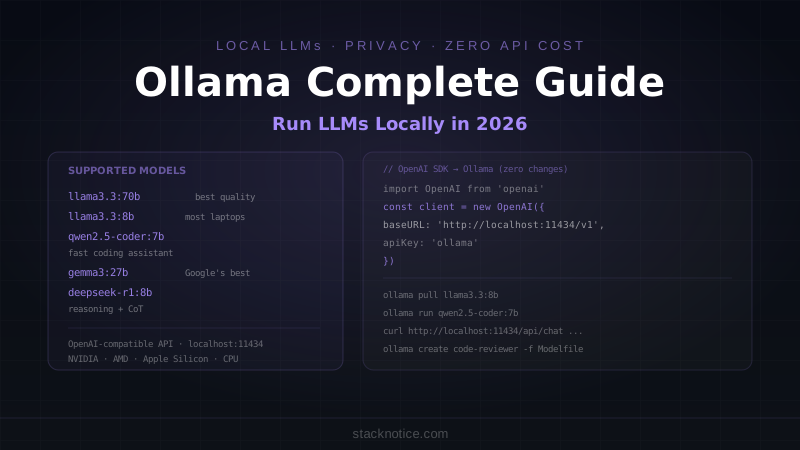
| Model | Size | VRAM needed | Best for |
|---|---|---|---|
llama3.3:70b | 43GB | 48GB+ | Best quality, server use |
llama3.3:8b | 4.7GB | 8GB | Good balance, most laptops |
qwen2.5-coder:32b | 20GB | 24GB | Code generation |
qwen2.5-coder:7b | 4.7GB | 8GB | Fast coding assistant |
mistral:7b | 4.1GB | 8GB | Fast general purpose |
gemma3:27b | 16GB | 20GB | Google's best local model |
gemma3:4b | 2.5GB | 4GB | Very fast, limited RAM |
phi4:14b | 9.1GB | 12GB | Microsoft, reasoning tasks |
deepseek-r1:8b | 4.9GB | 8GB | Reasoning with chain-of-thought |
Rule of thumb: pick the largest model your VRAM can hold with ~20% headroom. If you only have CPU, models run but slowly — keep them under 8B.
# Check what's available
ollama search coding

# Pull specific size variant
ollama pull qwen2.5-coder:7b
ollama pull gemma3:27b
The REST API
Everything the CLI does, the API does too. This is how you integrate Ollama into your applications.
Generate endpoint (single turn)
curl http://localhost:11434/api/generate \
  -H "Content-Type: application/json" \
  -d '{
    "model": "llama3.3:8b",
    "prompt": "Write a TypeScript function that debounces async functions",
    "stream": false
  }'
Response:
{
  "model": "llama3.3:8b",
  "response": "Here's a TypeScript debounce function...",
  "done": true,
  "total_duration": 4821000000,
  "eval_count": 312
}
Chat endpoint (multi-turn)
curl http://localhost:11434/api/chat \
  -H "Content-Type: application/json" \
  -d '{
    "model": "llama3.3:8b",
    "messages": [
      {
        "role": "system",
        "content": "You are a senior TypeScript developer. Be concise."
      },
      {
        "role": "user",
        "content": "What is the difference between interface and type in TypeScript?"
      }
    ],
    "stream": false
  }'
Streaming responses
Set "stream": true (or omit — it defaults to true) to receive server-sent events:
curl http://localhost:11434/api/chat \
  -H "Content-Type: application/json" \
  -d '{
    "model": "llama3.3:8b",
    "messages": [{"role": "user", "content": "Count to 5"}],
    "stream": true
  }'
Each chunk is a JSON line with "done": false until the final chunk with "done": true.
TypeScript Integration
Fetch-based client
// lib/ollama.ts
interface OllamaMessage {
  role: 'system' | 'user' | 'assistant'
  content: string
}

interface OllamaChatOptions {
  model?: string
  temperature?: number
  maxTokens?: number
}

const OLLAMA_URL = process.env.OLLAMA_URL ?? 'http://localhost:11434'
const DEFAULT_MODEL = process.env.OLLAMA_MODEL ?? 'llama3.3:8b'

export async function chat(
  messages: OllamaMessage[],
  options: OllamaChatOptions = {}
): Promise<string> {
  const response = await fetch(`${OLLAMA_URL}/api/chat`, {
    method: 'POST',
    headers: { 'Content-Type': 'application/json' },
    body: JSON.stringify({
      model: options.model ?? DEFAULT_MODEL,
      messages,
      stream: false,
      options: {
        temperature: options.temperature ?? 0.7,
        num_predict: options.maxTokens ?? 2048
      }
    })
  })

  if (!response.ok) {
    throw new Error(`Ollama error: ${response.status} ${await response.text()}`)
  }

  const data = await response.json()
  return data.message.content
}

export async function* streamChat(
  messages: OllamaMessage[],
  options: OllamaChatOptions = {}
): AsyncGenerator<string> {
  const response = await fetch(`${OLLAMA_URL}/api/chat`, {
    method: 'POST',
    headers: { 'Content-Type': 'application/json' },
    body: JSON.stringify({
      model: options.model ?? DEFAULT_MODEL,
      messages,
      stream: true,
      options: { temperature: options.temperature ?? 0.7 }
    })
  })

  if (!response.ok) {
    throw new Error(`Ollama error: ${response.status}`)
  }

  const reader = response.body!.getReader()
  const decoder = new TextDecoder()

  while (true) {
    const { done, value } = await reader.read()
    if (done) break

    const lines = decoder.decode(value).split('\n').filter(Boolean)
    for (const line of lines) {
      const data = JSON.parse(line)
      if (data.message?.content) {
        yield data.message.content
      }
    }
  }
}
Usage:
import { chat, streamChat } from './lib/ollama'

// Single response
const response = await chat([
  { role: 'system', content: 'You are a helpful coding assistant.' },
  { role: 'user', content: 'Write a SQL query to find duplicate emails' }
])
console.log(response)

// Streaming — pipe to stdout or SSE
for await (const chunk of streamChat([
  { role: 'user', content: 'Explain React Server Components' }
])) {
  process.stdout.write(chunk)
}
OpenAI SDK compatibility
Ollama exposes an OpenAI-compatible endpoint at /v1. This means you can use the official openai npm package with zero code changes:
import OpenAI from 'openai'

const client = new OpenAI({
  baseURL: 'http://localhost:11434/v1',
  apiKey: 'ollama'  // required by SDK but ignored by Ollama
})

const completion = await client.chat.completions.create({
  model: 'llama3.3:8b',
  messages: [
    { role: 'system', content: 'You are a code reviewer.' },
    { role: 'user', content: 'Review this function: const add = (a, b) => a + b' }
  ],
  temperature: 0.3,
  stream: false
})

console.log(completion.choices[0].message.content)
This compatibility is why switching between cloud APIs and local Ollama is often just changing baseURL and model. If you're already using the Claude API or OpenAI, you can add Ollama as a fallback or development alternative with minimal refactoring.
Streaming in a Next.js API route
// app/api/chat/route.ts
import { NextRequest } from 'next/server'

export async function POST(request: NextRequest) {
  const { messages } = await request.json()

  const ollamaResponse = await fetch('http://localhost:11434/api/chat', {
    method: 'POST',
    headers: { 'Content-Type': 'application/json' },
    body: JSON.stringify({
      model: 'llama3.3:8b',
      messages,
      stream: true
    })
  })

  // Stream Ollama's response directly to the client
  const stream = new ReadableStream({
    async start(controller) {
      const reader = ollamaResponse.body!.getReader()
      const decoder = new TextDecoder()

      while (true) {
        const { done, value } = await reader.read()
        if (done) {
          controller.close()
          break
        }

        const lines = decoder.decode(value).split('\n').filter(Boolean)
        for (const line of lines) {
          const data = JSON.parse(line)
          if (data.message?.content) {
            // Send as SSE
            controller.enqueue(
              new TextEncoder().encode(`data: ${JSON.stringify({ content: data.message.content })}\n\n`)
            )
          }
          if (data.done) {
            controller.close()
            return
          }
        }
      }
    }
  })

  return new Response(stream, {
    headers: {
      'Content-Type': 'text/event-stream',
      'Cache-Control': 'no-cache',
      'Connection': 'keep-alive'
    }
  })
}
Python Integration
import httpx
import json
from typing import Generator

OLLAMA_URL = "http://localhost:11434"

def chat(messages: list[dict], model: str = "llama3.3:8b", temperature: float = 0.7) -> str:
    response = httpx.post(
        f"{OLLAMA_URL}/api/chat",
        json={
            "model": model,
            "messages": messages,
            "stream": False,
            "options": {"temperature": temperature}
        },
        timeout=120.0
    )
    response.raise_for_status()
    return response.json()["message"]["content"]

def stream_chat(messages: list[dict], model: str = "llama3.3:8b") -> Generator[str, None, None]:
    with httpx.stream(
        "POST",
        f"{OLLAMA_URL}/api/chat",
        json={"model": model, "messages": messages, "stream": True},
        timeout=None
    ) as response:
        for line in response.iter_lines():
            if line:
                data = json.loads(line)
                if data.get("message", {}).get("content"):
                    yield data["message"]["content"]

# Usage
result = chat([
    {"role": "system", "content": "You are a Python expert."},
    {"role": "user", "content": "What's the difference between __str__ and __repr__?"}
])
print(result)

# Streaming
for chunk in stream_chat([{"role": "user", "content": "Write a FastAPI health endpoint"}]):
    print(chunk, end="", flush=True)
With OpenAI Python SDK
from openai import OpenAI

client = OpenAI(
    base_url="http://localhost:11434/v1",
    api_key="ollama"
)

response = client.chat.completions.create(
    model="qwen2.5-coder:7b",
    messages=[
        {"role": "user", "content": "Write a Python function to validate an email address"}
    ]
)
print(response.choices[0].message.content)
Custom Modelfiles
A Modelfile defines a custom model variant — a base model with a specific system prompt, temperature, or context length. Think of it as a locked-in configuration for a specific use case:
# Modelfile.code-reviewer
FROM qwen2.5-coder:7b

SYSTEM """
You are a senior software engineer performing code reviews. Your job is to:
1. Identify bugs, security issues, and performance problems
2. Flag violations of SOLID principles
3. Suggest concrete improvements with example code

Be direct and specific. Don't comment on style unless it affects readability significantly.
Format issues as: [SEVERITY] Description — then suggest the fix.
SEVERITY levels: CRITICAL, HIGH, MEDIUM, LOW
"""

PARAMETER temperature 0.2
PARAMETER top_p 0.9
PARAMETER num_ctx 8192
Build and run:
ollama create code-reviewer -f Modelfile.code-reviewer
ollama run code-reviewer

# Or via API
curl http://localhost:11434/api/chat \
  -d '{"model": "code-reviewer", "messages": [{"role": "user", "content": "Review: SELECT * FROM users WHERE id = " + userId}]}'
Common Modelfile parameters:
| Parameter | Description | Example |
|---|---|---|
temperature | Randomness (0=deterministic, 1=creative) | 0.2 for code, 0.8 for writing |
top_p | Nucleus sampling threshold | 0.9 |
num_ctx | Context window size (tokens) | 8192, 32768 |
num_predict | Max tokens to generate | 2048 |
stop | Stop sequences | "stop": ["</code>"] |
Production Patterns
Running Ollama as a service
On Linux with systemd (included in the official install):
# Ollama is already a systemd service after install
systemctl status ollama
systemctl enable ollama  # start on boot

# Configure via environment
sudo systemctl edit ollama
Add to the override file:
[Service]
Environment="OLLAMA_HOST=0.0.0.0:11434"
Environment="OLLAMA_MODELS=/data/ollama/models"
Environment="OLLAMA_NUM_PARALLEL=2"
OLLAMA_HOST=0.0.0.0 makes Ollama accessible from other machines — only do this on a private network or behind a reverse proxy with auth.
Hardware acceleration
Ollama auto-detects NVIDIA GPUs (via CUDA), AMD GPUs (via ROCm), and Apple Silicon (via Metal). No configuration needed — it picks the fastest available backend.
Check which layers are GPU-accelerated:
ollama run llama3.3:8b --verbose
# Shows: layers loaded to GPU vs CPU
For multi-GPU setups, Ollama distributes layers automatically across all available GPUs.
Using Ollama in AI agent systems
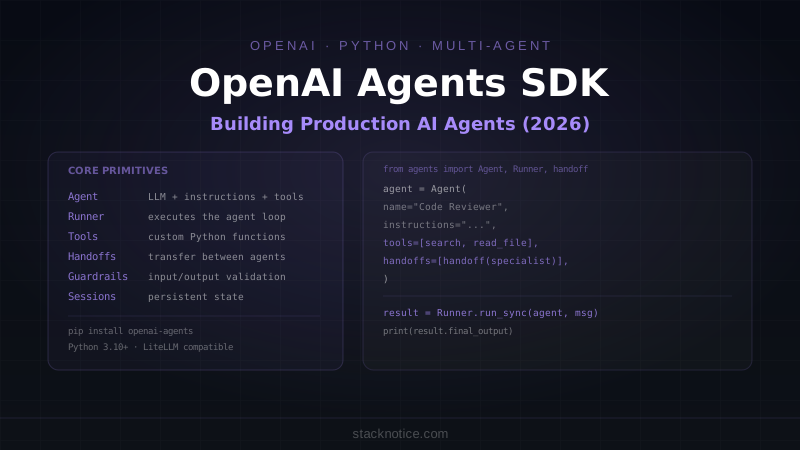
Ollama integrates directly into agent frameworks as a drop-in model provider. Combined with the OpenAI Agents SDK via LiteLLM:
from agents import Agent, Runner
from agents.models import LitellmModel

# Use local Ollama model in an agent
local_agent = Agent(
    name="Local Code Reviewer",
    instructions="Review code for bugs and security issues.",
    model=LitellmModel(model="ollama/qwen2.5-coder:7b")
)

result = Runner.run_sync(local_agent, "Review: eval(user_input)")
print(result.final_output)
For enterprise AI agent deployments, local inference via Ollama solves the data residency problem entirely — code, queries, and responses never leave your infrastructure.
Ollama vs Cloud APIs
| Factor | Ollama (local) | Cloud API |
|---|---|---|
| Cost at scale | Near zero (electricity) | $0.01–$15 per 1M tokens |
| Privacy | Data stays on-prem | Data sent to provider |
| Quality ceiling | Llama 3.3 70B ≈ GPT-4o level | Best-in-class models |
| Latency | Depends on hardware | Predictable, ~1-3s TTFT |
| Setup | One-time install | API key only |
| Offline | ✅ | ❌ |
| Scaling | Limited by hardware | Unlimited |
Use Ollama when:
- You're processing sensitive data (PII, financial, medical)
- You're building a high-volume application where API costs would be significant
- You need offline or air-gapped deployment
- Development and testing without burning API credits
- You want zero external dependencies in your stack
Use cloud APIs when:
- You need frontier model quality for complex reasoning
- Low-latency responses at unpredictable load
- You don't have GPU hardware available
The practical pattern most teams land on: Ollama for development and internal tools, cloud APIs (Claude Sonnet, GPT-4o) for customer-facing production features where quality matters most.
Common Issues
Model loads but responses are slow:
The model is running on CPU instead of GPU. Check ollama run model --verbose to see GPU layer count. If it shows 0 GPU layers, verify your GPU drivers (CUDA for NVIDIA, ROCm for AMD).
Out of memory error:
Try a smaller quantization: ollama pull llama3.3:8b-instruct-q4_K_M (Q4 quantization uses roughly half the VRAM of the default Q8).
Port 11434 already in use:
Another Ollama instance is running. Check with ps aux | grep ollama or lsof -i :11434.
Model not found error from API:
The model name must match exactly what ollama list shows. llama3.3 and llama3.3:latest are the same, but llama3 is not.
Ollama has made local inference practical enough that the question is no longer "can I run this locally" but "should I run this locally." For privacy-sensitive workloads, internal tooling, and development environments, the answer is almost always yes.