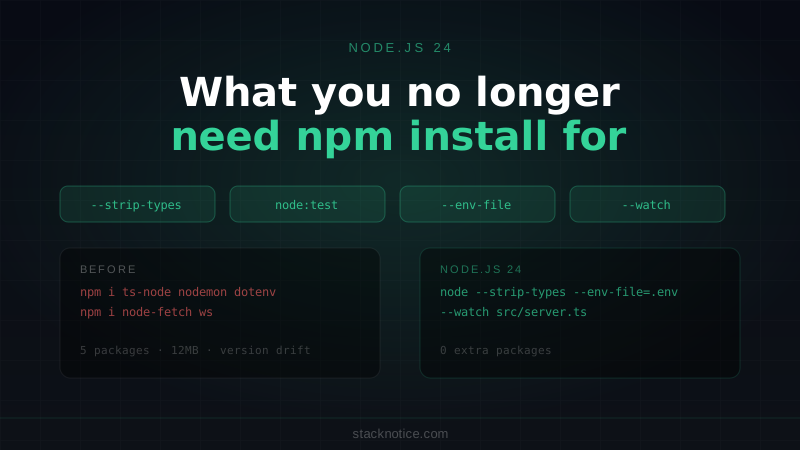
Every few years, Node.js absorbs something that used to require a separate package. node-fetch was replaced by native fetch. nodemon got replaced by --watch. ts-node got sidelined by --experimental-strip-types. dotenv got replaced by --env-file.
Node.js 24, released in April 2026 as the current LTS candidate, continues this trend. This article covers the features that have actually shipped, what they replace, and when the npm package is still the better choice.
--experimental-strip-types: TypeScript Without a Build Step
The headline feature of Node.js 22+, stabilizing rapidly in 24: you can run .ts files directly without ts-node, tsx, or a build step.
# Before: had to install ts-node or tsx
npx ts-node src/server.ts

# Node.js 22+
node --experimental-strip-types src/server.ts

# Node.js 24 — no flag needed in some cases, see below
node src/server.ts
What it does: strips TypeScript syntax before execution. It does not type-check your code — that's still tsc --noEmit's job. Think of it as "remove the type annotations and run the JavaScript."
// src/greet.ts — runs directly with Node.js 22+
function greet(name: string): string {
  return `Hello, ${name}`
}

console.log(greet('World'))
node --experimental-strip-types src/greet.ts
# Hello, WorldWhat it handles
// ✅ Type annotations
function add(a: number, b: number): number { return a + b }

// ✅ Interfaces and type aliases
interface User { id: string; name: string }
type Status = 'active' | 'inactive'

// ✅ Generics
function identity<T>(value: T): T { return value }

// ✅ Non-null assertion
const el = document.getElementById('app')!

// ✅ Type imports
import type { RequestHandler } from 'express'

// ❌ const enum — requires compilation
const enum Direction { Up, Down }

// ❌ namespace — not supported
namespace MyApp { }

// ❌ Decorators — requires transpilation (not just stripping)
@Injectable()
class Service { }
Running a project with --experimental-strip-types
For scripts, one-off tools, and backend services that don't use decorators or const enum, this replaces ts-node entirely:
// package.json
{
  "scripts": {
    "dev": "node --experimental-strip-types --watch src/server.ts",
    "start": "node --experimental-strip-types src/server.ts"
  }
}
For production, compile with tsc as usual — the stripped-types flag is a development convenience, not a production strategy.
If your project uses decorators (NestJS, TypeORM), const enum, or needs path alias resolution, tsx is still the better tool. It handles more TypeScript features and has better error messages.
Built-in Test Runner: node:test
Node.js has shipped a test runner since v18, and it's production-ready in v24. For unit tests and integration tests that don't need a browser environment, it replaces Jest or Vitest on the Node.js side.
// src/math.test.ts
import { describe, it } from 'node:test'
import assert from 'node:assert/strict'
import { add, multiply } from './math.ts'

describe('add', () => {
  it('returns the sum of two numbers', () => {
    assert.equal(add(2, 3), 5)
  })

  it('handles negative numbers', () => {
    assert.equal(add(-1, 1), 0)
  })
})

describe('multiply', () => {
  it('returns the product', () => {
    assert.equal(multiply(3, 4), 12)
  })
})
Run it:
node --experimental-strip-types --test src/**/*.test.tsWith watch mode:
node --experimental-strip-types --test --watch src/**/*.test.tsTest runner features
import { describe, it, before, after, mock } from 'node:test'
import assert from 'node:assert/strict'

describe('UserService', () => {
  // Lifecycle hooks
  before(async () => {
    await setupTestDatabase()
  })

  after(async () => {
    await teardownTestDatabase()
  })

  it('creates a user', async () => {
    const user = await createUser({ name: 'Alice', email: 'alice@example.com' })
    assert.ok(user.id)
    assert.equal(user.name, 'Alice')
  })

  it('rejects duplicate emails', async () => {
    await createUser({ name: 'Bob', email: 'bob@example.com' })
    await assert.rejects(
      () => createUser({ name: 'Bob 2', email: 'bob@example.com' }),
      { message: /duplicate/i }
    )
  })
})

// Mocking
describe('with mocked fetch', () => {
  it('calls the API', async () => {
    const mockFetch = mock.fn(() =>
      Promise.resolve(new Response(JSON.stringify({ ok: true })))
    )
    globalThis.fetch = mockFetch

    await callExternalApi()

    assert.equal(mockFetch.mock.calls.length, 1)
    mock.restore()
  })
})
Output is TAP-compatible. Pipe it to any TAP reporter, or use the --reporter flag:
node --test --reporter spec src/**/*.test.tsWhen Vitest is still better
The built-in test runner doesn't have:
- Snapshot testing
- Coverage (without external tools)
- Browser/JSDOM environment
- Component testing
For React component tests, Vitest + Testing Library remains the right choice. See the Next.js testing guide for that setup.
For pure Node.js backend logic — services, utilities, route handlers — node:test is good enough and has zero install overhead.
Native Fetch (Stable Since v21)
fetch is fully stable in Node.js 21+ and the default in 24. No more node-fetch, cross-fetch, or axios for basic HTTP requests.
// Before: needed node-fetch or axios
import fetch from 'node-fetch'

// Node.js 21+: just works
const response = await fetch('https://api.example.com/users')
const users = await response.json()
The implementation is based on the WHATWG Fetch standard — the same API as the browser. If you know fetch from the frontend, it's identical:
// POST with JSON body
async function createUser(data: { name: string; email: string }) {
  const response = await fetch('https://api.example.com/users', {
    method: 'POST',
    headers: { 'Content-Type': 'application/json' },
    body: JSON.stringify(data),
  })

  if (!response.ok) {
    throw new Error(`HTTP ${response.status}: ${await response.text()}`)
  }

  return response.json() as Promise<{ id: string; name: string; email: string }>
}
// Streaming response
async function streamCompletion(prompt: string) {
const response = await fetch('https://api.anthropic.com/v1/messages', {
method: 'POST',
headers: {
'Content-Type': 'application/json',
'x-api-key': process.env.ANTHROPIC_API_KEY!,
'anthropic-version': '2023-06-01',
},
body: JSON.stringify({
model: 'claude-sonnet-4-6',
max_tokens: 1024,
stream: true,
messages: [{ role: 'user', content: prompt }],
}),
})
for await (const chunk of response.body!) {
process.stdout.write(new TextDecoder().decode(chunk))
}
}Axios still wins for: interceptors, automatic JSON parsing, timeout handling, retry logic, and testing with mock adapters. For those use cases, axios or ky remain better.
For simple requests and server-side code, native fetch is enough.
--env-file: Load .env Without dotenv
# Before: needed dotenv
node -r dotenv/config src/server.ts

# Node.js 20.6+
node --env-file=.env src/server.ts

# Multiple env files
node --env-file=.env --env-file=.env.local src/server.ts
In package.json:
{
  "scripts": {
    "dev": "node --env-file=.env --experimental-strip-types --watch src/server.ts",
    "dev:local": "node --env-file=.env --env-file=.env.local --experimental-strip-types --watch src/server.ts"
  }
}
Your .env file syntax is the same as dotenv:
# .env
DATABASE_URL=postgres://localhost:5432/myapp
PORT=3000
NODE_ENV=development--env-file doesn't expand variables — DATABASE_URL=${DB_HOST}:${DB_PORT}/myapp won't work. If you need variable expansion, dotenv with dotenv-expand is still better.
--watch: File Watching Without nodemon
node --watch has been available since v18 and is solid in v24:
# Before: needed nodemon
npx nodemon src/server.ts

# Node.js 18+
node --watch src/server.ts

# Combined with TypeScript stripping
node --experimental-strip-types --watch src/server.ts
Unlike nodemon, --watch only watches files that are actually require()d or imported by your process. No glob patterns needed, no configuration file. It restarts when any file in the dependency graph changes.
For complex watch configurations (watching non-imported files like templates, env files, or static assets), nodemon with a nodemon.json config is still more flexible.
WebSocket Client (v22+)
Node.js 22 shipped a built-in WebSocket client — no ws package needed for client connections:
// Before: needed the 'ws' package as a client
import WebSocket from 'ws'

// Node.js 22+
const ws = new WebSocket('wss://echo.websocket.org')

ws.addEventListener('open', () => {
  ws.send('Hello from Node.js')
})

ws.addEventListener('message', (event) => {
  console.log('Received:', event.data)
  ws.close()
})

ws.addEventListener('error', (event) => {
  console.error('WebSocket error:', event)
})
This is a client WebSocket. For WebSocket servers, ws is still the standard — Node.js doesn't ship a server implementation.
util.parseArgs: CLI Argument Parsing
For simple CLI tools, util.parseArgs() replaces commander, yargs, or minimist:
import { parseArgs } from 'node:util'

const { values, positionals } = parseArgs({
  options: {
    output: {
      type: 'string',
      short: 'o',
      default: './dist',
    },
    verbose: {
      type: 'boolean',
      short: 'v',
      default: false,
    },
    watch: {
      type: 'boolean',
      short: 'w',
      default: false,
    },
  },
  allowPositionals: true,
})

// node build.ts src/index.ts -o ./out --verbose
console.log(values.output)   // './out'
console.log(values.verbose)  // true
console.log(positionals)     // ['src/index.ts']
For CLIs with subcommands, help text generation, or complex validation, commander is still the better choice. For simple scripts with a handful of flags, parseArgs is built in and works well.
The Minimal Node.js 24 Server Setup
Combining everything: a simple HTTP API with TypeScript, env loading, and tests — all without extra packages:
// src/server.ts
import { createServer } from 'node:http'
import { readFileSync } from 'node:fs'

const PORT = Number(process.env.PORT) || 3000

interface User {
  id: string
  name: string
  email: string
}

// In-memory store for this example
const users: User[] = [
  { id: '1', name: 'Alice', email: 'alice@example.com' },
]

const server = createServer(async (req, res) => {
  const url = new URL(req.url!, `http://localhost:${PORT}`)

  // GET /users
  if (req.method === 'GET' && url.pathname === '/users') {
    res.writeHead(200, { 'Content-Type': 'application/json' })
    res.end(JSON.stringify(users))
    return
  }

  // POST /users
  if (req.method === 'POST' && url.pathname === '/users') {
    let body = ''
    for await (const chunk of req) body += chunk
    const data = JSON.parse(body) as Omit<User, 'id'>

    const user: User = { id: crypto.randomUUID(), ...data }
    users.push(user)

    res.writeHead(201, { 'Content-Type': 'application/json' })
    res.end(JSON.stringify(user))
    return
  }

  res.writeHead(404)
  res.end(JSON.stringify({ error: 'Not found' }))
})

server.listen(PORT, () => {
  console.log(`Server running on http://localhost:${PORT}`)
})
# Run with no extra dependencies
node --experimental-strip-types --env-file=.env --watch src/server.ts// src/server.test.ts
import { describe, it, before, after } from 'node:test'
import assert from 'node:assert/strict'
// Tests run against the actual HTTP server
let baseUrl: string
before(async () => {
// Start server on random port
process.env.PORT = '0'
const { default: startServer } = await import('./server.ts')
baseUrl = `http://localhost:${startServer.address().port}`
})
describe('GET /users', () => {
it('returns a list of users', async () => {
const res = await fetch(`${baseUrl}/users`)
assert.equal(res.status, 200)
const users = await res.json()
assert.ok(Array.isArray(users))
})
})
describe('POST /users', () => {
it('creates a user', async () => {
const res = await fetch(`${baseUrl}/users`, {
method: 'POST',
headers: { 'Content-Type': 'application/json' },
body: JSON.stringify({ name: 'Bob', email: 'bob@example.com' }),
})
assert.equal(res.status, 201)
const user = await res.json()
assert.ok(user.id)
assert.equal(user.name, 'Bob')
})
})Zero external dependencies for the server runtime, zero for tests. The only package.json you'd need is for TypeScript types (@types/node) and a production framework if you go that route.
What to Still Install
Being honest: some things are still better as packages.
| Task | Built-in option | Still better as a package |
|---|---|---|
| TypeScript execution | --experimental-strip-types | tsx if you use decorators |
| Testing | node:test | Vitest for React/browser tests |
| HTTP requests | fetch | axios or ky for interceptors/retry |
| Env files | --env-file | dotenv + dotenv-expand for variable interpolation |
| File watching | --watch | nodemon for complex glob patterns |
| CLI args | util.parseArgs | commander for subcommands/help text |
| WebSocket client | WebSocket | ws if you need a server too |
The pattern is consistent: if the use case is simple and standard, the built-in is good enough. When you need configurability, error handling, or features that go beyond the basics, the npm package is still worth it.
Upgrading to Node.js 24
# With nvm
nvm install 24
nvm use 24

# With Volta
volta install node@24

# Check version
node -v  # v24.x.x
Check your existing project for compatibility:
# Run your test suite with Node.js 24
node --test

# Check for deprecation warnings
node --pending-deprecation src/server.ts
Breaking changes from Node.js 22 to 24 are minimal. The bigger jump is from Node.js 18/20 to 22, where the --experimental-strip-types and --env-file flags were introduced. If you're still on Node.js 18, both features are available on 22 and worth updating for alone.
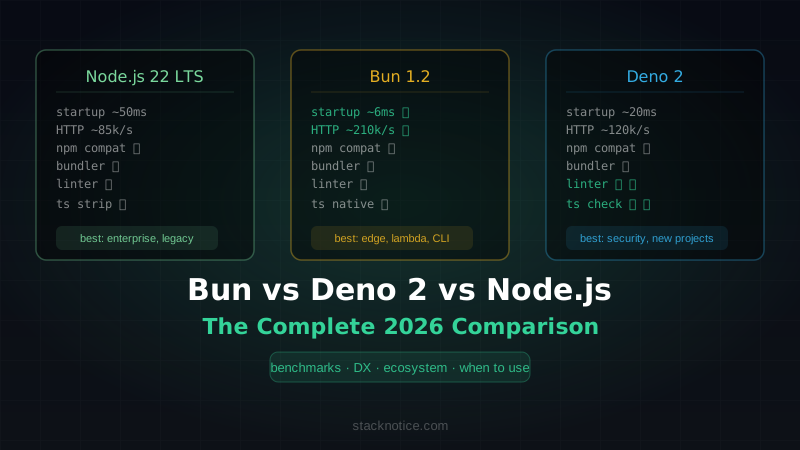
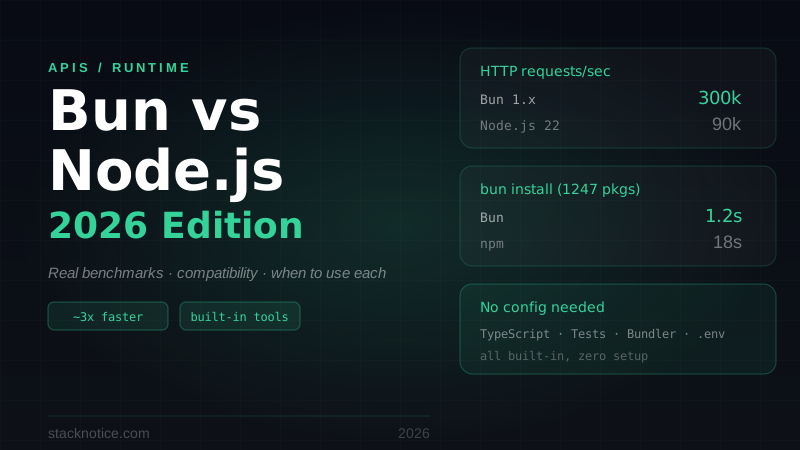
For comparison with Bun and Deno on the same dimensions, see the Bun vs Deno vs Node.js comparison and the deeper Bun vs Node.js performance guide.