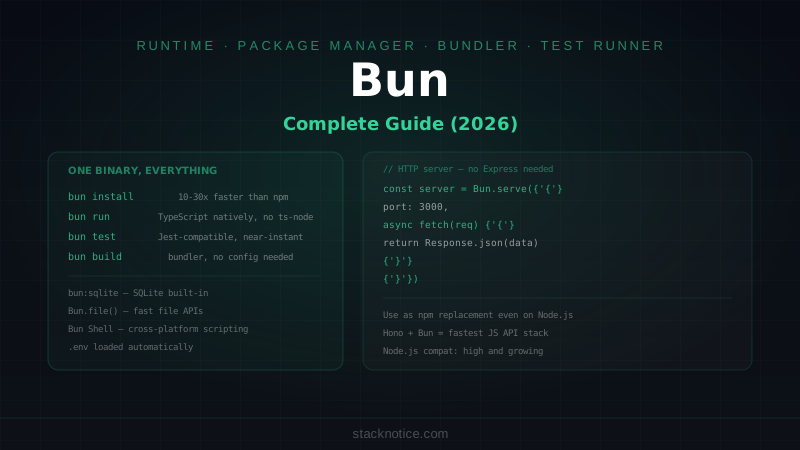
Bun is a JavaScript runtime, package manager, bundler, and test runner — all in one binary. It's built on JavaScriptCore (Safari's engine) instead of V8, written in Zig, and designed to be fast at everything Node.js is slow at: startup time, npm install, test execution, and bundling.
This guide covers what Bun can actually do, with real code for each feature. Not a benchmark post — a practical guide for developers deciding whether and how to use Bun in production.
What Bun Replaces (and What It Doesn't)
Bun can replace:
- Node.js — as a runtime for scripts and servers
- npm / pnpm — as a package manager (even on Node.js projects)
- Jest — as a test runner
- esbuild / Rollup — as a bundler
- ts-node — TypeScript runs natively, no transpilation step
Bun cannot replace:
- Node.js in production if your app uses native modules with specific ABI requirements
- Webpack for complex custom build pipelines
- Specialized tools that depend on Node internals (some Electron apps, some native bindings)
Most Node.js code runs on Bun without changes. The compatibility layer is strong — Express, Fastify, Prisma, and most popular packages work out of the box.
Installation
# macOS / Linux
curl -fsSL https://bun.sh/install | bash

# Windows (PowerShell)
powershell -c "irm bun.sh/install.ps1 | iex"

# Verify
bun --version  # 1.x.x
No Node.js required. Bun is a single binary.
Package Manager
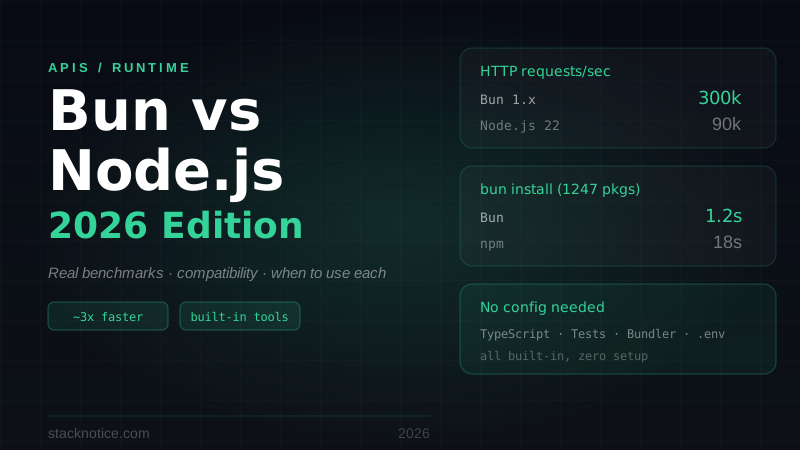
Bun's package manager is a drop-in replacement for npm that's significantly faster — typically 10-30x on cold installs, 5-10x with cache.
bun install                    # install all dependencies
bun add express                # add a package
bun add -d @types/node         # add dev dependency
bun remove lodash              # remove a package
bun update                     # update all packages
The lockfile is bun.lockb (binary format, faster to read/write than package-lock.json). Commit it to git — it ensures reproducible installs.
Use Bun as package manager even on Node.js projects. You don't have to switch runtimes to get faster installs. Just run bun install instead of npm install and keep running node for execution.
# package.json scripts still work with bun run
bun run dev      # runs the "dev" script
bun run build
bun run test
Running TypeScript Natively
No ts-node, no tsx, no tsc needed for execution:
bun script.ts        # runs TypeScript directly
bun src/index.ts     # with path

# Watch mode (re-runs on file changes)
bun --watch src/index.ts

# Hot reload (preserves module state where possible)
bun --hot src/server.ts
TypeScript types are stripped at runtime — Bun does not type-check. Run tsc --noEmit separately for type checking. This is intentional: type checking is slow and shouldn't block execution.
// This just works — no config needed
import { readFileSync } from 'fs'
import type { Config } from './types'

const config: Config = JSON.parse(readFileSync('./config.json', 'utf-8'))
console.log(config)
HTTP Server
Bun has a built-in HTTP server that's faster than Node's http module and simpler than Express for basic use cases:
// server.ts
const server = Bun.serve({
  port: 3000,
  hostname: '0.0.0.0',

  async fetch(req) {
    const url = new URL(req.url)

    if (url.pathname === '/') {
      return new Response('Hello from Bun!', {
        headers: { 'Content-Type': 'text/plain' }
      })
    }

    if (url.pathname === '/api/posts' && req.method === 'GET') {
      const posts = await db.post.findMany({ where: { published: true } })
      return Response.json(posts)
    }

    if (url.pathname === '/api/posts' && req.method === 'POST') {
      const body = await req.json()
      const post = await db.post.create({ data: body })
      return Response.json(post, { status: 201 })
    }

    return new Response('Not Found', { status: 404 })
  },

  error(err) {
    console.error(err)
    return new Response('Internal Server Error', { status: 500 })
  }
})

console.log(`Listening on http://localhost:${server.port}`)
For anything beyond basic routing, use Hono or Elysia — both are built to run on Bun natively.
With Hono (recommended for real APIs)
import { Hono } from 'hono'
import { cors } from 'hono/cors'
import { logger } from 'hono/logger'
import { zValidator } from '@hono/zod-validator'
import { z } from 'zod'

const app = new Hono()

app.use('*', logger())
app.use('/api/*', cors())

const createPostSchema = z.object({
  title: z.string().min(1),
  content: z.string().min(1),
  published: z.boolean().default(false)
})

app.get('/api/posts', async (c) => {
  const posts = await db.post.findMany({ where: { published: true } })
  return c.json(posts)
})

app.post('/api/posts', zValidator('json', createPostSchema), async (c) => {
  const data = c.req.valid('json')
  const post = await db.post.create({ data })
  return c.json(post, 201)
})

app.get('/api/posts/:slug', async (c) => {
  const slug = c.req.param('slug')
  const post = await db.post.findUnique({ where: { slug } })
  if (!post) return c.json({ error: 'Not found' }, 404)
  return c.json(post)
})

export default {
  port: 3000,
  fetch: app.fetch
}
File APIs
Bun's file APIs are faster and more ergonomic than Node's fs module:
// Reading files
const file = Bun.file('./data.json')
const text = await file.text()
const json = await file.json<MyType>()
const buffer = await file.arrayBuffer()
const size = file.size
const type = file.type  // MIME type

// Writing files
await Bun.write('./output.txt', 'Hello, World!')
await Bun.write('./data.json', JSON.stringify(data, null, 2))
await Bun.write('./copy.png', Bun.file('./original.png'))

// Streaming a large file
const reader = Bun.file('./large-file.csv').stream()
for await (const chunk of reader) {
  // process chunk
}

// Check if file exists
const exists = await Bun.file('./config.json').exists()
No fs/promises imports needed. Bun.file() returns a BunFile object that's lazy — it doesn't read the file until you call .text(), .json(), etc.
Built-in SQLite
Bun ships with SQLite built in — no npm install, no native bindings:
import { Database } from 'bun:sqlite'

const db = new Database('myapp.db')

// Create tables
db.run(`
  CREATE TABLE IF NOT EXISTS posts (
    id INTEGER PRIMARY KEY AUTOINCREMENT,
    title TEXT NOT NULL,
    slug TEXT UNIQUE NOT NULL,
    content TEXT NOT NULL,
    published INTEGER DEFAULT 0,
    created_at TEXT DEFAULT (datetime('now'))
  )
`)

// Prepared statements (always use these — prevent SQL injection)
const insertPost = db.prepare(
  'INSERT INTO posts (title, slug, content, published) VALUES (?, ?, ?, ?)'
)

const getPostBySlug = db.prepare(
  'SELECT * FROM posts WHERE slug = ?'
)

const getPublishedPosts = db.prepare(
  'SELECT id, title, slug, created_at FROM posts WHERE published = 1 ORDER BY created_at DESC'
)

// Use them
insertPost.run('Hello World', 'hello-world', 'Content here', 1)

const post = getPostBySlug.get('hello-world') as {
  id: number
  title: string
  slug: string
  content: string
} | null

const posts = getPublishedPosts.all() as Array<{
  id: number
  title: string
  slug: string
  created_at: string
}>

db.close()
bun:sqlite is synchronous — designed for SQLite's single-writer model. For a more ergonomic API, use Drizzle ORM with the Bun SQLite adapter:
import { drizzle } from 'drizzle-orm/bun-sqlite'
import { Database } from 'bun:sqlite'
import { posts } from './schema'
import { eq } from 'drizzle-orm'

const sqlite = new Database('myapp.db')
const db = drizzle(sqlite)

const allPosts = await db.select().from(posts).where(eq(posts.published, true))
Test Runner
bun test is a Jest-compatible test runner that's much faster than Jest:
bun test                    # run all tests
bun test --watch            # watch mode
bun test src/utils.test.ts  # run specific file
bun test --coverage         # with coverage report
The API is Jest-compatible — most Jest tests run without modification:
// posts.test.ts
import { describe, it, expect, beforeEach, afterEach, mock } from 'bun:test'
import { createPost, getPostBySlug, deletePost } from './posts'

// Mock a module
const mockDb = mock(() => ({
  post: {
    create: mock(() => Promise.resolve({ id: '1', title: 'Test', slug: 'test' })),
    findUnique: mock(() => Promise.resolve(null)),
    delete: mock(() => Promise.resolve())
  }
}))

describe('Post operations', () => {
  beforeEach(() => {
    mockDb.mockClear()
  })

  it('creates a post with correct slug', async () => {
    const post = await createPost({
      title: 'Hello World',
      content: 'Content here'
    })

    expect(post.slug).toBe('hello-world')
    expect(post.title).toBe('Hello World')
  })

  it('returns null for non-existent slug', async () => {
    const post = await getPostBySlug('does-not-exist')
    expect(post).toBeNull()
  })

  it('handles special characters in title', async () => {
    const post = await createPost({
      title: 'TypeScript: The Good Parts',
      content: '...'
    })

    expect(post.slug).toBe('typescript-the-good-parts')
  })
})

// Snapshot testing
it('returns correct post shape', async () => {
  const post = { id: '1', title: 'Test', slug: 'test', published: false }
  expect(post).toMatchSnapshot()
})
Notable difference from Jest: bun test runs tests in a single process with workers, not isolated processes. Startup is nearly instant vs 2-3 seconds for Jest.
Bun Shell
Bun has a built-in shell for cross-platform scripting — replaces bash scripts with TypeScript:
import { $ } from 'bun'

// Run commands
await $`ls -la`
await $`git add -A && git commit -m "automated commit"`

// Capture output
const result = await $`git log --oneline -5`.text()
console.log(result)

// With variables (automatically escaped — safe)
const branch = 'main'
const files = await $`git diff --name-only ${branch}`.lines()
console.log(files)  // string[]

// Pipe commands
const count = await $`cat package.json | grep dependencies`.text()

// Check exit code
const { exitCode } = await $`npm test`.nothrow()
if (exitCode !== 0) {
  console.error('Tests failed')
  process.exit(1)
}

// Run in different directory
await $`npm install`.cwd('/path/to/project')

// Environment variables
await $`NODE_ENV=production bun run build`.env({ ...process.env, DEBUG: 'false' })
Bun Shell works on Windows, macOS, and Linux using the same syntax — no bash compatibility issues.
Environment Variables
Bun automatically loads .env, .env.local, .env.production etc. — no dotenv package needed:
// No import needed — Bun loads .env automatically
const apiKey = process.env.API_KEY        // works
const dbUrl = Bun.env.DATABASE_URL        // Bun-specific, same thing

// Type-safe env validation (still recommended)
import { z } from 'zod'

const envSchema = z.object({
  DATABASE_URL: z.string().url(),
  API_KEY: z.string().min(1),
  PORT: z.coerce.number().default(3000),
  NODE_ENV: z.enum(['development', 'production', 'test']).default('development')
})

export const env = envSchema.parse(process.env)
// env.PORT is number, env.NODE_ENV is a union — fully typed
Bundler
Bun's bundler is fast and handles TypeScript, JSX, and tree-shaking without configuration:
# Bundle a single entry point
bun build src/index.ts --outdir dist

# Bundle for browser
bun build src/app.tsx --outdir dist --target browser

# With minification
bun build src/index.ts --outdir dist --minify

# Watch mode
bun build src/index.ts --outdir dist --watch
// Or programmatic API
const result = await Bun.build({
entrypoints: ['./src/index.ts'],
outdir: './dist',
target: 'bun',
minify: process.env.NODE_ENV === 'production',
sourcemap: 'external',
define: {
'process.env.NODE_ENV': JSON.stringify(process.env.NODE_ENV)
}
})
if (!result.success) {
console.error('Build failed:', result.logs)
process.exit(1)
}The bundler is good for backend bundles and simple frontend apps. For complex frontend build pipelines (code splitting, CSS modules, complex chunking strategies), Vite or webpack are still more configurable.
WebSockets
Built-in WebSocket server — no ws package needed:
const server = Bun.serve({
  port: 3000,

  fetch(req, server) {
    const url = new URL(req.url)

    if (url.pathname === '/ws') {
      const upgraded = server.upgrade(req, {
        data: { userId: url.searchParams.get('userId') }
      })
      if (upgraded) return // returns undefined on success

      return new Response('WebSocket upgrade failed', { status: 400 })
    }

    return new Response('Hello')
  },

  websocket: {
    message(ws, message) {
      console.log(`Received from ${ws.data.userId}:`, message)
      ws.send(`Echo: ${message}`)

      // Broadcast to all connected clients
      server.publish('chat', message)
    },

    open(ws) {
      ws.subscribe('chat')
      console.log(`Client connected: ${ws.data.userId}`)
    },

    close(ws, code, reason) {
      console.log(`Client disconnected: ${ws.data.userId}`)
    }
  }
})
When to Use Bun in Production
Bun is production-ready for:
- API servers — especially with Hono or Elysia, where startup time and throughput matter
- CLI tools and scripts — instant startup, no build step
- Build tools — replacing custom webpack/rollup scripts
- Serverless functions — faster cold starts
- Background workers — queue processors, cron jobs
Be cautious with Bun in production if:
- Your app uses native Node.js addons (.node files) — compatibility varies
- You rely on specific Node.js internal APIs not yet implemented in Bun
- Your team isn't familiar with Bun's differences from Node
Check bun.sh/nodejs-compat for the current Node.js compatibility status. Most things work; the list of gaps is small and shrinking.
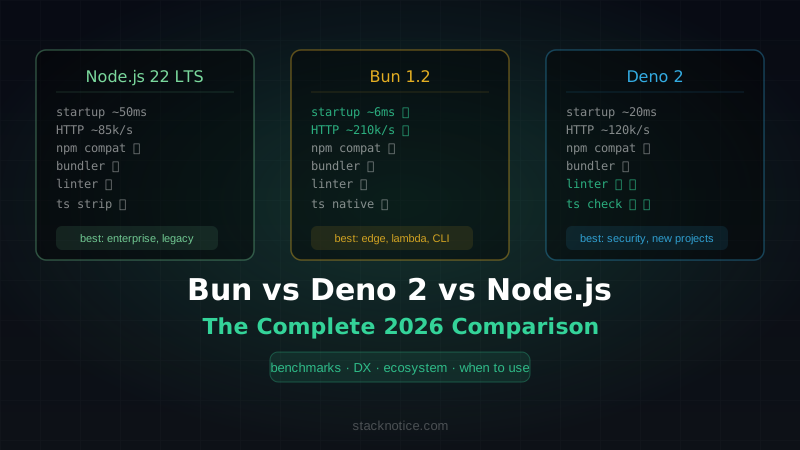
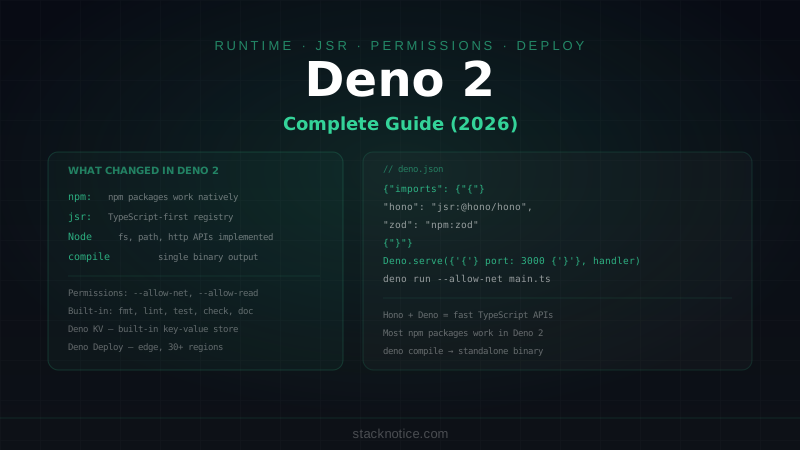
Bun vs Node.js vs Deno
| Bun | Node.js | Deno | |
|---|---|---|---|
| Engine | JavaScriptCore | V8 | V8 |
| Package manager | Built-in (fast) | npm/pnpm | JSR / npm |
| TypeScript | Native, no config | Requires tsx/ts-node | Native |
| Test runner | Built-in | Requires Jest/Vitest | Built-in |
| Bundler | Built-in | Requires webpack/esbuild | Built-in |
| SQLite | Built-in | Requires better-sqlite3 | Built-in |
| Node.js compat | High | — | Moderate |
| Ecosystem | npm | npm | JSR + npm |
| Production maturity | Growing | Mature | Growing |
Node.js is still the safe default for large production systems where maturity and ecosystem coverage matter most. Bun is the right choice when you want fast tooling and are willing to test compatibility for your specific dependencies.
For a deeper comparison of all three runtimes, see Bun vs Deno vs Node.js in 2026.
Bun's pitch is simple: everything you already do with Node.js, npm, Jest, and esbuild — in one binary, faster. The free entry point is using it as a package manager on your existing Node.js project. From there, you can adopt as much or as little as makes sense.