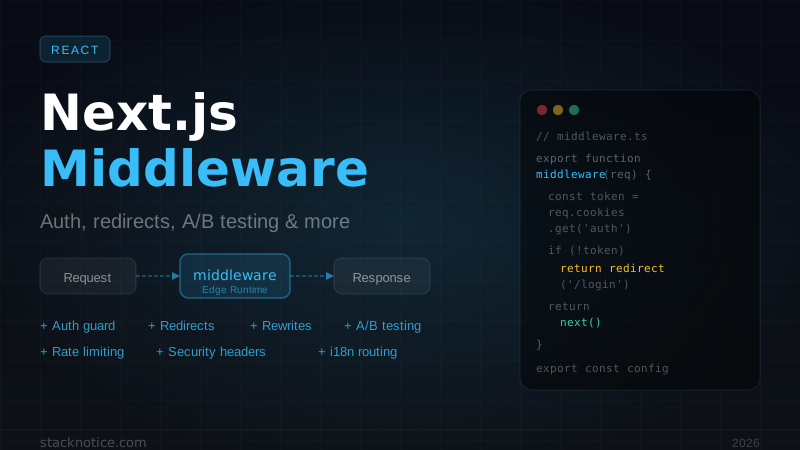
Auth guards for Clerk and Better Auth, feature flags via middleware, A/B testing at the edge, rate limiting with Upstash, security headers, and the Next.js 15 async API changes that break existing middleware code.
Middleware is the most underused lever in Next.js. It runs at the edge before anything else — before Server Components fetch data, before API routes execute, before the page renders. A well-placed middleware function handles auth, feature flags, and redirects for your entire app in one file.
The problem is that most guides show toy examples. This one covers the patterns that actually show up in production SaaS apps, including the Next.js 15 API changes that silently break older middleware code.
What Middleware Is (and Isn't)
Middleware intercepts every matched request and can:
- Redirect — send the user to a different URL (auth guards, locale routing)
- Rewrite — serve different content at the same URL (A/B testing, feature flags, maintenance mode)
- Modify headers — inject user context, add security headers, set CORS
- Read and set cookies — auth sessions, feature flag buckets, A/B assignments
- Return early — block a request without hitting your server at all
What it can't do: access the database, use Node.js APIs (fs, crypto from Node, jsonwebtoken), or run compute-heavy code. It's Edge Runtime only.
No fs, no Node.js crypto, no jsonwebtoken. For JWT verification use jose — it's built on the Web Crypto API and works everywhere. For DB lookups, pass data forward via request headers.
The Setup
middleware.ts lives at the project root — not inside app/. That's the most common mistake.
import { NextResponse } from 'next/server'
import type { NextRequest } from 'next/server'

export function middleware(request: NextRequest) {
  return NextResponse.next()
}

export const config = {
  matcher: ['/((?!_next/static|_next/image|favicon.ico).*)'],
}
The matcher is regex — always exclude static assets or middleware runs on every image and font request:
export const config = {
  matcher: [
    // Exclude static files and Next.js internals
    '/((?!_next/static|_next/image|favicon.ico|.*\\.(?:svg|png|jpg|jpeg|gif|webp)$).*)',
  ],
}
Or scope it to specific route groups:
export const config = {
  matcher: [
    '/dashboard/:path*',
    '/api/:path*',
    '/admin/:path*',
  ],
}
Next.js 15: The Breaking Change in headers() and cookies()
If you call headers() or cookies() inside a Server Component to read values set by middleware — that API is now async in Next.js 15. Old code that worked in Next.js 14 will throw a warning (and soon an error):
// Next.js 14 — synchronous, worked before
import { headers } from 'next/headers'

export default async function Page() {
  const userId = headers().get('x-user-id') // ❌ deprecated in Next.js 15
}
// Next.js 15 — await required
import { headers } from 'next/headers'
export default async function Page() {
const headerStore = await headers() // ✅
const userId = headerStore.get('x-user-id')
}Same applies to cookies():
const cookieStore = await cookies()
const session = cookieStore.get('session-token')
Middleware itself (the NextRequest API) hasn't changed — request.cookies.get() is still synchronous. Only the Server Component headers() / cookies() helpers became async.
Auth Guard: Session Cookie
The most common pattern — redirect unauthenticated users to login, redirect authenticated users away from the login page:
import { NextResponse } from 'next/server'
import type { NextRequest } from 'next/server'

const PUBLIC_PATHS = ['/', '/login', '/register', '/about', '/blog']
const AUTH_ONLY_PATHS = ['/login', '/register']

export function middleware(request: NextRequest) {
  const { pathname } = request.nextUrl
  const sessionToken = request.cookies.get('session-token')?.value

  const isPublic = PUBLIC_PATHS.some(
    (path) => pathname === path || pathname.startsWith(`${path}/`)
  )

  if (!sessionToken && !isPublic) {
    const loginUrl = new URL('/login', request.url)
    loginUrl.searchParams.set('from', pathname)
    return NextResponse.redirect(loginUrl)
  }

  if (sessionToken && AUTH_ONLY_PATHS.includes(pathname)) {
    return NextResponse.redirect(new URL('/dashboard', request.url))
  }

  return NextResponse.next()
}

export const config = {
  matcher: ['/((?!_next/static|_next/image|favicon.ico|api/auth).*)'],
}
Auth Guard: JWT with jose
When you own the JWT (custom auth, Better Auth with JWT sessions), verify it in middleware:
import { NextResponse } from 'next/server'
import type { NextRequest } from 'next/server'
import { jwtVerify } from 'jose'

const JWT_SECRET = new TextEncoder().encode(process.env.JWT_SECRET!)

async function verifyToken(token: string) {
  try {
    const { payload } = await jwtVerify(token, JWT_SECRET)
    return payload
  } catch {
    return null
  }
}

export async function middleware(request: NextRequest) {
  const token = request.cookies.get('auth-token')?.value

  if (!token) {
    return NextResponse.redirect(new URL('/login', request.url))
  }

  const payload = await verifyToken(token)
  if (!payload) {
    const response = NextResponse.redirect(new URL('/login', request.url))
    response.cookies.delete('auth-token')
    return response
  }

  // Forward user context to Server Components and API routes via headers
  const requestHeaders = new Headers(request.headers)
  requestHeaders.set('x-user-id', payload.sub as string)
  requestHeaders.set('x-user-role', payload.role as string)

  return NextResponse.next({ request: { headers: requestHeaders } })
}

export const config = {
  matcher: ['/dashboard/:path*', '/api/protected/:path*'],
}
In any Server Component, read it with the async API:
import { headers } from 'next/headers'

export default async function DashboardPage() {
  const h = await headers()
  const userId = h.get('x-user-id')
  const role = h.get('x-user-role')
  // userId is guaranteed to be set — middleware redirected if not
}
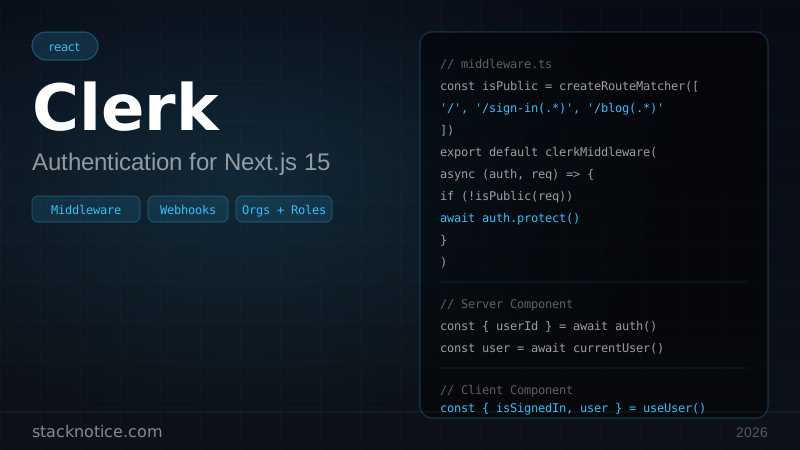
Clerk Middleware
Clerk handles the token verification, session management, and route protection through its own middleware wrapper:
import { clerkMiddleware, createRouteMatcher } from '@clerk/nextjs/server'

const isPublicRoute = createRouteMatcher([
  '/',
  '/sign-in(.*)',
  '/sign-up(.*)',
  '/blog(.*)',
  '/api/webhook(.*)',
])

export default clerkMiddleware(async (auth, request) => {
  if (!isPublicRoute(request)) {
    await auth.protect()
  }
})

export const config = {
  matcher: ['/((?!_next/static|_next/image|favicon.ico).*)', '/(api|trpc)(.*)'],
}
For role-based access:
export default clerkMiddleware(async (auth, request) => {
  const { userId, sessionClaims } = await auth()

  const isAdminRoute = request.nextUrl.pathname.startsWith('/admin')
  const isProtected = !isPublicRoute(request)

  if (isProtected && !userId) {
    return auth.redirectToSignIn()
  }

  if (isAdminRoute && sessionClaims?.metadata?.role !== 'admin') {
    return new Response('Forbidden', { status: 403 })
  }
})
The Clerk + Next.js authentication guide has the complete setup including auth() in Server Components.
Better Auth Middleware
Better Auth stores sessions in your own database, so you can't verify in the Edge Runtime the same way Clerk does — it would require a DB call. The correct pattern is to verify the session cookie signature (if using signed cookies) or treat it as opaque and let Server Components validate fully:
import { NextResponse } from 'next/server'
import type { NextRequest } from 'next/server'

// Better Auth sets a cookie named 'better-auth.session_token' by default
const SESSION_COOKIE = 'better-auth.session_token'

const PROTECTED_PREFIXES = ['/dashboard', '/settings', '/api/protected']
const AUTH_PATHS = ['/sign-in', '/sign-up']

export function middleware(request: NextRequest) {
  const { pathname } = request.nextUrl
  const sessionToken = request.cookies.get(SESSION_COOKIE)?.value

  const isProtected = PROTECTED_PREFIXES.some((prefix) =>
    pathname.startsWith(prefix)
  )

  if (isProtected && !sessionToken) {
    const loginUrl = new URL('/sign-in', request.url)
    loginUrl.searchParams.set('callbackUrl', pathname)
    return NextResponse.redirect(loginUrl)
  }

  if (sessionToken && AUTH_PATHS.includes(pathname)) {
    return NextResponse.redirect(new URL('/dashboard', request.url))
  }

  // Pass the session token to Server Components for full validation
  const requestHeaders = new Headers(request.headers)
  if (sessionToken) {
    requestHeaders.set('x-has-session', '1')
  }

  return NextResponse.next({ request: { headers: requestHeaders } })
}

export const config = {
  matcher: ['/((?!_next/static|_next/image|favicon.ico).*)'],
}
The middleware does a fast cookie-presence check. Your Server Components call auth.api.getSession() for the actual DB validation. This gives you sub-millisecond redirect for users with no cookie at all, plus full session validation for users who have one.
The Better Auth + Next.js complete guide covers the server-side session validation in detail.
Feature Flags via Middleware
Middleware is the right place to implement feature flags when you want zero overhead for users not in the flag group — no client-side JS, no layout shift, no API call. Store the flag state in a cookie, check it in middleware, rewrite to the flagged route:
import { NextResponse } from 'next/server'
import type { NextRequest } from 'next/server'

// Feature flag configuration
const FLAGS: Record<string, { enabled: boolean; rollout: number }> = {
  'new-dashboard': { enabled: true, rollout: 0.25 },  // 25% of users
  'ai-assistant':  { enabled: true, rollout: 0.10 },  // 10% of users
}

function isInRollout(userId: string, flag: string, rollout: number): boolean {
  // Deterministic: same user always gets same assignment
  const hash = [...`${userId}:${flag}`].reduce((acc, char) => {
    return ((acc << 5) - acc + char.charCodeAt(0)) | 0
  }, 0)
  return (Math.abs(hash) % 100) / 100 < rollout
}

export function middleware(request: NextRequest) {
  const { pathname } = request.nextUrl

  if (!pathname.startsWith('/dashboard')) {
    return NextResponse.next()
  }

  const userId = request.cookies.get('user-id')?.value ?? 'anonymous'
  const flagCookies: Record<string, string> = {}

  // Check existing assignments or compute new ones
  for (const [flag, config] of Object.entries(FLAGS)) {
    const existing = request.cookies.get(`flag:${flag}`)?.value
    if (existing) {
      flagCookies[flag] = existing
    } else if (config.enabled) {
      flagCookies[flag] = isInRollout(userId, flag, config.rollout) ? '1' : '0'
    }
  }

  // Rewrite to the new dashboard variant if flagged in
  if (flagCookies['new-dashboard'] === '1' && pathname === '/dashboard') {
    const response = NextResponse.rewrite(new URL('/dashboard-v2', request.url))

    // Persist assignments
    for (const [flag, value] of Object.entries(flagCookies)) {
      if (!request.cookies.get(`flag:${flag}`)) {
        response.cookies.set(`flag:${flag}`, value, {
          maxAge: 60 * 60 * 24 * 30,
          sameSite: 'lax',
          httpOnly: true,
        })
      }
    }

    return response
  }

  return NextResponse.next()
}
The /dashboard-v2 route is invisible to the user — the URL stays /dashboard. In your PostHog analytics, log the flag:new-dashboard cookie value alongside conversion events.
If you have PostHog or LaunchDarkly, their Edge SDKs handle this pattern for you, including the analytics integration. Roll your own only if you want zero external dependencies.
A/B Testing at the Edge
Same pattern as feature flags, but the goal is measuring conversion rather than controlling access:
export function middleware(request: NextRequest) {
  const { pathname } = request.nextUrl

  if (pathname !== '/') return NextResponse.next()

  let bucket = request.cookies.get('ab-landing')?.value

  if (!bucket) {
    bucket = Math.random() < 0.5 ? 'control' : 'variant'
  }

  const url = request.nextUrl.clone()
  url.pathname = bucket === 'variant' ? '/landing-v2' : '/'

  const response = NextResponse.rewrite(url)

  if (!request.cookies.get('ab-landing')) {
    response.cookies.set('ab-landing', bucket, {
      maxAge: 60 * 60 * 24 * 30,
      sameSite: 'lax',
    })
  }

  return response
}

export const config = {
  matcher: ['/'],
}
No client-side JS means no layout shift. The user sees the assigned variant from the first byte.
Security Headers on Every Response
Add security headers once in middleware instead of touching every Route Handler and Server Component:
export function middleware(request: NextRequest) {
  const response = NextResponse.next()

  response.headers.set('X-Frame-Options', 'DENY')
  response.headers.set('X-Content-Type-Options', 'nosniff')
  response.headers.set('Referrer-Policy', 'strict-origin-when-cross-origin')
  response.headers.set('Permissions-Policy', 'camera=(), microphone=(), geolocation=()')
  response.headers.delete('X-Powered-By')

  response.headers.set(
    'Strict-Transport-Security',
    'max-age=63072000; includeSubDomains; preload'
  )

  response.headers.set(
    'Content-Security-Policy',
    [
      "default-src 'self'",
      "script-src 'self' 'unsafe-eval' 'unsafe-inline' https://va.vercel-scripts.com",
      "style-src 'self' 'unsafe-inline'",
      "img-src 'self' data: https:",
      "font-src 'self'",
      "connect-src 'self'",
    ].join('; ')
  )

  return response
}You can also set security headers in next.config.mjs via the headers() function. The difference: next.config.mjs headers are applied statically and don't have access to the request. Middleware headers can be conditional. Use middleware when the header value depends on the request; use config for static headers applied everywhere.
Rate Limiting with Upstash
Upstash provides a Redis REST API that works from Edge Runtime without Node.js:
import { Ratelimit } from '@upstash/ratelimit'
import { Redis } from '@upstash/redis'

const ratelimit = new Ratelimit({
  redis: Redis.fromEnv(),
  limiter: Ratelimit.slidingWindow(20, '1 m'),
  analytics: true,
})

export async function middleware(request: NextRequest) {
  if (!request.nextUrl.pathname.startsWith('/api/')) {
    return NextResponse.next()
  }

  const ip = request.headers.get('x-forwarded-for')?.split(',')[0].trim() ?? '127.0.0.1'
  const { success, limit, remaining, reset } = await ratelimit.limit(ip)

  if (!success) {
    return new NextResponse('Too Many Requests', {
      status: 429,
      headers: {
        'X-RateLimit-Limit': limit.toString(),
        'X-RateLimit-Remaining': '0',
        'X-RateLimit-Reset': reset.toString(),
        'Retry-After': Math.ceil((reset - Date.now()) / 1000).toString(),
      },
    })
  }

  const response = NextResponse.next()
  response.headers.set('X-RateLimit-Limit', limit.toString())
  response.headers.set('X-RateLimit-Remaining', remaining.toString())
  return response
}

export const config = {
  matcher: ['/api/:path*'],
}
The @upstash/ratelimit package handles the sliding window logic over Upstash Redis REST. No Node.js, works from Edge.
Geolocation Routing (Vercel)
request.geo is populated by Vercel's edge network — country, region, and city:
export function middleware(request: NextRequest) {
  const country = request.geo?.country ?? 'US'
  const { pathname } = request.nextUrl

  // Redirect EU users to GDPR-compliant variant
  const EU = ['DE', 'FR', 'IT', 'ES', 'PL', 'NL', 'BE', 'SE', 'AT', 'CH', 'DK', 'FI']
  if (EU.includes(country) && !pathname.startsWith('/eu')) {
    return NextResponse.redirect(new URL(`/eu${pathname}`, request.url))
  }

  const response = NextResponse.next()
  response.headers.set('x-user-country', country)
  return response
}
request.geo is undefined outside Vercel (local dev, self-hosted). Add the ?? 'US' fallback or the code throws.
Composing Multiple Concerns
Real middleware handles several things. Keep it readable with small focused functions:
import { NextResponse } from 'next/server'
import type { NextRequest } from 'next/server'

function applySecurityHeaders(response: NextResponse): NextResponse {
  response.headers.set('X-Frame-Options', 'DENY')
  response.headers.set('X-Content-Type-Options', 'nosniff')
  return response
}

function handleRedirects(request: NextRequest): NextResponse | null {
  const { pathname } = request.nextUrl
  if (pathname.startsWith('/posts/')) {
    return NextResponse.redirect(
      new URL(pathname.replace('/posts/', '/blog/'), request.url),
      { status: 301 }
    )
  }
  return null
}

function handleMaintenance(request: NextRequest): NextResponse | null {
  if (
    process.env.MAINTENANCE === 'true' &&
    !request.nextUrl.pathname.startsWith('/maintenance')
  ) {
    return NextResponse.rewrite(new URL('/maintenance', request.url))
  }
  return null
}

export function middleware(request: NextRequest) {
  const redirect = handleRedirects(request)
  if (redirect) return applySecurityHeaders(redirect)

  const maintenance = handleMaintenance(request)
  if (maintenance) return applySecurityHeaders(maintenance)

  return applySecurityHeaders(NextResponse.next())
}

export const config = {
  matcher: ['/((?!_next/static|_next/image|favicon.ico).*)'],
}
Each function has a single responsibility and returns null when it has nothing to do. The main function reads as a pipeline.
Production Gotchas
Prefetch requests run middleware too. When Next.js prefetches a route in the background, it still triggers middleware. If your middleware does expensive async work (rate limit checks, token verification), this doubles your cost. Filter them out:
export async function middleware(request: NextRequest) {
  // Skip expensive operations for prefetch requests
  const isPrefetch = request.headers.get('x-nextjs-data') === '1' ||
    request.headers.get('purpose') === 'prefetch'

  if (isPrefetch) return NextResponse.next()

  // ... rest of middleware
}
Matcher too broad catches prefetch URLs. /:path* matches everything including Next.js's internal /_next/data/... URLs used for RSC payloads. Always exclude them:
matcher: ['/((?!_next).*)']The middleware file location. It must be at the project root (same level as app/), not inside app/. Next.js won't error — it just silently doesn't run.
project/
  app/
    middleware.ts   ← does nothing
  middleware.ts     ← correct
Async middleware with short-circuit paths. If you return early (redirect), make sure you're not skipping cleanup that always needs to run (like setting a security header):
// Bug: security headers not set on redirect
export function middleware(request: NextRequest) {
  if (!hasSession(request)) {
    return NextResponse.redirect('/login')  // ← misses security headers
  }
  const response = NextResponse.next()
  response.headers.set('X-Frame-Options', 'DENY')
  return response
}

// Fixed: set headers on all responses
export function middleware(request: NextRequest) {
  let response: NextResponse

  if (!hasSession(request)) {
    response = NextResponse.redirect('/login')
  } else {
    response = NextResponse.next()
  }

  response.headers.set('X-Frame-Options', 'DENY')
  return response
}
Infinite redirect loops. If you redirect /dashboard → /login and your matcher includes /login, you'll loop. Always exclude auth paths from the matcher or add an explicit check:
const AUTH_PATHS = ['/login', '/register', '/sign-in']

export function middleware(request: NextRequest) {
  const { pathname } = request.nextUrl

  if (AUTH_PATHS.some((p) => pathname.startsWith(p))) {
    return NextResponse.next()  // Never redirect auth pages
  }

  // ... auth check
}
Debugging
Middleware runs server-side — check the terminal, not the browser console:
export function middleware(request: NextRequest) {
  console.log(`[mw] ${request.method} ${request.nextUrl.pathname}`)
  console.log(`[mw] cookies:`, Object.fromEntries(request.cookies.getAll().map((c) => [c.name, c.value.slice(0, 20)])))

  return NextResponse.next()
}
On Vercel, these appear in the Function Logs tab in the dashboard.
Performance
Middleware on Vercel Edge adds roughly:
- 0.5–2ms for synchronous middleware
- 5–15ms for one async call (Upstash Redis, rate limit check)
- 30–80ms for a DB call — don't do this in middleware
The matcher is your first performance tool. Scoping middleware to /dashboard/:path* instead of /(.*) means it runs once per dashboard visit instead of once per image load.
Quick Reference
| Pattern | API |
|---|---|
| Redirect | NextResponse.redirect(new URL('/login', request.url)) |
| Rewrite | NextResponse.rewrite(new URL('/variant', request.url)) |
| Block request | new NextResponse('Forbidden', { status: 403 }) |
| Set response header | response.headers.set('key', 'value') |
| Read request cookie | request.cookies.get('name')?.value |
| Set response cookie | response.cookies.set('name', 'value', { httpOnly: true }) |
| Delete cookie | response.cookies.delete('name') |
| Forward data to Server Components | new Headers(request.headers) → headers.set(...) → NextResponse.next({ request: { headers } }) |
| Read forwarded data in Server Component | const h = await headers(); h.get('key') |
| Get IP | request.headers.get('x-forwarded-for')?.split(',')[0].trim() |
| Get country (Vercel) | request.geo?.country ?? 'US' |
Middleware is one file, but it's the one file that touches every request. The patterns here — auth guards, feature flags, security headers — are worth setting up early. They're nearly impossible to retrofit cleanly once you have 50 routes.
If you're evaluating auth providers, see the Clerk vs Better Auth comparison for the full trade-off breakdown. For the request lifecycle beyond middleware — Server Components, Route Handlers, caching — the Next.js App Router complete guide covers the full picture.