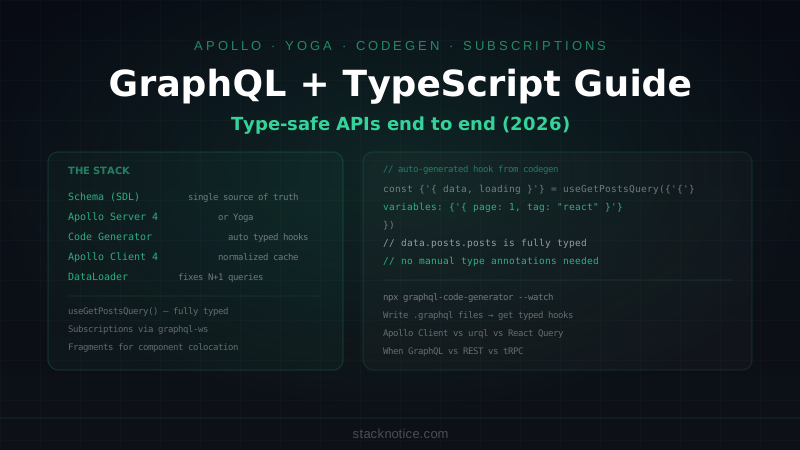
GraphQL remains the dominant API layer for complex frontend/backend communication in 2026, particularly in teams where the frontend needs precise control over what data it fetches and when. The tooling has matured significantly — GraphQL Code Generator produces fully typed hooks from your schema automatically, Apollo Client 4 has a cleaner caching model, and schema-first development with SDL gives you a single source of truth that both server and client share.
This guide covers building a complete type-safe GraphQL setup: server with Apollo Server 4 or GraphQL Yoga, automatic type generation, and a Next.js client with typed hooks for queries, mutations, and subscriptions.
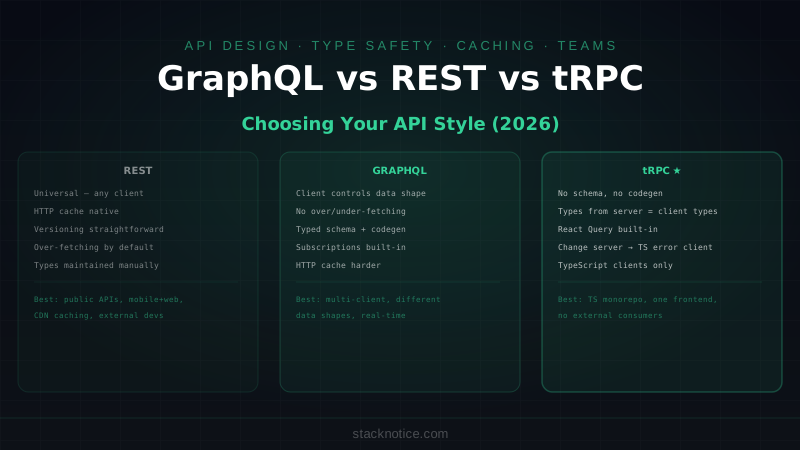
GraphQL vs REST vs tRPC in 2026
Before diving in, it's worth being clear about when GraphQL makes sense:
Choose GraphQL when:
- Multiple clients (web, mobile, third parties) consume the same API with different data needs
- Your data model has complex relationships and clients need flexible traversal
- You want to expose a public or semi-public API
- Real-time subscriptions are a core feature
- You need fine-grained field-level access control
Choose REST (or Hono/Express) when:
- Simple CRUD operations with predictable shapes
- File uploads, webhooks, streaming responses
- You need HTTP caching at the CDN level
- Public API that needs to be easy for anyone to call
Choose tRPC when:
- Full-stack TypeScript monorepo where client and server share the same codebase
- You want type safety without a schema language or codegen step
- Internal API consumed only by your own frontend
GraphQL's main overhead is the toolchain — schema, resolvers, codegen, client setup. That overhead pays off in large teams where frontend and backend work independently and the schema becomes a contract between them.
Server: Apollo Server 4
npm install @apollo/server graphql
npm install -D @graphql-codegen/cli
Schema Definition
// src/graphql/schema.ts
import { gql } from 'graphql-tag'

export const typeDefs = gql`
  type Query {
    posts(
      page: Int = 1
      limit: Int = 20
      published: Boolean
      tag: String
    ): PostsResult!
    post(slug: String!): Post
    me: User
  }

  type Mutation {
    createPost(input: CreatePostInput!): Post!
    updatePost(id: ID!, input: UpdatePostInput!): Post!
    deletePost(id: ID!): Boolean!
    publishPost(id: ID!): Post!
  }

  type Subscription {
    postPublished: Post!
    commentAdded(postId: ID!): Comment!
  }

  type Post {
    id: ID!
    title: String!
    slug: String!
    content: String!
    excerpt: String
    published: Boolean!
    publishedAt: String
    views: Int!
    createdAt: String!
    author: User!
    tags: [Tag!]!
    comments: [Comment!]!
    commentCount: Int!
  }

  type PostsResult {
    posts: [Post!]!
    total: Int!
    page: Int!
    totalPages: Int!
  }

  type User {
    id: ID!
    email: String!
    name: String
    avatar: String
    role: UserRole!
    posts: [Post!]!
  }

  type Tag {
    id: ID!
    name: String!
    slug: String!
    postCount: Int!
  }

  type Comment {
    id: ID!
    content: String!
    createdAt: String!
    author: User!
    post: Post!
  }

  input CreatePostInput {
    title: String!
    content: String!
    excerpt: String
    tags: [String!]
    published: Boolean
  }

  input UpdatePostInput {
    title: String
    content: String
    excerpt: String
    tags: [String!]
  }

  enum UserRole {
    USER
    ADMIN
    MODERATOR
  }
`
Context and Resolvers
// src/graphql/context.ts
import { db } from '../lib/db'
import { getUserFromToken } from '../lib/auth'
import type { User } from '@prisma/client'

export interface GraphQLContext {
  db: typeof db
  user: User | null
}

export async function createContext({ req }: { req: Request }): Promise<GraphQLContext> {
  const token = req.headers.get('authorization')?.replace('Bearer ', '')
  const user = token ? await getUserFromToken(token) : null

  return { db, user }
}
// src/graphql/resolvers/post.ts
import type { GraphQLContext } from '../context'
import type { Post } from '@prisma/client'
import { GraphQLError } from 'graphql'
export const postResolvers = {
Query: {
posts: async (
_: unknown,
args: { page: number; limit: number; published?: boolean; tag?: string },
ctx: GraphQLContext
) => {
const { page = 1, limit = 20, published, tag } = args
const skip = (page - 1) * Math.min(limit, 50)
const where = {
...(published !== undefined && { published }),
...(tag && { tags: { some: { tag: { slug: tag } } } })
}
const [posts, total] = await Promise.all([
ctx.db.post.findMany({
where,
skip,
take: Math.min(limit, 50),
orderBy: { createdAt: 'desc' },
include: {
author: true,
tags: { include: { tag: true } },
_count: { select: { comments: true } }
}
}),
ctx.db.post.count({ where })
])
return {
posts,
total,
page,
totalPages: Math.ceil(total / limit)
}
},
post: async (_: unknown, { slug }: { slug: string }, ctx: GraphQLContext) => {
return ctx.db.post.findUnique({
where: { slug },
include: {
author: true,
tags: { include: { tag: true } },
comments: {
include: { author: true },
orderBy: { createdAt: 'desc' },
take: 20
},
_count: { select: { comments: true } }
}
})
},
me: async (_: unknown, __: unknown, ctx: GraphQLContext) => {
return ctx.user
}
},
Mutation: {
createPost: async (
_: unknown,
{ input }: { input: { title: string; content: string; excerpt?: string; tags?: string[]; published?: boolean } },
ctx: GraphQLContext
) => {
if (!ctx.user) throw new GraphQLError('Unauthorized', { extensions: { code: 'UNAUTHORIZED' } })
const slug = input.title
.toLowerCase()
.replace(/[^a-z0-9]+/g, '-')
.replace(/^-|-$/g, '')
return ctx.db.post.create({
data: {
title: input.title,
slug,
content: input.content,
excerpt: input.excerpt,
published: input.published ?? false,
publishedAt: input.published ? new Date() : null,
authorId: ctx.user.id,
tags: input.tags ? {
create: input.tags.map(tagSlug => ({
tag: {
connectOrCreate: {
where: { slug: tagSlug },
create: {
name: tagSlug.charAt(0).toUpperCase() + tagSlug.slice(1),
slug: tagSlug
}
}
}
}))
} : undefined
},
include: { author: true, tags: { include: { tag: true } } }
})
},
deletePost: async (_: unknown, { id }: { id: string }, ctx: GraphQLContext) => {
if (!ctx.user) throw new GraphQLError('Unauthorized', { extensions: { code: 'UNAUTHORIZED' } })
const post = await ctx.db.post.findUnique({ where: { id } })
if (!post) throw new GraphQLError('Post not found', { extensions: { code: 'NOT_FOUND' } })
if (post.authorId !== ctx.user.id && ctx.user.role !== 'ADMIN') {
throw new GraphQLError('Forbidden', { extensions: { code: 'FORBIDDEN' } })
}
await ctx.db.post.delete({ where: { id } })
return true
}
},
Post: {
commentCount: (post: Post & { _count?: { comments: number } }) => {
return post._count?.comments ?? 0
}
}
}Server Setup
// src/server.ts
import { ApolloServer } from '@apollo/server'
import { startStandaloneServer } from '@apollo/server/standalone'
import { typeDefs } from './graphql/schema'
import { postResolvers } from './graphql/resolvers/post'
import { createContext } from './graphql/context'

const server = new ApolloServer({
  typeDefs,
  resolvers: postResolvers,
  introspection: process.env.NODE_ENV !== 'production',
  formatError: (formattedError, error) => {
    // Don't expose internal errors in production
    if (process.env.NODE_ENV === 'production') {
      if (formattedError.extensions?.code === 'INTERNAL_SERVER_ERROR') {
        console.error('GraphQL internal error:', error)
        return { message: 'Internal server error' }
      }
    }
    return formattedError
  }
})

const { url } = await startStandaloneServer(server, {
  listen: { port: 4000 },
  context: createContext
})

console.log(`GraphQL server ready at ${url}`)
Alternative: GraphQL Yoga
GraphQL Yoga is lighter than Apollo Server and integrates better with modern runtimes (Edge, Cloudflare Workers, Bun):
npm install graphql-yoga graphql// src/yoga.ts
import { createYoga, createSchema } from 'graphql-yoga'
import { typeDefs } from './graphql/schema'
import { postResolvers } from './graphql/resolvers/post'
import { createContext } from './graphql/context'
const yoga = createYoga({
schema: createSchema({ typeDefs, resolvers: postResolvers }),
context: createContext,
graphiql: process.env.NODE_ENV !== 'production',
})
// Works as a standard Request/Response handler — deploy anywhere
export default yogaYoga exports a standard fetch-compatible handler, so it deploys to Next.js API routes, Cloudflare Workers, Bun, and Node.js with the same code.
Code Generator: Automatic TypeScript Types
This is the biggest productivity win in modern GraphQL. GraphQL Code Generator reads your schema and your client queries, then generates typed React hooks automatically:
npm install -D @graphql-codegen/cli @graphql-codegen/client-preset
npx graphql-code-generator init
# codegen.yml
schema: http://localhost:4000/graphql
documents: src/**/*.graphql
generates:
src/generated/graphql.ts:
preset: client
config:
useTypeImports: true
enumsAsTypes: trueWrite your queries in .graphql files:
# src/graphql/queries/posts.graphql
query GetPosts($page: Int, $limit: Int, $tag: String) {
  posts(page: $page, limit: $limit, tag: $tag) {
    posts {
      id
      title
      slug
      excerpt
      publishedAt
      views
      author {
        id
        name
        avatar
      }
      tags {
        tag {
          id
          name
          slug
        }
      }
      commentCount
    }
    total
    page
    totalPages
  }
}

query GetPost($slug: String!) {
  post(slug: $slug) {
    id
    title
    slug
    content
    publishedAt
    views
    author {
      id
      name
      avatar
    }
    tags {
      tag {
        name
        slug
      }
    }
    comments {
      id
      content
      createdAt
      author {
        id
        name
        avatar
      }
    }
    commentCount
  }
}

mutation CreatePost($input: CreatePostInput!) {
  createPost(input: $input) {
    id
    title
    slug
  }
}
Run codegen:
npx graphql-code-generator
# or in watch mode during development:
npx graphql-code-generator --watch
This generates src/generated/graphql.ts with typed hooks:
// Auto-generated — don't edit manually
export type GetPostsQuery = {
  posts: {
    posts: Array<{
      id: string
      title: string
      slug: string
      excerpt: string | null
      publishedAt: string | null
      views: number
      author: { id: string; name: string | null; avatar: string | null }
      tags: Array<{ tag: { id: string; name: string; slug: string } }>
      commentCount: number
    }>
    total: number
    page: number
    totalPages: number
  }
}

export const GetPostsDocument = ...
export function useGetPostsQuery(...)
export function useGetPostsLazyQuery(...)
Apollo Client 4 in Next.js
npm install @apollo/client graphql// lib/apollo-client.ts
import { ApolloClient, InMemoryCache, createHttpLink, from } from '@apollo/client'
import { onError } from '@apollo/client/link/error'
import { setContext } from '@apollo/client/link/context'
const httpLink = createHttpLink({
uri: process.env.NEXT_PUBLIC_GRAPHQL_URL ?? 'http://localhost:4000/graphql',
})
const authLink = setContext((_, { headers }) => {
const token = typeof window !== 'undefined' ? localStorage.getItem('auth_token') : null
return {
headers: {
...headers,
...(token ? { authorization: `Bearer ${token}` } : {})
}
}
})
const errorLink = onError(({ graphQLErrors, networkError }) => {
if (graphQLErrors) {
graphQLErrors.forEach(({ message, extensions }) => {
if (extensions?.code === 'UNAUTHORIZED') {
localStorage.removeItem('auth_token')
window.location.href = '/login'
}
console.error(`GraphQL error: ${message}`)
})
}
if (networkError) {
console.error('Network error:', networkError)
}
})
export const apolloClient = new ApolloClient({
link: from([errorLink, authLink, httpLink]),
cache: new InMemoryCache({
typePolicies: {
Post: {
keyFields: ['id'],
},
Query: {
fields: {
posts: {
keyArgs: ['tag', 'published'],
merge(existing, incoming, { args }) {
// Merge paginated results
const existingPosts = existing?.posts ?? []
const page = args?.page ?? 1
if (page === 1) return incoming
return {
...incoming,
posts: [...existingPosts, ...incoming.posts]
}
}
}
}
}
}
}),
defaultOptions: {
watchQuery: { errorPolicy: 'all' },
query: { errorPolicy: 'all' },
}
})// app/providers.tsx
'use client'
import { ApolloProvider } from '@apollo/client'
import { apolloClient } from '@/lib/apollo-client'
export function Providers({ children }: { children: React.ReactNode }) {
return (
<ApolloProvider client={apolloClient}>
{children}
</ApolloProvider>
)
}Using Generated Hooks
// app/blog/page.tsx
'use client'
import { useGetPostsQuery } from '@/generated/graphql'

export default function BlogPage() {
  const { data, loading, error, fetchMore } = useGetPostsQuery({
    variables: { page: 1, limit: 20 }
  })

  if (loading) return <PostsSkeleton />
  if (error) return <p>Error: {error.message}</p>

  const { posts, total, page, totalPages } = data!.posts

  return (
    <div>
      <h1>Blog ({total} posts)</h1>
      <div className="grid gap-6">
        {posts.map(post => (
          <article key={post.id}>
            <h2>{post.title}</h2>
            <p>{post.excerpt}</p>
            <span>{post.author.name}</span>
            <span>{post.commentCount} comments</span>
          </article>
        ))}
      </div>
      {page < totalPages && (
        <button onClick={() => fetchMore({ variables: { page: page + 1 } })}>
          Load more
        </button>
      )}
    </div>
  )
}
// app/blog/new/page.tsx
'use client'
import { useCreatePostMutation } from '@/generated/graphql'
import { useRouter } from 'next/navigation'
export default function NewPostPage() {
const router = useRouter()
const [createPost, { loading, error }] = useCreatePostMutation({
onCompleted: (data) => {
router.push(`/blog/${data.createPost.slug}`)
},
update: (cache, { data }) => {
// Invalidate the posts list cache after creating
cache.evict({ fieldName: 'posts' })
}
})
async function handleSubmit(e: React.FormEvent<HTMLFormElement>) {
e.preventDefault()
const formData = new FormData(e.currentTarget)
await createPost({
variables: {
input: {
title: formData.get('title') as string,
content: formData.get('content') as string,
excerpt: formData.get('excerpt') as string || undefined,
published: formData.get('published') === 'on'
}
}
})
}
return (
<form onSubmit={handleSubmit}>
<input name="title" placeholder="Post title" required />
<textarea name="content" placeholder="Content" required />
<input name="excerpt" placeholder="Short excerpt" />
<label>
<input type="checkbox" name="published" />
Publish immediately
</label>
{error && <p className="text-red-500">{error.message}</p>}
<button type="submit" disabled={loading}>
{loading ? 'Creating...' : 'Create Post'}
</button>
</form>
)
}Real-time Subscriptions
GraphQL subscriptions push updates from server to client over WebSockets:
npm install @apollo/client subscriptions-transport-ws graphql-ws// lib/apollo-client.ts — add WebSocket link
import { GraphQLWsLink } from '@apollo/client/link/subscriptions'
import { createClient } from 'graphql-ws'
import { split, getMainDefinition } from '@apollo/client'
const wsLink = new GraphQLWsLink(
createClient({
url: process.env.NEXT_PUBLIC_GRAPHQL_WS_URL ?? 'ws://localhost:4000/graphql',
})
)
// Route subscriptions over WebSocket, queries/mutations over HTTP
const splitLink = split(
({ query }) => {
const definition = getMainDefinition(query)
return (
definition.kind === 'OperationDefinition' &&
definition.operation === 'subscription'
)
},
wsLink,
from([errorLink, authLink, httpLink])
)
export const apolloClient = new ApolloClient({
link: splitLink,
cache: new InMemoryCache(/* ... */)
})# src/graphql/subscriptions/comments.graphql
subscription OnCommentAdded($postId: ID!) {
commentAdded(postId: $postId) {
id
content
createdAt
author {
id
name
avatar
}
}
}// components/CommentFeed.tsx
'use client'
import { useOnCommentAddedSubscription, useGetPostQuery } from '@/generated/graphql'
export function CommentFeed({ postId }: { postId: string }) {
const { data: postData } = useGetPostQuery({ variables: { slug: postId } })
// Subscription adds new comments in real time
useOnCommentAddedSubscription({
variables: { postId },
onData: ({ client, data }) => {
const newComment = data.data?.commentAdded
if (!newComment) return
// Add to Apollo cache directly
client.cache.modify({
id: client.cache.identify({ __typename: 'Post', id: postId }),
fields: {
comments: (existingComments = []) => [newComment, ...existingComments],
commentCount: (count: number) => count + 1
}
})
}
})
return (
<ul>
{postData?.post?.comments.map(comment => (
<li key={comment.id}>
<strong>{comment.author.name}</strong>
<p>{comment.content}</p>
</li>
))}
</ul>
)
}Fragments: Colocation with Components
Fragments let each component declare exactly what data it needs — a core pattern for keeping components self-contained:
# src/graphql/fragments/post.graphql
fragment PostCard on Post {
  id
  title
  slug
  excerpt
  publishedAt
  views
  commentCount
  author {
    name
    avatar
  }
  tags {
    tag {
      name
      slug
    }
  }
}

fragment PostDetail on Post {
  ...PostCard
  content
  comments {
    id
    content
    createdAt
    author {
      name
      avatar
    }
  }
}
# Use fragments in queries
query GetPosts($page: Int) {
posts(page: $page) {
posts {
...PostCard
}
total
}
}
query GetPost($slug: String!) {
post(slug: $slug) {
...PostDetail
}
}Code Generator generates the fragment types and composes them correctly. When PostCard adds a field, every query using it gets the field automatically.
Performance: N+1 with DataLoader
A common GraphQL performance trap — resolving author for 20 posts fires 20 separate database queries:
// ❌ N+1 problem
Post: {
  author: (post: Post, _, ctx: GraphQLContext) => {
    return ctx.db.user.findUnique({ where: { id: post.authorId } })
    // Fires for every post in the list
  }
}
Fix with DataLoader — batches multiple lookups into a single query:
npm install dataloader// src/graphql/loaders.ts
import DataLoader from 'dataloader'
import { db } from '../lib/db'
import type { User } from '@prisma/client'
export function createUserLoader() {
return new DataLoader<string, User | null>(async (userIds) => {
const users = await db.user.findMany({
where: { id: { in: [...userIds] } }
})
const userMap = new Map(users.map(u => [u.id, u]))
return userIds.map(id => userMap.get(id) ?? null)
})
}
// Add to context
export async function createContext({ req }: { req: Request }): Promise<GraphQLContext> {
return {
db,
user: await getUserFromToken(req),
loaders: {
user: createUserLoader()
}
}
}
// Use in resolver
Post: {
author: (post: Post, _, ctx: GraphQLContext) => {
return ctx.loaders.user.load(post.authorId)
// 20 posts → 1 DB query, not 20
}
}DataLoader batches all load() calls that happen within the same tick into a single batch query. Combined with the Prisma patterns for selecting only necessary fields, this keeps GraphQL APIs fast even under load.
Apollo Client vs urql vs React Query
If you're evaluating client libraries:
| Apollo Client 4 | urql | React Query + fetch | |
|---|---|---|---|
| Bundle size | ~46KB | ~10KB | ~13KB |
| Cache | Normalized (powerful) | Document (simpler) | No normalization |
| Subscriptions | ✅ | ✅ | Manual |
| Code generator | ✅ Full | ✅ Full | Partial |
| Learning curve | High | Medium | Low |
| Best for | Complex caching needs | Simpler apps | Already using RQ |
Apollo Client's normalized cache is its biggest advantage — it deduplicates data across queries and updates all components when shared data changes. For apps with complex interconnected data, that's worth the bundle size and learning curve. For simpler apps, urql's smaller footprint and simpler mental model are attractive.
If you're already using TanStack Query for REST endpoints and only need GraphQL for one part of the app, you can use TanStack Query with raw fetch + Code Generator's typed documents instead of Apollo Client.