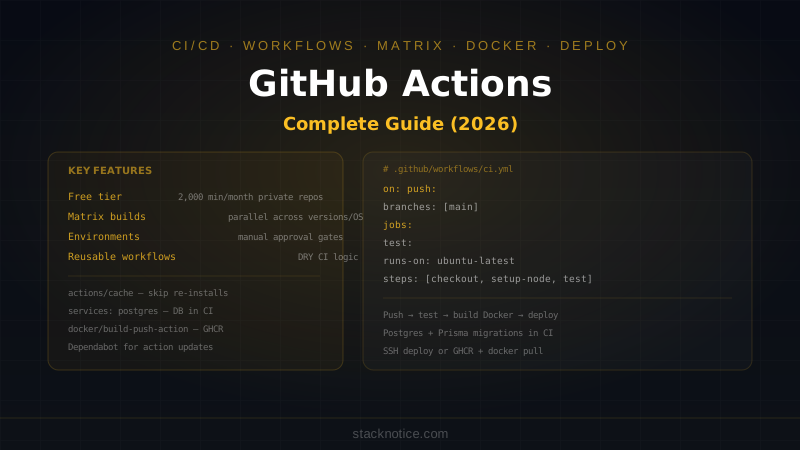
GitHub Actions is the CI/CD system built into GitHub — no separate service to set up, no extra billing for private repos up to 2,000 minutes/month. Every push, pull request, or tag can trigger a workflow that tests, builds, and deploys your project automatically.
This guide covers the complete workflow from scratch: syntax, jobs, secrets, matrix builds, caching, Docker deployments, and the patterns that actually save time.
How It Works
A workflow is a YAML file in .github/workflows/. GitHub runs it on a managed virtual machine when the trigger fires:
push → GitHub reads .github/workflows/*.yml → spins up runner → runs jobs
Runners are Ubuntu, Windows, or macOS VMs. Free plan gets Ubuntu runners for private repos. Compute is billed by the minute after the free tier.
First Workflow
# .github/workflows/ci.yml
name: CI

on:
  push:
    branches: [main, develop]
  pull_request:
    branches: [main]

jobs:
  test:
    runs-on: ubuntu-latest

    steps:
      - name: Checkout code
        uses: actions/checkout@v4

      - name: Set up Node.js
        uses: actions/setup-node@v4
        with:
          node-version: '20'
          cache: 'npm'

      - name: Install dependencies
        run: npm ci

      - name: Type check
        run: npx tsc --noEmit

      - name: Run tests
        run: npm test

      - name: Build
        run: npm run build
Save that file and push — the workflow runs on every push to main/develop and every PR targeting main.
Core Syntax
Triggers (on)
on:
  # Push to specific branches
  push:
    branches: [main, 'release/*']
    paths:
      - 'src/**'           # only when src/ changes
      - 'package.json'

  # Pull requests
  pull_request:
    types: [opened, synchronize, reopened]

  # On a schedule (cron)
  schedule:
    - cron: '0 2 * * 1'   # every Monday at 2am UTC

  # Manually trigger from GitHub UI
  workflow_dispatch:
    inputs:
      environment:
        description: 'Deploy target'
        required: true
        default: 'staging'
        type: choice
        options: [staging, production]

  # When another workflow completes
  workflow_run:
    workflows: ['CI']
    types: [completed]
    branches: [main]
Jobs and Steps
jobs:
  build:
    runs-on: ubuntu-latest
    timeout-minutes: 15        # fail if job takes longer

    env:
      NODE_ENV: production     # env vars for all steps in this job

    steps:
      - uses: actions/checkout@v4

      - name: Step with shell script
        run: |
          echo "Multiple commands"
          npm ci
          npm run build

      - name: Step with env var
        env:
          API_KEY: ${{ secrets.API_KEY }}
        run: npm run deploy

      - name: Upload artifact
        uses: actions/upload-artifact@v4
        with:
          name: build-output
          path: dist/
          retention-days: 7
Job Dependencies
jobs:
  test:
    runs-on: ubuntu-latest
    steps:
      - uses: actions/checkout@v4
      - run: npm ci && npm test

  build:
    runs-on: ubuntu-latest
    needs: test          # waits for test to pass
    steps:
      - uses: actions/checkout@v4
      - run: npm ci && npm run build

  deploy:
    runs-on: ubuntu-latest
    needs: [test, build]  # waits for both
    if: github.ref == 'refs/heads/main'  # only on main branch
    steps:
      - run: echo "Deploying..."
Secrets and Variables
Store sensitive values in GitHub repo settings → Secrets and variables:
steps:
  - name: Deploy
    env:
      DATABASE_URL: ${{ secrets.DATABASE_URL }}
      API_KEY: ${{ secrets.API_KEY }}
      VERCEL_TOKEN: ${{ secrets.VERCEL_TOKEN }}
    run: npx vercel --prod --token=$VERCEL_TOKEN
Organization secrets — available across all org repos without re-entering. Environment secrets — scoped to specific deployment environments (staging, production) with required reviewers.
Never log secrets — GitHub masks known secret values in logs, but only if they match exactly. Avoid printing env vars in CI.
Caching
Cache dependencies to skip reinstalling on every run:
- name: Cache node_modules
  uses: actions/cache@v4
  with:
    path: ~/.npm
    key: ${{ runner.os }}-node-${{ hashFiles('**/package-lock.json') }}
    restore-keys: |
      ${{ runner.os }}-node-

- name: Install dependencies
  run: npm ci
The cache key includes the hash of package-lock.json — if dependencies change, the cache is invalidated and rebuilt. restore-keys provides a fallback to a partial cache match.
For Bun:
- uses: oven-sh/setup-bun@v2
  with:
    bun-version: latest

- name: Cache bun
  uses: actions/cache@v4
  with:
    path: ~/.bun/install/cache
    key: ${{ runner.os }}-bun-${{ hashFiles('**/bun.lockb') }}

- run: bun install --frozen-lockfile
Matrix Builds
Test across multiple Node.js versions or OSes:
jobs:
  test:
    runs-on: ${{ matrix.os }}

    strategy:
      matrix:
        node-version: ['18', '20', '22']
        os: [ubuntu-latest, windows-latest, macos-latest]
      fail-fast: false   # don't cancel other matrix jobs on first failure

    steps:
      - uses: actions/checkout@v4

      - uses: actions/setup-node@v4
        with:
          node-version: ${{ matrix.node-version }}
          cache: 'npm'

      - run: npm ci
      - run: npm test
This generates 9 jobs (3 versions × 3 OSes) that all run in parallel.
Exclude specific combinations:
strategy:
  matrix:
    node-version: ['18', '20', '22']
    os: [ubuntu-latest, macos-latest]
    exclude:
      - node-version: '18'
        os: macos-latest
Complete CI/CD for Node.js + Docker
A real-world workflow: test, build a Docker image, push to a registry, deploy:
# .github/workflows/deploy.yml
name: Deploy

on:
  push:
    branches: [main]

env:
  REGISTRY: ghcr.io
  IMAGE_NAME: ${{ github.repository }}

jobs:
  test:
    runs-on: ubuntu-latest
    services:
      postgres:
        image: postgres:16
        env:
          POSTGRES_USER: test
          POSTGRES_PASSWORD: test
          POSTGRES_DB: testdb
        ports: ['5432:5432']
        options: >-
          --health-cmd pg_isready
          --health-interval 10s
          --health-timeout 5s
          --health-retries 5

    steps:
      - uses: actions/checkout@v4

      - uses: actions/setup-node@v4
        with:
          node-version: '20'
          cache: 'npm'

      - run: npm ci

      - name: Run migrations
        env:
          DATABASE_URL: postgres://test:test@localhost:5432/testdb
        run: npx prisma migrate deploy

      - name: Run tests
        env:
          DATABASE_URL: postgres://test:test@localhost:5432/testdb
          NODE_ENV: test
        run: npm test -- --coverage

      - name: Upload coverage
        uses: codecov/codecov-action@v4
        with:
          token: ${{ secrets.CODECOV_TOKEN }}

  build-and-push:
    runs-on: ubuntu-latest
    needs: test
    permissions:
      contents: read
      packages: write

    steps:
      - uses: actions/checkout@v4

      - name: Log in to GitHub Container Registry
        uses: docker/login-action@v3
        with:
          registry: ${{ env.REGISTRY }}
          username: ${{ github.actor }}
          password: ${{ secrets.GITHUB_TOKEN }}

      - name: Extract Docker metadata
        id: meta
        uses: docker/metadata-action@v5
        with:
          images: ${{ env.REGISTRY }}/${{ env.IMAGE_NAME }}
          tags: |
            type=ref,event=branch
            type=sha,prefix=sha-
            type=raw,value=latest,enable=${{ github.ref == 'refs/heads/main' }}

      - name: Build and push Docker image
        uses: docker/build-push-action@v5
        with:
          context: .
          push: true
          tags: ${{ steps.meta.outputs.tags }}
          labels: ${{ steps.meta.outputs.labels }}
          cache-from: type=gha
          cache-to: type=gha,mode=max

  deploy:
    runs-on: ubuntu-latest
    needs: build-and-push
    environment: production

    steps:
      - name: Deploy to server
        uses: appleboy/ssh-action@v1
        with:
          host: ${{ secrets.SERVER_HOST }}
          username: ${{ secrets.SERVER_USER }}
          key: ${{ secrets.SSH_PRIVATE_KEY }}
          script: |
            docker pull ${{ env.REGISTRY }}/${{ env.IMAGE_NAME }}:latest
            docker stop my-app || true
            docker rm my-app || true
            docker run -d \
              --name my-app \
              --restart unless-stopped \
              -p 3000:3000 \
              -e DATABASE_URL=${{ secrets.DATABASE_URL }} \
              ${{ env.REGISTRY }}/${{ env.IMAGE_NAME }}:latest
Deployment Environments
Environments add protection to deployments — required reviewers, wait timers, and environment-specific secrets:
jobs:
  deploy-staging:
    environment: staging      # no approval needed
    steps:
      - run: deploy to staging

  deploy-production:
    environment: production   # requires approval from configured reviewers
    needs: deploy-staging
    steps:
      - run: deploy to production
Set up environments in GitHub → Settings → Environments. Assign required reviewers — the workflow pauses until someone approves.
Reusable Workflows
Extract common patterns into reusable workflows:
# .github/workflows/reusable-test.yml
name: Reusable Test

on:
  workflow_call:
    inputs:
      node-version:
        required: false
        type: string
        default: '20'
    secrets:
      DATABASE_URL:
        required: true

jobs:
  test:
    runs-on: ubuntu-latest
    steps:
      - uses: actions/checkout@v4
      - uses: actions/setup-node@v4
        with:
          node-version: ${{ inputs.node-version }}
          cache: 'npm'
      - run: npm ci
      - run: npm test
        env:
          DATABASE_URL: ${{ secrets.DATABASE_URL }}
Call it from another workflow:
# .github/workflows/ci.yml
jobs:
  test:
    uses: ./.github/workflows/reusable-test.yml
    with:
      node-version: '20'
    secrets:
      DATABASE_URL: ${{ secrets.DATABASE_URL }}
Useful Patterns
Skip CI for specific commits
on:
  push:
    branches: [main]

jobs:
  ci:
    if: "!contains(github.event.head_commit.message, '[skip ci]')"
    runs-on: ubuntu-latest
    steps:
      - run: echo "Running CI"
Run only on changed files
- uses: dorny/paths-filter@v3
  id: changes
  with:
    filters: |
      api:
        - 'packages/api/**'
      web:
        - 'packages/web/**'

- name: Test API
  if: steps.changes.outputs.api == 'true'
  run: npm run test:api

- name: Test Web
  if: steps.changes.outputs.web == 'true'
  run: npm run test:web
Notify on failure
- name: Notify Slack on failure
  if: failure()
  uses: slackapi/slack-github-action@v1
  with:
    payload: |
      {
        "text": "Deploy failed for ${{ github.repository }} on ${{ github.ref }}",
        "blocks": [{
          "type": "section",
          "text": {
            "type": "mrkdwn",
            "text": "*Deploy failed* — <${{ github.server_url }}/${{ github.repository }}/actions/runs/${{ github.run_id }}|View run>"
          }
        }]
      }
  env:
    SLACK_WEBHOOK_URL: ${{ secrets.SLACK_WEBHOOK_URL }}
Automatic dependency updates
Use Dependabot to keep actions and npm packages up to date:
# .github/dependabot.yml
version: 2
updates:
  - package-ecosystem: github-actions
    directory: /
    schedule:
      interval: weekly

  - package-ecosystem: npm
    directory: /
    schedule:
      interval: weekly
    open-pull-requests-limit: 5
    groups:
      dev-dependencies:
        dependency-type: development
Costs and Limits
| Plan | Free minutes/month | Storage |
|---|---|---|
| Free | 2,000 (public repos: unlimited) | 500 MB |
| Pro | 3,000 | 1 GB |
| Team | 3,000 | 2 GB |
| Enterprise | 50,000 | 50 GB |
Ubuntu runners cost 1 minute = 1 minute. Windows = 2x. macOS = 10x. Self-hosted runners are free (you provide the hardware).
For teams burning through minutes:
- Cache aggressively — skip reinstalling dependencies on every run
- Use
pathsfilters — don't run CI when only docs change - Self-hosted runners for heavy workloads (especially macOS)
- Limit matrix to essential combinations
For CI/CD that ties GitHub Actions to Claude's AI capabilities for automated PR review and code analysis, see Claude Code with GitHub Actions. For the containerization side, the Docker Compose guide covers the local development setup that your GitHub Actions pipeline will replicate in CI.