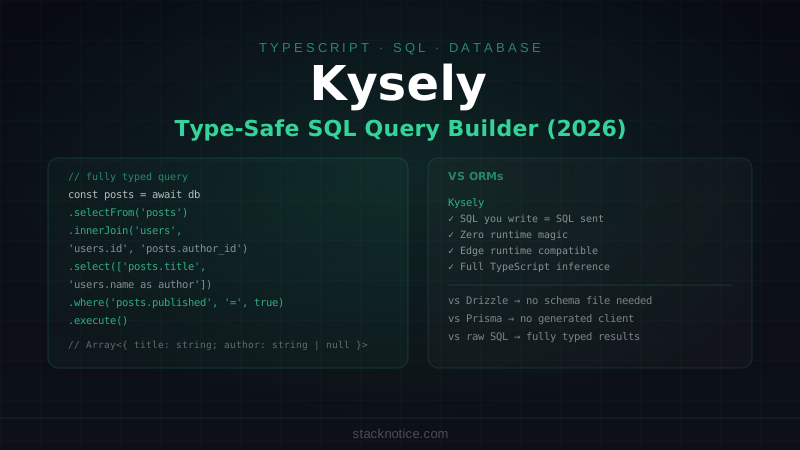
ORMs solve one problem and create three others: magic behavior you didn't ask for, performance you can't tune without fighting the abstraction, and SQL you can't read when something goes wrong. Kysely takes a different position — it models SQL directly in TypeScript. You write what looks like SQL, TypeScript checks every table name, column reference, and result type at compile time, and you're never surprised by what query gets generated because you wrote it yourself.
This guide covers Kysely from initial setup through real production patterns: typed queries, joins with inferred result types, transactions, migration management, and the singleton pattern for Next.js.
What Kysely Is (and Isn't)
Kysely is a query builder, not an ORM. The distinction matters:
- ORM (Prisma, Drizzle with relations): defines your schema once, generates queries, manages relations, abstracts SQL
- Query builder (Kysely): you write SQL-like code, TypeScript validates column and table names, no abstractions over the query itself
You won't find user.posts style relation loading. You write the JOIN. What you get in return: exact control over every query, no N+1 surprises, and a result type that reflects exactly the columns you selected.
Installation
npm install kysely pg
npm install --save-dev @types/pg
For other databases: npm install better-sqlite3 (SQLite) or npm install mysql2 (MySQL). Kysely supports all three with the same API.
Defining the Database Schema
The TypeScript interface you define becomes the single source of truth for all query types. Every column, every table, every nullable field:
// lib/database-types.ts
import type { Generated, ColumnType } from 'kysely'

// Generated<T> = the database provides this (auto-increment, defaults, timestamps)
// ColumnType<Select, Insert, Update> = different types for each operation

export interface UsersTable {
  id: Generated<string>         // uuid, auto-generated
  email: string
  name: string | null
  role: 'admin' | 'user' | 'viewer'
  avatar_url: string | null
  created_at: Generated<Date>
  updated_at: ColumnType<Date, Date | undefined, Date>
}

export interface PostsTable {
  id: Generated<string>
  title: string
  slug: string
  content: string
  author_id: string
  published: Generated<boolean>
  view_count: Generated<number>
  created_at: Generated<Date>
  updated_at: ColumnType<Date, Date | undefined, Date>
}

export interface CommentsTable {
  id: Generated<string>
  post_id: string
  author_id: string
  text: string
  created_at: Generated<Date>
}

// The root database interface — this is what you pass to Kysely<Database>
export interface Database {
  users: UsersTable
  posts: PostsTable
  comments: CommentsTable
}
Kysely also exports helper types for each operation:
import type { Selectable, Insertable, Updateable } from 'kysely'
import type { UsersTable } from './database-types'

type User = Selectable<UsersTable>      // what SELECT returns (Generated<T> → T)
type NewUser = Insertable<UsersTable>   // what INSERT accepts (Generated<T> optional)
type UserUpdate = Updateable<UsersTable> // what UPDATE accepts (all fields optional)
Creating the Connection
// lib/db.ts
import { Kysely, PostgresDialect } from 'kysely'
import { Pool } from 'pg'
import type { Database } from './database-types'

// Singleton pattern for Next.js — prevents connection pool exhaustion in dev
const globalForDb = global as unknown as { db: Kysely<Database> }

export const db =
  globalForDb.db ||
  new Kysely<Database>({
    dialect: new PostgresDialect({
      pool: new Pool({
        connectionString: process.env.DATABASE_URL,
        max: 10,           // max connections in pool
        idleTimeoutMillis: 30_000,
        connectionTimeoutMillis: 2_000,
      }),
    }),
  })

if (process.env.NODE_ENV !== 'production') globalForDb.db = db
The globalForDb singleton prevents Next.js hot reload from creating dozens of connection pools in development — the same pattern used for Prisma and Drizzle.
SELECT Queries
Basic select with full type inference:
import { db } from '@/lib/db'

// selectAll() → all columns, result typed as Selectable<UsersTable>[]
const allUsers = await db
  .selectFrom('users')
  .selectAll()
  .execute()

// select() with specific columns → result only has those columns
const userEmails = await db
  .selectFrom('users')
  .select(['id', 'email', 'name'])
  .where('role', '=', 'admin')
  .orderBy('created_at', 'desc')
  .execute()
// TypeScript: Array<{ id: string; email: string; name: string | null }>

// Single row
const user = await db
  .selectFrom('users')
  .selectAll()
  .where('email', '=', email)
  .executeTakeFirst()
// user: Selectable<UsersTable> | undefined

// Throw if not found
const user = await db
  .selectFrom('users')
  .selectAll()
  .where('id', '=', userId)
  .executeTakeFirstOrThrow()
// user: Selectable<UsersTable> — never undefined
WHERE with multiple conditions
const activeAdmins = await db
  .selectFrom('users')
  .selectAll()
  .where('role', '=', 'admin')
  .where('avatar_url', 'is not', null)
  .orderBy('created_at', 'desc')
  .limit(20)
  .offset((page - 1) * 20)
  .execute()

// OR condition
const results = await db
  .selectFrom('users')
  .selectAll()
  .where((eb) =>
    eb.or([
      eb('role', '=', 'admin'),
      eb('role', '=', 'viewer'),
    ])
  )
  .execute()

// Dynamic WHERE (only add clause if value is present)
let query = db.selectFrom('users').selectAll()

if (search) {
  query = query.where('email', 'like', `%${search}%`)
}
if (role && role !== 'all') {
  query = query.where('role', '=', role)
}

const users = await query.orderBy('created_at', 'desc').execute()
JOIN Queries
The result type is automatically inferred from which columns you select across joined tables:
const postsWithAuthors = await db
  .selectFrom('posts')
  .innerJoin('users', 'users.id', 'posts.author_id')
  .select([
    'posts.id',
    'posts.title',
    'posts.slug',
    'posts.created_at',
    'posts.view_count',
    'users.name as author_name',
    'users.email as author_email',
    'users.avatar_url as author_avatar',
  ])
  .where('posts.published', '=', true)
  .orderBy('posts.created_at', 'desc')
  .limit(10)
  .execute()

// Result type is fully inferred:
// Array<{
//   id: string
//   title: string
//   slug: string
//   created_at: Date
//   view_count: number
//   author_name: string | null
//   author_email: string
//   author_avatar: string | null
// }>
Left join with nullable result handling:
const postsWithCommentCount = await db
  .selectFrom('posts')
  .leftJoin('comments', 'comments.post_id', 'posts.id')
  .select([
    'posts.id',
    'posts.title',
    (eb) => eb.fn.count<number>('comments.id').as('comment_count'),
  ])
  .where('posts.published', '=', true)
  .groupBy(['posts.id', 'posts.title'])
  .orderBy('comment_count', 'desc')
  .execute()
INSERT
import type { Insertable } from 'kysely'
import type { UsersTable } from '@/lib/database-types'

type NewUser = Insertable<UsersTable>

async function createUser(data: NewUser) {
  return db
    .insertInto('users')
    .values(data)
    .returning(['id', 'email', 'name', 'role', 'created_at'])
    .executeTakeFirstOrThrow()
}

// Batch insert
async function importUsers(users: NewUser[]) {
  return db
    .insertInto('users')
    .values(users)
    .returning(['id', 'email'])
    .execute()
}

// Upsert (INSERT ... ON CONFLICT)
async function upsertUser(data: NewUser) {
  return db
    .insertInto('users')
    .values(data)
    .onConflict((oc) =>
      oc.column('email').doUpdateSet({
        name: data.name,
        avatar_url: data.avatar_url,
        updated_at: new Date(),
      })
    )
    .returning(['id', 'email'])
    .executeTakeFirstOrThrow()
}
UPDATE
import type { Updateable } from 'kysely'

async function updateUser(id: string, data: Updateable<UsersTable>) {
  return db
    .updateTable('users')
    .set({ ...data, updated_at: new Date() })
    .where('id', '=', id)
    .returning(['id', 'email', 'name', 'role', 'updated_at'])
    .executeTakeFirst()
}

// Increment a counter atomically
await db
  .updateTable('posts')
  .set((eb) => ({ view_count: eb('view_count', '+', 1) }))
  .where('id', '=', postId)
  .execute()
DELETE
async function deleteUser(id: string) {
  const deleted = await db
    .deleteFrom('users')
    .where('id', '=', id)
    .returning(['id', 'email'])
    .executeTakeFirst()

  return deleted ?? null
}

// Delete with JOIN condition
await db
  .deleteFrom('comments')
  .where('author_id', '=', userId)
  .execute()
Transactions
All operations on trx are inside the transaction — if any throw, the whole transaction rolls back:
async function createPostWithTags(
  authorId: string,
  postData: Omit<Insertable<PostsTable>, 'author_id'>,
  tagIds: string[]
) {
  return db.transaction().execute(async (trx) => {
    // Create the post
    const post = await trx
      .insertInto('posts')
      .values({ ...postData, author_id: authorId })
      .returning(['id', 'title', 'slug'])
      .executeTakeFirstOrThrow()

    // Link tags in bulk
    if (tagIds.length > 0) {
      await trx
        .insertInto('post_tags')
        .values(tagIds.map((tagId) => ({ post_id: post.id, tag_id: tagId })))
        .execute()
    }

    // Bump the author's post count
    await trx
      .updateTable('users')
      .set((eb) => ({ post_count: eb('post_count', '+', 1) }))
      .where('id', '=', authorId)
      .execute()

    return post
  })
}
Auto-Generating Types with kysely-codegen
Rather than writing the database interface by hand, kysely-codegen introspects your actual database and generates the TypeScript types:
npm install --save-dev kysely-codegen

# Generate types from your database
npx kysely-codegen --dialect postgres --out-file src/lib/database-types.ts
Point it at your database URL and it outputs a complete Database interface matching your actual schema. Regenerate after every migration to keep types in sync:
{
  "scripts": {
    "db:types": "kysely-codegen --dialect postgres --out-file src/lib/database-types.ts",
    "db:migrate": "tsx src/lib/migrations/run.ts && npm run db:types"
  }
}
Migrations
Kysely has a built-in migrator — no external CLI needed:
// lib/migrations/run.ts
import { Migrator, FileMigrationProvider } from 'kysely'
import { db } from '../db'
import * as path from 'path'
import { promises as fs } from 'fs'

const migrator = new Migrator({
  db,
  provider: new FileMigrationProvider({
    fs,
    path,
    migrationFolder: path.join(__dirname, 'files'),
  }),
})

const { error, results } = await migrator.migrateToLatest()

results?.forEach(({ migrationName, status }) => {
  if (status === 'Success') console.log(`✓ ${migrationName}`)
  if (status === 'Error') console.error(`✗ ${migrationName}`)
})

if (error) throw error
await db.destroy()
// lib/migrations/files/2026_001_create_users.ts
import type { Kysely } from 'kysely'
export async function up(db: Kysely<any>) {
await db.schema
.createTable('users')
.addColumn('id', 'uuid', (col) => col.primaryKey().defaultTo(db.fn('gen_random_uuid')))
.addColumn('email', 'varchar(255)', (col) => col.notNull().unique())
.addColumn('name', 'varchar(255)')
.addColumn('role', 'varchar(20)', (col) => col.notNull().defaultTo('user'))
.addColumn('avatar_url', 'text')
.addColumn('created_at', 'timestamptz', (col) => col.notNull().defaultTo(db.fn('now')))
.addColumn('updated_at', 'timestamptz', (col) => col.notNull().defaultTo(db.fn('now')))
.execute()
}
export async function down(db: Kysely<any>) {
await db.schema.dropTable('users').execute()
}Kysely vs Drizzle vs Prisma
| Kysely | Drizzle | Prisma | |
|---|---|---|---|
| Philosophy | SQL-first | Schema-first | ORM |
| Type source | TypeScript interface | Schema definition | Prisma schema |
| Relations | Manual JOIN | Defined + queried | Magic .include |
| Bundle size | Tiny | Small | Large (generated client) |
| Edge runtime | ✅ | ✅ | ❌ (requires Node.js) |
| Learning curve | Low if you know SQL | Medium | Low |
| Magic factor | None | Low | High |
Choose Kysely when: you want full SQL control with TypeScript safety, you're targeting edge runtimes, or your team already thinks in SQL. Choose Drizzle when you prefer a schema-first workflow with relation helpers. Choose Prisma when you want maximum developer ergonomics and don't mind the abstraction layer.
Quick Reference
// Setup
const db = new Kysely<Database>({ dialect: new PostgresDialect({ pool }) })

// SELECT
db.selectFrom('users').selectAll().where('id', '=', id).executeTakeFirstOrThrow()
db.selectFrom('users').select(['id', 'email']).execute()

// JOIN
db.selectFrom('posts')
  .innerJoin('users', 'users.id', 'posts.author_id')
  .select(['posts.title', 'users.name as author'])
  .execute()

// INSERT
db.insertInto('users').values({ email, name }).returning(['id']).executeTakeFirstOrThrow()

// UPDATE
db.updateTable('users').set({ name }).where('id', '=', id).execute()

// DELETE
db.deleteFrom('users').where('id', '=', id).execute()

// TRANSACTION
db.transaction().execute(async (trx) => {
  await trx.insertInto('users').values({...}).execute()
  await trx.insertInto('posts').values({...}).execute()
})

// Helper types
type User = Selectable<UsersTable>
type NewUser = Insertable<UsersTable>
type UserUpdate = Updateable<UsersTable>
Kysely fits naturally alongside Drizzle in a stack where some services need full ORM conveniences and others need raw query control. For the data-critical paths — reporting queries, complex aggregations, or anything where the generated SQL needs to be exact — Kysely's explicit model earns its place.