Deno 2 is a different runtime from what Deno was in 2020. The original version launched with a hard stance against node_modules, npm, and CommonJS. The vision was clean but impractical — most real-world JavaScript code assumes npm packages exist.
Deno 2 walked that back. You can now run npm packages, import from npm directly, use node_modules, and run most Node.js code without modification. The result is a runtime that keeps Deno's strengths — native TypeScript, built-in toolchain, explicit permissions, first-class WebAssembly — while finally being compatible with the ecosystem developers actually use.
This guide covers Deno 2 from installation through production deployment, including what actually works and where Node.js compatibility still has gaps.
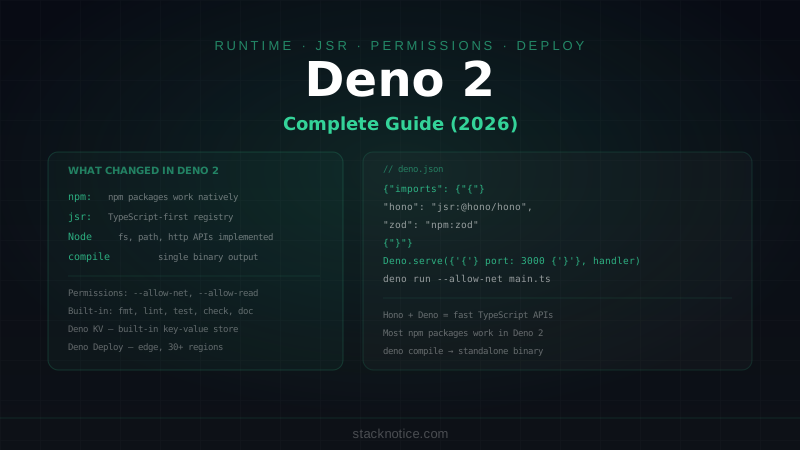
What Changed in Deno 2
The headline changes:
- npm packages work —
import { express } from 'npm:express'or install intonode_modules - Node.js APIs implemented —
fs,path,http,crypto,stream, and more - node_modules support —
deno installnow creates a propernode_modulesdirectory - Workspaces — monorepo support with multiple
deno.jsonconfigs - JSR — the new TypeScript-first registry, replacing
deno.land/x - Long-term support releases — Deno 2.x has LTS tracks for production use
Installation
# macOS / Linux
curl -fsSL https://deno.land/install.sh | sh

# Windows
irm https://deno.land/install.ps1 | iex

# Verify
deno --version
# deno 2.x.x
# v8 12.x.x
# typescript 5.x.x
Deno is a single binary with no external dependencies.
TypeScript by Default
Deno runs TypeScript natively without configuration:
deno run script.ts        # runs TypeScript directly
deno run --watch main.ts  # watch mode
No tsconfig.json required for basic use. Deno uses its own TypeScript configuration internally. If you need to customize, deno.json handles it:
{
  "compilerOptions": {
    "strict": true,
    "noImplicitAny": true
  }
}
Package Management
npm Packages
Import npm packages with the npm: specifier — no install step needed:
// Resolved on first run, cached globally
import express from 'npm:express@4'
import { z } from 'npm:zod'
import chalk from 'npm:chalk'
Or install explicitly into node_modules (for editor tooling and faster startup):
deno install npm:express npm:zod npm:hono
deno add npm:@types/node --dev
JSR — The TypeScript-First Registry
JSR (JavaScript Registry) is Deno's replacement for deno.land/x. It hosts TypeScript packages with full type information and works with Node.js too:
deno add jsr:@std/path
deno add jsr:@std/http
deno add jsr:@hono/hono
Import:
import { join, dirname } from 'jsr:@std/path'
import { serveFile } from 'jsr:@std/http/file-server'
JSR packages can be used from Node.js and Bun as well — they're published to npm automatically.
deno.json — The Config File
{
  "name": "@myorg/myapp",
  "version": "1.0.0",

  "imports": {
    "@/": "./src/",
    "hono": "jsr:@hono/hono@^4",
    "zod": "npm:zod@^3"
  },

  "tasks": {
    "dev": "deno run --watch --allow-net --allow-read src/main.ts",
    "build": "deno compile --allow-net --allow-read src/main.ts",
    "test": "deno test --allow-net src/",
    "fmt": "deno fmt",
    "lint": "deno lint"
  },

  "compilerOptions": {
    "strict": true
  },

  "fmt": {
    "lineWidth": 100,
    "singleQuote": true
  },

  "lint": {
    "rules": {
      "exclude": ["no-explicit-any"]
    }
  }
}
Run tasks:
deno task dev
deno task build
HTTP Server
Deno has a built-in HTTP server:
// main.ts
const server = Deno.serve(
  { port: 3000, hostname: '0.0.0.0' },
  async (req: Request) => {
    const url = new URL(req.url)

    if (url.pathname === '/') {
      return new Response('Hello from Deno!', {
        headers: { 'Content-Type': 'text/plain' }
      })
    }

    if (url.pathname === '/api/health') {
      return Response.json({ status: 'ok', timestamp: Date.now() })
    }

    return new Response('Not Found', { status: 404 })
  }
)

console.log(`Server running at http://localhost:3000`)
Run it:
deno run --allow-net main.tsWith Hono (Recommended for Real APIs)
Hono runs on Deno natively and is the most popular framework in the Deno ecosystem:
import { Hono } from 'jsr:@hono/hono'
import { cors } from 'jsr:@hono/hono/cors'
import { zValidator } from 'npm:@hono/zod-validator'
import { z } from 'npm:zod'

const app = new Hono()

app.use('*', cors())

const createPostSchema = z.object({
  title: z.string().min(1),
  content: z.string().min(1),
  published: z.boolean().default(false)
})

app.get('/api/posts', async (c) => {
  const posts = await db.query('SELECT * FROM posts WHERE published = 1')
  return c.json(posts)
})

app.post('/api/posts', zValidator('json', createPostSchema), async (c) => {
  const data = c.req.valid('json')
  const result = await db.execute(
    'INSERT INTO posts (title, content, published) VALUES (?, ?, ?)',
    [data.title, data.content, data.published ? 1 : 0]
  )
  return c.json({ id: result.lastInsertId }, 201)
})

Deno.serve({ port: 3000 }, app.fetch)
File System APIs
Deno has explicit file APIs:
// Reading files
const text = await Deno.readTextFile('./config.json')
const data = JSON.parse(text)

const bytes = await Deno.readFile('./image.png')  // Uint8Array

// Writing files
await Deno.writeTextFile('./output.txt', 'Hello, Deno!')
await Deno.writeFile('./data.bin', new Uint8Array([1, 2, 3]))

// Append mode
await Deno.writeTextFile('./log.txt', 'new entry\n', { append: true })

// File info
const stat = await Deno.stat('./config.json')
console.log(stat.size, stat.mtime)

// Directory operations
await Deno.mkdir('./dist', { recursive: true })
await Deno.remove('./old-file.txt')
await Deno.rename('./old.txt', './new.txt')

// Reading directory
for await (const entry of Deno.readDir('./src')) {
  console.log(entry.name, entry.isFile, entry.isDirectory)
}

// Copy files
await Deno.copyFile('./src.txt', './dest.txt')
All file operations require --allow-read and/or --allow-write permission flags.
Permissions Model
Deno's security model is explicit: code can't access the network, file system, or environment without you granting permission. This is the key differentiator from Node.js.
# Explicit permissions
deno run --allow-net main.ts
deno run --allow-read=./src,./config main.ts
deno run --allow-write=/tmp main.ts
deno run --allow-env=DATABASE_URL,PORT main.ts
deno run --allow-run=git,npm main.ts

# Combinations
deno run --allow-net --allow-read --allow-env main.ts

# Allow everything (escape hatch — avoid in production)
deno run --allow-all main.ts
# or
deno run -A main.ts
You can also define permissions in deno.json:
{
  "tasks": {
    "start": "deno run --allow-net=:3000 --allow-read=./public --allow-env=DATABASE_URL src/main.ts"
  }
}
Practical tip: Start with -A during development to avoid friction, then lock down permissions before shipping. The runtime will tell you exactly what it needs if you run without permissions — the error messages say which permission flag to add.
Environment Variables
// .env is NOT loaded automatically in Deno (unlike Bun)
// Use --env-file flag or deno.env.toml

// Load manually
import { load } from 'jsr:@std/dotenv'
await load({ export: true })

// Access env vars
const port = parseInt(Deno.env.get('PORT') ?? '3000')
const dbUrl = Deno.env.get('DATABASE_URL')
if (!dbUrl) throw new Error('DATABASE_URL is required')
Or use the --env-file flag:
deno run --env-file=.env --allow-net --allow-env main.tsFor type-safe env validation (recommended):
import { z } from 'npm:zod'

const env = z.object({
  DATABASE_URL: z.string().url(),
  PORT: z.coerce.number().default(3000),
  NODE_ENV: z.enum(['development', 'production', 'test']).default('development')
}).parse(Object.fromEntries(
  Object.entries(Deno.env.toObject())
))
Testing
Deno has a built-in test runner:
deno test                       # run all tests
deno test --watch               # watch mode
deno test src/utils_test.ts     # specific file
deno test --coverage=./cov_profile
deno coverage ./cov_profile
Test files use the naming convention *_test.ts or *.test.ts:
// src/utils_test.ts
import { assertEquals, assertThrows, assertRejects } from 'jsr:@std/assert'
import { slugify, createToken, getUserById } from './utils.ts'

Deno.test('slugify converts spaces to hyphens', () => {
  assertEquals(slugify('Hello World'), 'hello-world')
})

Deno.test('slugify removes special characters', () => {
  assertEquals(slugify('TypeScript: The Good Parts!'), 'typescript-the-good-parts')
})

Deno.test('createToken throws on empty input', () => {
  assertThrows(
    () => createToken(''),
    Error,
    'Input cannot be empty'
  )
})

Deno.test('getUserById rejects for invalid id', async () => {
  await assertRejects(
    () => getUserById(''),
    Error,
    'Invalid user ID'
  )
})

// Group tests
Deno.test({
  name: 'database operations',
  permissions: { read: true, write: true },
  fn: async (t) => {
    await t.step('creates a user', async () => {
      const user = await createUser({ name: 'Test', email: 'test@example.com' })
      assertEquals(user.name, 'Test')
    })

    await t.step('throws for duplicate email', async () => {
      await assertRejects(() => createUser({ name: 'Dup', email: 'test@example.com' }))
    })
  }
})
Built-in Toolchain
Deno ships with formatting, linting, and type checking — no separate packages needed:
deno fmt                   # format all files (like Prettier)
deno fmt --check           # check only (for CI)

deno lint                  # lint all files
deno lint --rules-dir=.    # custom rules

deno check main.ts         # type-check without running
deno doc src/utils.ts      # generate documentation
The formatter handles TypeScript, JavaScript, JSON, and Markdown. Configuration in deno.json:
{
  "fmt": {
    "lineWidth": 100,
    "indentWidth": 2,
    "singleQuote": true,
    "proseWrap": "always"
  },
  "lint": {
    "include": ["src/"],
    "exclude": ["src/generated/"],
    "rules": {
      "tags": ["recommended"],
      "include": ["ban-untagged-todo"],
      "exclude": ["no-explicit-any"]
    }
  }
}
Compile to Binary
Deno can compile TypeScript to a standalone executable — no runtime needed on the target machine:
# Compile for the current platform
deno compile --allow-net --allow-read --output my-app src/main.ts

# Cross-compile
deno compile --target x86_64-unknown-linux-gnu --output app-linux src/main.ts
deno compile --target x86_64-pc-windows-msvc --output app.exe src/main.ts
deno compile --target aarch64-apple-darwin --output app-mac-arm src/main.ts
Useful for CLI tools and server binaries that need to run without Deno installed.
Deno Deploy
Deno Deploy is a serverless edge platform — write standard Deno code and deploy globally in seconds:
# Install deployctl
deno install -Arf jsr:@deno/deployctl

# Deploy from directory
deployctl deploy --project=my-project src/main.ts

# Or connect GitHub for automatic deploys
Deno Deploy runs your code on V8 isolates at the edge (30+ regions). It's similar to Cloudflare Workers but uses Deno's runtime and has a more generous free tier.
Supported on Deno Deploy:
Deno.serve(),fetch()Deno.openKv()— the built-in key-value store- Environment variables
- WebSockets
Not supported:
- File system writes
- Native binaries
node_modules(use npm: specifiers instead)
Deno KV
Deno has a built-in key-value store, available on Deno Deploy and locally:
const kv = await Deno.openKv()

// Set a value
await kv.set(['users', userId], { name: 'Alice', email: 'alice@example.com' })

// Get a value
const result = await kv.get(['users', userId])
if (result.value) {
  console.log(result.value.name)
}

// Delete
await kv.delete(['users', userId])

// List with prefix
const entries = kv.list({ prefix: ['users'] })
for await (const entry of entries) {
  console.log(entry.key, entry.value)
}

// Atomic operations
await kv.atomic()
  .check({ key: ['counter'], versionstamp: null })
  .set(['counter'], 0)
  .commit()
Node.js Compatibility
Most Node.js code runs on Deno 2 without changes. The compatibility layer handles:
fs,path,os,crypto,stream,events,http,httpsprocess.env,process.argv,process.exit()Buffer,__dirname,__filename,require()- npm packages that use these APIs
What still has gaps:
- Native addons (
.nodefiles) - Some
clusterandchild_processfeatures - Some
worker_threadsedge cases - Packages that use undocumented Node.js internals
For most applications — APIs, CLIs, tooling — the compatibility is sufficient. Check deno.land/manual/node/compatibility for the full matrix.
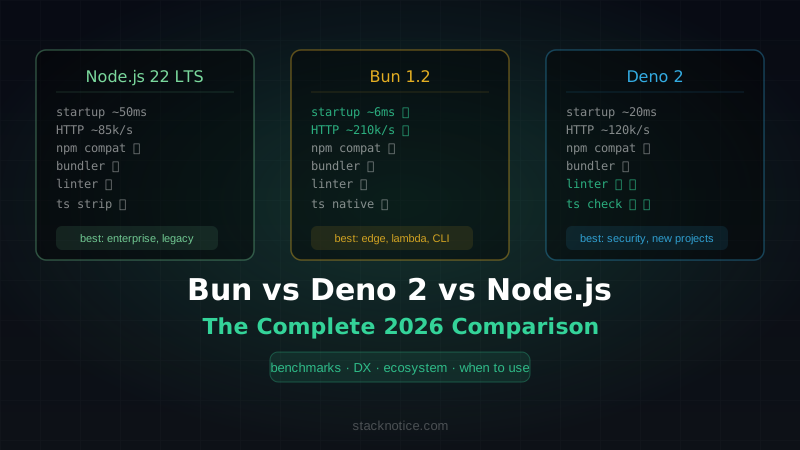
Deno vs Node.js vs Bun
| Deno 2 | Node.js | Bun | |
|---|---|---|---|
| Engine | V8 | V8 | JavaScriptCore |
| TypeScript | Native | Requires tsx/ts-node | Native |
| Package manager | deno install + npm:/jsr: | npm/pnpm/yarn | Built-in |
| Formatting | Built-in (deno fmt) | Prettier (separate) | None built-in |
| Linting | Built-in (deno lint) | ESLint (separate) | None built-in |
| Test runner | Built-in | Jest/Vitest | Built-in (bun test) |
| SQLite | jsr:@db/sqlite | better-sqlite3 | Built-in (bun:sqlite) |
| Permissions | Explicit (sandboxed) | None | None |
| Binary compile | Yes (deno compile) | pkg/sea | Yes (bun build --compile) |
| Edge deployment | Deno Deploy | Vercel/Railway | Cloudflare Workers |
| npm compat | High (Deno 2) | Native | High |
| Node compat | High | Native | High |
| Production maturity | Growing | Mature | Growing |
Which to choose:
- Deno 2 if you want a secure-by-default runtime with built-in tooling and edge deployment via Deno Deploy
- Bun if raw speed is the priority and you want the fastest possible startup, installs, and built-in SQLite
- Node.js if you need maximum ecosystem compatibility and production maturity
For a deeper comparison across all three, see Bun vs Deno vs Node.js in 2026.
Deno 2's main story is pragmatism without abandoning principles. The permissions model and built-in toolchain are genuinely useful for production security and team consistency. The npm compatibility means you're not giving up the ecosystem to use it. The easiest entry point: run a Node.js CLI tool with deno run npm:some-tool and see if it works — it usually does, with security sandboxing included automatically.