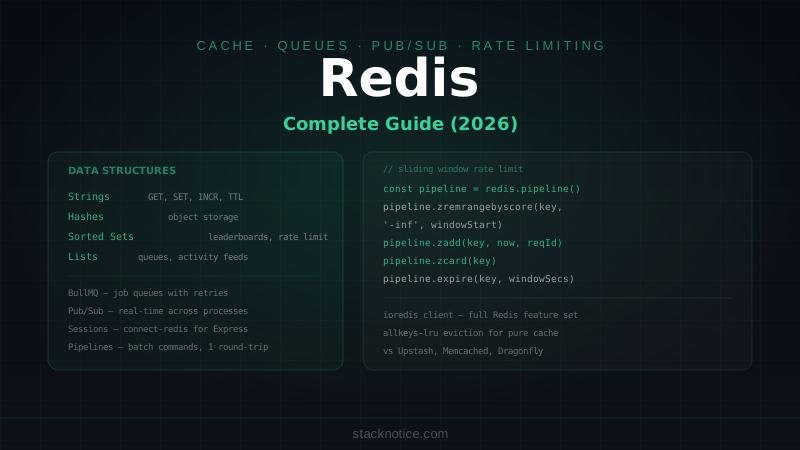
Redis is a data structure server that lives in memory. It's fast because reads and writes never touch a disk during normal operation. It's versatile because it supports more than just key-value pairs — strings, hashes, sorted sets, lists, streams, and pub/sub channels are all first-class primitives.
Most developers use Redis as a cache. That's a fine starting point, but it undersells what Redis can do: session storage, rate limiting, leaderboards, job queues, real-time event streams, and distributed locks are all solved with Redis primitives rather than custom code.
This guide covers Redis from setup through production patterns using Node.js and TypeScript.
Setup
Local with Docker
docker run -d \
  --name redis \
  -p 6379:6379 \
  redis:7-alpine

# With password
docker run -d \
  --name redis \
  -p 6379:6379 \
  redis:7-alpine \
  redis-server --requirepass your-password
Node.js Client — ioredis
npm install ioredis
npm install -D @types/node
// src/lib/redis.ts
import { Redis } from 'ioredis'
const redis = new Redis({
host: process.env.REDIS_HOST ?? 'localhost',
port: parseInt(process.env.REDIS_PORT ?? '6379'),
password: process.env.REDIS_PASSWORD,
maxRetriesPerRequest: 3,
enableReadyCheck: true,
lazyConnect: false,
})
redis.on('error', (err) => console.error('Redis error:', err))
redis.on('connect', () => console.log('Redis connected'))
export default redisFor managed Redis (production), use Upstash Redis with Next.js — serverless, no connection management. For self-hosted or when you need full Redis features, ioredis + a managed Redis instance (Railway, Render, AWS ElastiCache) is the path.
Data Structures
Strings — the Basic Building Block
Strings hold any value up to 512MB. The most common use: cache a computed or fetched value.
// Set a value
await redis.set('user:123:name', 'Alice')

// Set with expiry (TTL in seconds)
await redis.set('session:abc', JSON.stringify(sessionData), 'EX', 3600)

// Set only if key doesn't exist (atomic check-and-set)
const created = await redis.set('lock:job:42', '1', 'EX', 30, 'NX')
// Returns 'OK' if set, null if key already existed — distributed lock pattern

// Get
const name = await redis.get('user:123:name')

// Increment (atomic — no race conditions)
const count = await redis.incr('pageview:post:slug-here')
await redis.incrby('stats:downloads', 5)

// Delete
await redis.del('user:123:name')

// Check existence
const exists = await redis.exists('user:123:name')  // 1 or 0

// Remaining TTL (in seconds)
const ttl = await redis.ttl('session:abc')  // -1 = no expiry, -2 = doesn't exist
Hashes — Object Storage
A hash stores multiple field-value pairs under one key — natural fit for user objects or settings:
// Set multiple fields
await redis.hset('user:123', {
  name: 'Alice',
  email: 'alice@example.com',
  role: 'admin',
  createdAt: new Date().toISOString()
})

// Get one field
const email = await redis.hget('user:123', 'email')

// Get all fields
const user = await redis.hgetall('user:123')
// Returns: { name: 'Alice', email: 'alice@example.com', role: 'admin', ... }

// Update a field
await redis.hset('user:123', 'role', 'moderator')

// Delete a field
await redis.hdel('user:123', 'tempField')

// Check field existence
const hasEmail = await redis.hexists('user:123', 'email')

// Get all keys/values separately
const fields = await redis.hkeys('user:123')
const values = await redis.hvals('user:123')
Sorted Sets — Leaderboards and Rankings
Sorted sets store unique members with a score. Members are always sorted by score:
// Add members with scores
await redis.zadd('leaderboard:weekly', [
  100, 'alice',
  85,  'bob',
  92,  'charlie',
  78,  'diana'
])

// Increment a score (when alice earns more points)
await redis.zincrby('leaderboard:weekly', 15, 'alice')

// Get top 10 with scores (highest first)
const top10 = await redis.zrevrange('leaderboard:weekly', 0, 9, 'WITHSCORES')
// Returns: ['alice', '115', 'charlie', '92', 'bob', '85', ...]

// Get a member's rank (0-indexed, lowest score = rank 0)
const rank = await redis.zrevrank('leaderboard:weekly', 'alice')  // 0 = top

// Get a member's score
const score = await redis.zscore('leaderboard:weekly', 'alice')  // '115'

// Get members in a score range
const midRange = await redis.zrangebyscore('leaderboard:weekly', 80, 100, 'WITHSCORES')

// Count members in a score range
const count = await redis.zcount('leaderboard:weekly', 90, '+inf')
Sorted sets also model time-series data when you use Unix timestamps as scores — lets you query events in a time window efficiently.
Lists — Queues and Activity Feeds
Lists are ordered sequences. Push to one end, pop from the other — FIFO queue.
// Push to the right (tail)
await redis.rpush('notifications:user:123', JSON.stringify({ type: 'like', postId: '456' }))

// Push to the left (head)
await redis.lpush('recent:searches', 'nextjs hooks')

// Blocking pop (waits for an item — useful for job consumers)
const item = await redis.blpop('job:queue', 10)  // waits up to 10 seconds

// Non-blocking pop
const next = await redis.lpop('job:queue')

// Range (get without removing)
const recent = await redis.lrange('recent:searches', 0, 9)  // last 10 searches

// Trim to keep only the last N items
await redis.ltrim('recent:searches', 0, 99)  // keep only 100 items

// Length
const queueDepth = await redis.llen('job:queue')
Sets — Unique Collections
Sets hold unique values — intersections, unions, and membership checks are fast:
// Track active sessions per user
await redis.sadd('sessions:user:123', 'session-token-abc')
await redis.srem('sessions:user:123', 'session-token-abc')

// Check membership
const isActive = await redis.sismember('sessions:user:123', 'session-token-abc')

// Get all members
const sessions = await redis.smembers('sessions:user:123')

// Set operations
const commonFollowers = await redis.sinter('followers:alice', 'followers:bob')
const allFollowers = await redis.sunion('followers:alice', 'followers:bob')
const onlyAlice = await redis.sdiff('followers:alice', 'followers:bob')

// Count members
const count = await redis.scard('sessions:user:123')
Caching Patterns
Cache-Aside (Lazy Loading)
The most common pattern — check cache first, load from DB on miss, populate cache:
async function getPost(slug: string) {
  const cacheKey = `post:${slug}`

  // 1. Check cache
  const cached = await redis.get(cacheKey)
  if (cached) {
    return JSON.parse(cached)
  }

  // 2. Cache miss — load from database
  const post = await db.post.findUnique({
    where: { slug },
    include: { author: true, tags: true }
  })

  if (!post) return null

  // 3. Populate cache (1 hour TTL)
  await redis.set(cacheKey, JSON.stringify(post), 'EX', 3600)

  return post
}

// Invalidate when post changes
async function updatePost(slug: string, data: Partial<Post>) {
  const post = await db.post.update({ where: { slug }, data })
  await redis.del(`post:${slug}`)  // force fresh load on next request
  return post
}
Memoize with Expiry
Wrap any async function with Redis caching:
async function memoize<T>(
  key: string,
  fn: () => Promise<T>,
  ttlSeconds: number
): Promise<T> {
  const cached = await redis.get(key)
  if (cached) return JSON.parse(cached) as T

  const result = await fn()
  await redis.set(key, JSON.stringify(result), 'EX', ttlSeconds)
  return result
}

// Usage
const stats = await memoize(
  'dashboard:stats',
  () => computeExpensiveDashboardStats(),
  300  // cache 5 minutes
)
Rate Limiting
Use Redis to track request counts per user/IP with a sliding window:
async function checkRateLimit(
  identifier: string,  // IP or userId
  limit: number,
  windowSeconds: number
): Promise<{ allowed: boolean; remaining: number; resetAt: number }> {
  const key = `ratelimit:${identifier}`
  const now = Date.now()
  const windowStart = now - windowSeconds * 1000

  // Use a sorted set — score = timestamp, member = unique request ID
  const pipeline = redis.pipeline()
  pipeline.zremrangebyscore(key, '-inf', windowStart)  // remove old requests
  pipeline.zadd(key, now, `${now}-${Math.random()}`)  // add current request
  pipeline.zcard(key)                                   // count in window
  pipeline.expire(key, windowSeconds)                   // cleanup TTL

  const results = await pipeline.exec()
  const count = results![2][1] as number

  return {
    allowed: count <= limit,
    remaining: Math.max(0, limit - count),
    resetAt: now + windowSeconds * 1000
  }
}

// In Express middleware
app.use(async (req, res, next) => {
  const ip = req.ip ?? 'unknown'
  const { allowed, remaining, resetAt } = await checkRateLimit(ip, 100, 60)

  res.setHeader('X-RateLimit-Remaining', remaining)
  res.setHeader('X-RateLimit-Reset', resetAt)

  if (!allowed) {
    return res.status(429).json({ error: 'Too many requests' })
  }

  next()
})
Session Storage
Store Express sessions in Redis so they survive server restarts:
npm install express-session connect-redisimport session from 'express-session'
import { RedisStore } from 'connect-redis'
import redis from './lib/redis'
app.use(session({
store: new RedisStore({ client: redis }),
secret: process.env.SESSION_SECRET!,
resave: false,
saveUninitialized: false,
cookie: {
secure: process.env.NODE_ENV === 'production',
httpOnly: true,
maxAge: 7 * 24 * 60 * 60 * 1000 // 7 days
}
}))Pub/Sub
Redis pub/sub broadcasts messages across processes — the same mechanism used by Socket.io's Redis Adapter:
import { Redis } from 'ioredis'

// Publisher — regular client
const publisher = new Redis({ host: 'localhost' })

// Subscriber — dedicated client (can't run commands while subscribed)
const subscriber = new Redis({ host: 'localhost' })

// Subscribe to a channel
await subscriber.subscribe('notifications')

subscriber.on('message', (channel, message) => {
  console.log(`[${channel}] ${message}`)
  const data = JSON.parse(message)
  // process notification...
})

// Publish from anywhere in your application
await publisher.publish('notifications', JSON.stringify({
  type: 'new_order',
  orderId: '123',
  userId: 'alice'
}))

// Pattern subscribe (subscribe to multiple channels matching a pattern)
await subscriber.psubscribe('user:*:events')
subscriber.on('pmessage', (pattern, channel, message) => {
  // channel = 'user:alice:events', message = '...'
})
Job Queues with BullMQ
BullMQ uses Redis as a queue backend — reliable job processing with retries, delays, and priorities:
npm install bullmqimport { Queue, Worker, Job } from 'bullmq'
const connection = { host: 'localhost', port: 6379 }
// Producer — add jobs to queue
const emailQueue = new Queue('email', { connection })
await emailQueue.add('send-welcome', {
to: 'alice@example.com',
name: 'Alice'
}, {
attempts: 3,
backoff: { type: 'exponential', delay: 1000 }
})
await emailQueue.add('send-digest', { userId: 'alice' }, {
delay: 60_000, // process after 1 minute
priority: 10 // lower number = higher priority
})
// Consumer — process jobs
const emailWorker = new Worker('email', async (job: Job) => {
if (job.name === 'send-welcome') {
const { to, name } = job.data
await resend.emails.send({
from: 'hello@myapp.com',
to,
subject: `Welcome, ${name}!`,
html: `<h1>Hello ${name}!</h1>`
})
}
}, {
connection,
concurrency: 5 // process up to 5 jobs simultaneously
})
emailWorker.on('completed', (job) => {
console.log(`Job ${job.id} completed`)
})
emailWorker.on('failed', (job, error) => {
console.error(`Job ${job?.id} failed:`, error.message)
})Eviction Policies
When Redis runs out of memory, it evicts keys based on the configured policy. Set in redis.conf or on connection:
| Policy | Behavior |
|---|---|
noeviction | Returns errors when memory is full (default) |
allkeys-lru | Evicts least recently used key across all keys |
volatile-lru | Evicts LRU key among keys with TTL |
allkeys-lfu | Evicts least frequently used key |
volatile-ttl | Evicts key with shortest TTL |
For a pure cache, allkeys-lru is the right choice — Redis automatically removes old data to make room for new entries.
# Set via CLI or redis.conf
redis-cli CONFIG SET maxmemory 256mb
redis-cli CONFIG SET maxmemory-policy allkeys-lru
Atomic Operations with Pipelines
Reduce round-trips by batching commands:
// Without pipeline — 4 round trips
await redis.set('a', '1')
await redis.set('b', '2')
await redis.incr('counter')
await redis.expire('session', 3600)

// With pipeline — 1 round trip
const results = await redis
  .pipeline()
  .set('a', '1')
  .set('b', '2')
  .incr('counter')
  .expire('session', 3600)
  .exec()
// results: array of [error, result] for each command
For operations that need to be atomic (all-or-nothing), use Lua scripts or transactions:
// Transaction (MULTI/EXEC)
const result = await redis
  .multi()
  .decrby('inventory:item:42', 1)
  .rpush('orders:pending', JSON.stringify(order))
  .exec()
// If any command fails, none execute
Redis vs Alternatives
| Redis | Memcached | Upstash | Dragonfly | |
|---|---|---|---|---|
| Data structures | Rich | Strings only | Redis-compatible | Redis-compatible |
| Persistence | Yes (RDB/AOF) | No | Managed | Yes |
| Pub/sub | Yes | No | Yes | Yes |
| Streams | Yes | No | Yes | Yes |
| Serverless | No | No | Yes | No |
| Horizontal scale | Redis Cluster | Native | Managed | Better than Redis |
| Best for | General purpose | Pure caching | Serverless/edge | High throughput |
For Next.js serverless environments, Upstash is the right call — no persistent connections needed. For self-hosted backends (NestJS, Fastify, Express) running as long-lived processes, a managed Redis instance (Redis Cloud, Railway, Render) with ioredis is simpler and gives you access to the full feature set.
Redis's data structures remove entire categories of problems that would otherwise require custom code. Rate limiting becomes a sorted set with score-based expiry. Leaderboards become a sorted set with member scores. Job queues become lists with atomic pop. Before reaching for a specialized service, check if Redis already has a primitive that fits — it usually does.