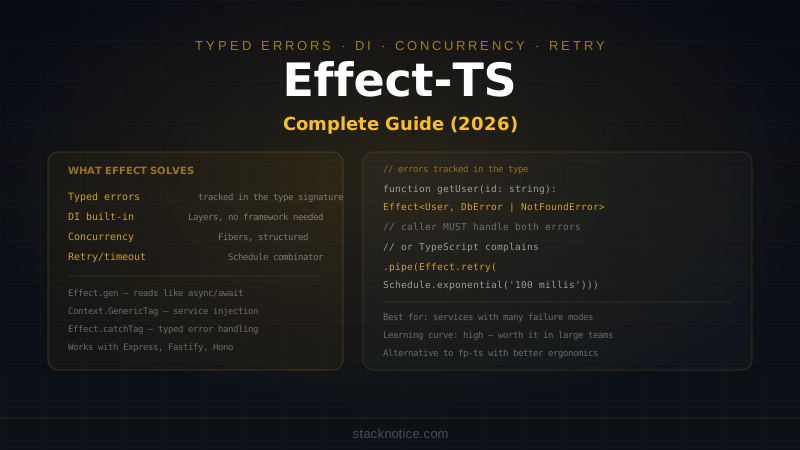
Effect-TS is a TypeScript library that treats errors, dependencies, and async operations as first-class values — tracked in the type signature. The claim: you stop writing try/catch everywhere, stop missing error cases, and get dependency injection without a framework.
That's a real promise. Whether it's worth the learning curve depends on what you're building.
This guide covers Effect honestly: what it solves, how it works, real code patterns, and when not to use it.
The Problem Effect Solves
Consider this function:
async function getUser(id: string): Promise<User> {
  const user = await db.user.findUnique({ where: { id } })
  return user  // TypeScript says this is fine
}
Two problems:
usermight benull— TypeScript won't stop you from returningnullwhereUseris expected if you're not careful- The function can throw a database error — nothing in the type tells callers to handle it
Effect makes errors and optionality explicit in the type:
import { Effect, Option } from 'effect'

function getUser(id: string): Effect.Effect<User, DatabaseError | NotFoundError> {
  // The return type says: "this gives you a User, or fails with DatabaseError or NotFoundError"
  // Callers know exactly what can go wrong
}
If you add a new failure mode, the type changes. TypeScript forces all callers to handle it. This is the core value proposition.
Installation
npm install effectNo config, no peer dependencies. Effect is a pure TypeScript library.
Core Concepts
Effect<Value, Error, Requirements>
An Effect is a description of a computation — not the computation itself. It's lazy:
import { Effect, Console } from 'effect'

// This doesn't run anything — it describes what to run
const program = Console.log('Hello, Effect!')

// This runs it
Effect.runPromise(program)
The three type parameters:
Value— what the effect produces on successError— what it can fail with (defaults tonever)Requirements— what dependencies it needs (defaults tonever)
Creating Effects
import { Effect } from 'effect'

// From a value
const succeed = Effect.succeed(42)

// From an error
const fail = Effect.fail(new Error('something went wrong'))

// From a function that might throw
const fromTryCatch = Effect.try({
  try: () => JSON.parse('{"valid": true}'),
  catch: (error) => new ParseError(`Invalid JSON: ${error}`)
})

// From a Promise
const fromPromise = Effect.tryPromise({
  try: () => fetch('https://api.example.com/data').then(r => r.json()),
  catch: (error) => new NetworkError(`Fetch failed: ${error}`)
})

// Async computation
const asyncEffect = Effect.gen(function* () {
  const response = yield* Effect.tryPromise({
    try: () => fetch('/api/data'),
    catch: (e) => new NetworkError(String(e))
  })
  const data = yield* Effect.tryPromise({
    try: () => response.json(),
    catch: (e) => new ParseError(String(e))
  })
  return data
})
Custom Error Types
Define errors as classes with a _tag — Effect uses this for pattern matching:
class DatabaseError {
  readonly _tag = 'DatabaseError'
  constructor(readonly message: string, readonly cause?: unknown) {}
}

class NotFoundError {
  readonly _tag = 'NotFoundError'
  constructor(readonly resource: string, readonly id: string) {}
}

class ValidationError {
  readonly _tag = 'ValidationError'
  constructor(readonly field: string, readonly message: string) {}
}
Real Example: User Service
import { Effect, Option } from 'effect'

// Types
class DatabaseError {
  readonly _tag = 'DatabaseError'
  constructor(readonly message: string, readonly cause?: unknown) {}
}

class NotFoundError {
  readonly _tag = 'NotFoundError'
  constructor(readonly resource: string, readonly id: string) {}
}

// Service functions
function findUser(id: string): Effect.Effect<User, DatabaseError | NotFoundError> {
  return Effect.gen(function* () {
    const user = yield* Effect.tryPromise({
      try: () => db.user.findUnique({ where: { id } }),
      catch: (cause) => new DatabaseError('Query failed', cause)
    })

    if (!user) {
      return yield* Effect.fail(new NotFoundError('user', id))
    }

    return user
  })
}

function updateUser(
  id: string,
  data: Partial<User>
): Effect.Effect<User, DatabaseError | NotFoundError> {
  return Effect.gen(function* () {
    yield* findUser(id)  // ensures user exists, propagates NotFoundError

    const updated = yield* Effect.tryPromise({
      try: () => db.user.update({ where: { id }, data }),
      catch: (cause) => new DatabaseError('Update failed', cause)
    })

    return updated
  })
}

// Composing with error handling
function getUserProfile(id: string) {
  return findUser(id).pipe(
    Effect.catchTag('NotFoundError', (error) =>
      Effect.succeed(null)  // treat not found as null instead of error
    ),
    Effect.catchTag('DatabaseError', (error) =>
      Effect.fail(new Error(`Database unavailable: ${error.message}`))
    )
  )
}
Effect.gen — The Readable Way
Effect.gen lets you write effectful code that looks like normal async/await:
// Without gen — callback chains
const program = Effect.tryPromise({
  try: () => db.user.findMany(),
  catch: (e) => new DatabaseError(String(e))
}).pipe(
  Effect.flatMap((users) =>
    Effect.tryPromise({
      try: () => sendNotifications(users),
      catch: (e) => new NotificationError(String(e))
    })
  ),
  Effect.map((results) => results.filter(r => r.success).length)
)

// With gen — reads like async/await
const program = Effect.gen(function* () {
  const users = yield* Effect.tryPromise({
    try: () => db.user.findMany(),
    catch: (e) => new DatabaseError(String(e))
  })

  const results = yield* Effect.tryPromise({
    try: () => sendNotifications(users),
    catch: (e) => new NotificationError(String(e))
  })

  return results.filter(r => r.success).length
})
Both are equivalent — gen is syntactic sugar over flatMap.
Dependency Injection with Context
Effect has a built-in dependency injection system — no framework needed:
import { Effect, Context, Layer } from 'effect'

// Define a service interface
interface EmailService {
  sendWelcome: (email: string) => Effect.Effect<void, EmailError>
  sendReset: (email: string, token: string) => Effect.Effect<void, EmailError>
}

// Create a tag — the identifier for the service
const EmailService = Context.GenericTag<EmailService>('EmailService')

// Implementation using Resend
const ResendEmailService = Layer.succeed(EmailService, {
  sendWelcome: (email) =>
    Effect.tryPromise({
      try: () => resend.emails.send({
        from: 'hello@myapp.com',
        to: email,
        subject: 'Welcome!',
        html: '<h1>Welcome</h1>'
      }),
      catch: (e) => new EmailError(`Welcome email failed: ${e}`)
    }),

  sendReset: (email, token) =>
    Effect.tryPromise({
      try: () => resend.emails.send({
        from: 'noreply@myapp.com',
        to: email,
        subject: 'Reset your password',
        html: `<a href="/reset?token=${token}">Reset password</a>`
      }),
      catch: (e) => new EmailError(`Reset email failed: ${e}`)
    })
})

// Test implementation
const MockEmailService = Layer.succeed(EmailService, {
  sendWelcome: (email) => Effect.log(`[Mock] Welcome email sent to ${email}`),
  sendReset: (email, token) => Effect.log(`[Mock] Reset email sent to ${email}`)
})

// Using the service in business logic
function registerUser(
  email: string,
  password: string
): Effect.Effect<User, DatabaseError | EmailError, EmailService> {
  return Effect.gen(function* () {
    const emailSvc = yield* EmailService  // inject the service

    const user = yield* Effect.tryPromise({
      try: () => db.user.create({ data: { email, passwordHash: await hash(password) } }),
      catch: (e) => new DatabaseError(String(e))
    })

    yield* emailSvc.sendWelcome(email)  // typed error shows in registerUser's type

    return user
  })
}

// Running with real implementation
Effect.runPromise(
  registerUser('alice@example.com', 'password123').pipe(
    Effect.provide(ResendEmailService)
  )
)

// Running with mock in tests
Effect.runPromise(
  registerUser('alice@example.com', 'password123').pipe(
    Effect.provide(MockEmailService)
  )
)
Concurrency
Effect has structured concurrency — operations run in fibers (lightweight threads):
import { Effect } from 'effect'

// Sequential — one after another
const sequential = Effect.gen(function* () {
  const users = yield* fetchUsers()
  const posts = yield* fetchPosts()
  return { users, posts }
})

// Parallel — both run at the same time, both must succeed
const parallel = Effect.gen(function* () {
  const [users, posts] = yield* Effect.all([fetchUsers(), fetchPosts()])
  return { users, posts }
})

// Race — first to complete wins, other is cancelled
const raceResult = yield* Effect.race(fetchFromPrimary(), fetchFromFallback())

// Timeout
const withTimeout = Effect.gen(function* () {
  const result = yield* Effect.timeout(fetchLargeData(), '5 seconds')
  return result
})
When Effect.all is used with fibers, if one fails the others are automatically cancelled — no dangling promises.
Retry and Resilience
import { Effect, Schedule } from 'effect'

// Retry 3 times with exponential backoff
const withRetry = fetchData().pipe(
  Effect.retry(
    Schedule.exponential('100 millis').pipe(
      Schedule.jittered,             // add jitter to avoid thundering herd
      Schedule.upTo('30 seconds'),   // cap total retry time
      Schedule.compose(Schedule.recurs(3))  // max 3 attempts
    )
  )
)

// Retry only on specific errors
const selectiveRetry = fetchData().pipe(
  Effect.retry({
    while: (error) => error._tag === 'NetworkError',  // don't retry auth errors
    schedule: Schedule.exponential('200 millis').pipe(Schedule.recurs(5))
  })
)

// Circuit breaker pattern
const withCircuitBreaker = fetchData().pipe(
  Effect.timeout('3 seconds'),
  Effect.retry(Schedule.recurs(2)),
  Effect.catchAll((error) => Effect.succeed(getCachedData()))  // fallback
)
Error Handling Patterns
// Match on specific error tags
const handled = program.pipe(
  Effect.catchTag('NotFoundError', (e) =>
    Effect.succeed({ found: false, resource: e.resource })
  ),
  Effect.catchTag('DatabaseError', (e) =>
    Effect.fail(new ServiceUnavailableError(e.message))  // transform the error
  )
)

// Catch all errors and convert to a result type
const asResult = program.pipe(
  Effect.match({
    onFailure: (error) => ({ success: false as const, error }),
    onSuccess: (value) => ({ success: true as const, value })
  })
)

// Fold — handle both cases
const withFallback = program.pipe(
  Effect.catchAll(() => Effect.succeed(defaultValue))
)
Running Effects
import { Effect } from 'effect'

// Async (returns a Promise — use at the edge: HTTP handler, CLI entry point)
const result = await Effect.runPromise(program)

// Sync (throws on failure — only when you know the effect cannot fail)
const syncResult = Effect.runSync(safeProgram)

// With error handling at the boundary
const safeRun = await Effect.runPromise(
  program.pipe(
    Effect.catchAll((error) => {
      console.error('Unhandled error:', error)
      return Effect.succeed(null)
    })
  )
)
Integrating with Express / Fastify
You don't have to rewrite everything. Run effects at the route handler boundary:
// Express route
app.get('/users/:id', async (req, res) => {
  const result = await Effect.runPromise(
    getUserProfile(req.params.id).pipe(
      Effect.provide(ProductionEmailService),
      Effect.match({
        onFailure: (error) => ({ error: error.message, status: 500 }),
        onSuccess: (user) => ({ user, status: 200 })
      })
    )
  )

  res.status(result.status).json(result)
})

// Fastify route
server.get<{ Params: { id: string } }>('/users/:id', async (request, reply) => {
  const result = await Effect.runPromise(
    getUserProfile(request.params.id).pipe(
      Effect.provide(ProductionEmailService),
      Effect.catchTag('NotFoundError', () =>
        Effect.fail({ statusCode: 404, message: 'User not found' })
      ),
      Effect.catchAll((error) =>
        Effect.fail({ statusCode: 500, message: 'Internal error' })
      )
    )
  ).catch((error) => {
    reply.status(error.statusCode ?? 500).send({ error: error.message })
  })

  return result
})
When to Use Effect
Good fit:
- Business logic with many failure modes that must all be handled
- Services that depend on other services (DI without a framework)
- Background job processors with retry and timeout requirements
- Large teams where typed errors prevent missing error handling across modules
- APIs where "this can fail with X or Y" needs to be communicated to callers
Not worth it:
- Simple CRUD APIs where thrown exceptions are fine
- Small scripts and utilities
- Projects where the team isn't willing to learn the abstraction
- Frontend code — overkill for most UI logic
Effect has a significant learning curve. The mental model of lazy effects, fibers, and layers takes time to internalize. Teams that adopt it usually do so incrementally — starting with a single service module, not the entire app.
Effect vs fp-ts vs Raw Promises
| Effect | fp-ts | Raw async/await | |
|---|---|---|---|
| Typed errors | ✅ | ✅ (Either) | ❌ |
| DI built-in | ✅ (Layers) | ❌ | ❌ |
| Concurrency | ✅ (Fibers) | ❌ | Promise.all |
| Retry/timeout | ✅ (Schedule) | ❌ | Manual |
| Learning curve | High | Very high | None |
| Bundle size | Medium | Small | None |
| Ecosystem | Growing fast | Mature but slow | — |
| Readability | Good with gen | Poor | Excellent |
Effect is effectively fp-ts rewritten with better ergonomics and more features. If you're already using fp-ts, Effect is the migration path the community is moving toward.
Effect is not for every project. For TypeScript backends where you want typed errors and clean dependency injection without decorators or IoC containers, it's one of the most compelling options in 2026. Start with a single module — maybe the email service or payment processing layer where "what can go wrong" matters most. If the pattern clicks for your team, expand from there.