OpenAI entering the terminal-based AI coding agent space with Codex CLI puts two serious tools in direct comparison: Claude Code from Anthropic and Codex CLI from OpenAI. Both are CLI agents that read your codebase, edit files, and run shell commands. Both are designed to replace a significant portion of manual coding work.
The surface-level similarity is real. The difference in philosophy is also real, and it shows up in how you actually use them day to day.
What Each Tool Is
Claude Code is Anthropic's terminal-based AI coding agent. It runs on Claude models (Sonnet 4.6 by default, Opus 4.6 for harder tasks), has an explicit permission model, supports parallel subagents, Plan Mode, and a rich context system via CLAUDE.md files.
Codex CLI is OpenAI's open-source terminal coding agent. It runs on GPT-4o and o3 models, is fully open source (MIT license), and has a "full auto" execution mode designed for minimal interruption.
Both can read files, write code, run terminal commands, and handle multi-step tasks. The divergence is in how much control they give you versus how much they assume autonomy.
The Foundational Difference: Autonomy vs Control
This is the clearest way to understand both tools:
Codex CLI leans toward autonomy. Its design philosophy is to complete tasks with minimal interruption. In --full-auto mode, it reads files, makes changes, and runs commands without asking. The assumption is that you've scoped the task correctly and want the agent to execute it without constant approval requests.
Claude Code leans toward control. Its explicit permission model asks before consequential actions — running commands, modifying files outside the established scope, pushing to git. You can whitelist trusted commands, but the default is to surface what it's about to do before doing it.
Neither is objectively better. The right choice depends on how much you trust the agent's judgment in your specific codebase and workflow.
Model and API
Codex CLI: GPT-4o and o3
# Codex CLI with different models
codex --model gpt-4o "add input validation to the signup form"
codex --model o3 "analyze the architecture and suggest improvements"  # slower, deeper
Codex CLI defaults to GPT-4o for speed and cost. It can also use o3 for tasks that benefit from OpenAI's reasoning model — complex architecture analysis, harder debugging problems.
Being open source, Codex CLI's model routing is configurable and the community can extend it.
Claude Code: Claude models
# Claude Code model selection
claude                              # Sonnet 4.6 — default
claude --model claude-opus-4-6     # Opus — deeper reasoning
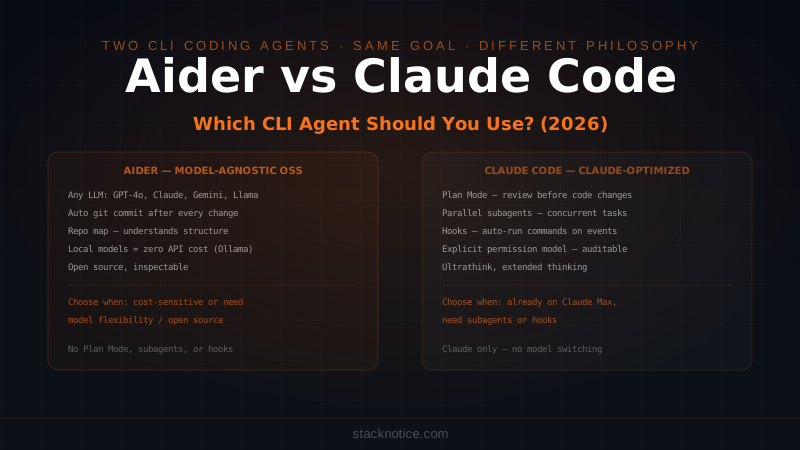
Claude Code is optimized for Claude's architecture. Features like extended thinking (ultrathink), Plan Mode, and subagents are built specifically around how Claude reasons — they don't generalize to other models.
The practical implication: if you're evaluating purely on model quality for coding tasks, both GPT-4o and Claude Sonnet 4.6 are strong. The choice matters less than the tooling built around the model.
Permission Models
Codex CLI: three modes
# Suggest only — show changes, don't apply
codex --approval-mode suggest "refactor the auth module"

# Auto-edit — edit files, ask before commands
codex --approval-mode auto-edit "refactor the auth module"

# Full auto — edit files AND run commands without asking
codex --approval-mode full-auto "refactor the auth module"
Full auto is where Codex CLI is genuinely different from anything else. It will edit your files and run terminal commands — git commit, npm install, docker build — without asking. The speed is real. The risk is also real: a wrong command in full auto mode runs before you see it.
Codex CLI mitigates this with a network sandbox — in full auto mode, it can block network access to prevent unintended external requests. But file system and shell access are still fully open.
Claude Code: explicit by default, configurable
# Every consequential action asks first
claude

# Configure trusted commands permanently
claude config add-allowed-command "npm test"
claude config add-allowed-command "npx drizzle-kit push"

# Session-level approvals
# > Run command: git push origin main ? [y/n/always/never]
The default is explicit. You can grant permanent permission for commands you trust, which effectively brings Claude Code close to Codex CLI's auto-edit behavior for those specific commands. But you're making the trust decisions deliberately, not as a mode toggle.
For work in production codebases, the explicit default is the right call. For a throwaway project where speed matters more than caution, Codex CLI's full auto mode is genuinely useful.
Context and Project Understanding
Codex CLI: git history + explicit files
Codex CLI can read files you pass to it, uses git history as context, and has access to your terminal environment. It doesn't have a dedicated persistent context file system like CLAUDE.md.
# Pass files explicitly
codex "fix the failing tests" src/auth.ts src/__tests__/auth.test.ts

# Codex can also read git log for context
codex "what changed in the last three commits that might be causing the 401 errors"
Claude Code: CLAUDE.md hierarchy
Claude Code's persistent context system is CLAUDE.md — a file you write and maintain that loads into every session:
# Project Context

## Stack
- Next.js 15, TypeScript strict, Drizzle ORM + Neon, Clerk auth, Bun

## Key files
- /src/lib/auth.ts — Clerk JWT validation
- /src/lib/db/schema.ts — Full Drizzle schema

## Constraints
- Never use `any`. Ask before installing packages.
This loads automatically. Every session starts with Claude knowing your stack, conventions, and key file locations. See the CLAUDE.md vs Projects vs Memory breakdown for the full context system.
The difference: Codex CLI's context is session-scoped (what you pass in). CLAUDE.md is persistent across sessions — you set it up once and it works indefinitely.
Features Unique to Each
Codex CLI has
- Open source (MIT) — inspect, fork, contribute, self-host
- Full auto mode — zero-interruption execution for trusted workflows
- Network sandbox — isolate agent from unintended network calls
- o3 reasoning model — for tasks that need deeper analysis
- Community extensions — open source ecosystem growing around it
Claude Code has
- Plan Mode — Claude writes a plan before touching any code; you approve or redirect
- Parallel subagents — spawn multiple Claude instances on different parts of a task
- Hooks system — run shell commands automatically on tool events (pre-save, post-tool-use)
- CLAUDE.md hierarchy — global + project + subdirectory persistent context
- Ultrathink — extended reasoning for the hardest problems
- Headless mode — non-interactive execution for CI/automation pipelines
- Worktrees integration — seamless multi-branch workflows
Plan Mode is the most significant differentiator in day-to-day use. Before writing a single line of code, Claude produces a detailed plan of what it intends to do, which files it will touch, and where the risks are. You review and redirect before implementation. This prevents the expensive failure mode of implementing the wrong approach across many files. See the Plan Mode guide for the full workflow.
Open Source vs Proprietary
This matters for some teams more than others.
Codex CLI is fully open source under MIT. You can read the code, self-host it, modify it for internal use, and contribute to it. For teams with security requirements around AI tooling, being able to audit the code is significant.
Claude Code is proprietary. Anthropic controls the implementation. The CLI's behavior is documented but the source is not public.
If open source is a hard requirement for your organization, Codex CLI is the only option in this comparison.
Cost
| Setup | Approximate cost |
|---|---|
| Codex CLI + GPT-4o | API pricing, varies by task size |
| Codex CLI + o3 | Higher — o3 is more expensive than GPT-4o |
| Claude Code + Sonnet 4.6 | API pricing, competitive with GPT-4o |
| Claude Code + Opus 4.6 | 3-5x Sonnet |
| Claude Code on Claude Max | $100/month flat |
If you're already on Claude Max, Claude Code adds no marginal cost per task. If you're not, cost comparison between GPT-4o and Claude Sonnet is roughly equivalent for most tasks.
Which to Use
Choose Codex CLI if:
- Open source is a requirement — you need to audit or modify the tool
- You want full auto mode for trusted environments where zero interruption matters
- You want GPT-4o or o3 specifically (not Claude)
- You want to contribute to or customize the agent itself
Choose Claude Code if:
- You're already using Claude and on Max (no marginal cost)
- Plan Mode is valuable to your workflow — reviewing approach before implementation
- You need subagents for parallel work across large codebases
- The hooks system fits your automation needs
- Persistent CLAUDE.md context across sessions is important
- You're doing complex multi-step tasks that benefit from Claude's reasoning
Consider both if:
- Your team has different preferences — Codex CLI and Claude Code don't conflict
- You want to use Codex CLI for fast, high-trust local development and Claude Code for sensitive production work
For the broader comparison including Cursor, Aider, Copilot, and Windsurf, see the complete AI coding tools comparison. For Aider specifically — the main open-source CLI alternative — see Aider vs Claude Code.